
NET Framework 4.5新特性 (二) 控制台支持 Unicode (UTF-16) 编码
从 .NET Framework 4.5 开始,Console 类支持与 UnicodeEncoding 类的 UTF-16 编码。 显示 Unicode 字符到控制台,你可以设置 OutputEncoding 属性为 UTF8Encoding 或 UnicodeEncoding。
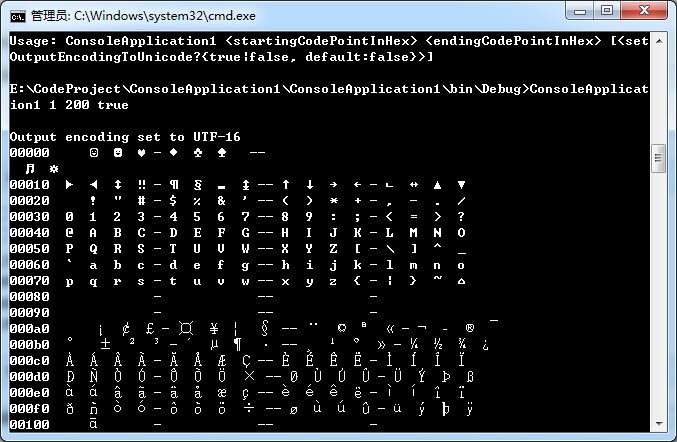
下面的示例显示 Unicode 字符的范围到控制台中。 该示例接受三个命令行参数:显示范围的开头,显示范围的末尾,以及是否使用当前控制台编码 (false) 或 UTF-16 编码 (true)。 假定控制台使用一个 TrueType 字体。
    class Program

    {

        private static void Main(string[] args)

        {

            uint rangeStart = ;

            uint rangeEnd = ;

            bool setOutputEncodingToUnicode = true;

            // Get the current encoding so we can restore it.

            Encoding originalOutputEncoding = Console.OutputEncoding;

            try

            {

                switch (args.Length)

                {

                    case :

                        rangeStart = uint.Parse(args[], NumberStyles.HexNumber);

                        rangeEnd = uint.Parse(args[], NumberStyles.HexNumber);

                        setOutputEncodingToUnicode = true;

                        break;

                    case :

                        if (!uint.TryParse(args[], NumberStyles.HexNumber, null, out rangeStart))

                            throw new ArgumentException(String.Format("{0} is not a valid hexadecimal number.", args[]));

                        if (!uint.TryParse(args[], NumberStyles.HexNumber, null, out rangeEnd))

                            throw new ArgumentException(String.Format("{0} is not a valid hexadecimal number.", args[]));

                        bool.TryParse(args[], out setOutputEncodingToUnicode);

                        break;

                    default:

                        Console.WriteLine("Usage: {0} <{1}> <{2}> [{3}]",

                                          Environment.GetCommandLineArgs()[],

                                          "startingCodePointInHex",

                                          "endingCodePointInHex",

                                          "<setOutputEncodingToUnicode?{true|false, default:false}>");

                        return;

                }

                if (setOutputEncodingToUnicode)

                {

                    // This won't work before .NET Framework 4.5.

                    try

                    {

                        // Set encoding using endianness of this system.

                        // We're interested in displaying individual Char objects, so

                        // we don't want a Unicode BOM or exceptions to be thrown on

                        // invalid Char values.

                        Console.OutputEncoding = new UnicodeEncoding(!BitConverter.IsLittleEndian, false);

                        Console.WriteLine("\nOutput encoding set to UTF-16");

                    }

                    catch (IOException)

                    {

                        Console.OutputEncoding = new UTF8Encoding();

                        Console.WriteLine("Output encoding set to UTF-8");

                    }

                }

                else

                {

                    Console.WriteLine("The console encoding is {0} (code page {1})",

                                      Console.OutputEncoding.EncodingName,

                                      Console.OutputEncoding.CodePage);

                }

                DisplayRange(rangeStart, rangeEnd);

            }

            catch (ArgumentException ex)

            {

                Console.WriteLine(ex.Message);

            }

            finally

            {

                // Restore console environment.

                Console.OutputEncoding = originalOutputEncoding;

            }

        }

        public static void DisplayRange(uint start, uint end)

        {

            const uint upperRange = 0x10FFFF;

            const uint surrogateStart = 0xD800;

            const uint surrogateEnd = 0xDFFF;

            if (end <= start)

            {

                uint t = start;

                start = end;

                end = t;

            }

            // Check whether the start or end range is outside of last plane.

            if (start > upperRange)

                throw new ArgumentException(String.Format("0x{0:X5} is outside the upper range of Unicode code points (0x{1:X5})",

                                                          start, upperRange));

            if (end > upperRange)

                throw new ArgumentException(String.Format("0x{0:X5} is outside the upper range of Unicode code points (0x{0:X5})",

                                                          end, upperRange));

            // Since we're using 21-bit code points, we can't use U+D800 to U+DFFF.

            if ((start < surrogateStart & end > surrogateStart) || (start >= surrogateStart & start <= surrogateEnd))

                throw new ArgumentException(String.Format("0x{0:X5}-0x{1:X5} includes the surrogate pair range 0x{2:X5}-0x{3:X5}",

                                                          start, end, surrogateStart, surrogateEnd));

            uint last = RoundUpToMultipleOf(0x10, end);

            uint first = RoundDownToMultipleOf(0x10, start);

            uint rows = (last - first) / 0x10;

            for (uint r = ; r < rows; ++r)

            {

                // Display the row header.

                Console.Write("{0:x5} ", first + 0x10 * r);

                for (uint c = ; c < 0x10; ++c)

                {

                    uint cur = (first + 0x10 * r + c);

                    if (cur < start)

                    {

                        Console.Write(" {0} ", Convert.ToChar(0x20));

                    }

                    else if (end < cur)

                    {

                        Console.Write(" {0} ", Convert.ToChar(0x20));

                    }

                    else

                    {

                        // the cast to int is safe, since we know that val <= upperRange.

                        String chars = Char.ConvertFromUtf32((int)cur);

                        // Display a space for code points that are not valid characters.

                        if (CharUnicodeInfo.GetUnicodeCategory(chars[]) ==

                                                        UnicodeCategory.OtherNotAssigned)

                            Console.Write(" {0} ", Convert.ToChar(0x20));

                        // Display a space for code points in the private use area.

                        else if (CharUnicodeInfo.GetUnicodeCategory(chars[]) ==

                                                       UnicodeCategory.PrivateUse)

                            Console.Write(" {0} ", Convert.ToChar(0x20));

                        // Is surrogate pair a valid character?

                        // Note that the console will interpret the high and low surrogate

                        // as separate (and unrecognizable) characters.

                        else if (chars.Length >  && CharUnicodeInfo.GetUnicodeCategory(chars, ) ==

                                                     UnicodeCategory.OtherNotAssigned)

                            Console.Write(" {0} ", Convert.ToChar(0x20));

                        else

                            Console.Write(" {0} ", chars);

                    }

                    switch (c)

                    {

                        case :

                        case :

                            Console.Write("-");

                            break;

                        case :

                            Console.Write("--");

                            break;

                    }

                }

                Console.WriteLine();

                if ( < r && r % 0x10 == )

                    Console.WriteLine();

            }

        }

        private static uint RoundUpToMultipleOf(uint b, uint u)

        {

            return RoundDownToMultipleOf(b, u) + b;

        }

        private static uint RoundDownToMultipleOf(uint b, uint u)

        {

            return u - (u % b);

        }

    }
演示结果
NET Framework 4.5新特性 (二) 控制台支持 Unicode (UTF-16) 编码的更多相关文章
- 精进不休 .NET 4.5 (12) - ADO.NET Entity Framework 6.0 新特性, WCF Data Services 5.6 新特性
[索引页][源码下载] 精进不休 .NET 4.5 (12) - ADO.NET Entity Framework 6.0 新特性, WCF Data Services 5.6 新特性 作者:weba ...
- .Net Framework 各个版本新特性总结 (一)
.Net Framework 4.5 新特性 最近面试时又看到有问.Net Framework 新特性的问题,一时被问到了.平时也是拿起来就用,新版本出来了,新特性也就是瞄一眼,也没去仔细查看.这次干 ...
- NET Framework 4.5新特性 数据库的连接加密保护。
NET Framework 4.5新特性 (一) 数据库的连接加密保护. NET Framework 4.5 ado.net数据库连接支持使用SecureString内存流方式保密文本. 一旦使用这 ...
- NET Framework 4.5新特性 (一) 数据库的连接加密保护。
NET Framework 4.5 ado.net数据库连接支持使用SecureString内存流方式保密文本. 一旦使用这类操作,文本加密是私有不能共享的,并在不再需要时从计算机内存中删除. S ...
- atitit.js 各版本 and 新特性跟浏览器支持报告
atitit.js 各版本 and 新特性跟浏览器支持报告 一个完整的JavaScript实现是由以下3个不同部分组成的 •核心(ECMAScript)--JavaScript的核心ECMAScrip ...
- ECMAScript 5和ECMAScript6的新特性以及浏览器支持情况
ECMAScript简介: 它是一种由Ecma国际(前身为欧洲计算机制造商协会)制定和发布的脚本语言规范,javascript在它基础上经行了自己的封装.但通常来说,术语ECMAScript和java ...
- ECMAScript和JavaScript的区别,ECMAScript发展更新历史,ECMAScript5和ECMAScript6的新特性及浏览器支持情况,ECMAScript 5/ECMAScript 2015正式发布
ECMAScript和JavaScript的区别 ECMA是European Computer Manufacturers Association的缩写,即欧洲计算机制造商协会.欧洲计算机制造商协会是 ...
- .NET Framework 4.5新特性
前言 .Net FrameWrok的每个版本都要他的新特性的加入,比如,NET1.1中的委托,NET2.0中的泛型,NET3.0中的Linq,.NET4.0中的动态类型,那么.NET Framewor ...
- framework各版本新特性(为面试准备)
菜鸟D估计描述这些新特性的文章都是烂大街的货色,之所以拿出来分(e)享(xin)一下,有两个原因:1.当年面试的时候有人问到,我不知道该怎么回答:2.项目需要发布了,但是考虑到framework的版本 ...
随机推荐
- Bootstrap学习笔记面板(Panels)
本文将讲解Bootstrap面板(Panels).面板组件用于把DOM组件插入到一个盒子中.创建一个基本的面板,只需要向div元素添加class .panel和 panel-default即可,如下面 ...
- angularJS 状态样式绑定
angularJS提供输入框不同状态下的样式绑定 输入框有4种状态 ng-model 指令可以为应用数据提供状态值(invalid, dirty, touched, error): <!DOCT ...
- excel weekday
weekday(日期值)=星期几 星期天是1 星期六是7
- Atitit .h5文件上传 v3
Atitit .h5文件上传 v3 1. 上传原理1 2. V3版新特性1 3. Html1 4. Js2 5. uploadV2.js2 6. upServlet & FileUploadS ...
- C++11时间操作
C++11提供了chrono库,这个库可以处理和时间相关的一些事情.这个库里面主要有3个类:时间间隔Duration.时钟Clocks和时间点Time point. Duration template ...
- Retrofit--官网2.1.0
Retrofit--官网2.1.0 android Retrofit 介绍 API 描述 请求方法 URL 处理 请求体 表单的 ENCODED 和 MULTIPART HEADER 处理 同步 VS ...
- hbase java Api练习
package cn.itcast_01_hbase; import java.util.ArrayList; import java.util.List; import org.apache.had ...
- 解读MT7620A上的DTS文件
DTS文件,即Device Tree Source,是某些芯片(在Openwrt的target/linux/中,至少ramips,lantiq和BRCM有此文件)用于描述硬件设备资源的文件.此文件是驱 ...
- git三种模式及常用命令
Git的三种重要模式,分别是已提交.已修改.已暂存. 已提交(committed):表示数据文件已经顺利提交到Git数据库中. 已修改(modified):表示数据文件已经被修改,但未被保存到Git数 ...
- java.lang.IllegalArgumentException: n must be positive
public static String randomKey(){ Random random = new Random(); int key = random.nextInt(((int)Syste ...