
React-Native -课后练习
import React, { Component } from 'react';

import {

  AppRegistry,

  StyleSheet,

  Text,

  View,

  Image,

} from 'react-native';

class meituan extends Component {

  render() {

    return (

        <View>

      <View style={[styles.view_row,styles.height_160]}>

          <View style={[styles.height_160,styles.partLeft]}>

              <Text style={[styles.marginTextTop_18,styles.grendTextFontSize]}>我们约吧</Text>

              <Text style={[styles.marginTextTop_14,styles.textfontSize_10,{textAlign:'center'}]}>恋人家人好朋友</Text>

              <Image style={[styles.yueba_height,styles.marginTextTop_14]} source={{uri:'http://ww4.sinaimg.cn/mw690/6b2243e8gw1f71tzeulkpj20f00k00ve.jpg'}}></Image>

          </View>

          <View style={[styles.height_160,styles.partRgith]}>

              <View style={[styles.view_row,{flex:1}]}>

                  <View style={{flex:1}}>

                  <Text style={[styles.textfontSize_14,styles.red_font,styles.textfontSize_14,{marginLeft:30}]}>低价超值</Text>

                  <Text style={[styles.textfontSize_10,styles.textfontSize_14,{marginTop:14,marginLeft:30}]}>十元惠生活</Text>

                  </View>

                  <View style={[{flex:1},{marginTop:-10,marginLeft:10}]}>

                      <Image style={styles.hanbaoImage} source={{uri:'http://ww4.sinaimg.cn/mw690/005Ge4Xjjw1f6nttg4srgj316o1kwhdt.jpg'}}></Image>

                  </View>

              </View>

                  <View style={{flex:1,flexDirection:'row',borderWidth:0.5,borderColor:'red'}}>

                      <View style={{flex:1}}>

                          <Text style={[styles.textfontSize_14,styles.red_font,{marginLeft:10,marginTop:8}]}>聚会邀请</Text>

                          <Text style={[styles.textfontSize_10,{marginLeft:10,marginTop:8}]}>朋友家人常聚餐</Text>

                          <Image style={[styles.hongshaorouImage,{alignSelf:'center'}]} source={{uri:'http://ww2.sinaimg.cn/mw690/6b2243e8gw1f79z2o5rakj20qp0snn22.jpg'}}></Image>

                      </View>

                      <View style={{flex:1}}>

                          <Text style={[styles.textfontSize_14,styles.blue_font,{marginLeft:10,marginTop:8}]}>名店抢购</Text>

                          <Text style={[styles.textfontSize_10,{marginLeft:10,marginTop:8}]}>距离结束</Text>

                          <Text style={[styles.textfontSize_10,{marginLeft:10,marginTop:8}]}>12:20:30</Text>

                      </View>

                  </View>

          </View>

      </View>

            <View>

                <View style={{backgroundColor:'#FF00FF',height:8,marginTop:20}}></View>

                <View style={{borderWidth:0.5,borderColor:'blue',height:65,flexDirection:'row'}}>

                    <View style={{flex:1}}>

                        <Text style={{color:'red',fontSize:18,marginLeft:15,marginTop:10}}>一元吃大餐</Text>

                        <Text style={{color:'blue',fontSize:12,marginLeft:15,marginTop:10}}>新用户专享</Text>

                    </View>

                    <View style={{flex:1}}>

                        <Image style={{height:50,width:120,marginTop:7.5,alignSelf:'flex-end',marginRight:10}} source={{uri:'http://ww2.sinaimg.cn/mw690/006uhw44gw1f7c4d3as1qj31hc1z4txo.jpg'}}></Image>

                    </View>

                </View>

                <View>

                    <View style={{flexDirection:'row',borderBottomWidth:1,borderColor:'red'}}>

                        <View style={{flex:1,borderColor:'green',borderRightWidth:1,flexDirection:'row'}}>

                            <View style={{flex:1}}>

                                <Text style={{fontSize:14,color:'red'}}>撸串节狂欢</Text>

                                <Text style={{fontSize:12}}>烤串6.6元起</Text>

                            </View>

                            <View style={{flex:1}}>

                                <Image style={styles.hanbaoImage} source={{uri:'http://ww1.sinaimg.cn/mw690/0068LYwcgw1f7bn60viq3j30f00k1mz6.jpg'}}></Image>

                            </View>

                        </View>

                        <View style={{flex:1,flexDirection:'row'}}>

                            <View style={{flex:1}}>

                                <Text style={{fontSize:14,color:'red'}}>撸串节狂欢</Text>

                                <Text style={{fontSize:12}}>烤串6.6元起</Text>

                            </View>

                            <View style={{flex:1}}>

                                <Image style={styles.hanbaoImage} source={{uri:'http://ww2.sinaimg.cn/mw690/87a5d32cgw1f79yc94vv7j20ku1127a3.jpg'}}></Image>

                            </View>

                        </View>

                    </View>

                    <View style={{flexDirection:'row'}}>

                        <View style={{flex:1,borderColor:'green',borderRightWidth:1,flexDirection:'row'}}>

                            <View style={{flex:1}}>

                                <Text style={{fontSize:14,color:'red'}}>撸串节狂欢</Text>

                                <Text style={{fontSize:12}}>烤串6.6元起</Text>

                            </View>

                            <View style={{flex:1}}>

                                <Image style={styles.hanbaoImage} source={{uri:'http://ww1.sinaimg.cn/mw690/8d9f2af2gw1f7agt9adphj20ku112x22.jpg'}}></Image>

                            </View>

                        </View>

                        <View style={{flex:1,flexDirection:'row'}}>

                            <View style={{flex:1}}>

                                <Text style={{fontSize:14,color:'red'}}>撸串节狂欢</Text>

                                <Text style={{fontSize:12}}>烤串6.6元起</Text>

                            </View>

                            <View style={{flex:1}}>

                                <Image style={styles.hanbaoImage} source={{uri:'http://ww1.sinaimg.cn/mw690/0068acO1jw1f7ajiogif1j30zk172dnu.jpg'}}></Image>

                            </View>

                        </View>

                    </View>

                </View>

                <View style={{backgroundColor:'red',height:10}}></View>

      </View>

        </View>

    );

  }

}

const styles = StyleSheet.create({

      view_row:{

         flexDirection:'row',

          paddingTop:20,

      },

       view_column:{

            flexDirection:'column',

            paddingTop:20,

        },

      height_160:{

        height:160,

      },

      marginTextTop_18:{

          marginTop:18,

      },

      marginTextTop_14:{

        marginTop:14,

      },

      partLeft:{

          flex:1,

          borderColor:'red',

          borderWidth:1,

      },

      partRgith:{

          flex:2,

          borderColor:'red',

          borderWidth:1,

      },

      grendTextFontSize:{

          fontSize:14,

          color:'#55A44B',

          textAlign:'center'

      },

      red_font:{

          color:'red'

      },

        blue_font:{

        color:'blue',

        },

      textfontSize_10:{

          fontSize:10,

      },

      textfontSize_14:{

          fontSize:14,

      },

      yueba_height:{

          height:85,

      },

        hanbaoImage:{

          width:55, height:55,

        },

       hongshaorouImage:{

          width:25, height:25,

       }

});

AppRegistry.registerComponent('meituan', () => meituan);
React-Native -课后练习
效果图
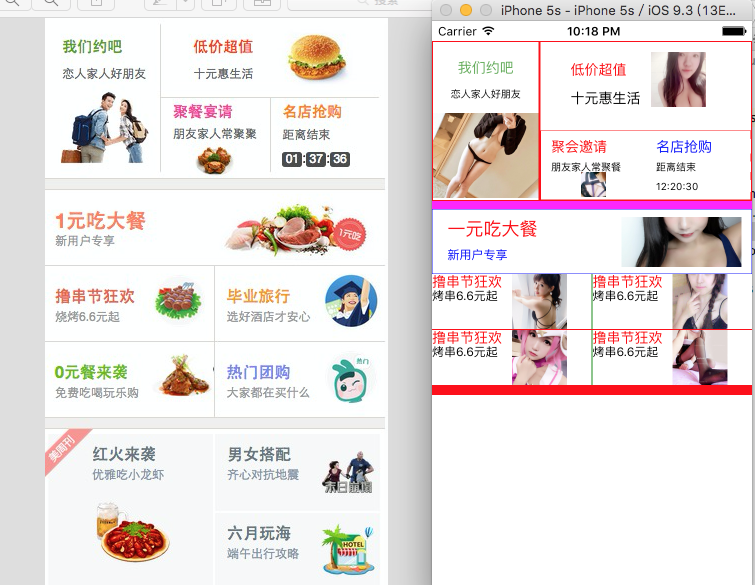
仔细不要急 一步一步来
React-Native -课后练习的更多相关文章
- React Native 之 Text的使用
前言 学习本系列内容需要具备一定 HTML 开发基础,没有基础的朋友可以先转至 HTML快速入门(一) 学习 本人接触 React Native 时间并不是特别长,所以对其中的内容和性质了解可能会有所 ...
- React Native环境配置之Windows版本搭建
接近年底了,回想这一年都做了啥,学习了啥,然后突然发现,这一年买了不少书,看是看了,就没有完整看完的.悲催. 然后,最近项目也不是很紧了,所以抽空学习了H5.自学啃书还是很无趣的,虽然Head Fir ...
- 史上最全Windows版本搭建安装React Native环境配置
史上最全Windows版本搭建安装React Native环境配置 配置过React Native 环境的都知道,在Windows React Native环境配置有很多坑要跳,为了帮助新手快速无误的 ...
- 【腾讯Bugly干货分享】React Native项目实战总结
本文来自于腾讯bugly开发者社区,非经作者同意,请勿转载,原文地址:http://dev.qq.com/topic/577e16a7640ad7b4682c64a7 “8小时内拼工作,8小时外拼成长 ...
- React Native环境搭建以及几个基础控件的使用
之前写了几篇博客,但是没有从最基础的开始写,现在想了想感觉不太合适,所以现在把基础的一些东西给补上,也算是我从零开始学习RN的经验吧! 一.环境搭建 首先声明一下,本人现在用的编辑器是SublimeT ...
- React Native组件介绍
1.React Native目前已有的组件 ActivityIndicatorIOS:标准的旋转进度轮; DatePickerIOS:日期选择器: Image:图片控件: ListView:列表控件: ...
- React Native图片控件的使用
首先定义组件 import { AppRegistry, StyleSheet, Text, View, Image,} from 'react-native'; 然后将render返回中的模版增加I ...
- react-native学习笔记--史上最详细Windows版本搭建安装React Native环境配置
参考:http://www.lcode.org/react-native/ React native中文网:http://reactnative.cn/docs/0.23/android-setup. ...
- windows 7下React Native环境配置
React Native 是 Facebook 推出的一个用 Java 语言就能同时编写 ios,android,以及后台的一项技术,它可以做到实时热更新 .FaceBook 也号称这们技术是 “Le ...
- React Native初探
前言 很久之前就想研究React Native了,但是一直没有落地的机会,我一直认为一个技术要有落地的场景才有研究的意义,刚好最近迎来了新的APP,在可控的范围内,我们可以在上面做任何想做的事情. P ...
随机推荐
- 企业号查询部门id(改版后)
1.搜索部门,输入"名称" 2.在后面可以查到部门ID
- js创建命名空间
CreateNameSpace: function () { var nameSpaceObjec = arguments[0].split('.'); var currentNameSpaceNam ...
- gulp整理
gulp基于node 1.全局安装gulp: $ npm install --global gulp 2.前往项目目录,然后安装作为项目的开发依赖(devDependencies): $ npm in ...
- WPF中运行时使内容可以上下左右被鼠标拖动应该怎么做?
<Window x:Class="testGridSplitter.MainWindow" xmlns="http://schemas.microsoft.com/ ...
- Java笔记:修饰符
Synchronized 修饰符 Synchronized 关键字声明的方法同一时间只能被一个线程访问.Synchronized 修饰符可以应用于四个访问修饰符. 实例 public synchron ...
- SQL删除重复数据只保留一条
用SQL语句,删除掉重复项只保留一条 在几千条记录里,存在着些相同的记录,如何能用SQL语句,删除掉重复的呢 1.查找表中多余的重复记录,重复记录是根据单个字段(peopleId)来判断 select ...
- ******IT公司面试题汇总+优秀技术博客汇总
滴滴面试题:滴滴打车数据库如何拆分 前端时间去滴滴面试,有一道题目是这样的,滴滴每天有100万的订单,如果让你去设计数据库,你会怎么去设计? 当时我的想法是根据用户id的最后一位对某个特殊的值取%操作 ...
- MySQL性能优化总结
一.MySQL的主要适用场景 1.Web网站系统 2.日志记录系统 3.数据仓库系统 4.嵌入式系统 二.MySQL架构图: 三.MySQL存储引擎概述 1)MyISAM存储引擎 MyISAM存储引擎 ...
- Linux下Keepalived+LVS-DR模式配置高可用负载均衡集群
一.环境说明: 操作系统:Centos-6.5_x86_64 keepalived软件安装在node2和node3机器上. 实际安装之前,先关闭keepalived节点(node ...
- [转]js实现各种进制的转换
关键点: parseInt(string, radix).toString(target_radix); 参考:http://www.cnblogs.com/guowei1027/archive/20 ...