
ps查看和调整优先级
主题ps查看和调整优先级
一查看优先级
nice值越大优先级越低
[root@centos72 ~]# ps axo  pid,cmd,ni |  head

   PID CMD                          NI

     1 /usr/lib/systemd/systemd --   0

     2 [kthreadd]                    0

     3 [ksoftirqd/0]                 0

     5 [kworker/0:0H]              -20

     7 [migration/0]                 -

     8 [rcu_bh]                      0

     9 [rcu_sched]                   0

    10 [lru-add-drain]             -20

    11 [watchdog/0]                  -

[root@centos72 ~]# ps axo  pid,cmd,ni |   tail

  8406 [kworker/1:1]                 0

  8457 sshd: root@pts/3              0

  8465 -bash                         0

  8485 dd if=/dev/zero of=/dev/nul   0

  8573 [kworker/1:1H]              -20

 10541 [kworker/0:2]                 0

 11025 [kworker/0:1]                 0

 11295 [kworker/0:0]                 0

 11297 ps axo pid,cmd,ni             0

 11298 tail
开启一个进程
[root@centos72 ~]#  ping  -f  127.0.0.1

PING 127.0.0.1 (127.0.0.1) 56(84) bytes of data.

^C

--- 127.0.0.1 ping statistics ---

4860967 packets transmitted, 4860967 received, 0% packet loss, time 44792ms

rtt min/avg/max/mdev = 0.001/0.003/14.741/0.028 ms, pipe 2, ipg/ewma 0.009/0.009 ms
按照CPU进行排序,CPU占用过高
[root@centos72 ~]# ps axo  pid,cmd,ni,%cpu   k  %cpu  | tail

  1142 -bash                         0  0.0

  1230 [kworker/0:1]                 0  0.0

  1253 [kworker/0:2]                 0  0.0

  1255 sshd: root@pts/1              0  0.0

  1259 -bash                         0  0.0

  1338 ps axo pid,cmd,ni,%cpu k %c   0  0.0

  1339 tail                          0  0.0

  1294 [kworker/0:0]                 0  0.1

   906 sshd: root@pts/0              0  0.2

  1283 ping -f 127.0.0.1             0 95.9
二调整优先级
注意此时进程正在运行
[root@centos72 ~]# ps axo  pid,cmd,ni,%cpu   k  %cpu  |  grep  ping

  1355 grep --color=auto ping        0  0.0

  1283 ping -f 127.0.0.1             0 96.0
[root@centos72 ~]#  renice  -n  -20  1283

1283 (process ID) old priority 0, new priority -20

[root@centos72 ~]# ps axo  pid,cmd,ni,%cpu   k  %cpu  |  grep  ping

  1358 grep --color=auto ping        0  0.0

  1283 ping -f 127.0.0.1           -20 95.8
注意此时进程正在运行
[root@centos72 ~]#  ping  -f  127.0.0.1

PING 127.0.0.1 (127.0.0.1) 56(84) bytes of data.

.^

--- 127.0.0.1 ping statistics ---

7827881 packets transmitted, 7827881 received, 0% packet loss, time 58781ms

rtt min/avg/max/mdev = 0.001/0.002/13.661/0.011 ms, pipe 2, ipg/ewma 0.007/0.006 ms
在执行命令的时候直接调整优先级
使用nice命令指定
[root@centos72 ~]# nice  -n  -5  ping  -f  127.0.0.1

PING 127.0.0.1 (127.0.0.1) 56(84) bytes of data.

^C

--- 127.0.0.1 ping statistics ---

3272228 packets transmitted, 3272228 received, 0% packet loss, time 26347ms

rtt min/avg/max/mdev = 0.001/0.003/8.853/0.015 ms, pipe 2, ipg/ewma 0.008/0.005 ms

[root@centos72 ~]#
[root@centos72 ~]#  ps axo  pid,cmd,ni,%cpu  | grep  ping

  1158 ping -f 127.0.0.1            -5 94.6

  1161 grep --color=auto ping        0  0.0
[root@centos72 ~]# nice  -n  5  ping  -f  127.0.0.1

PING 127.0.0.1 (127.0.0.1) 56(84) bytes of data.
[root@centos72 ~]#  ps axo  pid,cmd,ni,%cpu  | grep  ping

  1162 ping -f 127.0.0.1             5  110

  1164 grep --color=auto ping        0  0.0
优先级高并不一定更快
[root@centos72 ~]#  nice  -n  -11  ping  127.0.0.1

PING 127.0.0.1 (127.0.0.1) 56(84) bytes of data.

64 bytes from 127.0.0.1: icmp_seq=1 ttl=64 time=0.019 ms

64 bytes from 127.0.0.1: icmp_seq=2 ttl=64 time=0.030 ms

64 bytes from 127.0.0.1: icmp_seq=3 ttl=64 time=0.026 ms

^C

--- 127.0.0.1 ping statistics ---

3 packets transmitted, 3 received, 0% packet loss, time 1999ms

rtt min/avg/max/mdev = 0.019/0.025/0.030/0.004 ms

[root@centos72 ~]# ping  127.0.0.1

PING 127.0.0.1 (127.0.0.1) 56(84) bytes of data.

64 bytes from 127.0.0.1: icmp_seq=1 ttl=64 time=0.028 ms

64 bytes from 127.0.0.1: icmp_seq=2 ttl=64 time=0.027 ms

64 bytes from 127.0.0.1: icmp_seq=3 ttl=64 time=0.022 ms

64 bytes from 127.0.0.1: icmp_seq=4 ttl=64 time=0.023 ms

64 bytes from 127.0.0.1: icmp_seq=5 ttl=64 time=0.023 ms

^C

--- 127.0.0.1 ping statistics ---

5 packets transmitted, 5 received, 0% packet loss, time 3999ms

rtt min/avg/max/mdev = 0.022/0.024/0.028/0.006 ms
三注意事项——优先级之间的关系
(一)ni: nice值的优先级和pri优先级是相反的
nice值的优先级越高,那么对应的pri优先级越低
[root@centos72 ~]#  ps axo  pid,cmd,ni,%cpu,pri   | grep ping

  1283 ping -f 127.0.0.1           -20 96.2  39

  1360 grep --color=auto ping        0  0.0
[root@centos72 ~]#  ps axo  pid,cmd,ni,%cpu,pri  |  tail

  1099 [kworker/0:1]                 0  0.0  19

  1101 sshd: root@pts/2              0  0.7  19

  1105 -bash                         0  0.0  19

  1143 [kworker/1:1]                 0  0.0  19

  1159 [kworker/1:2]                 0  0.0  19

  1165 [kworker/0:0]                 0  0.0  19

  1183 [kworker/0:2]                 0  0.0  19

  1184 [kworker/1:0]                 0  0.0  19

  1190 ps axo pid,cmd,ni,%cpu,pri    0  0.0  19

  1191 -bash                         0  0.0
[root@centos72 ~]#  nice  -n  10  ping  127.0.0.1

PING 127.0.0.1 (127.0.0.1) 56(84) bytes of data.

64 bytes from 127.0.0.1: icmp_seq=1 ttl=64 time=0.025 ms

64 bytes from 127.0.0.1: icmp_seq=2 ttl=64 time=0.023 ms

64 bytes from 127.0.0.1: icmp_seq=3 ttl=64 time=0.027 ms

64 bytes from 127.0.0.1: icmp_seq=4 ttl=64 time=0.026 ms

64 bytes from 127.0.0.1: icmp_seq=5 ttl=64 time=0.026 ms

64 bytes from 127.0.0.1: icmp_seq=6 ttl=64 time=0.027 ms

64 bytes from 127.0.0.1: icmp_seq=7 ttl=64 time=0.026 ms

64 bytes from 127.0.0.1: icmp_seq=8 ttl=64 time=0.057 ms

64 bytes from 127.0.0.1: icmp_seq=9 ttl=64 time=0.023 ms

64 bytes from 127.0.0.1: icmp_seq=10 ttl=64 time=0.025 ms

64 bytes from 127.0.0.1: icmp_seq=11 ttl=64 time=0.024 ms

64 bytes from 127.0.0.1: icmp_seq=12 ttl=64 time=0.026 ms

64 bytes from 127.0.0.1: icmp_seq=13 ttl=64 time=0.024 ms

64 bytes from 127.0.0.1: icmp_seq=14 ttl=64 time=0.037 ms

64 bytes from 127.0.0.1: icmp_seq=15 ttl=64 time=0.023 ms

^C

--- 127.0.0.1 ping statistics ---

15 packets transmitted, 15 received, 0% packet loss, time 14000ms

rtt min/avg/max/mdev = 0.023/0.027/0.057/0.011 ms

[root@centos72 ~]#  ps axo  pid,cmd,ni,%cpu,pri  |  tail

  1101 sshd: root@pts/2              0  0.7  19

  1105 -bash                         0  0.0  19

  1143 [kworker/1:1]                 0  0.0  19

  1159 [kworker/1:2]                 0  0.0  19

  1165 [kworker/0:0]                 0  0.0  19

  1183 [kworker/0:2]                 0  0.0  19

  1184 [kworker/1:0]                 0  0.0  19

  1192 ping 127.0.0.1               10  0.0   9

  1193 ps axo pid,cmd,ni,%cpu,pri    0  0.0  19

  1194 tail                          0  0.0
[root@centos72 ~]#  nice  -n  -10  ping  127.0.0.1

PING 127.0.0.1 (127.0.0.1) 56(84) bytes of data.

64 bytes from 127.0.0.1: icmp_seq=1 ttl=64 time=0.021 ms

64 bytes from 127.0.0.1: icmp_seq=2 ttl=64 time=0.028 ms

64 bytes from 127.0.0.1: icmp_seq=3 ttl=64 time=0.027 ms

64 bytes from 127.0.0.1: icmp_seq=4 ttl=64 time=0.023 ms

64 bytes from 127.0.0.1: icmp_seq=5 ttl=64 time=0.023 ms

64 bytes from 127.0.0.1: icmp_seq=6 ttl=64 time=0.023 ms

^C

--- 127.0.0.1 ping statistics ---

6 packets transmitted, 6 received, 0% packet loss, time 4999ms

rtt min/avg/max/mdev = 0.021/0.024/0.028/0.003 ms
[root@centos72 ~]#  ps axo  pid,cmd,ni,%cpu,pri  |  tail

  1101 sshd: root@pts/2              0  0.6  19

  1105 -bash                         0  0.0  19

  1143 [kworker/1:1]                 0  0.0  19

  1159 [kworker/1:2]                 0  0.0  19

  1165 [kworker/0:0]                 0  0.0  19

  1183 [kworker/0:2]                 0  0.0  19

  1184 [kworker/1:0]                 0  0.0  19

  1195 ping 127.0.0.1              -10  0.0  29

  1196 ps axo pid,cmd,ni,%cpu,pri    0  0.0  19

  1197 tail                          0  0.0
注意帮助文档的此说明并不准确
[root@centos72 ~]# man  ps  | grep  PRI

       pri         PRI       priority of the process.  Higher number means lower priority.

       rtprio      RTPRIO    realtime priority.
数字越大优先级越高
所以帮助文档是有一定的bug的,不要迷信权威
[root@centos72 ~]# ps -C  ping  o   pid,cmd,ni,%cpu,pri

   PID CMD                          NI %CPU PRI

  1246 ping 127.0.0.1               10  0.0   9

  1248 ping 127.0.0.1              -10  0.0
在6上没有PRI的相关说明
[root@centos65 ~]# man  ps  | grep  PRI

rtprio     RTPRIO   realtime priority.
(二)pri的优先级的值和早期系统优先级相反
也就是从139到0,早期的系统优先级是从0到139
所以pri的值越大优先级越高
[root@centos72 ~]#  nice  -n  30  ping  127.0.0.1

[root@centos72 ~]#  ps axo  pid,cmd,ni,%cpu,pri  |  tail

  1058 ping 8.8.8.8                  0  0.0  19

  1059 sshd: root@pts/1              0  0.1  19

  1063 -bash                         0  0.0  19

  1086 sshd: root@pts/2              0  0.6  19

  1090 -bash                         0  0.0  19

  1110 [kworker/1:1]                 0  0.0  19

  1113 [kworker/0:0]                 0  0.0  19

  1114 ping 127.0.0.1               19  0.0   0

  1118 ps axo pid,cmd,ni,%cpu,pri    0  0.0  19

  1119 tail                          0  0.0
(三)实时优先级rtprio和nice优先级关系
从下图可以看出实时优先级和nice优先级对应系统优先级的一部分,实时优先级和nice优先级是没有交集的
ncie优先级又被称为动态优先级,比如占用的内存太多了就会自动的把优先级调小。
实时优先级是静态的优先级,指定好了就固定不变了。
调整实时优先级使用chrt
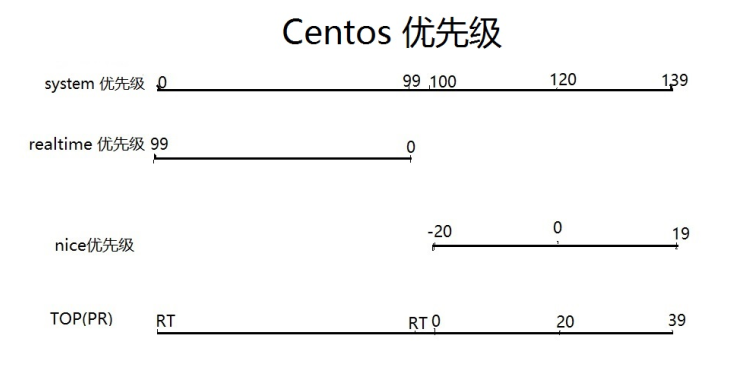
rtprio: 实时优先级
因为nice优先级不对应任何的实时优先级,所以无法显示实时优先级
[root@centos72 ~]#  nice  -n  -20 ping  127.0.0.1

PING 127.0.0.1 (127.0.0.1) 56(84) bytes of data.

64 bytes from 127.0.0.1: icmp_seq=1 ttl=64 time=0.034 ms

64 bytes from 127.0.0.1: icmp_seq=2 ttl=64 time=0.026 ms

64 bytes from 127.0.0.1: icmp_seq=3 ttl=64 time=0.022 ms

^C

--- 127.0.0.1 ping statistics ---

3 packets transmitted, 3 received, 0% packet loss, time 2000ms

rtt min/avg/max/mdev = 0.022/0.027/0.034/0.006 ms
[root@centos72 ~]#  ps  -C  ping  o   pid,cmd,ni,%cpu,pri,rtprio  |  tail

   PID CMD                          NI %CPU PRI RTPRIO

  1260 ping 127.0.0.1              -20  0.0  39      -
7 [migration/0] - 0.0 139 99中139是最高的优先级,值越大优先级越高,
因为是pri优先级,和系统优先级是相反的
[root@centos72 ~]#  ps  axo   pid,cmd,ni,%cpu,pri,rtprio  |  head

   PID CMD                          NI %CPU PRI RTPRIO

     1 /usr/lib/systemd/systemd --   0  0.0  19      -

     2 [kthreadd]                    0  0.0  19      -

     3 [ksoftirqd/0]                 0  0.0  19      -

     5 [kworker/0:0H]              -20  0.0  39      -

     6 [kworker/u256:0]              0  0.0  19      -

     7 [migration/0]                 -  0.0 139     99

     8 [rcu_bh]                      0  0.0  19      -

     9 [rcu_sched]                   0  0.0  19      -

    10 [lru-add-drain]             -20  0.0  39      -
看门狗监控内核状态的,最高优先级
就像国家的安全部分监控其他部门,比如明朝的锦衣卫
[root@centos72 ~]#  ps  axo   pid,cmd,ni,%cpu,pri,rtprio  |  grep  watch

    11 [watchdog/0]                  -  0.0 139     99

    12 [watchdog/1]                  -  0.0 139     99

  1272 grep --color=auto watch       0  0.0  19      -
ps查看和调整优先级的更多相关文章
- linux ps查看进程命令
linux ps查看进程命令ps命令作用:将某个时间点的程序运作情况撷取下来 实例: [root@linux ~]# ps aux [root@linux ~]# ps -lA [root@linux ...
- 【Linux】常用指令、ps查看进程、kill杀进程、启动停止tomcat命令、查看日志、查看端口、find查找文件
1.说出 10 个 linux 常用的指令 1) ls 查看目录中的文件 2)cd /home 进入 '/ home' 目录:cd .. 返回上一级目录:cd ../.. 返回上两级目录 3)mkdi ...
- Java如何查看线程的优先级?
Java编程中,如何查看线程的优先级? 以下示例演示如何使用Thread类的getPriority()方法检查线程的优先级. package com.yiibai; public class Thre ...
- Linux常用指令---ps(查看进程)
Linux中的ps命令是Process Status的缩写.ps命令用来列出系统中当前运行的那些进程.ps命令列出的是当前那些进程的快照,就是执行ps命令的那个时刻的那些进程,如果想要动态的显示进程信 ...
- linux ps查看进程命令详解
http://linux.net527.cn/Linuxwendang/xitongguanliyuan/39094.htmlLinux操作系统PS命令详细解析 要对系统中进程进行监测控制,用 ps ...
- ps查看进程
ps:要对进程进行监测和控制,首先必须要了解当前进程的情况,也就是需要查看当前进程,而ps命令就是最基本同时也是非常强大的进程查看命令.使用该命令可以确定有哪些进程正在运行和运行的状态.进程是否结束. ...
- Linux ps 查看进程
[root@wang /]# ps aux ps -elf ^C [root@wang /]# ps aux USER PID %CPU %MEM VSZ RSS TTY STAT START TIM ...
- Linux:PS查看进程信息,和查看tomcat内存等信息
版权声明:本文为博主原创文章,遵循CC 4.0 BY-SA版权协议,转载请附上原文出处链接和本声明. 本文链接:https://blog.csdn.net/fly910905/article/deta ...
- 用ps 查看线程状态
ps -eLo pid,tid,class,rtprio,ni,pri,psr,pcpu,pmem,stat,wchan:30,comm 线程相关选项: THREAD DISPLAY H Show t ...
随机推荐
- navicat12过期问题,Windows平台。
首先关闭Navicat 然后 win+R,输入regedit 回车,打开注册表编辑器: 删除HKEY_CURRENT_USER\Software\PremiumSoft\Data 展开HKEY_CUR ...
- SSH小应用
1:Spring整合Hibernate <?xml version="1.0" encoding="UTF-8"?> <!DOCTYPE hi ...
- 【Linux】运维常用命令
1.查看进程 ps -ef 如果需要查看特定的进程,比如redis的 ps -ef | grep redis 2.强制杀死进程 kill -9 进程id 3.忽略输出后台启动 nohup ./red ...
- PHP远程DoS漏洞深入分析及防护方案
PHP远程DoS漏洞 4月3日,有人在PHP官网提交PHP 远程DoS漏洞(PHP Multipart/form-data remote dos Vulnerability),代号69364.由于该漏 ...
- Java反射之方法反射demo
package reflect; import java.lang.reflect.Method; public class ClassDemo3 { public static void main( ...
- 20150721—HTML的定位 JS (转)
本文转载于:http://blog.csdn.net/xuantian868/article/details/3116442 HTML:scrollLeft,scrollWidth,clientW ...
- SAS中的Order By - Proc Sort
SAS中的Order By - Proc Sort 1.排序proc sort proc sort在按数据集中某一个变量或几个变量的升序或降序将记录重新排列,并把结果保存在输出数据集中,如果不另外指定 ...
- 美化Windows
更改壁纸 https://www.omgubuntu.co.uk/2010/09/a-look-back-at-every-ubuntu-default-wallpaper google: ubunt ...
- 01、python的基础-->while循环应用
1.简单的输出小程序 name = input('请输入你的名字:') age = input('请输入你的年龄:') print('我的名字叫'+name,'我今年'+ age + '岁') 2.w ...
- 精简Docker镜像的几个方法
一.使用更精简的镜像 常用的Linux系统镜像一般有 Debian.Ubuntu.CentOS和Alpine,其中Alpine是面向安全的轻量级Linux发行版本.Docker的Alpine镜像仅有不 ...