
node.js入门学习(二)MIME模块,request和response对象,demo之不同url请求不同html页面,页面包含图片、样式css等静态资源
目录:
一、构建http服务程序-根据不同请求做出不同响应
二、根据用户不同请求,读取不同HTML文件响应
三、响应的HTML文件中包含图片的处理方式
四、根据后缀查询MIME类型
五、案例:不同url请求不同html页面,页面包含图片、样式css等静态资源
六、request对象
七、response对象常用成员(API)
一、构建http服务程序-根据不同请求做出不同响应 <--返回目录
// 加载http模块

var http = require("http");

// 创建一个http服务对象

http.createServer(function(req, res) {

    if(req.url === '/') {

        res.end("hello index");

    } else if(req.url === '/list') {

        res.end("hello list");

    } else {

        res.end("404,not found!");

    }

}).listen('8080', function() {

    console.log('服务器已经启动。');

});
二、根据用户不同请求,读取不同HTML文件响应 <--返回目录
第一步:在D:/hello.js中写代码:
// 加载http模块

var http = require("http");

var fs = require("fs");

var path = require("path");

// 创建一个http服务对象

http.createServer(function(req, res) {

    if(req.url === '/') {

        fs.readFile(path.join(__dirname, 'pages/index.html'), function(err, data) {

            if(err) throw err;

            res.end(data);

        });

    } else if(req.url === '/list') {

        fs.readFile(path.join(__dirname, 'pages/list.html'), function(err, data) {

            if(err) throw err;

            res.end(data);

        });

    } else {

        res.end("404,not found!");

    }

}).listen('8080',function() {

    console.log('服务器已经启动。');

});
第二步:在d盘下创建pages文件夹,在pages文件夹中添加index.html文件和list.html文件
index.html(list.html把index替换成list)
<!DOCTYPE html>

<html>

<head>

    <title>index页面</title>

    <meta charset="utf-8">

</head>

<body>

<h2>index页面</h2>

</body>

</html>
第三步:浏览器访问:http://localhost:8080/list
三、响应的HTML文件中包含图片的处理方式 <--返回目录
第一步:在D:/hello.js中写代码:
// 加载http模块

var http = require("http");

var fs = require("fs");

var path = require("path");

// 创建一个http服务对象

http.createServer(function(req,res) {

    if(req.url === '/') {

        fs.readFile(path.join(__dirname, 'pages/index.html'), function(err, data) {

            if(err) throw err;

            res.end(data);

        });

    } else if(req.url === '/list') {

        fs.readFile(path.join(__dirname, 'pages/list.html'), function(err, data) {

            if(err) throw err;

            res.end(data);

        });

    } else if(req.url.includes('.jpg')){

        fs.readFile(path.join(__dirname, 'images', req.url), function(err, data) {

            if(err) throw err;

            res.end(data);

        });

    } else {

        res.end("404,not found!");

    }

}).listen('8080',function() {

    console.log('服务器已经启动。');

});
第二步:在d盘下创建pages文件夹,在pages文件夹中添加index.html文件和list.html文件
index.html文件
<!DOCTYPE html>

<html>

<head>

    <title>index页面</title>

    <meta charset="utf-8">

</head>

<body>

<h2>index页面</h2>

<img src="/1.jpg">

</body>

</html>
第三步:在d盘下创建images文件夹,在images文件夹中添加1.jpg文件
第四步:浏览器访问:http://localhost:8080
四、根据后缀查询MIME类型 <--返回目录
请求的静态资源可能是图片,可能是css等等,图片后缀可能是jpg,可能是png等等。为了写出通用的程序,可以使用第三方模块mime。
使用第三方模块mime:
// 根据请求后缀,来决定返回数据的MIME类型

var mime = require("mime");

res.setHeader('Content-Type', mime.getType(req.url));
五、案例:不同url请求不同html页面,页面包含图片、样式css等静态资源 <--返回目录
项目结构:
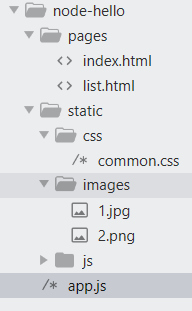
在项目根目录node-hello下,执行npm install mime命令,下载安装mime模块;安装完后会在node-hello目录下创建node_modules目录。
app.js
// 加载http模块

var http = require("http");

var fs = require("fs");

var path = require("path");

var mime = require("mime");

// 创建一个http服务对象

http.createServer(function(req,res) {

    if(req.url === '/') {

        fs.readFile(path.join(__dirname, 'pages/index.html'), function(err, data) {

            if(err) throw err;

            res.end(data);

        });

    } else if(req.url === '/list') {

        fs.readFile(path.join(__dirname, 'pages/list.html'), function(err, data) {

            if(err) throw err;

            res.end(data);

        });

    } else if(req.url.includes('static')){

        fs.readFile(path.join(__dirname, req.url), function(err, data) {

            if(err) {
          res.end("文件不存在!");
          return;
       }

            res.setHeader('Content-Type', mime.getType(req.url));

            res.end(data);

        });

    } else {

        res.end("404,not found!");

    }

}).listen('8080',function() {

    console.log('服务器已经启动。');

});
index.html
<!DOCTYPE html>

<html>

<head>

    <title>index页面</title>

    <meta charset="utf-8">

    <link rel="stylesheet" type="text/css" href="/static/css/common.css">

</head>

<body>

    <h2>index页面</h2>

    <img src="/static/images/1.jpg">

    <img src="/static/images/2.png">

</body>

</html>
请求静态资源时,响应信息:

如果不使用mime,并且将res.setHeader('Content-Type', mime.getType(req.url));注释掉,其实静态资源也能正常处理。
六、request对象 <--返回目录
1)request对象类型http.IncomingMessage,继承自stream.Readable;
2)request对象常用成员
- request.headers 获取所有的请求报文头,返回一个对象{'host':'localhost:8080', 'Connection':'keep-alive', ...}
- request.rawHeaders 获取所有的请求报文头,返回一个数组 ['host','localhost:8080','Connection','keep-alive', ...]
- request.httpVersion 获取客户端使用的http版本
- request.method 请求是get还是post
- request.url
七、response对象常用成员(API) <--返回目录
1) response.write('数据',['数据编码'],[fn]);
2) response.end();//结束响应
3) response.end([data], [encoding], [callback]);
- 该方法中如果指定了data,则相当于调用response.write(data,encoding)之后再调用response.end(callback)
4) response.setHeader('','');//在响应内容前设置,设置响应报文头
5) 设置http响应状态码和对应的消息
response.statusCode=404
response.statusMessage='Not Found';
6) response.writeHead() 直接向客户端写入http响应报文头
response.writeHead(404,'Not Found', {'Content-Type':'text/html;charset=utf-8'})
node.js入门学习(二)MIME模块,request和response对象,demo之不同url请求不同html页面,页面包含图片、样式css等静态资源的更多相关文章
- Node.js入门学习笔记(一)
先来个最常见的"Hello World!". 打开你最喜欢的编辑器(我用的是Sublime Text),创建一个helloWorld.js的文件.我们要做的就是向stdout输出& ...
- node.js入门学习笔记整理
(1)node Node.js 是一个基于 Chrome V8 引擎的 JavaScript 运行环境. Node与javaScript的区别在于,javaScript的顶层对象是window,而no ...
- node.js入门学习(一)环境安装,REPL,fs模块,path模块,http模块
一.node.js介绍 1.1.node.js是什么 官网首页总结:Node.js® 是一个基于 Chrome V8 引擎 的 JavaScript 运行时. 1)node.js是一个开发平台,就像j ...
- node.js入门学习(四)--Demo图书的增删改查
需求:图书的增删改查,图书数据保存在data.json文件中. 1.Demo结构: 2.首先下载安装node.js,配置环境变量:参考博客 3.项目初始化 1)创建项目根目录node-hello,进入 ...
- 手把手教你学node.js之学习使用外部模块
学习使用外部模块 目标 建立一个 lesson2 项目,在其中编写代码. 当在浏览器中访问 http://localhost:3000/?q=alsotang 时,输出 alsotang 的 md5 ...
- node.js入门学习(五)--Demo模块化改造
1.node.js中模块的分类 1)node.js内置模块(核心,原生) 所有内置模块在安装node.js时就已经编译成二进制文件,可以直接加载运行(速度较快),部分内置模块,在node.exe这个进 ...
- node.js入门学习(三)--npm
一.npm介绍 1)npm:node package manager是node.js默认的以js编写的软件包管理系统 官网:www.npmjs.com 文档:docs.npmjs.com 2)提到np ...
- Node.js基础学习二之POST请求
本篇介绍下 Node.js post 请求 需求: 用户登录,前端界面输入用户名和密码,点击登录请求后台验证,根据后台反馈的信息做出响应 前端: (1)使用form表单 (2)使用ajax异步请求 服 ...
- Node.js入门学习笔记(三)
基于事件驱动的回调 这个问题不好回答,不过这是Node.js原生的工作方式.它是事件驱动的,这也是它为什么这么快的原因.你可以花一点时间阅读一下Felix Geisendörfer的大作 Unders ...
随机推荐
- php连接mysql,数据CRUD操作
插入数据 <?php $name = $_GET['username']; $sex = $_GET['sex']; $hobby = $_GET['hobby']; $address = $_ ...
- 配置java开发环境,存在多个版本JDK时,怎样让所需版本生效
我本地有个1.7.0的java版本,后来我新装了一个13的版本,但是命令行查java版本的时候,生效的还是1.7.0的版本,经过资料查询以及自身亲测,现将过程记录如下: 1.电脑右键选择--属性--高 ...
- 【神经网络与深度学习】用训练好的caffemodel来进行分类
现在我正在利用imagenet进行finetune训练,待训练好模型,下一步就是利用模型进行分类.故转载一些较有效的相关博客. 博客来源:http://www.cnblogs.com/denny402 ...
- SpringBoot项目集成cas单点登录
添加依赖 添加cas client依赖 <dependency> <groupId>net.unicon.cas</groupId> <artifactId& ...
- IDEA 双击只选择了一个变量的某部分单词
1,很多抄袭文章说 在keymap 里搜索 select Word at caret , 鄙视手动抄袭和编写爬虫来 作恶的开发者. 2,自己试了,File菜单 ----> settings- ...
- vue项目中引入循环执行setInterval或者requestAnimationFrame的用法等
项目中循环计时处理某些方法的情况还是比较常见的,一般会用setInterval来处理,但是这个方法会似的页面卡顿等使用体验不好. 所以就使用浏览器提供的requestAnimationFrame方法, ...
- .net core 2.2.0 SOAP踩坑
首先确认下面几个程序集是最新版本: <PackageReference Include="System.ServiceModel.Http" Version="4. ...
- oracle链接报错shared memory realm does not exist
问题描述: 前两天能够正常链接,今天来了突然不能链接,原因不详. 处理方法: 连接linux进行如下操作: 1.sqlplus /nolog 2.conn / as sysdba 3.startup ...
- Git忽略文件的三个办法
方法一(并不好用) 在git中如果想忽略掉某个文件,不让这个文件提交到版本库中,可以使用修改根目录中 .gitignore 文件的方法(如无,则需自己手工建立此文件).这个文件每一行保存了一个匹配的规 ...
- celery开发中踩的坑
celery开发中踩的坑 celery连接redis 当使用redis做broker,redis连接需要密码时: BROKER_URL='redis://:xxxxx@127.0.0.1:6379/0 ...