
笔记66 Spring Boot快速入门(六)
SpringBoot中使用Mybatis
一、注解方式
1.创建映射文件CategoryMapper.java
使用注解@Mapper 表示这是一个Mybatis Mapper接口。
使用@Select注解表示调用findAll方法会去执行对应的sql语句。
 package com.example.springbootmybatisdemo.mapper;

 import com.example.springbootmybatisdemo.pojo.Category;

 import org.apache.ibatis.annotations.Mapper;

 import org.apache.ibatis.annotations.Select;

 import java.util.List;

 @Mapper

 public interface CategoryMapper {

     @Select("select * from category")

     List<Category> findAll();

 }
2.创建CategoryController.java
有问题:无法自动加载mapper,显示有错误,但是运行结果正确。
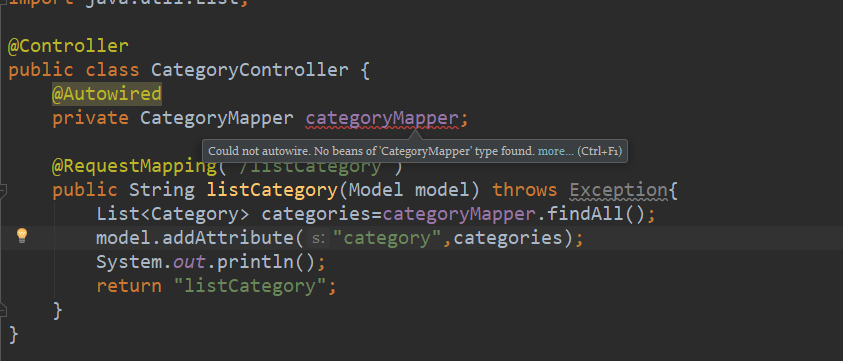
 package com.example.springbootmybatisdemo.controller;

 import com.example.springbootmybatisdemo.mapper.CategoryMapper;

 import com.example.springbootmybatisdemo.pojo.Category;

 import org.springframework.beans.factory.annotation.Autowired;

 import org.springframework.stereotype.Controller;

 import org.springframework.ui.Model;

 import org.springframework.web.bind.annotation.RequestMapping;

 import java.util.List;

 @Controller

 public class CategoryController {

     @Autowired

     private CategoryMapper categoryMapper;

     @RequestMapping("/listCategory")

     public String listCategory(Model model) throws Exception{

         List<Category> categories=categoryMapper.findAll();

         model.addAttribute("category",categories);

         System.out.println();

         return "listCategory";

     }

 }
3.listCategory.html
 <!DOCTYPE html>

 <html lang="en" xmlns:th="http://www.thymeleaf.org">

 <head>

     <meta http-equiv="Content-Type" content="text/html; charset=UTF-8" />

     <title>Title</title>

 </head>

 <body>

 <div class="showing">

     <h2>SpringBoot+mybatis</h2>

     <table>

         <thead>

         <tr>

             <th>id</th>

             <th>name</th>

         </tr>

         </thead>

         <tbody>

         <tr th:each="c: ${category}">

             <td align="center" th:text="${c.id}"></td>

             <td align="center" th:text="${c.name}"></td>

         </tr>

         </tbody>

     </table>

 </div>

 </body>

 </html>
二、xml方式(有问题)
三、SpringBoot+Mybatis抽插数据库
1.使用第三方插件PageHelper进行分页查询
增加依赖:
         <dependency>

             <groupId>com.github.pagehelper</groupId>

             <artifactId>pagehelper</artifactId>

             <version>4.1.6</version>

         </dependency>
2.配置PageHelper
PageHelperConfig.java
 package com.example.springbootmybatisdemo.config;

 import com.github.pagehelper.PageHelper;

 import org.springframework.context.annotation.Bean;

 import org.springframework.context.annotation.Configuration;

 import java.util.Properties;

 @Configuration

 public class PageHelperConfig {

     @Bean

     public PageHelper pageHelper(){

         PageHelper pageHelper = new PageHelper();

         Properties p = new Properties();

         p.setProperty("offsetAsPageNum", "true");

         p.setProperty("rowBoundsWithCount", "true");

         p.setProperty("reasonable", "true");

         pageHelper.setProperties(p);

         return pageHelper;

     }

 }
注解@Configuration 表示PageHelperConfig 这个类是用来做配置的。
注解@Bean 表示启动PageHelper这个拦截器。
offsetAsPageNum:设置为true时,会将RowBounds第一个参数offset当成pageNum页码使用.
rowBoundsWithCount:设置为true时,使用RowBounds分页会进行count查询.
reasonable:启用合理化时,如果pageNum<1会查询第一页,如果pageNum>pages会查询最后一页。比jpa中Pageable进行分页查询时更合理,不需要再去处理。
3.修改映射mapper
CategoryMapper.java
 package com.example.springbootmybatisdemo.mapper;

 import com.example.springbootmybatisdemo.pojo.Category;

 import org.apache.ibatis.annotations.*;

 import java.util.List;

 @Mapper

 public interface CategoryMapper {

     @Select("select * from category")

     List<Category> findAll();

     @Insert("insert into category(name) values (#{name})")

     int save(Category category);

     @Delete(" delete from category where id= #{id} ")

      void delete(int id);

     @Select("select * from category where id= #{id} ")

     Category get(int id);

     @Update("update category set name=#{name} where id=#{id} ")

     int update(Category category);

 }
4.控制层
CategoryController.java
 package com.example.springbootmybatisdemo.controller;

 import com.example.springbootmybatisdemo.mapper.CategoryMapper;

 import com.example.springbootmybatisdemo.pojo.Category;

 import com.github.pagehelper.PageHelper;

 import com.github.pagehelper.PageInfo;

 import org.springframework.beans.factory.annotation.Autowired;

 import org.springframework.stereotype.Controller;

 import org.springframework.ui.Model;

 import org.springframework.web.bind.annotation.RequestMapping;

 import org.springframework.web.bind.annotation.RequestParam;

 import java.util.List;

 @Controller

 public class CategoryController {

     @Autowired

     private CategoryMapper categoryMapper;

     @RequestMapping("/listCategory")

     public String listCategory(Model model) throws Exception{

         List<Category> categories=categoryMapper.findAll();

         model.addAttribute("category",categories);

         System.out.println();

         return "listCategory";

     }

     @RequestMapping("/listCategories")

     public String listCategories(Model model,

                                  @RequestParam(value = "start",defaultValue = "0")int start,

                                  @RequestParam(value = "size",defaultValue = "5") int size) throws Exception{

         PageHelper.startPage(start,size,"id desc");

         List<Category> categories=categoryMapper.findAll();

         PageInfo<Category> pageInfo=new PageInfo<>(categories);

         System.out.println(pageInfo.getPageNum());

         model.addAttribute("pageInfo",pageInfo);

         return "listCategories";

     }

     @RequestMapping("/addCategory")

     public String addCategory(Category category) throws Exception{

         categoryMapper.save(category);

         return "redirect:listCategories";

     }

     @RequestMapping("/deleteCategory")

     public String deleteCategory(Category category)throws Exception{

         categoryMapper.delete(category.getId());

         return "redirect:listCategories";

     }

     @RequestMapping("/updateCategory")

     public String updateCategory(Category category)throws Exception{

         categoryMapper.update(category);

         return "redirect:listCategories";

     }

     @RequestMapping("/editCategory")

     public String editCategory(int id,Model model)throws Exception{

         Category category=categoryMapper.get(id);

         model.addAttribute("category",category);

         return "editCategory";

     }

 }
根据start,size进行分页,并且设置id 倒排序
因为PageHelper的作用,这里就会返回当前分页的集合了
根据返回的集合,创建PageInfo对象
5.视图层
listCategories.html
 <!DOCTYPE html>

 <html lang="en" xmlns:th="http://www.thymeleaf.org">

 <head>

     <meta http-equiv="Content-Type" content="text/html; charset=UTF-8" />

     <title>Title</title>

 </head>

 <body>

 <div class="showing">

     <h2>SpringBoot+Mybatis</h2>

     <div style="width:500px;margin:20px auto;text-align: center">

         <table align="center" border="1" cellspacing="0">

             <thead>

             <tr>

                 <th>id</th>

                 <th>name</th>

                 <td>编辑</td>

                 <td>删除</td>

             </tr>

             </thead>

             <tbody>

             <tr th:each="c: ${pageInfo.list}">

                 <td align="center" th:text="${c.id}"></td>

                 <td align="center" th:text="${c.name}"></td>

                 <td align="center" ><a th:href="@{/editCategory(id=${c.id})}">编辑</a></td>

                 <td align="center" ><a th:href="@{/deleteCategory(id=${c.id})}">删除</a></td>

             </tr>

             </tbody>

         </table>

         <br />

         <div>

             <a th:href="@{/listCategories(start=1)}">[首  页]</a>

             <a th:href="@{/listCategories(start=${pageInfo.pageNum -1})}">[上一页]</a>

             <a th:href="@{/listCategories(start=${pageInfo.pageNum +1})}">[下一页]</a>

             <a th:href="@{/listCategories(start=${pageInfo.pages})}">[末  页]</a>

         </div>

         <form action="/addCategory" method="post">

             name:<input name="name"/><br/>

             <button type="submit">提交</button>

         </form>

     </div>

 </div>

 </body>

 </html>
editCategory.html
 <!DOCTYPE html>

 <html lang="en" xmlns:th="http://www.thymeleaf.org">

 <head>

     <meta http-equiv="Content-Type" content="text/html; charset=UTF-8" />

     <title>Title</title>

 </head>

 <body>

 <div class="showing">

     <h2>springboot+jpa</h2>

     <div style="margin:0px auto; width:500px">

         <form action="/updateCategory" method="post">

             name: <input name="name" th:value="${category.name}" /> <br/>

             <input name="id" type="hidden" th:value="${category.id}" />

             <button type="submit">提交</button>

         </form>

     </div>

 </div>

 </body>

 </html>
5.测试

6.问题:当编辑完以后就返回首页了。
修改:在编辑时传入当前分页数,然后跳转到listCategories的时候传入start。
四、代码
https://github.com/lyj8330328/springboot-mybatis-demo
笔记66 Spring Boot快速入门(六)的更多相关文章
- 笔记61 Spring Boot快速入门(一)
IDEA+Spring Boot快速搭建 一.IDEA创建项目 略 项目创建成功后在resources包下,属性文件application.properties中,把数据库连接属性加上,同时可以设置服 ...
- 笔记63 Spring Boot快速入门(三)
SpringBoot中使用JSP Springboot的默认视图支持是Thymeleaf,但是Thymeleaf还没开始学,熟悉的还是jsp,所以要让Springboot支持 jsp. 一.在pom. ...
- 笔记65 Spring Boot快速入门(五)
SpringBoot+JPA 一.什么是JPA? JPA是Java Persistence API的简称,中文名Java持久层API,是JDK 5.0注解或XML描述对象-关系表的映射关系,并将运行期 ...
- 笔记70 Spring Boot快速入门(八)(重要)
上传文件 一.方式一 1.上传页面 upLoadPage.html <!DOCTYPE html> <html lang="en"> <head> ...
- 笔记64 Spring Boot快速入门(四)
SpringBoot中错误处理.端口设置和上下文路径以及配置切换 一.错误处理 假设在访问首页的时候会出现一些错误,然后将这些错误当作异常抛出,反馈给用户. 1.修改IndexController.j ...
- 笔记62 Spring Boot快速入门(二)
SpringBoot部署 一.jar方式 1.首先安装maven. <1>下载最新的maven版本:https://maven.apache.org/download.cgi <2& ...
- 笔记67 Spring Boot快速入门(七)
SpringBoot+RESTful+JSON 一.RESTful架构 REST全称是Representational State Transfer,中文意思是表述(编者注:通常译为表征)性状态转移. ...
- Spring Boot 快速入门
Spring Boot 快速入门 http://blog.csdn.net/xiaoyu411502/article/details/47864969 今天给大家介绍一下Spring Boot MVC ...
- Spring Boot快速入门(二):http请求
原文地址:https://lierabbit.cn/articles/4 一.准备 postman:一个接口测试工具 创建一个新工程 选择web 不会的请看Spring Boot快速入门(一):Hel ...
随机推荐
- sleep - 延迟指定数量的时间
总览 (SYNOPSIS) sleep [OPTION]... NUMBER[SUFFIX] 描述 (DESCRIPTION) 暂停 NUMBER 秒. SUFFIX 如果 是 s, 指 暂停 的 秒 ...
- centos 升级python
1.下载python3.6.1的包 wget https://www.python.org/ftp/python/3.6.1/Python-3.6.1.tgz 2.解压 tar -zxvf Pytho ...
- Cascade R-CNN目标检测
成功的因素: 1.级联而非并联检测器 2.提升iou阈值训练级联检测器的同时不带来负面影响 核心思想: 区分正负样本的阈值u取值影响较大,加大iou阈值直观感受是可以增加准确率的,但是实际上不是,因为 ...
- Xcode 编辑器之关于Other Linker Flags相关问题
一,概述 问题场景一 当从网上去下载一些之前的完整的项目的时候,用终端也 pod update了,但一运行,熟悉的linker错误就出来了. 解决办法 在Other Linker Flags(也即 O ...
- centos下安装java jdk1.8
---恢复内容开始--- mysql密码修改了,发现还没装jdk,那就一起记录下来吧.虽然网上好多,但自己想查更方便了. 查看有没有装jdk #java -version显示下面信息,不是oracle ...
- delphi文件类型
1.DPR: Delphi Project文件,包含了Pascal代码.应用系统的工程文件2.PAS: Pascal文件,Pascal单元的源代码,可以是与窗体有关的单元或是独立的单元.3.DFM:D ...
- Linux下Mysql安装与常见问题解决方案
1.Mysql安装 环境: Mysql版本: 开始安装: 首先检查环境有没有老版本mysql,有的话先卸载干净,具体百度. 接着先获取mysql的安装包:wget https://dev.mysql. ...
- HTML5: HTML5 内联 SVG
ylbtech-HTML5: HTML5 内联 SVG 1.返回顶部 1. HTML5 内联 SVG HTML5 支持内联 SVG. 什么是SVG? SVG 指可伸缩矢量图形 (Scalable Ve ...
- Flask-Restless初步了解
Flask-Restless是Flask框架的一个扩展库 1. 功能介绍 通过使用SQLAlchemy或Flask-SQLAlchemy框架定义的数据库模型,提供一个简单的ReSTful A ...
- Nginx网络架构实战学习笔记(二):编译PHP并与nginx整合、安装ecshop、商城url重写实战
文章目录 编译PHP并与nginx整合 安装ecshop(这是一个多年前php的项目貌似,作为java开发的我暂时不去关心) 商城url重写实战 编译PHP并与nginx整合 安装mysql yum ...