
Vue自行封装常用组件-文本提示
使用方法:
1.在父组件中引入"toast.vue"
//import toast from "./toast";
2.在父组件中注册 toast
//components:{toast},
3.放在父组件中使用
//<toast ref="toast"></toast>
4.调用toast组件
//this.$refs.toast.showToast('text')
注:index.vue为父组件,后者为子组件,效果图先上,可以先看是否是自己想要的组件,再选择使用
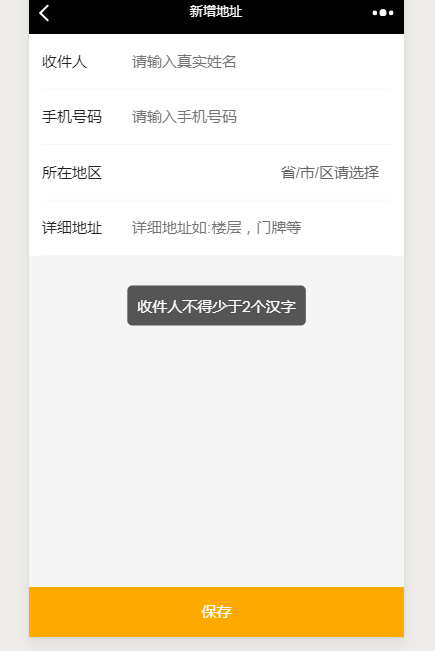
index.vue
<template>

    <div>

        <toast ref="toast"></toast>

    </div>

</template>

<script>

import toast from './toast.vue'

    export default {

        components:{

            toast

        },

        methods:{

        },

        created(){

            this.$refs.toast.showToast('弹出文本TEXT')

        }

    }

</script>

<style lang="less" scoped>

</style>
toast.vue
<template>

    <div class="toast" v-show="toastShow">

        {{toastText}}

    </div>

</template>

<script>

    export default {

        data() {

            return {

                toastShow: false,

                toastText: ''

            }

        },

        methods: {

            showToast (str) {

                let v = this

                v.toastText = str

                v.toastShow = true

                setTimeout(function(){

                v.toastShow = false

                }, 1500)

            }

        }

    }

</script>

<style lang="less" scoped>

    .toast {

        position: fixed;

        z-index: 2000;

        left: 50%;

        top:45%;

        transition:all .5s;

        -webkit-transform: translateX(-50%) translateY(-50%);

            -moz-transform: translateX(-50%) translateY(-50%);

            -ms-transform: translateX(-50%) translateY(-50%);

                -o-transform: translateX(-50%) translateY(-50%);

                transform: translateX(-50%) translateY(-50%);

        text-align: center;

        border-radius: .1rem;

        color:#FFF;

        background: rgba(17, 17, 17, 0.7);

        padding: .4rem .4rem;

        max-width: 14rem;

        font-size: .55rem

    }

</style>
Vue自行封装常用组件-文本提示的更多相关文章
- Vue自行封装常用组件-弹出框
使用方法: 1.在父组件中引入"box.vue" //import popUpBox from "./box.vue"; 2.在父组件中注册 popUpBo ...
- Vue自行封装常用组件-倒计时
倒计时组件,比较复杂一点,大神勿调侃,精确到毫秒,因为项目中多次出现倒计时,所以拿出来分享下 使用方法:1.在父组件中引入"uni-countdown" //import uniC ...
- vue移动端常用组件
3d picker组件 参考链接:https://segmentfault.com/a/1190000007253581?utm_source=tag-newest安装:npm install vue ...
- Vue 数组封装和组件data定义为函数一些猜测
数组封装 var vm={ list:[0,1] } var push=vm.list.push;//把数组原来的方法存起来 vm.list.push=function(arg){//重新定义数组的 ...
- Vue文件封装日历组件
封装就是要具有灵活性,样式自适应,调用的时候传入props就可以变成自己想要的样式. 效果展示网址:https://1963331542.github.io/ 源代码: <template> ...
- Vue中封装axios组件实例
首先要创建一个网络模块network文件夹 里面要写封装好的几个组件 在config.js里面这样写 在index.js要这样写 core.js文件里面内容如下 然后要在main.js文件里面要设置 ...
- [ vue ] Quasar封装q-dialog组件,在外层实现弹出框的开启和关闭
场景描述: 见:https://www.cnblogs.com/remly/p/12981582.html 具体实现: <!-- 父组件 --> <template> < ...
- vue中封装swipe组件
<template> <!-- TODO swipe --> <div id="hy-swiper"> <div class=" ...
- VUE 2.0 引入高德地图,自行封装组件
1. 高德地图官网 申请帐号, 申请相应(JavaScript API)的 Key 2. 在项目中引入, 这里和其他的引入不同的是 直接在 index.html, 不是在 main.js 引入, 博主 ...
随机推荐
- 读取 .properties文件到数据库
最近有一个这样的需求,将原本配置文件 .properties文件改到数据库当中,这样不用每次修改都重启服务器 java自带有处理 .properties文件的专有类 Properties,处理也很不错 ...
- JS原生上传大文件显示进度条-php上传文件
JS原生上传大文件显示进度条-php上传文件 在php.ini修改需要的大小: upload_max_filesize = 8M post_max_size = 10M memory_li ...
- 基于axis的WebService的案例
1.axis axis是Apache旗下产品,它是一个webservice容器,可被用于创建.部署和运行webservice.网址http://axis.apache.org/,网址上的部分截图如下. ...
- 重启sshd服务
查看状态: systemctl status sshd.service 启动服务: systemctl start sshd.service 重启服务: systemctl restart sshd. ...
- (转)Jquery+Ajax实现Select动态定数据
解决思路: 在数据库中建立类型字典式表.将下拉框需要添加的项,在数据库表里中文.英文名称对应起来. 下拉框动态绑定数据库表中需要字段. <div id="bgDiv" sty ...
- 完全理解js中的&&和||
阅读代码时对一行代码很困惑 step > max_step && (step = min_step); 查阅资料后发现它等价于 if (step > max_step) { ...
- mysql常用排查命令
1.查看服务器使用状态 mysqladmin -uroot -p -S /tmp/mysql.sock -r -i 1 ext |\ awk -F"|" \ "BEGIN ...
- coredump产生的几种可能情况
coredump产生的几种可能情况 造成程序coredump的原因有很多,这里总结一些比较常用的经验吧: 1,内存访问越界 a) 由于使用错误的下标,导致数组访问越界. b) 搜索字符串时,依靠字符串 ...
- C++运算符重载总结(真的很详细了w(゚Д゚)w)
C++运算符重载总结(真的很详细了w(゚Д゚)w) 概述 运算符重载可以使得一些特殊类型参与运算,我是这样理解的. 使用友元形式的运算符重载 //一般形式 class x{ friend 返回类型 o ...
- 关于Windows10内存随时间不断升高问题
问题描述 电脑买了10个月了,头半年的运行内存都是正常的,基本不会超过60%,但是最近几个月发现自己电脑的运行内存会随时间不断地升高,关机后重启也无法解决这个问题QAQ 常见的症状为一开机,点开任务管 ...