
002--PowerDesigner显示注释comment
PowerDesigner显示注释comment
参考博客:https://blog.csdn.net/chao_1990/article/details/52620206
原始样式
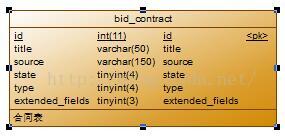
显示操作

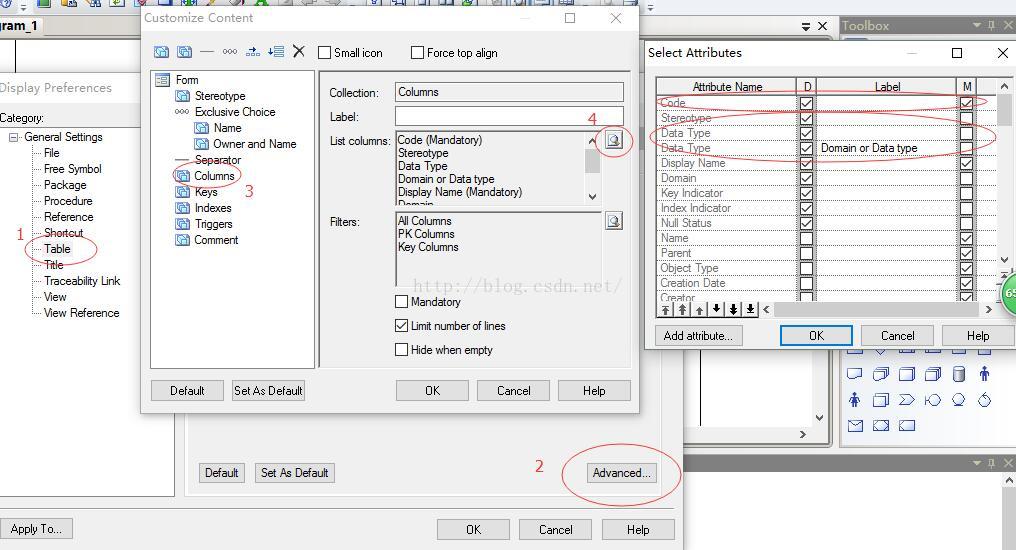
调出执行命令的接口

执行下列命令
1、从name替换comment
 Option   Explicit

     ValidationMode   =   True

     InteractiveMode   =   im_Batch

     Dim   mdl   '   the   current   model

     '   get   the   current   active   model

     Set   mdl   =   ActiveModel

     If   (mdl   Is   Nothing)   Then

           MsgBox   "There   is   no   current   Model "

     ElseIf   Not   mdl.IsKindOf(PdPDM.cls_Model)   Then

           MsgBox   "The   current   model   is   not   an   Physical   Data   model. "

     Else

           ProcessFolder   mdl

     End   If

     '   This   routine   copy   name   into   comment   for   each   table,   each   column   and   each   view

     '   of   the   current   folder

     Private   sub   ProcessFolder(folder)

           Dim   Tab   'running     table

           for   each   Tab   in   folder.tables

                 if   not   tab.isShortcut   then

                       tab.comment   =   tab.name

                       Dim   col   '   running   column

                       for   each   col   in   tab.columns

                             col.comment=   col.name

                       next

                 end   if

           next

           Dim   view   'running   view

           for   each   view   in   folder.Views

                 if   not   view.isShortcut   then

                       view.comment   =   view.name

                 end   if

           next

           '   go   into   the   sub-packages

           Dim   f   '   running   folder

           For   Each   f   In   folder.Packages

                 if   not   f.IsShortcut   then

                       ProcessFolder   f

                 end   if

           Next

     end   sub
2、从comment替换name
     Option   Explicit

     ValidationMode   =   True

     InteractiveMode   =   im_Batch

     Dim   mdl   '   the   current   model

     '   get   the   current   active   model

     Set   mdl   =   ActiveModel

     If   (mdl   Is   Nothing)   Then

           MsgBox   "There   is   no   current   Model "

     ElseIf   Not   mdl.IsKindOf(PdPDM.cls_Model)   Then

           MsgBox   "The   current   model   is   not   an   Physical   Data   model. "

     Else

           ProcessFolder   mdl

     End   If

     Private   sub   ProcessFolder(folder)

     On Error Resume Next

           Dim   Tab   'running     table

           for   each   Tab   in   folder.tables

                 if   not   tab.isShortcut   then

                       tab.name   =   tab.comment

                       Dim   col   '   running   column

                       for   each   col   in   tab.columns

                       if col.comment="" then

                       else

                             col.name=   col.comment

                       end if

                       next

                 end   if

           next

           Dim   view   'running   view

           for   each   view   in   folder.Views

                 if   not   view.isShortcut   then

                       view.name   =   view.comment

                 end   if

           next

           '   go   into   the   sub-packages

           Dim   f   '   running   folder

           For   Each   f   In   folder.Packages

                 if   not   f.IsShortcut   then

                       ProcessFolder   f

                 end   if

           Next

     end   sub
最终效果图如下
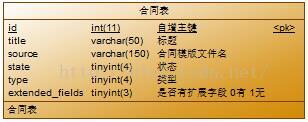
可以看到图1中的id列已被中文注释替换。
上述已亲测,执行命令1【从name替换comment】,显示列表中可以显示注释信息!
002--PowerDesigner显示注释comment的更多相关文章
- PowerDesigner设计时表显示注释选项
PowerDesigner设计时表显示注释选项:选定编辑的表,右键- >Properties- >Columns- >Customize Columns and Filter(或直接 ...
- 【FPGA】always (*) 后代码全部显示注释字体的颜色之解决方法
2015年08月26日 09:44:05 风雨也无晴 阅读数:1289 版权声明:本文为博主原创文章,未经博主允许不得转载. https://blog.csdn.net/scottly1/art ...
- net发布的dll方法和类显示注释信息(字段说明信息)[图解]
自己发布的dll添加的另一个项目中突然没有字段说明信息了,给使用带来了很多的不便,原因是为了跨项目引用,所以导致不显示注释信息的,一下是解决这个问题的方法. 在要发布(被引用)的项目上右键 => ...
- Android Studio鼠标悬停显示注释
Android Studio鼠标悬停显示注释 在AS中配置 如果你想从网上查看注释,到这一步就操作完成. 下面说明让软件使用本地注释: 使用本地注释 以Windows为例: 找到下面文件 C:\Use ...
- phpmyadmin数据表结构没有显示注释列
新开的一个项目,用phpmyadmin作为图形化操作数据库工具.创建数据表时为其每列添加好注释,浏览数据表内容有显示注释内容,但是查看数据表结构没有显示注释列,不方便直观查看数据表每列的意思. 上网搜 ...
- PowerDesigner设计表时显示注释列Comment,Columns中没有Comment的解决办法
我使用的PowerDesigner版本为16.5,如下图: 在所要编辑的表上双击,打开Table Properties窗口,并将上面的选项卡切换到Columns,如下图: 我们点击Customize ...
- PowerDesigner显示Common注释列并自动赋值
PowerDesigner中默认不显示Common注释列,可根据以下步骤显示并紫东填充Name列内容. 1.显示Common注释列 2.运行VB Script脚本自动赋值 使用Shift+Ctrl+X ...
- powerDesigner 把name项添加到注释(comment)
第一次写博客,分享一点经验吧,平时大家用powerDesigner的时候,pd是不会把name项默认添加到comment的,所以生成的数据库表里面也没有中文字段的注释. 我在网上查了一下.有解决方案了 ...
- powerDesigner 把name项添加到注释(comment),完美方案!
第一次写博客,分享一点经验吧,平时大家用powerDesigner的时候,pd是不会把name项默认添加到comment的,所以生成的数据库表里面也没有中文字段的注释. 我在网上查了一下.有解决方案了 ...
随机推荐
- 202-基于TI DSP TMS320C6678、Xilinx K7 FPGA XC7K325T的高速数据处理核心板
该DSP+FPGA高速信号采集处理板由我公司自主研发,包含一片TI DSP TMS320C6678和一片Xilinx FPGA K7 XC72K325T-1ffg900.包含1个千兆网口,1个FMC ...
- 十大基本功之testbench
1. 激励的产生 对于testbench而言,端口应当和被测试的module一一对应.端口分为input,output和inout类型产生激励信号的时候,input对应的端口应当申明为reg, o ...
- 六、ARM 寻址方式
寻址方式是针对源操作数来说的 6.1 立即数寻址 源操作数是立即数 立即数:操作码以 # 号开头的数字为立即数 立即数寻址: MOV R0, #0x300 伪指令: LDR R0 ...
- linux shell 命令笔记
标准输入.标准输出.标准错误 File descriptors are integers associated with an opened file or data stream. File des ...
- JS实现网页飘窗
1.在html中设置一个飘窗的div,div中可以添加图片,添加文字通过css展现在飘窗中: <!--飘窗--> <div id="roll"> <i ...
- Cocos Creator更改底层,点击节点获取路径
Mac : 右键creator->显示包内容->Contents->Resources->engine->bin->cocos2d-js-for-preview.j ...
- git push -u origin master和git push <远程主机名> <本地分支名>:<远程分支名>作用
git push git push命令用于将本地分支的更新,推送到远程主机.它的格式与git pull命令相仿. $ git push <远程主机名> <本地分支名>:< ...
- java初学第一天
public class HellowWorld{ public static void main(String[] args){ System.out.println("jiuxu&quo ...
- 【leetcode】1108. Defanging an IP Address
题目如下: Given a valid (IPv4) IP address, return a defanged version of that IP address. A defanged IP a ...
- qs的两个用途
qs是npm安装的库 1.qs.stringify() 将对象序列化成URL的形式,以&进行拼接 const Qs = require('qs'); let obj= { method: ...