
css3中的scroll-behavior属性
scroll-behavior属性
当用户手动导航或者 CSSOM scrolling API 触发滚动操作时,CSS 属性 scroll-behavior 为一个滚动框指定滚动行为,当用户通过鼠标滑轮滚动或者手机触屏滚动,不受这个属性的影响。在根元素中指定这个属性时,它反而适用于视窗。
scroll-behavior属性包括: smooth | auto;
auto: 默认值,表示滚动框立即滚动到指定位置。 smooth 表示允许滚动时采用平滑过渡,而不知直接滚动到相应位置,最常见的比如回到顶部按钮和锚点。
scroll-behavior浏览器支持情况:
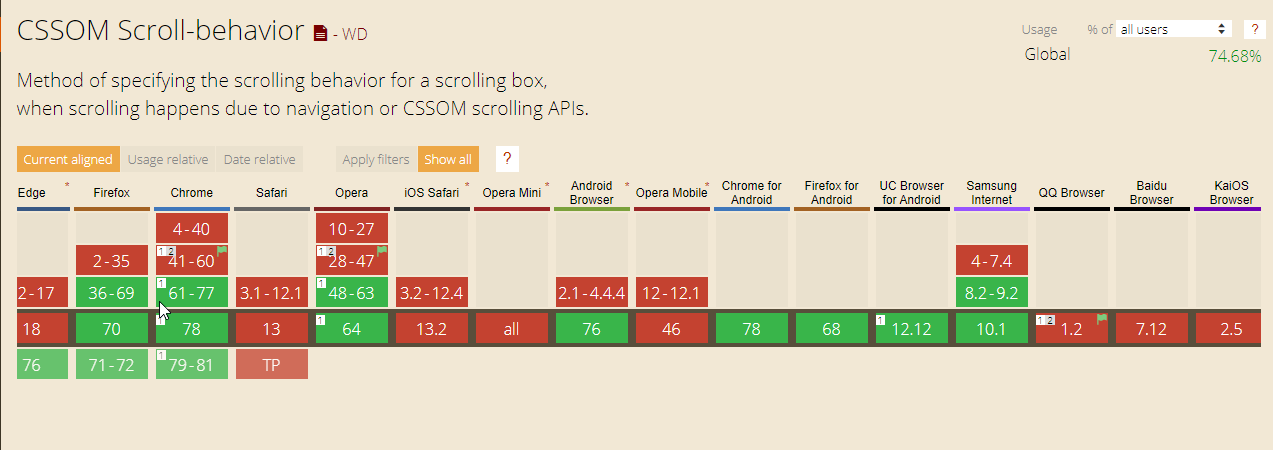
- 通过锚点的方式实现,代码如下:
html代码:<div class="tab-box">
<div class="tab-t">
<a class="labels" href="#tab1">选项卡1</a>
<a class="labels" href="#tab2">选项卡2</a>
<a class="labels" href="#tab3">选项卡3</a>
</div>
<div class="tab-body">
<div class="content" id="tab1">
<p>我是选项卡1</p>
</div>
<div class="content" id="tab2">
<p>我是选项卡2</p>
</div>
<div class="content" id="tab3">
<p>我是选项卡3</p>
</div>
</div>
</div>less代码:
 .tab-box{

   margin: 20px;

   .labels {

     width: 100px;

     margin-right: -1px;

     border: 1px solid #ccc;

     border-bottom:;

     padding-top: 5px;

     padding-bottom: 5px;

     background-color: #eee;

     text-align: center;

     display: inline-block;

     text-decoration: none;

     color:#555;

   }

   .tab-body {

       height: 200px;

       border: 1px solid #ccc;

       scroll-behavior: smooth;

       overflow: hidden;

     .content {

         height: 100%;

         padding: 0 20px;

         position: relative;

         overflow: hidden;

       input {

         position: absolute;

         top:;

         height: 100%;

         width: 100px;

         border:;

         padding:;

         margin:;

         clip: rect(0 0 0 0);

       }

     }

   }

} - 通过label和表单元素得到焦点的特性实现,代码如下:
html代码:
 <div class="tab-box">

   <div class="tab-t">

       <label class="label" for="tab1">选项卡1</label>

       <label class="label" for="tab2">选项卡2</label>

       <label class="label" for="tab3">选项卡3</label>

   </div>

   <div class="tab-body">

       <div class="content"><input id="tab1" type="text">

           <p>我是选项卡1</p>

       </div>

       <div class="content"><input id="tab2" type="text">

           <p>我是选项卡2</p>

       </div>

       <div class="content"><input id="tab3" type="text">

           <p>我是选项卡3</p>

       </div>

   </div>

 </div>
less代码:
 .tab-box{

   margin: 20px;

   .label {

     width: 100px;

     margin-right: -1px;

     border: 1px solid #ccc;

     border-bottom:;

     padding-top: 5px;

     padding-bottom: 5px;

     background-color: #eee;

     text-align: center;

     display: inline-block;

   }

   .tab-body {

       height: 200px;

       border: 1px solid #ccc;

       scroll-behavior: smooth;

       overflow: hidden;

     .content {

         height: 100%;

         padding: 0 20px;

         position: relative;

         overflow: hidden;

       input {

         position: absolute;

         top:;

         height: 100%;

         width: 100px;

         border:;

         padding:;

         margin:;

         clip: rect(0 0 0 0);

       }

     }

   }

 }
css3中的scroll-behavior属性的更多相关文章
- CSS3中transform几个属性值的注意点
transform(变形)是CSS3中的元素的属性,transform的属性值主要包括旋转rotate.扭曲skew.缩放scale和移动translate以及矩阵变形matrix 基本用法可以参考文 ...
- css3新增属性有哪些?css3中常用的新增属性总结
css3新增属性有哪些?来提问这个问题的人都应该知道css3是css的升级版本,那么,css3既然是升级版本,自然是会新增一些属性,接下来本篇文章将给大家介绍关于css3中常用的新增属性. 一.css ...
- css3中的zoom元素属性值测试
在样式表里头看到zoom:1的设置,很是好奇就去找了一些资料发现关于这个的讲述还是比较少. 理论知识 语法: zoom:normal | <number> | <percentage ...
- CSS3中盒子的box-sizing属性
box-sizing 属性 box-sizing 属性用来改变默认的 CSS盒模型 对元素宽高的计算方式.这个属性可以用于模拟那些非正确支持标准盒模型的浏览器的表现. box-sizing:conte ...
- 第92天:CSS3中颜色和文本属性
一.颜色的表示方式 1. rgba(255,0,0,0.1) rgba是代表Red(红色) Green(绿色) Blue(蓝色)和 Alpha透明度.虽然它有的时候被描述为一个颜色空间 新增了RGB ...
- CSS3中的动画效果记录
今天要记录的是CSS3中的三种属性transform.transition以及animation,这三个属性大大提升了css处理动画的能力. 一.Transform 变形 CSS中transform ...
- CSS3中DIV水平垂直居中-2(3)
用到CSS3中display的新属性. HTML <div class="parent"> </div> CSS html,body{ width: 100 ...
- CSS3让文本自动换行——word-break属性
1.依靠浏览器让文本自动换行 浏览器本身都自带着让文本自动换行的功能. 2.指定自动换行的处理方法 在CSS3中,可以使用word-break属性来自己决定自动换行的处理方法. div{ word-b ...
- CSS3中的变形与动画(二)
CSS3动画 过渡属性transiton-property 早期在Web中要实现动画效果,都是依赖于JavaScript或Flash来完成.但在CSS3中新增加了一个新的模块transition,它可 ...
- 利用ie的behavior属性兼容css3的一些属性
behavior是从Internet Explorer 5开始引入的,是一种通过使用 CSS 向 HTML 元素添加行为的方法. 但是只有 Internet Explorer 支持 behavior ...
随机推荐
- 关于javascript中的构造函数和普通函数探索 [转]
这是第一篇关于javascript模块的文章,在javascript入门的目录下,主要是记录一些对网上精彩的js研读碰到的疑惑,并做一些实验和探索 关于js中的对象和方法的定义博主感到非常的迷惑.针对 ...
- python列表解析和生成器表达式
列表解析作为动态创建列表的强大工具,值得学习. 列表解析技术之前的状况--函数式编程. lambda.filter(), map() enumerate, sorted, any, all, zip ...
- sed使用---转义字符
https://blog.csdn.net/wangcg123/article/details/50667883 单引号里面,s表示替换,三根斜线中间是替换的样式,特殊字符需要使用反斜线”\”进行转义 ...
- Kotlin 匿名内部类对象引用当前Activity的this用法
一,Kotlin中匿名内部类,引用Activity的this用法为 this@MainActivity (对应自己的Activity),还是上代码吧 class Main17Activity : Ap ...
- Altium Designer 19使用
铺铜之后运行DRC检查弹出警告: Design contains shelved or modified (but not repoured)polygons. The result of DRC w ...
- 【leetcode】897. Increasing Order Search Tree
题目如下: 解题思路:我的方法是先用递归的方法找出最左边的节点,接下来再对树做一次递归中序遍历,找到最左边节点后将其设为root,其余节点依次插入即可. 代码如下: # Definition for ...
- php fmod()函数 语法
php fmod()函数 语法 作用:fmod()函数的作用是两个数值做除法运算后的余数 语法:fmod(X,Y).大理石平台哪家好 参数: 参数 描述 X 必须,X为除数 Y 必须,被除数,如果Y为 ...
- vue使用中的问题总结
1.根实例问题 vue中的根实例可以有多个,每个根实例可以挂载DOM元素,只有在挂载的DOM元素上才可以使用该实例中的数据方法等. 并且,组件只有在某一个根实例所挂载的DOM元素上才可以使用. 2.组 ...
- 高精度乘法模板(luogu1303)
洛谷1303 //luogu1303,不压位的高精度乘法 #include <cstdio> #include <iostream> using namespace std; ...
- 洛谷 4099 [HEOI2013]SAO——树形DP
题目:https://www.luogu.org/problemnew/show/P4099 结果还是看了题解才会…… 关键是状态,f[ i ][ j ] 表示 i 子树. i 号点是第 j 个出现的 ...