
py-R-FCN的caffe配置(转)
参考:https://blog.csdn.net/wei_guo_xd/article/details/74451443
下载程序,
git clone https://github.com/Orpine/py-R-FCN.git
打开py-R-FCN,下载caffe
git clone https://github.com/Microsoft/caffe.git
编译Cython模块
cd lib
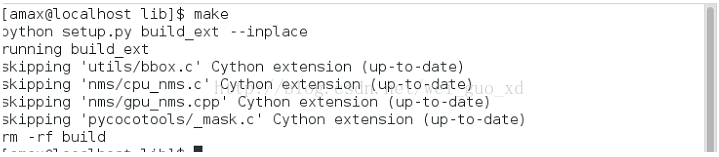
make
结果如下图所示:
编译caffe和pycaffe
cd caffe
cp Makefile.config.example MAkefile.config
然后配置Makefile.config文件,可参考我的Makefile.config
## Refer to http://caffe.berkeleyvision.org/installation.html
# Contributions simplifying and improving our build system are welcome!
# cuDNN acceleration switch (uncomment to build with cuDNN).
USE_CUDNN := 1
# CPU-only switch (uncomment to build without GPU support).
# CPU_ONLY := 1
# uncomment to disable IO dependencies and corresponding data layers
# USE_OPENCV := 0
# USE_LEVELDB := 0
# USE_LMDB := 0
# uncomment to allow MDB_NOLOCK when reading LMDB files (only if necessary)
# You should not set this flag if you will be reading LMDBs with any
# possibility of simultaneous read and write
# ALLOW_LMDB_NOLOCK := 1
# Uncomment if you're using OpenCV 3
# OPENCV_VERSION := 3
# To customize your choice of compiler, uncomment and set the following.
# N.B. the default for Linux is g++ and the default for OSX is clang++
# CUSTOM_CXX := g++
# CUDA directory contains bin/ and lib/ directories that we need.
CUDA_DIR := /usr/local/cuda
# On Ubuntu 14.04, if cuda tools are installed via
# "sudo apt-get install nvidia-cuda-toolkit" then use this instead:
# CUDA_DIR := /usr
# CUDA architecture setting: going with all of them.
# For CUDA < 6.0, comment the *_50 lines for compatibility.
CUDA_ARCH := -gencode arch=compute_30,code=sm_30 \
-gencode arch=compute_35,code=sm_35 \
-gencode arch=compute_50,code=sm_50 \
-gencode arch=compute_50,code=compute_50 \
-gencode arch=compute_53,code=compute_53 \
-gencode arch=compute_61,code=compute_61
# BLAS choice:
# atlas for ATLAS (default)
# mkl for MKL
# open for OpenBlas
BLAS := open
# Custom (MKL/ATLAS/OpenBLAS) include and lib directories.
# Leave commented to accept the defaults for your choice of BLAS
# (which should work)!
# BLAS_INCLUDE := /path/to/your/blas
# BLAS_LIB := /path/to/your/blas
# Homebrew puts openblas in a directory that is not on the standard search path
# BLAS_INCLUDE := $(shell brew --prefix openblas)/include
# BLAS_LIB := $(shell brew --prefix openblas)/lib
# This is required only if you will compile the matlab interface.
# MATLAB directory should contain the mex binary in /bin.
MATLAB_DIR := /usr/local/MATLAB/R2013b
# MATLAB_DIR := /Applications/MATLAB_R2012b.app
# NOTE: this is required only if you will compile the python interface.
# We need to be able to find Python.h and numpy/arrayobject.h.
PYTHON_INCLUDE := /usr/include/python2.7 \
/usr/lib64/python2.7/site-packages/numpy/core/include \
/usr/lib/python2.7/dist-packages/numpy/core/include
# Anaconda Python distribution is quite popular. Include path:
# Verify anaconda location, sometimes it's in root.
# ANACONDA_HOME := $(HOME)/anaconda
# PYTHON_INCLUDE := $(ANACONDA_HOME)/include \
# $(ANACONDA_HOME)/include/python2.7 \
# $(ANACONDA_HOME)/lib/python2.7/site-packages/numpy/core/include \
# Uncomment to use Python 3 (default is Python 2)
# PYTHON_LIBRARIES := boost_python3 python3.5m
# PYTHON_INCLUDE := /usr/include/python3.5m \
# /usr/lib/python3.5/dist-packages/numpy/core/include
# We need to be able to find libpythonX.X.so or .dylib.
PYTHON_LIB := /usr/lib
# PYTHON_LIB := $(ANACONDA_HOME)/lib
# Homebrew installs numpy in a non standard path (keg only)
# PYTHON_INCLUDE += $(dir $(shell python -c 'import numpy.core; print(numpy.core.__file__)'))/include
# PYTHON_LIB += $(shell brew --prefix numpy)/lib
# Uncomment to support layers written in Python (will link against Python libs)
WITH_PYTHON_LAYER := 1
# Whatever else you find you need goes here.
INCLUDE_DIRS := $(PYTHON_INCLUDE) /usr/local/include
LIBRARY_DIRS := $(PYTHON_LIB) /usr/local/lib /usr/lib
# If Homebrew is installed at a non standard location (for example your home directory) and you use it for general dependencies
INCLUDE_DIRS += /usr/local/hdf5/include
LIBRARY_DIRS += /usr/local/hdf5/lib
# Uncomment to use `pkg-config` to specify OpenCV library paths.
# (Usually not necessary -- OpenCV libraries are normally installed in one of the above $LIBRARY_DIRS.)
# USE_PKG_CONFIG := 1
# N.B. both build and distribute dirs are cleared on `make clean`
BUILD_DIR := build
DISTRIBUTE_DIR := distribute
# Uncomment for debugging. Does not work on OSX due to https://github.com/BVLC/caffe/issues/171
# DEBUG := 1
# The ID of the GPU that 'make runtest' will use to run unit tests.
TEST_GPUID := 0
# enable pretty build (comment to see full commands)
Q ?= @
make -j8
结果如下图所示:

make pycaffe
结果如下图所示:

下载预训练模型(https://1drv.ms/u/s!AoN7vygOjLIQqUWHpY67oaC7mopf),放到data数据集下,如图所示(第二个是我自己训练的模型):
运行演示脚本:
./tools/demo_rfcn.py
结果如下图所示:

下载训练,测试,验证数据集:
wget http://host.robots.ox.ac.uk/pascal/VOC/voc2007/VOCtrainval_06-Nov-2007.tar
wget http://host.robots.ox.ac.uk/pascal/VOC/voc2007/VOCtest_06-Nov-2007.tar
wget http://host.robots.ox.ac.uk/pascal/VOC/voc2007/VOCdevkit_08-Jun-2007.tar
wget http://host.robots.ox.ac.uk/pascal/VOC/voc2012/VOCtrainval_11-May-2012.tar
解压到VOCdevkit文件夹中:
tar xvf VOCtrainval_06-Nov-2007.tar
tar xvf VOCtest_06-Nov-2007.tar
tar xvf VOCdevkit_08-Jun-2007.tar
tar xvf VOCtrainval_11-May-2012.tar
VOCdevkit文件夹的结构如下图所示:

由于py-faster-rcnn不支持多个训练集,我们创造一个新的文件夹叫做VOC0712,把VOC2007和VOC2012里的JPEGImage和Annonation融合到一个单独的文件夹JPEGImage和Annonation里,用下面的程序生成新的ImageSets文件夹:
%writetxt.m
file = dir('F:\VOC0712\Annotations\*.xml');
len = length(file);
num_trainval=sort(randperm(len, floor(9*len/10)));%trainval集占所有数据的9/10,可以根据需要设置
num_train=sort(num_trainval(randperm(length(num_trainval), floor(5*length(num_trainval)/6))));%train集占trainval集的5/6,可以根据需要设置
num_val=setdiff(num_trainval,num_train);%trainval集剩下的作为val集
num_test=setdiff(1:len,num_trainval);%所有数据中剩下的作为test集
path = 'F:\VOC0712\ImageSets\Main\';
fid=fopen(strcat(path, 'trainval.txt'),'a+');
for i=1:length(num_trainval)
s = sprintf('%s',file(num_trainval(i)).name);
fprintf(fid,[s(1:length(s)-4) '\n']);
end
fclose(fid);
fid=fopen(strcat(path, 'train.txt'),'a+');
for i=1:length(num_train)
s = sprintf('%s',file(num_train(i)).name);
fprintf(fid,[s(1:length(s)-4) '\n']);
end
fclose(fid);
fid=fopen(strcat(path, 'val.txt'),'a+');
for i=1:length(num_val)
s = sprintf('%s',file(num_val(i)).name);
fprintf(fid,[s(1:length(s)-4) '\n']);
end
fclose(fid);
fid=fopen(strcat(path, 'test.txt'),'a+');
for i=1:length(num_test)
s = sprintf('%s',file(num_test(i)).name);
if ~isempty(strfind(s,'plain'))
fprintf(fid,[s(1:length(s)-4) '\n']);
end
end
fclose(fid);
为VOCdevkit创造新的超链接:VOCdevkit0712,如下图所示

下载在ImageNet上预训练好的模型,放到./data/imagenet_models里,如下图所示:

下面开始用VOC0712训练:
experiments/scripts/rfcn_end2end.sh 使用联合近似训练
experiments/scripts/rfcn_end2end_ohem.sh 使用联合近似训练+OHEM
experiments/scripts/rfcn_alt_opt_5stage_ohem.sh 使用分布训练+OHEM
./experiments/scripts/rfcn_end2end[_ohem].sh [GPU_ID] [NET] [DATASET] [--set ...]
下面开始用py-rfcn来训练自己的数据集:(我的数据集是标准pascal voc数据集,名字叫做VOC5000)
首先修改网络模型:
1.修改/py-R-FCN/models/pascal_voc/ResNet-50/rfcn_end2end/class-aware/train_ohem.prototxt
name: "ResNet-50"
layer {
name: 'input-data'
type: 'Python'
top: 'data'
top: 'im_info'
top: 'gt_boxes'
python_param {
module: 'roi_data_layer.layer'
layer: 'RoIDataLayer'
param_str: "'num_classes': 2" #改为你的数据集的类别数+1
}
}
layer {
name: 'roi-data'
type: 'Python'
bottom: 'rpn_rois'
bottom: 'gt_boxes'
top: 'rois'
top: 'labels'
top: 'bbox_targets'
top: 'bbox_inside_weights'
top: 'bbox_outside_weights'
python_param {
module: 'rpn.proposal_target_layer'
layer: 'ProposalTargetLayer'
param_str: "'num_classes': 2"#改为你的数据集的类别数+1
}
}
layer {
bottom: "conv_new_1"
top: "rfcn_cls"
name: "rfcn_cls"
type: "Convolution"
convolution_param {
num_output: 98 #2*(7^2) cls_num*(score_maps_size^2)(类别数+1)*49
kernel_size: 1
pad: 0
weight_filler {
type: "gaussian"
std: 0.01
}
bias_filler {
type: "constant"
value: 0
}
}
param {
lr_mult: 1.0
}
param {
lr_mult: 2.0
}
}
layer {
bottom: "conv_new_1"
top: "rfcn_bbox"
name: "rfcn_bbox"
type: "Convolution"
convolution_param {
num_output: 392 #8*(7^2) cls_num*(score_maps_size^2)(类别数+1)*49*4
kernel_size: 1
pad: 0
weight_filler {
type: "gaussian"
std: 0.01
}
bias_filler {
type: "constant"
value: 0
}
}
param {
lr_mult: 1.0
}
param {
lr_mult: 2.0
}
}
layer {
bottom: "rfcn_cls"
bottom: "rois"
top: "psroipooled_cls_rois"
name: "psroipooled_cls_rois"
type: "PSROIPooling"
psroi_pooling_param {
spatial_scale: 0.0625
output_dim: 2 #类别数+1
group_size: 7
}
}
layer {
bottom: "rfcn_bbox"
bottom: "rois"
top: "psroipooled_loc_rois"
name: "psroipooled_loc_rois"
type: "PSROIPooling"
psroi_pooling_param {
spatial_scale: 0.0625
output_dim: 8#类别数*4
group_size: 7
}
}
2.修改/py-R-FCN/models/pascal_voc/ResNet-50/rfcn_end2end/class-aware/test.prototxt
layer {
bottom: "conv_new_1"
top: "rfcn_cls"
name: "rfcn_cls"
type: "Convolution"
convolution_param {
num_output: 98 #21*(7^2) cls_num*(score_maps_size^2)(类别数+1)*2
kernel_size: 1
pad: 0
weight_filler {
type: "gaussian"
std: 0.01
}
bias_filler {
type: "constant"
value: 0
}
}
param {
lr_mult: 1.0
}
param {
lr_mult: 2.0
}
}
layer {
bottom: "conv_new_1"
top: "rfcn_bbox"
name: "rfcn_bbox"
type: "Convolution"
convolution_param {
num_output: 392 #8*(7^2) cls_num*(score_maps_size^2)(类别数+1)*49*4
kernel_size: 1
pad: 0
weight_filler {
type: "gaussian"
std: 0.01
}
bias_filler {
type: "constant"
value: 0
}
}
param {
lr_mult: 1.0
}
param {
lr_mult: 2.0
}
}
layer {
bottom: "rfcn_cls"
bottom: "rois"
top: "psroipooled_cls_rois"
name: "psroipooled_cls_rois"
type: "PSROIPooling"
psroi_pooling_param {
spatial_scale: 0.0625
output_dim: 2 #(类别数+1)
group_size: 7
}
}
layer {
bottom: "rfcn_bbox"
bottom: "rois"
top: "psroipooled_loc_rois"
name: "psroipooled_loc_rois"
type: "PSROIPooling"
psroi_pooling_param {
spatial_scale: 0.0625
output_dim: 8 #(类别数+1)*4
group_size: 7
}
}
layer {
name: "cls_prob_reshape"
type: "Reshape"
bottom: "cls_prob_pre"
top: "cls_prob"
reshape_param {
shape {
dim: -1
dim: 2 #(类别数+1)
}
}
}
layer {
name: "bbox_pred_reshape"
type: "Reshape"
bottom: "bbox_pred_pre"
top: "bbox_pred"
reshape_param {
shape {
dim: -1
dim: 8 #(类别数+1)*4
}
}
}
3.修改/py-R-FCN/lib/datasets/pascal_voc.py
class pascal_voc(imdb):
def __init__(self, image_set, year, devkit_path=None):
imdb.__init__(self, 'voc_' + year + '_' + image_set)
self._year = year
self._image_set = image_set
self._devkit_path = self._get_default_path() if devkit_path is None \
else devkit_path
self._data_path = os.path.join(self._devkit_path, 'VOC' + self._year)
self._classes = ('__background__', # always index 0
'aeroplane')
self._class_to_ind = dict(zip(self.classes, xrange(self.num_classes)))
self._image_ext = '.jpg'
修改self._classes为你的类别加背景。
4./py-R-FCN/lib/datasets/factory.py修改
for year in ['2007', '2012','2001','2002','2006','5000']:
for split in ['train', 'val', 'trainval', 'test']:
name = 'voc_{}_{}'.format(year, split)
__sets[name] = (lambda split=split, year=year: pascal_voc(split, year))
我的数据集叫:VOC5000,所以把5000加到年份当中。
5/py-R-FCN/experiments/scripts/rfcn_end2end_ohem.sh修改
case $DATASET in
pascal_voc)
TRAIN_IMDB="voc_5000_trainval"
TEST_IMDB="voc_5000_test"
PT_DIR="pascal_voc"
ITERS=4000
;;
把训练数据集和测试数据集改为你的数据集,迭代次数改为4000。
开始训练:./experiments/scripts/rfcn_end2end_ohem.sh 0 ResNet-50 pascal_voc
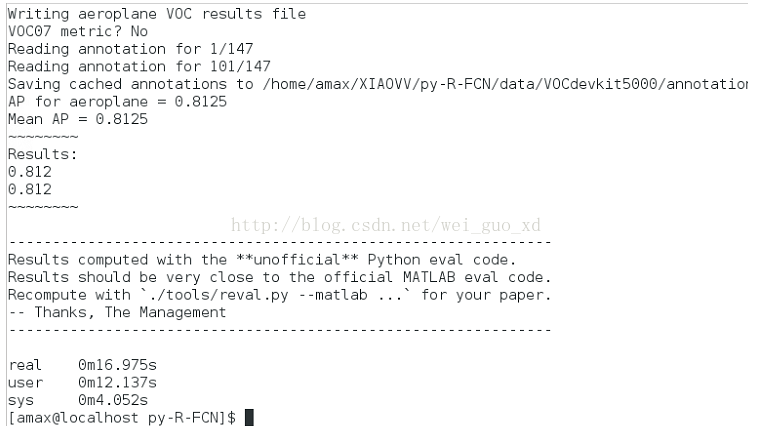
迭代4000次,取得了81.2%的精度。
py-R-FCN的caffe配置(转)的更多相关文章
- Ubuntu14.10+cuda7.0+caffe配置
转自:http://blog.csdn.net/lu597203933/article/details/46742199 Ubuntu14.10+cuda7.0+caffe配置 一:linux安装 L ...
- Ubuntu14.04 caffe 配置
1.前置条件验证 (1) Ubuntu14.04操作系统. (2) 检验计算机是否为NVIDIA显卡,终端输入命令 $ lspci | grep -invidia (3) 检验计算机是否为x86_6 ...
- r.js合并实践 --项目中用到require.js做生产时模块开发 r.js build.js配置详解
本文所用源代码已上传,需要的朋友自行下载:点我下载 第一步: 全局安装 npm install -g requirejs 第二步: 1.以下例子主要实现功能, 1)引用jq库获取dom中元素文本, ...
- ubuntu14.04下CPU的caffe配置,不成功的朋友请与我(lee)联系,后面附带邮箱
因广大朋友需求cpu的caffe配置.所以我(lee)在这份博客中对cpu配置caffe做出对应操作说明.希望能够解决大家对cpu配置caffe的困惑.少走弯路. 假设有安装不成功的朋友能够和我联系, ...
- 基于Windows10 x64+visual Studio2013+Python2.7.12环境下的Caffe配置学习
本文在windows下使用visual studio2013配置关联python(python-2.7.12.amd64.msi)的caffe项目,如果有耐心的人,当然可以自己去下载caffe项目自己 ...
- 一篇顺手的Ubuntu+caffe配置笔记
主要参考: https://github.com/lbzhang/dl-setup http://ouxinyu.github.io/Blogs/20151108001.html http://www ...
- [py][mx]django xadmin后台配置
xadmin配置 - 安装 pip install -r https://github.com/sshwsfc/xadmin/blob/django2/requirements.txt 以下被我测试通 ...
- caffe配置Makefile.config----ubuntu16.04--重点是matlab的编译
来源: http://blog.csdn.net/daaikuaichuan/article/details/61414219 配置Makefile.config(参考:http://blog.csd ...
- Ubuntn16.04+OpenCV3.1+CUDA8.0+cudnn5.1+caffe配置及问题集锦
ubuntn16.04 Caffe安装步骤记录(超详尽) 一开始安装好ubuntn16.04后,先安装的opencv3.1,再自己安装的390驱动,cuda8.0和cudnn,之后配置caffe一直不 ...
随机推荐
- 【MM系列】 MM60增强
公众号:SAP Technical 本文作者:matinal 原文出处:http://www.cnblogs.com/SAPmatinal/ 原文链接:[MM系列] MM60增强 前言部分 大家可 ...
- 【ABAP系列】SAP ABAP 控制ALV单元格编辑后获取新的数值
公众号:SAP Technical 本文作者:matinal 原文出处:http://www.cnblogs.com/SAPmatinal/ 原文链接:[ABAP系列]SAP ABAP 控制ALV单元 ...
- 第十届山东省acm省赛补题(1)
今天第一场个人训练赛的题目有点恐怖啊,我看了半个小时多硬是一道都不会写.我干脆就直接补题去了.... 先补的都是简单题,难题等我这周末慢慢来吧... A Calandar Time Limit: 1 ...
- 【Linux开发】Ubuntu图形界面切换与磁盘扩展分区
Ubuntu14.04设置字符界面快捷键:ctrl-alt-f1 切换回图形界面:ctrl-alt-f7 为虚拟机拓展了30G的空间,挂在了/mnt/sda3这个目录下: 说明一下Ubuntu14.0 ...
- Golang中的error类型
Golang中的error类型 error类型本身就是一个预定义好的接口,里面定义了一个method type error interface { Error() string } 生成一个新的err ...
- 解决172.17 或者172.18 机房环境下harbor服务器不通的问题
直接改docker-compose.yml文件: 把原来的network选项注释掉,自定义 #networks: # harbor: # external: false networks: harbo ...
- Flask框架(五) —— session源码分析
Flask框架(五) —— session源码分析 目录 session源码分析 1.请求来了,执行__call__方法 2.__call__方法 3.调用__call__方法 3.1.ctx = s ...
- SVN服务器和客户端使用教程总结
一.SVN简介 Subversion是什么? 它是一个自由/开源的版本控制系统,一组文件存放在中心版本库,记录每一次文件和目录的修改,Subversion允许把数据恢复到早期版本,或是检查数据修改的历 ...
- Windows系统里Oracle 11g R2 Client(64bit)的下载与安装
环境: windows10系统(64位) 最好先安装jre或jdk(此软件用来打开oracle自带的可视化操作界面,不装也没关系:可以安装plsql,或者直接用命令行操作) Oracle 11g 是仅 ...
- 利用Flot作基于时间段的曲线图
Flot是一个可以用于绘制多种图表的开源的JS库,Flot本身的功能已经是基本可以满足日常的需要啦,更可喜的是Flot还有很多的插件可以使用,从而为我们提供更加强大的定制功能,本文在作图中使用的显示坐 ...