
linux运维、架构之路-HAProxy反向代理
一、HAProxy介绍
专业反向代理,支持双机热备支持虚拟主机,配置简单,拥有非常不错的服务器健康检查功能,当其代理的后端节点出现故障, HAProxy会自动将该服务器摘除,故障恢复后再自动将该服务器加入,基于TCP和HTTP应用的代理软件,开源免费、快速并且可靠的一种方案。
二、HAProxy优点
1、专业做反向代理负载均衡的软件
2、负载均衡算法多,大概8种
3、性能优于nginx
4、支持动态管理、通过和haproxy的sock进行通信管理
5、有比较丰富的dashboard页面
6、强大的七层功能
三、HAProxy应用场景
1、"tcp"即4层代理(大多用于邮件服务器、内部协议通信服务器等)
2、HAProxy可以作为MySQL、邮件或其它的非web的负载均衡,我们常用于它作为MySQL(读)负载均衡
3、特别适用于负载特大的web站点,这些站点通常又需要会话保持或者七层处理
四、HAProxy服务部署
1、环境
#haproxy01

[root@haproxy01 ~]# cat /etc/redhat-release

CentOS release 6.9 (Final)

[root@haproxy01 ~]# uname -r

2.6.-.el6.x86_64

[root@haproxy01 ~]# getenforce

Disabled

[root@haproxy01 ~]# /etc/init.d/iptables status

iptables: Firewall is not running.

[root@haproxy01 ~]# hostname -I

172.19.5.3 172.16.1.3
#haproxy02

[root@haproxy02 ~]# cat /etc/redhat-release

CentOS release 6.9 (Final)

[root@haproxy02 ~]# uname -r

2.6.-.el6.x86_64

[root@haproxy02 ~]# getenforce

Disabled

[root@haproxy02 ~]# /etc/init.d/iptables status

iptables: Firewall is not running.

[root@haproxy02 ~]# hostname -I

172.19.5.4 172.16.1.4
2、编译安装HAProxy
##打开IP转发

echo "net.ipv4.ip_forward = 1" >> /etc/sysctl.conf && sysctl -p

yum -y install gcc systemd-devel #安装依赖

tar xf haproxy-1.8..tar.gz #解压

cd haproxy-1.8./

make TARGET=linux2628 PREFIX=/usr/local/haproxy

make install PREFIX=/usr/local/haproxy

cp /usr/local/haproxy/sbin/haproxy /usr/sbin/

cp ./examples/haproxy.init /etc/init.d/haproxy

chmod  /etc/init.d/haproxy

useradd -r haproxy

mkdir /etc/haproxy
3、设置HAProxy日志(/etc/rsyslog.conf)
$ModLoad imudp

$UDPServerRun

local3.*                                                /var/log/haproxy.log
systemctl restart rsyslog
4、创建配置文件
/etc/haproxy/haproxy.cfg
#---------------------------------------------------------------------

global #全局配置

 log 127.0.0.1 local3 info #指定服务器的日志级别

 chroot /usr/local/haproxy #改变工作目录

 user haproxy #用户组和用户

 group haproxy

 daemon #以守护进程的方式运行

 maxconn  #最大连接数

defaults #默认配置

 log global

 mode http #7层http;4层tcp 如果要让haproxy支持虚拟主机,mode 必须设为http

 option httplog #http日志格式

 timeout connect  #连接超时(毫秒)

        timeout client  #客户端超时(毫秒)

        timeout server  #服务器超时(毫秒)

 listen stats

 mode http

 bind 192.168.56.11:

 stats enable

 stats hide-version

 stats uri /stats

 stats admin if TRUE

frontend web_front #前端配置 web_front名称可自定义

 bind 192.168.56.11: #发起的http请求到80端口,会转发到设置的ip及端口

 mode http

 log global

 option httplog # 启用http日志

        default_backend http_back

backend http_back #后端配置,http_back名称可自定义

 option httpchk GET /index.jsp #设置健康检查页面

 option forwardfor header X-Forwarded-For #传递客户端真实IP

 balance roundrobin #roundrobin 轮询方式

# 需要转发的ip及端口

 server web01 192.168.56.12: check inter  rise  fall  weight

 server web02 192.168.56.13: check inter  rise  fall  weight
5、实现HAProxy负载均衡
#分别在haproxy01和haproxy02上面装了http服务,修改默监听端口为8080

#测试负载均衡数据

[root@haproxy01 ~]# curl 172.19.5.3

http01

[root@haproxy01 ~]# curl 172.19.5.3

http02

[root@haproxy01 ~]# curl 172.19.5.3

http01

[root@haproxy01 ~]# curl 172.19.5.3

http02

[root@haproxy01 ~]# curl 172.19.5.3

http01

[root@haproxy01 ~]# curl 172.19.5.3
[root@haproxy02 ~]# curl 172.19.5.4

http01

[root@haproxy02 ~]# curl 172.19.5.4

http02

[root@haproxy02 ~]# curl 172.19.5.4

http01

[root@haproxy02 ~]# curl 172.19.5.4

http02

[root@haproxy02 ~]# curl 172.19.5.4

http01

[root@haproxy02 ~]# curl 172.19.5.4

http02
五、HAProxy动态管理
1、安装socat命令
yum install -y socat
2、使用方法
[root@haproxy01 ~]# echo "help"|socat stdio /var/lib/haproxy/haproxy.sock

Unknown command. Please enter one of the following commands only :

  help           : this message

  prompt         : toggle interactive mode with prompt

  quit           : disconnect

  set maxconn global : change the per-process maxconn setting

  set rate-limit : change a rate limiting value

  set timeout    : change a timeout setting

  show env [var] : dump environment variables known to the process

  show stat resolvers [id]: dumps counters from all resolvers section and

                          associated name servers

  add acl        : add acl entry

  clear acl <id> : clear the content of this acl

  del acl        : delete acl entry

  get acl        : report the patterns matching a sample for an ACL

  show acl [id]  : report available acls or dump an acl's contents

  add map        : add map entry

  clear map <id> : clear the content of this map

  del map        : delete map entry

  get map        : report the keys and values matching a sample for a map

  set map        : modify map entry

  show map [id]  : report available maps or dump a map's contents

  show pools     : report information about the memory pools usage

  show sess [id] : report the list of current sessions or dump this session

  shutdown session : kill a specific session

  shutdown sessions server : kill sessions on a server

  clear counters : clear max statistics counters (add 'all' for all counters)

  show info      : report information about the running process

  show stat      : report counters for each proxy and server

  show errors    : report last request and response errors for each proxy

  clear table    : remove an entry from a table

  set table [id] : update or create a table entry's data

  show table [id]: report table usage stats or dump this table's contents

  disable frontend : temporarily disable specific frontend

  enable frontend : re-enable specific frontend

  set maxconn frontend : change a frontend's maxconn setting

  show servers state [id]: dump volatile server information (for backend <id>)

  show backend   : list backends in the current running config

  shutdown frontend : stop a specific frontend

  disable agent  : disable agent checks (use 'set server' instead)

  disable health : disable health checks (use 'set server' instead)

  disable server : disable a server for maintenance (use 'set server' instead)

  enable agent   : enable agent checks (use 'set server' instead)

  enable health  : enable health checks (use 'set server' instead)

  enable server  : enable a disabled server (use 'set server' instead)

  set maxconn server : change a server's maxconn setting

  set server     : change a server's state, weight or address

  get weight     : report a server's current weight

  set weight     : change a server's weight (deprecated)
3、监控数据
[root@haproxy01 ~]# echo "show info"|socat stdio /var/lib/haproxy/haproxy.sock

Name: HAProxy

Version: 1.7.9

Release_date: 2017/08/18

Nbproc: 1

Process_num: 1

Pid: 3897

Uptime: 0d 2h57m54s

Uptime_sec: 10674

Memmax_MB: 0

PoolAlloc_MB: 0

PoolUsed_MB: 0

PoolFailed: 0

Ulimit-n: 4031

Maxsock: 4031

Maxconn: 2000

Hard_maxconn: 2000

CurrConns: 0

CumConns: 3563

CumReq: 3575

Maxpipes: 0

PipesUsed: 0

PipesFree: 0

ConnRate: 1

ConnRateLimit: 0

MaxConnRate: 2

SessRate: 1

SessRateLimit: 0

MaxSessRate: 2

CompressBpsIn: 0

CompressBpsOut: 0

CompressBpsRateLim: 0

Tasks: 5

Run_queue: 1

Idle_pct: 100

node: haproxy01
4、管理后端节点
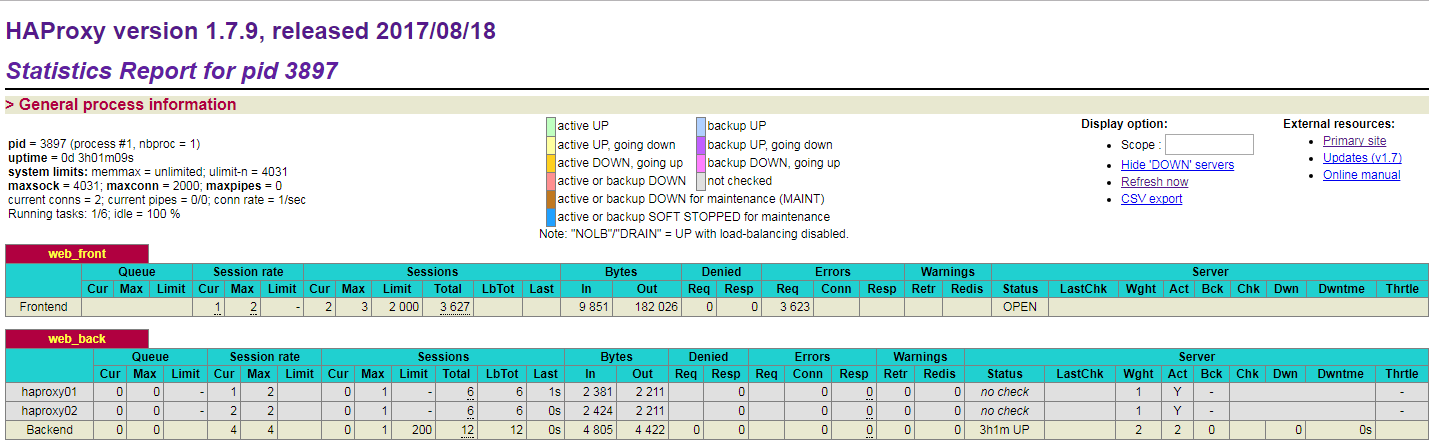
①后端节点正常状态
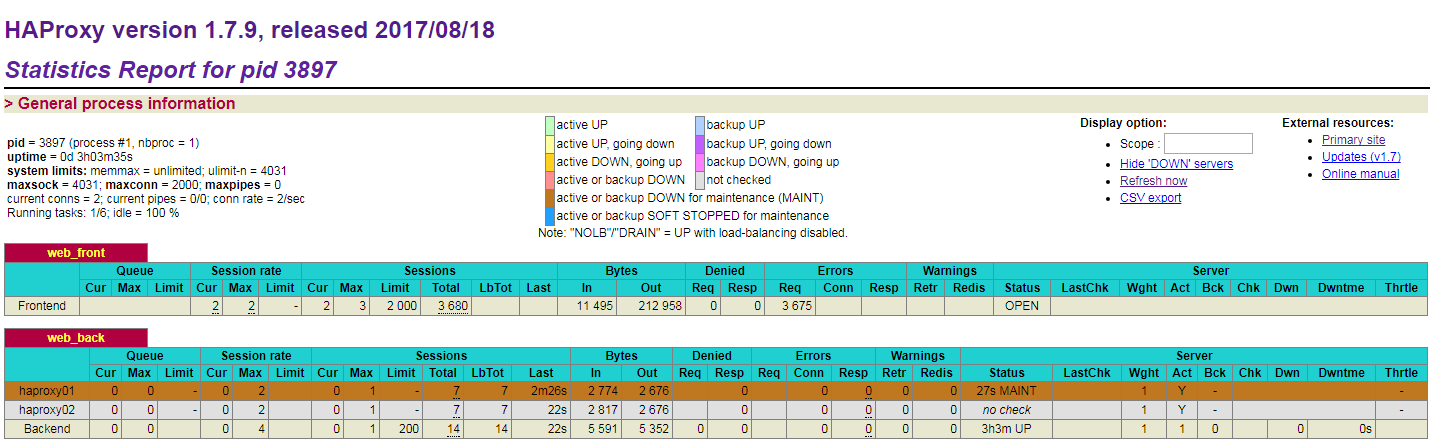
②关闭后端节点haproxy01
echo "disable server web_back/haproxy01"|socat stdio /var/lib/haproxy/haproxy.sock
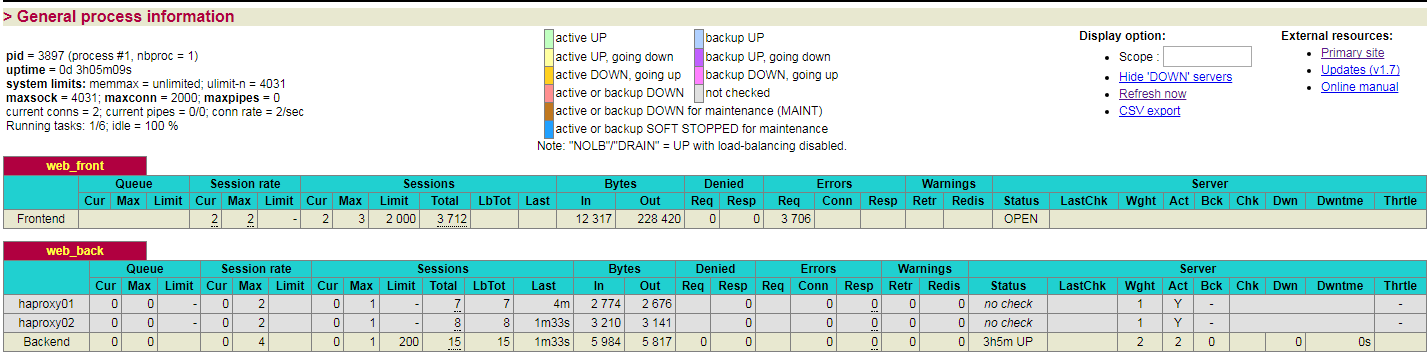
③打开后端节点haproxy01又恢复正常
[root@haproxy01 ~]# echo "enable server web_back/haproxy01"|socat stdio /var/lib/haproxy/haproxy.sock
六、HAProxy结合Keepalived实现高可用
1、安装keepalived
yum install keepalived -y
2、keepalived配置文件
|
#HAProxy01-keepalived配置# global_defs { router_id HAProxy-HA01 } vrrp_instance HAProxy_1 { state MASTER interface eth0 virtual_router_id 55 priority 150 advert_int 1 authentication { auth_type PASS auth_pass 1111 } virtual_ipaddress { 172.19.5.16/24 172.19.5.17/24 } } |
#HAProxy02-keepalived配置# global_defs { router_id HAProxy-HA02 } vrrp_instance HAProxy_1 { state BACKUP interface eth0 virtual_router_id 55 priority 100 advert_int 1 authentication { auth_type PASS auth_pass 1111 } virtual_ipaddress { 172.19.5.16/24 172.19.5.17/24 } } |
3、使用tcpdump检测主发包
[root@haproxy01 ~]# tcpdump -n 'host 224.0.0.18'

tcpdump: verbose output suppressed, use -v or -vv for full protocol decode

listening on eth0, link-type EN10MB (Ethernet), capture size  bytes

::52.240031 IP 172.19.5.3 > 224.0.0.18: VRRPv2, Advertisement, vrid , prio , authtype simple, intvl 1s, length

::53.241106 IP 172.19.5.3 > 224.0.0.18: VRRPv2, Advertisement, vrid , prio , authtype simple, intvl 1s, length

::54.242203 IP 172.19.5.3 > 224.0.0.18: VRRPv2, Advertisement, vrid , prio , authtype simple, intvl 1s, length

::55.243301 IP 172.19.5.3 > 224.0.0.18: VRRPv2, Advertisement, vrid , prio , authtype simple, intvl 1s, length

::56.244382 IP 172.19.5.3 > 224.0.0.18: VRRPv2, Advertisement, vrid , prio , authtype simple, intvl 1s, length

::57.245453 IP 172.19.5.3 > 224.0.0.18: VRRPv2, Advertisement, vrid , prio , authtype simple, intvl 1s, length

::58.245809 IP 172.19.5.3 > 224.0.0.18: VRRPv2, Advertisement, vrid , prio , authtype simple, intvl 1s, length

::59.246893 IP 172.19.5.3 > 224.0.0.18: VRRPv2, Advertisement, vrid , prio , authtype simple, intvl 1s, length

::00.247984 IP 172.19.5.3 > 224.0.0.18: VRRPv2, Advertisement, vrid , prio , authtype simple, intvl 1s, length

::01.249098 IP 172.19.5.3 > 224.0.0.18: VRRPv2, Advertisement, vrid , prio , authtype simple, intvl 1s, length
4、测试keepalived的高可用,故障切换
①使用vip访问测试
[root@m01 ~]# curl 172.19.5.16

http01

[root@m01 ~]# curl 172.19.5.16

http02

[root@m01 ~]# curl 172.19.5.17

http01

[root@m01 ~]# curl 172.19.5.17

http02
②haproxy01上查看vip
[root@haproxy01 ~]# ip a s eth0

: eth0: <BROADCAST,MULTICAST,UP,LOWER_UP> mtu  qdisc pfifo_fast state UP qlen

    link/ether ::::: brd ff:ff:ff:ff:ff:ff

    inet 172.19.5.3/ brd 172.19.5.255 scope global eth0

    inet 172.19.5.16/ scope global secondary eth0

    inet 172.19.5.17/ scope global secondary eth0

    inet6 fe80:::31ff:fe57:/ scope link

       valid_lft forever preferred_lft forever
③停掉haproxy01的keepalived服务
[root@haproxy01 ~]# /etc/init.d/keepalived stop

Stopping keepalived:                                       [  OK  ]
④haproxy02上查看vip
[root@haproxy02 ~]# ip a s eth0

: eth0: <BROADCAST,MULTICAST,UP,LOWER_UP> mtu  qdisc pfifo_fast state UP qlen

    link/ether f6:4f::db:f5:d8 brd ff:ff:ff:ff:ff:ff

    inet 172.19.5.4/ brd 172.19.5.255 scope global eth0

    inet 172.19.5.16/ scope global secondary eth0

    inet 172.19.5.17/ scope global secondary eth0

    inet6 fe80::f44f:56ff:fedb:f5d8/ scope link

       valid_lft forever preferred_lft forever
linux运维、架构之路-HAProxy反向代理的更多相关文章
- linux运维架构师职业规划
1.假如你从来未接触过Linux的话,首先要做的就找一本指导书来学习.现在公认的Linux的入门书籍是“鸟哥的私房菜”,讲的很全面,鸟哥的私房菜一共分为两部,一部是基础篇,一部是服务器篇.“鸟哥的私房 ...
- linux运维、架构之路-Nginx反向代理
一. Nginx负载均衡和反向代理知识 1.集群概念 一堆服务器合作做同一件事,这些机器可能需要整个技术团队架构.设计和统一协调管理,这些机器可以分布在一个机房,也可以分布在全国各个地区的多个机房 ...
- centos6.5环境自动化运维之puppet实现nginx反向代理功能及puppet安装配置详解
puppet是一种Linux.Unix.windows平台的集中配置管理系统,使用自有的puppet描述语言,可管理配置文件.用户.cron任务.软件包.系统服务等.puppet把这些系统实体称之为资 ...
- 运维工作笔记-------nginx的反向代理
1.nginx的反向代理意义 一般来说,我们在项目中,不会直接让项目服务器ip与外网做直接映射,这样一则是不安全,二是客户直接去访问项目服务器,对项目服务器带来的压力太大,从而导致项目运行速度变慢,程 ...
- Linux运维企业架构实战系列
Linux运维企业架构项目实战系列 项目实战1-LNMP的搭建.nginx的ssl加密.权限控制的实现 项目实战2-LVS.nginx实现负载均衡系列 2.1 项目实战2.1-实现基于LVS负载均衡集 ...
- 从苦逼到牛逼,详解Linux运维工程师的打怪升级之路
做运维也快四年多了,就像游戏打怪升级,升级后知识体系和运维体系也相对变化挺大,学习了很多新的知识点. 运维工程师是从一个呆逼进化为苦逼再成长为牛逼的过程,前提在于你要能忍能干能拼,还要具有敏锐的嗅觉感 ...
- Linux运维企业架构项目实战系列
Linux运维企业架构项目实战系列 项目实战1—LNMP的搭建.nginx的ssl加密.权限控制的实现 项目实战2—LVS.nginx实现负载均衡系列2.1 项目实战2.1—实现基于LVS负载均衡集群 ...
- Linux 运维入门到跑路书单推荐
一.基础入门 <鸟哥的Linux私房菜基础学习篇>:最具知名度的Linux入门书<鸟哥的Linux私房菜基础学习篇>,全面而详细地介绍了Linux操作系统. https://b ...
- Nginx+Lua+Redis整合实现高性能API接口 - 网站服务器 - LinuxTone | 运维专家网论坛 - 最棒的Linux运维与开源架构技术交流社区! - Powered by Discuz!
Nginx+Lua+Redis整合实现高性能API接口 - 网站服务器 - LinuxTone | 运维专家网论坛 - 最棒的Linux运维与开源架构技术交流社区! - Powered by Disc ...
随机推荐
- springboot使用MockMvc测试controller
通常,在我们平时开发项目时,如果想要输入URL对Controller进行测试,在代码编辑之后,需要重启服务器,建立http client进行测试.这样会使得测试变得很麻烦,比如,启动速度慢,测试验证不 ...
- MariaDB增删改
1.MariaDB 数据类型 MariaDB数据类型可以分为数字,日期和时间以及字符串值. 使用数据类型的原则:够用就行, 尽量使用范围小的,而不用大的 常用的数据类型: 1.整数:int, bit( ...
- LeetCode算法题-Positions of Large Groups(Java实现)
这是悦乐书的第323次更新,第346篇原创 01 看题和准备 今天介绍的是LeetCode算法题中Easy级别的第193题(顺位题号是830).在由小写字母组成的字符串S中,那些相同的连续字符会组成集 ...
- Pyinstaller-封装python
1. 当程序中没有调用matplotlib模块 ① pip intall pyinstaller ② 在cmd环境下,pyinstaller -F xxx.py 2.当程序中调用matplotlib ...
- [转帖]华为海思Hi1620芯片发布在即 7nm制程ARM架构最高可达3.0GHz
华为海思Hi1620芯片发布在即 7nm制程ARM架构最高可达3.0GHz https://www.cnbeta.com/articles/tech/850561.htm 中电科旗下的普华软件 支持国 ...
- nginx 事件机制原理
事件驱动模型是Nginx服务器保障完整功能和具有良好性能的重要机制之一. 事件驱动模型概述 实际上,事件驱动并不是计算机编程领域的专业词汇,它是一种比较古老的响应事件的模型,在计算机编程.公共关系.经 ...
- java基础笔记(8)
java的多线程 进程:程序的执行过程,持有内存资源 线程:是系统的最小执行单元,共享进程的资源 线程之间可以互斥.也可以同步: Thraed类: 通过一个案例来了解线程Thread类和Runnabl ...
- P1141零一迷宫
这是一道对于除了我之外其他人都十分简单的搜索题,我终于在这个夜里搞会了. 首先其问可以到达多少个点,并不是走一次可以最多经过几个点,这就解释了为什么不需要回溯,并且递归边界则是让其全部走完即可.于是便 ...
- P2505 [HAOI2012]道路
传送门 统计每条边被最短路经过几次,点数不大,考虑计算以每个点为起点时对其他边的贡献 对于某个点 $S$ 为起点的贡献,首先跑一遍最短路,建出最短路的 $DAG$ 考虑 $DAG$ 上的某条边被以 $ ...
- 100行代码撸完SpringIOC容器
用过Spring框架的人一定都知道Spring的依赖注入控制反转;通俗的讲就是负责实例化对象 和 管理对象间的依赖 实现解耦. 我们来对比两段代码: UserController{ UserServi ...