
IdentityServer4认证服务器集成Identity&配置持久化数据库
文章简介
asp.net core的空Web项目集成相关dll和页面文件配置IdnetityServer4认证服务器
Ids4集成Identity
Ids4配置持久化到数据库
写在最前面,此文章不详细讲述IdentityServer4的各个组成部分以及Oauth2相关知识,需要了解详细相关知识的,可以移步我的其他几篇博客(初探IdentityServer4),腾讯视频有Dave老师录制的详细教程(http://v.qq.com/vplus/4cfb00af75c16eb8d198c58fb86eb4dc?page=video)。
asp.net core的空Web项目集成相关dll和页面文件配置IdnetityServer4认证服务器
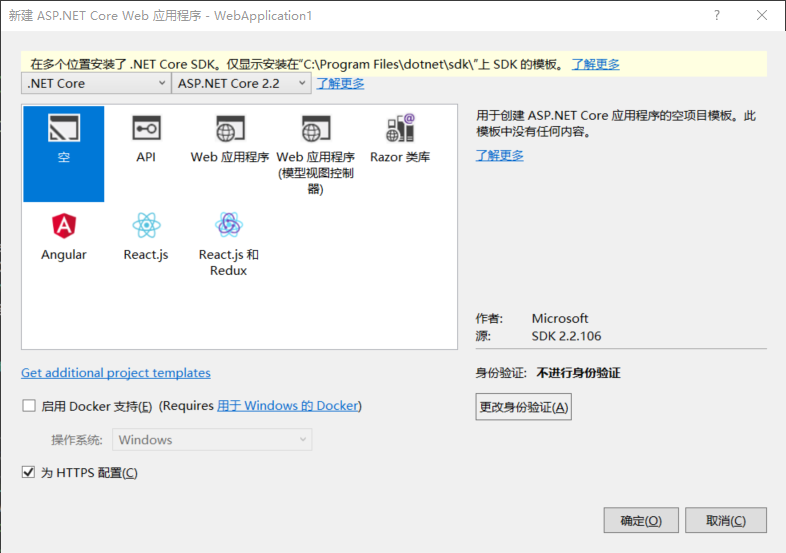
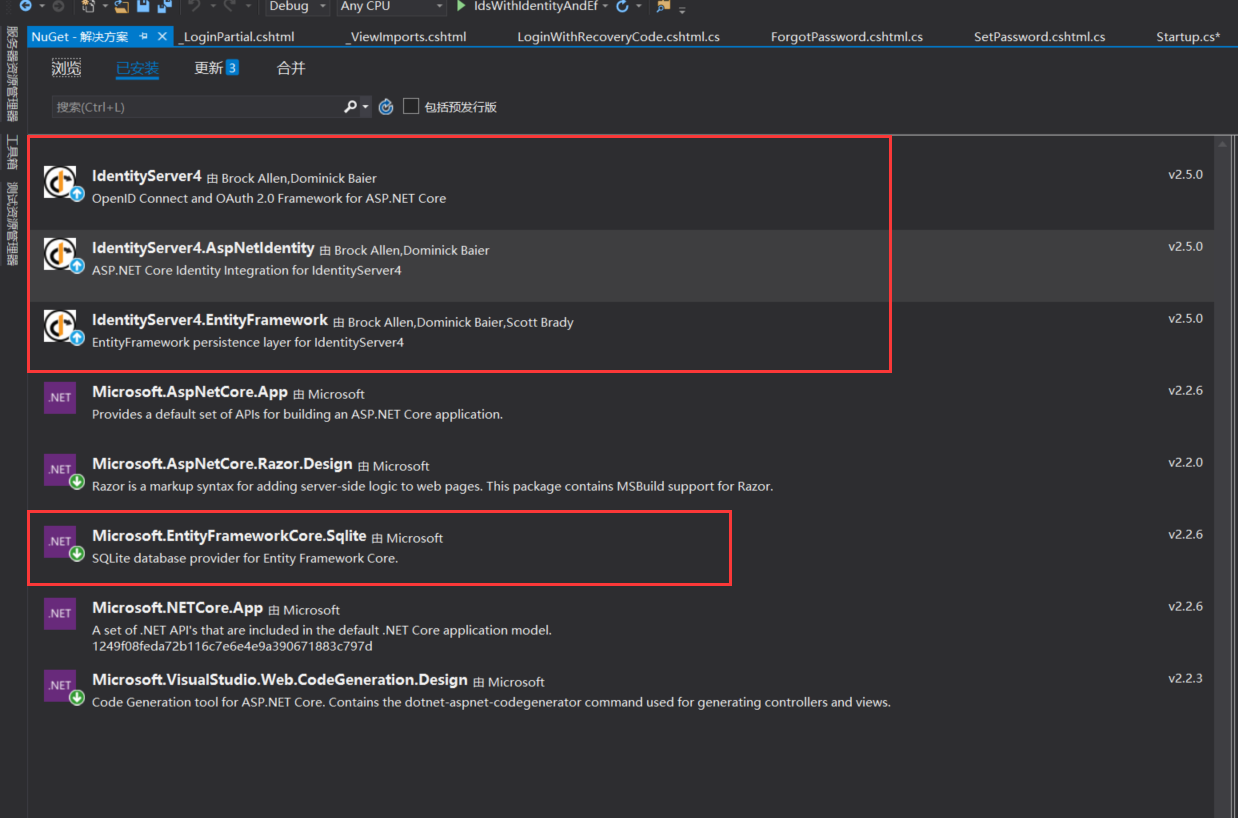
- 首先创建一个net core版本为2.2的空项目,如下图所示。引入IdntityServer4和Identity的相关Nuget包 IdentityServer4,IdentityServer4.AspNetIdentity,IdentityServer4.EntityFramework,Microsoft.EntityFrameworkCore.Sqlite(数据库我们用Sqlite)。入下图所示
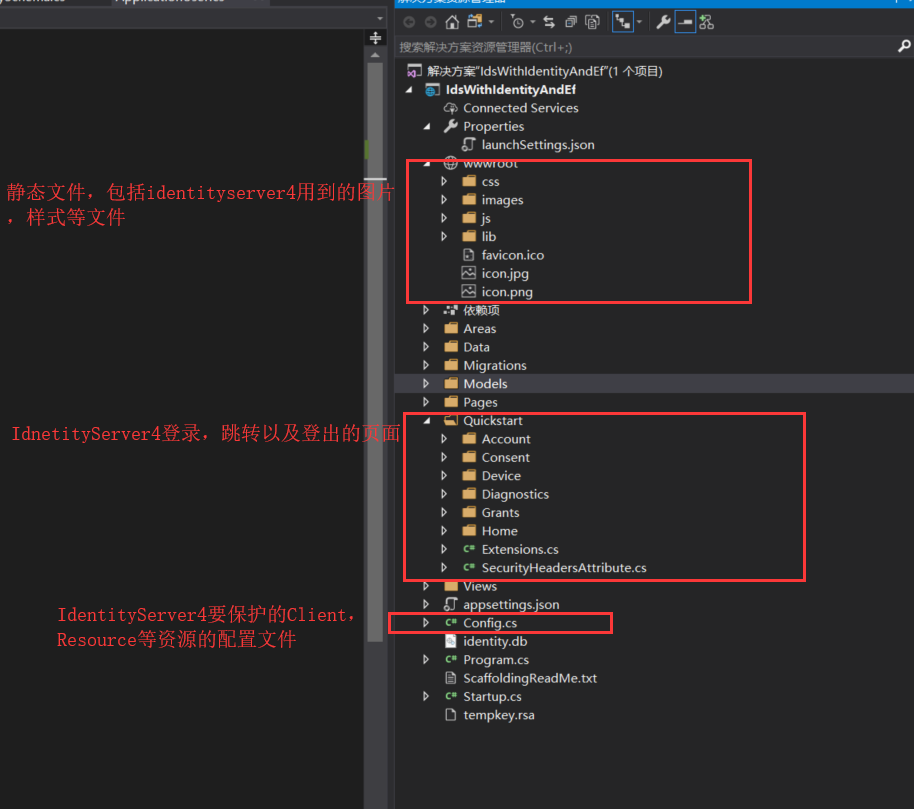
- 添加静态文件(wwwroot)和IdentityServer4的登录UI以及控制器相关类(官方文档的Quickstart),添加一个IdentityResource,ApiResource,和Client配置的Config类;因为Quickstart中用到的User类是继承自IdnetityUser的ApplicationUser,所以我们添加一个ApplicationUser类;项目路径是这样的:
- 接下来我们配置startup文件,这样,基于内存配置的(Config文件)我们的IdentityServer4认证服务器就搭好了
     public class Startup

     {

         public IConfiguration Configuration { get; }

         public IHostingEnvironment Environment { get; }

         public Startup(IConfiguration configuration, IHostingEnvironment environment)

         {

             Configuration = configuration;

             Environment = environment;

         }

         public void ConfigureServices(IServiceCollection services)

         {

             services.AddMvcCore()

            .AddAuthorization()

            .AddJsonFormatters();

             services.AddMvc().SetCompatibilityVersion(Microsoft.AspNetCore.Mvc.CompatibilityVersion.Version_2_1);

             services.Configure<IISOptions>(iis =>

             {

                 iis.AuthenticationDisplayName = "Windows";

                 iis.AutomaticAuthentication = false;

             });

             var builder = services.AddIdentityServer(options =>

             {

                 options.Events.RaiseErrorEvents = true;

                 options.Events.RaiseInformationEvents = true;

                 options.Events.RaiseFailureEvents = true;

                 options.Events.RaiseSuccessEvents = true;

             })

                 .AddInMemoryIdentityResources(Config.GetIdentityResources())

                 .AddInMemoryApiResources(Config.GetApis())

                 .AddInMemoryClients(Config.GetClients())

                 .AddTestUsers(Config.GetUsers());

             if (Environment.IsDevelopment())

             {

                 builder.AddDeveloperSigningCredential();

             }

             else

             {

                 throw new Exception("need to configure key material");

             }

         }

         public void Configure(IApplicationBuilder app, IHostingEnvironment env)

         {

             if (Environment.IsDevelopment())

             {

                 app.UseDeveloperExceptionPage();

                 app.UseDatabaseErrorPage();

             }

             else

             {

                 app.UseExceptionHandler("/Home/Error");

             }

             app.UseStaticFiles();

             app.UseMvcWithDefaultRoute();

         }

         }

     }
Ids4集成Identity
- 首先,添加一个数据库上下文,这里我们使用sqlite数据库,在项目根路径下添加一个叫做identity.db的文件,再在配置文件中,添加数据库链接字符串
     public class ApplicationDbContext : IdentityDbContext<ApplicationUser>

     {

         public ApplicationDbContext(DbContextOptions<ApplicationDbContext> options) : base(options) { }

         protected override void OnModelCreating(ModelBuilder builder)

         {

             base.OnModelCreating(builder);

         }

     }
{
"ConnectionStrings": {
"DefaultConnection": "Data Source=identity.db;"
}
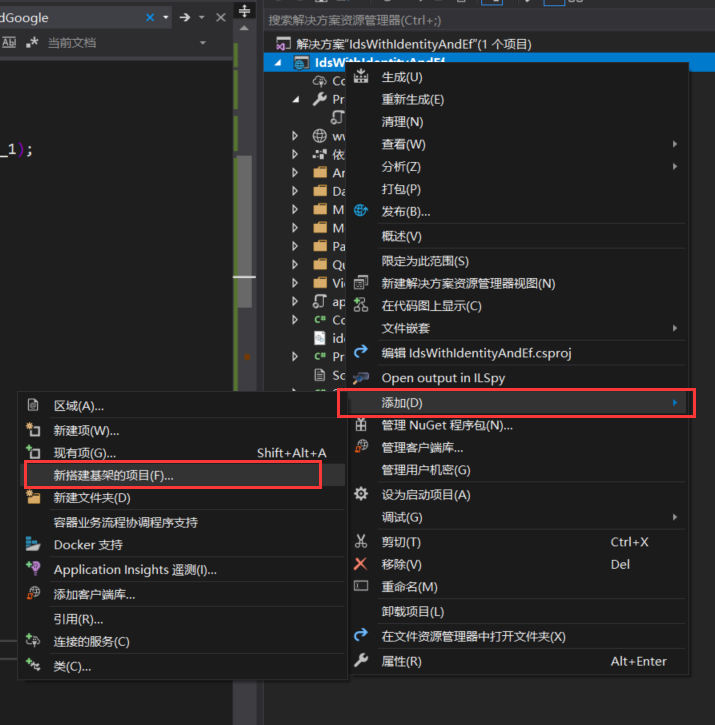
} - 添加Identity的项目基架,选择上一步添加的数据库链接上下文
- 修改startup,配置Idnetity相关信息
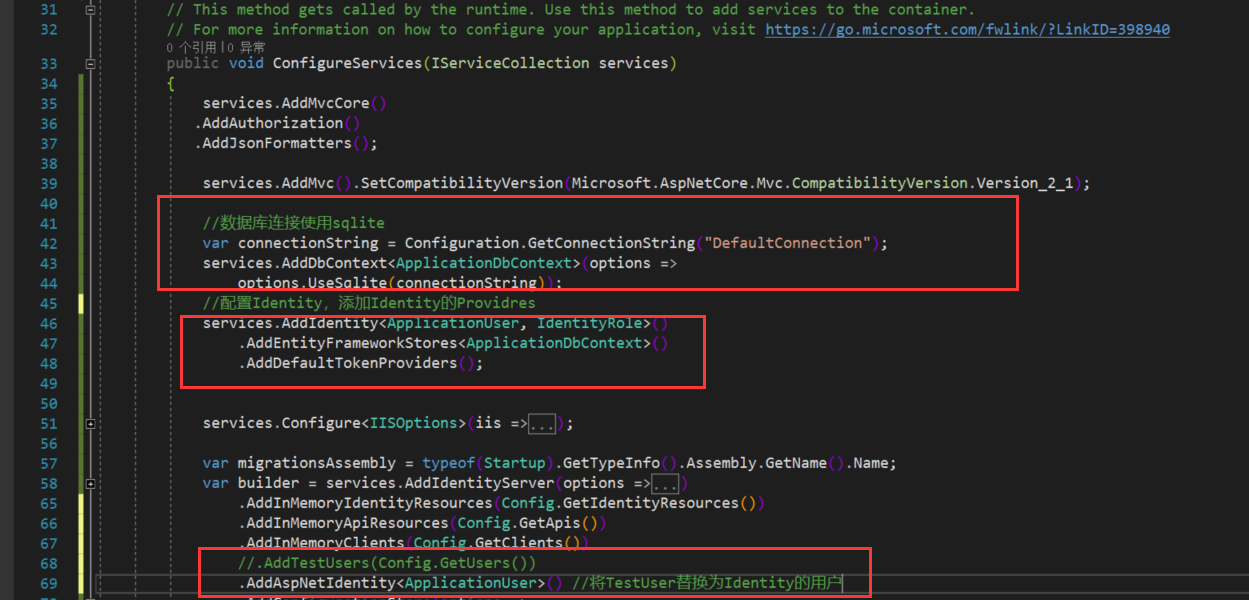
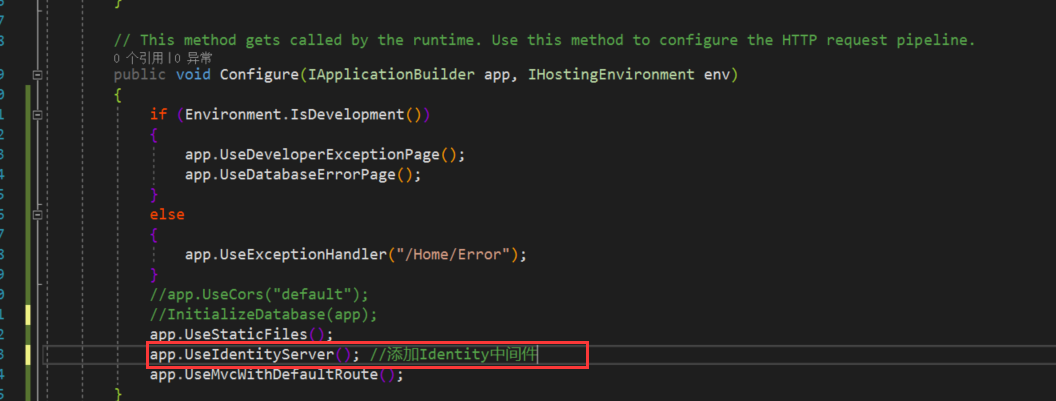
最后,添加Identity的数据库迁移文件,更新数据库
 Add-Migration CreateIdentitySchema

 Update-Database
迁移命令
Ids4配置持久化到数据库
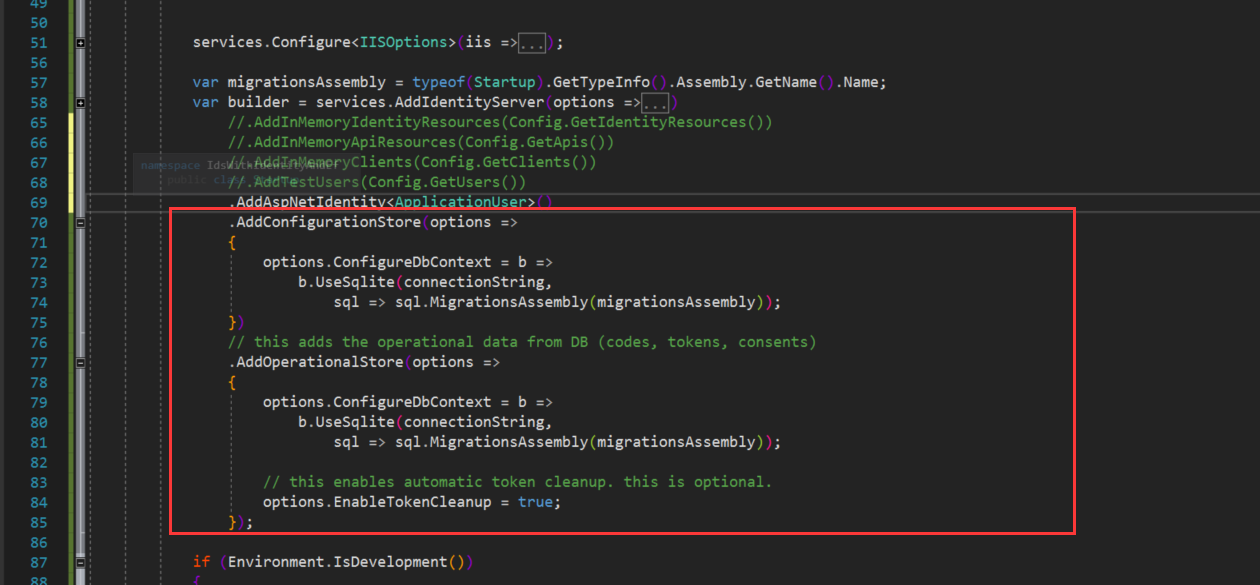
- 到现在为止,我们已经把Identity集成到IdentityServer4认证服务器中去了,但是我们的保护资源配置(Config.cs),还是在内存中静态的存在,接下来,我们把它持久化到数据库中。首先,修改ConfigureServices方法,将从Config.cs中获取Client和Resource的方法注释掉,替换成下图所示,其中ConfigurationStore包含了Cient,ApiResource,IdentityResource等信息,OperationalStore包含了用户登录时候生成的token信息
- 将Config中的配置信息写入到数据库中去
         private void InitializeDatabase(IApplicationBuilder app)

         {

             using (var serviceScope = app.ApplicationServices.GetService<IServiceScopeFactory>().CreateScope())

             {

                 serviceScope.ServiceProvider.GetRequiredService<PersistedGrantDbContext>().Database.Migrate();

                 var context = serviceScope.ServiceProvider.GetRequiredService<ConfigurationDbContext>();

                 context.Database.Migrate();

                 if (!context.Clients.Any())

                 {

                     foreach (var client in Config.GetClients())

                     {

                         context.Clients.Add(client.ToEntity());

                     }

                     context.SaveChanges();

                 }

                 if (!context.IdentityResources.Any())

                 {

                     foreach (var resource in Config.GetIdentityResources())

                     {

                         context.IdentityResources.Add(resource.ToEntity());

                     }

                     context.SaveChanges();

                 }

                 if (!context.ApiResources.Any())

                 {

                     foreach (var resource in Config.GetApis())

                     {

                         context.ApiResources.Add(resource.ToEntity());

                     }

                     context.SaveChanges();

                 }

             }

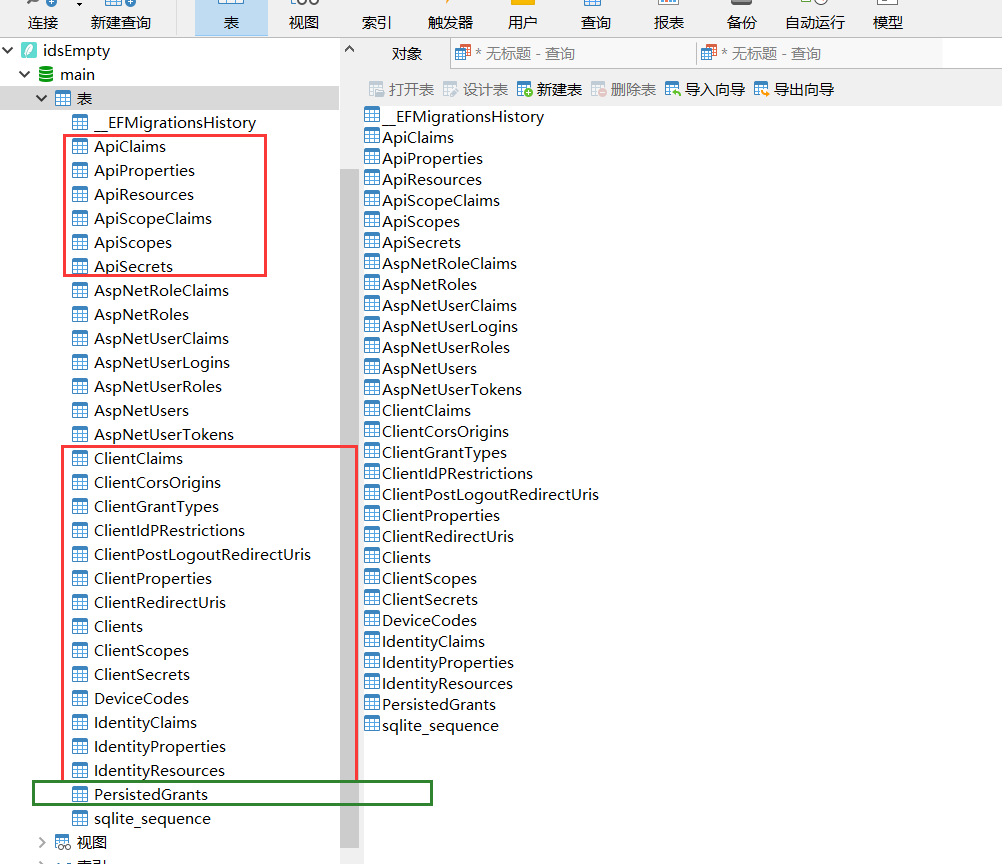
} - 分别为两个数据库上下文执行数据库迁移命令,此时,数据库中将多出这样几张表,红色的框是ConfigurationDbContext生成的,绿的框是PersistedGrantDbContext生成的。最后别忘了把初始化配置种子数据的方法(InitializeDatabase)放到Configure执行下
         private void InitializeDatabase(IApplicationBuilder app)

         {

             using (var serviceScope = app.ApplicationServices.GetService<IServiceScopeFactory>().CreateScope())

             {

                 serviceScope.ServiceProvider.GetRequiredService<PersistedGrantDbContext>().Database.Migrate();

                 var context = serviceScope.ServiceProvider.GetRequiredService<ConfigurationDbContext>();

                 context.Database.Migrate();

                 if (!context.Clients.Any())

                 {

                     foreach (var client in Config.GetClients())

                     {

                         context.Clients.Add(client.ToEntity());

                     }

                     context.SaveChanges();

                 }

                 if (!context.IdentityResources.Any())

                 {

                     foreach (var resource in Config.GetIdentityResources())

                     {

                         context.IdentityResources.Add(resource.ToEntity());

                     }

                     context.SaveChanges();

                 }

                 if (!context.ApiResources.Any())

                 {

                     foreach (var resource in Config.GetApis())

                     {

                         context.ApiResources.Add(resource.ToEntity());

                     }

                     context.SaveChanges();

                 }

             }

         }
配置持久化的迁移文件
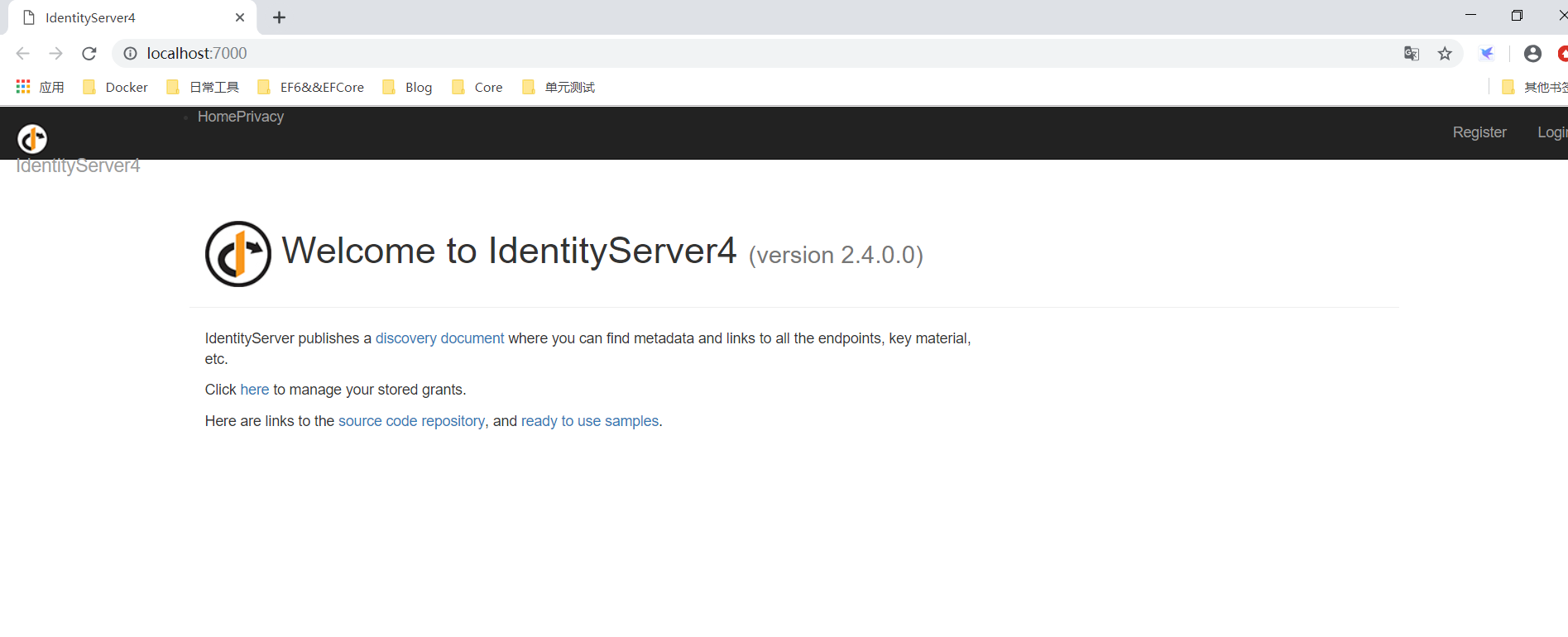
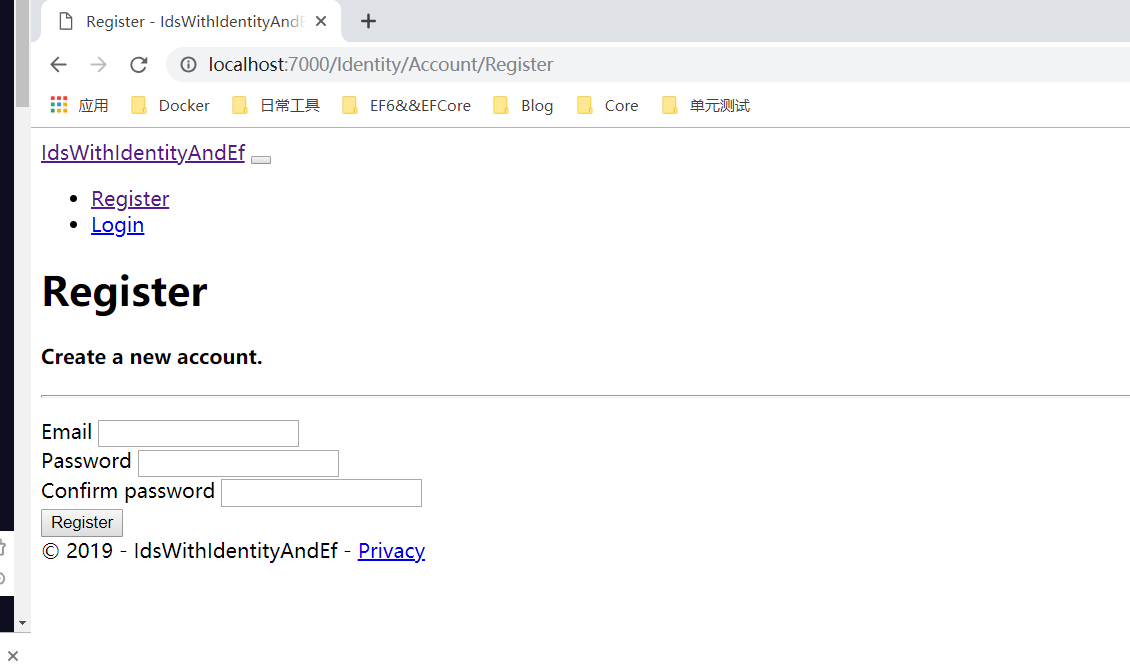
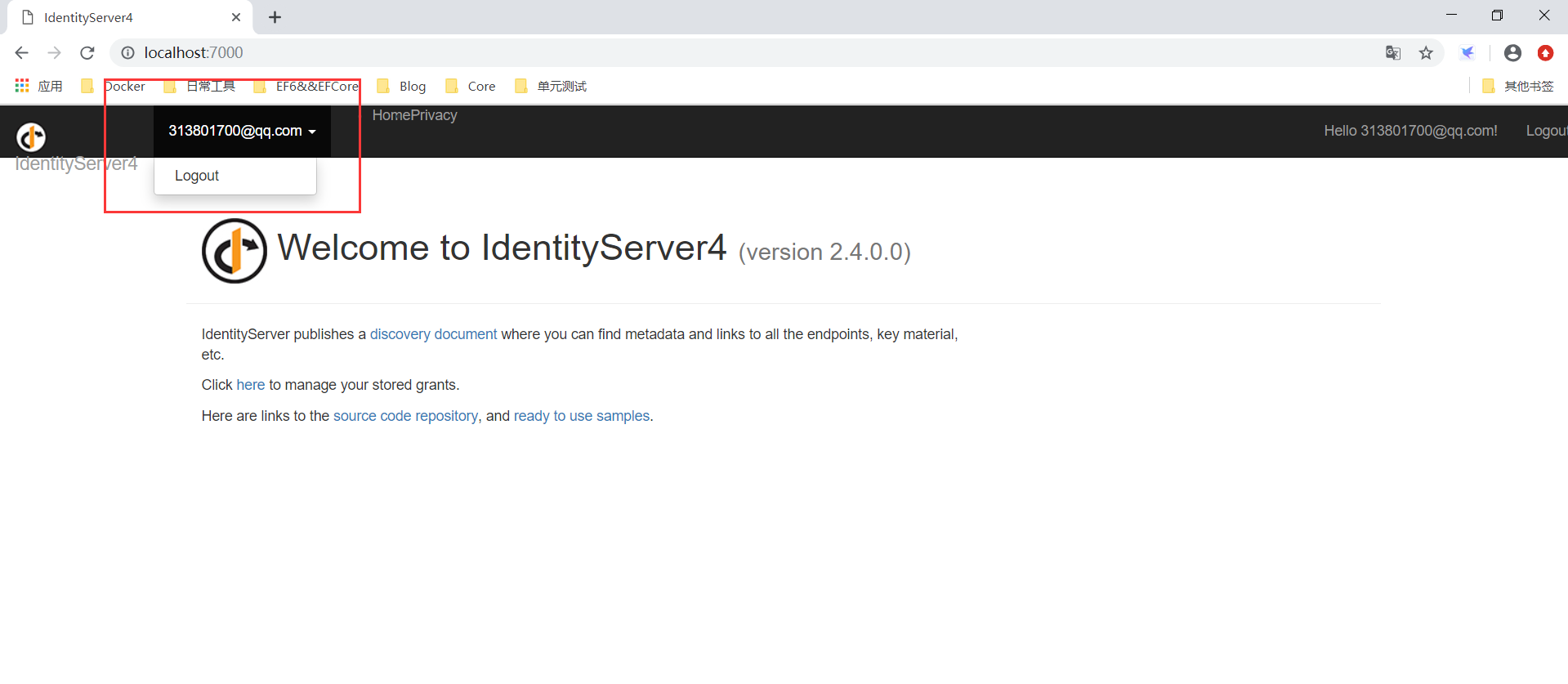
- 最后,运行起来看下效果:我们注册一个用户,登录下
- 示例Demo=》https://github.com/madeinchinalmc/IdentityServer4Sample.git
IdentityServer4认证服务器集成Identity&配置持久化数据库的更多相关文章
- 阿里云CentOs服务器 安装与配置mysql数据库
阿里云CentOs服务器 安装与配置mysql数据库 以上为Linux安装mysql数据库 Linux 安装mysql 数据库 一下为mysql 安装教程 Using username "r ...
- mybatis-spring集成:配置多数据库源中遇到的问题
转自:http://www.cfanz.cn/index.php?c=article&a=read&id=71583 mybatis配置多数据源本身很简单,和基本配置差别不大 但是如果 ...
- asp.net core网关Ocelot的简单介绍& Ocelot集成Identity认证
文章简介 Ocelot网关简介 Ocelot集成Idnetity认证处理 Ocelot网关简介 Ocelot是一个基于netcore实现的API网关,本质是一组按特定顺序排列的中间件.Ocelot内 ...
- .net core 3.0 搭建 IdentityServer4 验证服务器
叙述 最近在搞 IdentityServer4 API接口认证部分,由于之前没有接触过 IdentityServer4 于是在网上一顿搜搜搜,由于自己技术水平也有限,看了好几篇文章才搞懂,想通过博客 ...
- CAS 4.0.0RC 配置通过数据库认证用户登录
配置通过数据库认证用户登录 打开webapp\WEB-INF目录下的deployerConfigContext.xml,替换 <bean id="primaryAuthenticati ...
- SharePoint服务器将连接配置数据库的连接字符串保存在什么地方?
经常有人问我这个问题,SharePoint服务器将连接配置数据库的连接字符串保存在什么地方?虽然其他SharePoint服务器场设置都是保存到了配置数据库里面,但连接配置数据库本身的连接字符串,肯定是 ...
- windows server2008服务器下XAMPP集成环境配置apache的SSL证书:
1.在腾讯与申请的免费SSL证书.按其要求配置,并提交申请,进行审核,审核通过,获得一年使用的SSL免费证书. 2.按下面的要求,进行SSL证书安装配置.本人在配置XAMPP下的apache时,无需复 ...
- 在ASP.NET MVC5 及 Visual Studio 2013 中为Identity账户系统配置数据库链接及Code-First数据库迁移
在ASP.NET MVC5 及 Visual Studio 2013 中为Identity账户系统配置数据库链接及Code-First数据库迁移 最近发布的ASP.NET MVC 5 及Visual ...
- 【翻译】IdentityServer4:基于资源的配置
这篇文章基于https://leastprivilege.com/2016/12/01/new-in-identityserver4-resource-based-configuration/进行翻译 ...
随机推荐
- CDQ分治&整体二分学习个人小结
目录 小结 CDQ分治 二维LIS 第一道裸题 bzoj1176 Mokia bzoj3262 陌上花开 bzoj 1790 矩形藏宝地 hdu5126四维偏序 P3157 [CQOI2011]动态逆 ...
- 优化问题及KKT条件
整理自其他优秀博文及自己理解. 目录 无约束优化 等式约束 不等式约束(KKT条件) 1.无约束优化 无约束优化问题即高数下册中的 “多元函数的极值" 部分. 驻点:所有偏导数皆为0的点: ...
- quartz的初步总结及配置优化
1.scheduler 1. Scheduler就是Quartz的大脑,所有任务都是由它来设施.Scheduler包含一个两个重要组件: JobStore和ThreadPool.JobStore是会来 ...
- Java学习之构造函数
构造函数特点: 函数名和类名相同 没有返回值(不用定义返回值类型)作用: 对象初始化注意: 如果类没有定义构造函数时,系统会默认定义一个无参的构造函数 如果定义了构造函数,系统不会定义构造函 ...
- Intellij IDEA 安装Scala插件 + 创建Scala项目
一.IDEA 2018 Ultimate edition (旗舰破解版下载地址) 百度网盘地址:https://pan.baidu.com/s/1d9ArRH6adhDUGiJvRqnZMw 二.I ...
- activi7流程部署
package com.zcc.acvitivi; import org.activiti.engine.ProcessEngine;import org.activiti.engine.Proces ...
- Scrapy框架: settings.py设置
# -*- coding: utf-8 -*- # Scrapy settings for maitian project # # For simplicity, this file contains ...
- 导出CSV格式
import org.springframework.beans.factory.annotation.Autowired;import org.springframework.stereotype. ...
- LLppdd has a dream!
LLppdd has a dream Time Limit: 3 s Memory Limit: 256 MB 题目背景 LLppdd经过他充满坎坷的初三后,他的成绩也充满了坎坷. 临近中考了,他希望 ...
- MNIST多图显示--Python练习
在学习TensorFlow框架时,提到用MNIST手写数字数据库进行练习,为了更直观看下里面的数据到底长啥样,用OpenCV(cv2)中的imshow函数来进行显示. 默认已经安装: numpy.te ...