
前端 CSS 盒子模型 边框 border属性
边框
border:边框的意思,描述盒子的边框
边框有三个要素: 粗细 线性样式 颜色
border: solid
border特性
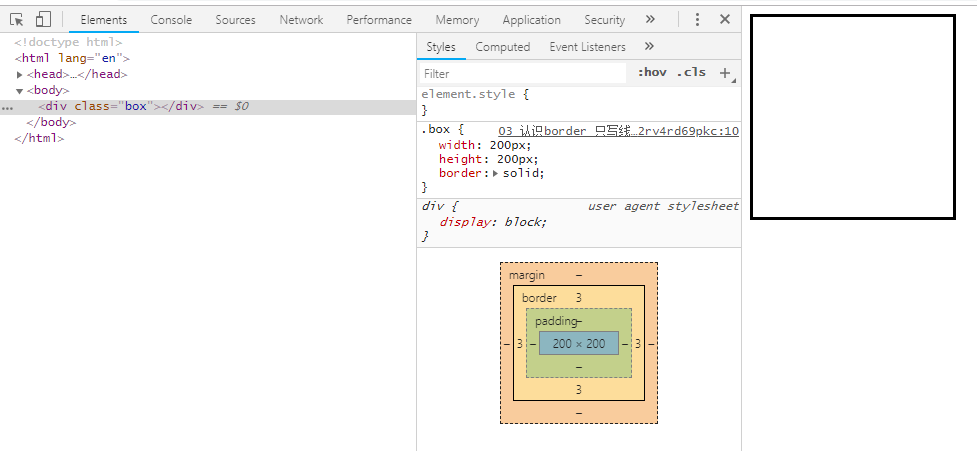
如果颜色不写,默认是黑色。如果粗细不写,不显示边框。如果只写线性样式,默认的有上下左右 3px的宽度,实体样式,并且黑色的边框。
通常使用简写方式
border :solid     5px  red;

        线性样式   粗细   颜色
<!DOCTYPE html>

<html lang="en">

<head>

    <meta charset="UTF-8">

    <meta http-equiv="x-ua-compatible" content="IE=edge">

    <meta name="viewport" content="width=device-width, initial-scale=1">

    <title>Title</title>

    <style type="text/css">

        .box{

            width: 200px;

            height: 200px;

            border:solid 5px red;

        }

    </style>

</head>

<body>

    <div class="box"></div>

</body>

</html>

如果颜色不写,默认是黑色
<!DOCTYPE html>

<html lang="en">

<head>

    <meta charset="UTF-8">

    <meta http-equiv="x-ua-compatible" content="IE=edge">

    <meta name="viewport" content="width=device-width, initial-scale=1">

    <title>Title</title>

    <style type="text/css">

        .box{

            width: 200px;

            height: 200px;

            border:solid 5px;

        }

    </style>

</head>

<body>

    <div class="box"></div>

</body>

</html>
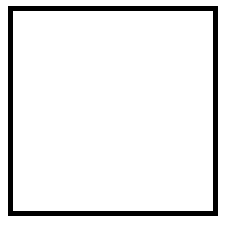
如果只写线性样式,默认的有上下左右 3px的宽度,实体样式,并且黑色的边框。
<!DOCTYPE html>

<html lang="en">

<head>

    <meta charset="UTF-8">

    <meta http-equiv="x-ua-compatible" content="IE=edge">

    <meta name="viewport" content="width=device-width, initial-scale=1">

    <title>Title</title>

    <style type="text/css">

        .box{

            width: 200px;

            height: 200px;

            border:solid ;

        }

    </style>

</head>

<body>

    <div class="box"></div>

</body>

</html>
border写法还可以分开写
按照3要素来写border
3个要素 粗细 线性样式 颜色
<!DOCTYPE html>

<html lang="en">

<head>

    <meta charset="UTF-8">

    <meta http-equiv="x-ua-compatible" content="IE=edge">

    <meta name="viewport" content="width=device-width, initial-scale=1">

    <title>Title</title>

    <style type="text/css">

        .box{

            width: 200px;

            height: 200px;

            /*border: 5px solid red;*/

            /* 按照3要素*/

            border-width: 5px;

            border-style: solid;

            border-color: red;

        }

    </style>

</head>

<body>

    <div class="box"></div>

</body>

</html>
等于 border: 5px solid red
border-width: 3px;

border-style: solid;

border-color: red;
后面可以继续写,方向和padding一样 上右下左
border-width: 5px 10px;  /* 上下 左右*/

border-style: solid dotted double dashed; /* 上右下左 */

border-color: red green yellow; /* 上 左右 下 */
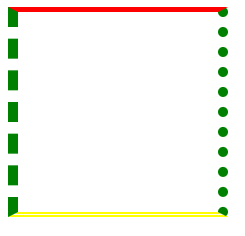
按照方向划分
四个方向
<!DOCTYPE html>

<html lang="en">

<head>

    <meta charset="UTF-8">

    <meta http-equiv="x-ua-compatible" content="IE=edge">

    <meta name="viewport" content="width=device-width, initial-scale=1">

    <title>Title</title>

    <style type="text/css">

        .box{

            width: 200px;

            height: 200px;

            /* 按照方向划分*/

            border-top-width: 10px;

            border-top-style: solid;

            border-top-color: red;

            border-right-width: 10px;

            border-right-style: solid;

            border-right-color: red;

            border-bottom-width: 10px;

            border-bottom-style: solid;

            border-bottom-color: red;

            border-left-width: 10px;

            border-left-style: solid;

            border-left-color: red;

        }

    </style>

</head>

<body>

    <div class="box"></div>

</body>

</html>
上面12条语句,相当于 bordr: 10px solid red;
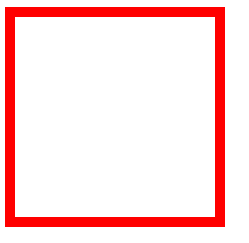
另外还可以这样写法 效果一样:
border-top: 10px solid red;

border-right: 10px solid red;

border-bottom: 10px solid red;

border-left: 10px solid red;
清除border边框的默认样式,比如input输入框
 border:none;

 border:0;
设置一个方向没有
<!DOCTYPE html>

<html lang="en">

<head>

    <meta charset="UTF-8">

    <meta http-equiv="x-ua-compatible" content="IE=edge">

    <meta name="viewport" content="width=device-width, initial-scale=1">

    <title>Title</title>

    <style type="text/css">

        .box{

            width: 200px;

            height: 200px;

            border-top: 10px solid red;

            border-right: 10px solid red;

            border-bottom: 10px solid red;

            border-left: 10px solid red;

            /* 设置border没有样式*/

            border-left: none;

        }

    </style>

</head>

<body>

    <div class="box"></div>

</body>

</html>
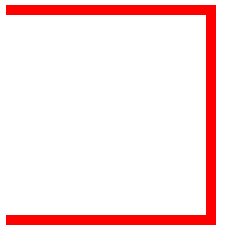
border-left: 0; 也可以
border-left: 0;
边框样式
| 值 | 描述 |
|---|---|
| none | 无边框。 |
| dotted | 点状虚线边框。 |
| dashed | 矩形虚线边框。 |
| solid | 实线边框。 |
前端 CSS 盒子模型 边框 border属性的更多相关文章
- [Web 前端] CSS 盒子模型,绝对定位和相对定位
cp : https://blog.csdn.net/web_yh/article/details/53239372 一.盒子模型: 标准模式和混杂模式(IE).在标准模式下浏览器按照规范呈现页面:在 ...
- 前端 CSS 盒子模型 目录
CSS盒子模型介绍 padding border属性
- 前端 CSS 盒子模型
盒模型的概念 在CSS中,"box model"这一术语是用来设计和布局时使用,然后在网页中基本上都会显示一些方方正正的盒子.我们称为这种盒子叫盒模型. 盒模型有两种:标准模型和I ...
- 2 CSS盒子模型&边框&轮廓&外边距&填充&分组嵌套&尺寸&display与visibility
盒子模型 Box Model 所有HTML元素可以看做盒子,CSS模型本质上是一个盒子,封装周围的HTML元素 包括:边距,边框,填充和实际内容 盒子模型允许我们在其他元素和周围元素边框之间的空间放 ...
- css 盒子模型 以及 box-sizing属性
在标准的盒子模型下,css中 width,padding以及border的关系 关于css中的width和padding以及border的关系. 在css中,width和height指的是内容区域的宽 ...
- 前端 CSS 盒子模型 padding 内边距 属性
padding:就是内边距的意思,它是边框到内容之间的距离 另外padding的区域是有背景颜色的.并且背景颜色和内容区域的颜色一样.也就是说background-color这个属性将填充所有的bor ...
- <转>HTML+CSS总结/深入理解CSS盒子模型
原文地址:http://www.chinaz.com/design/2010/1229/151993.shtml 前言:前阵子在做一个项目时,在页面布局方面遇到了一点小问题,于是上stackoverf ...
- {前端CSS} 语法 Css的几种引入方式 css选择器 选择器的优先级 CSS属性相关 背景属性 边框 CSS盒子模型 清除浮动 overflow溢出属性 定位(position)z-index
前端CSS CSS介绍 CSS(Cascading Style Sheet,层叠样式表)定义如何显示HTML元素,给HTML设置样式,让它更加美观. 当浏览器读到一个样式表,它就会按照这个样式表来对文 ...
- div介绍 盒子模型边框属性 CSS初始化 文字排版 边框调整 溢出
今天学习的div,了解了div是干什么用的掌握了什么是盒子模型,以及div的外边距内边距以及边框,运用div和CSS给文字排版,利用边框的来做图像,div溢出的处理 CSS初始化: 精确排版的时候用这 ...
随机推荐
- ajax 请求成功,但是后台feigin请求超时解决方案
========后台请求数据时间较长,报feigin超时错误====== fegin报错如下: feign.RetryableException: Read timed out executing P ...
- jQuery $.ajax传递数组的traditional参数传递必须true 对象的序列化
数组类型参数传递: 若一个请求中包含多个值,如:(test.action?tid=1&tid=2&tid=3),参数都是同一个,只是指定多个值,这样请求时后台会发生解析错误,应先使用 ...
- sourceTree 添加 ssh key 方法
1.使用 git 客户的生成公私钥:id_rsa.id_rsa.pub 1.1设置Git的user name和email: $ git config --global user.name " ...
- ESP8266--WIFI热点扫描
现在,通常,为了让手机连上一个WiFi热点,基本上都是打开手机设置里面的WiFi设置功能,然后会看到里面有个WiFi热点列表,然后选择你要的连接上. 基本上你只要打开手机连接WiFi功能,都会发现附近 ...
- java——hasCode是如何对应到数组索引的?为什么HashMap的initailCapacity要设置成2的n次幂?为什么要树化hashMap?
一: 源代码是这样实现的: static final int hash(Object var0) { int var1; return var0 == null ? 0 : (var1 = var0. ...
- C#之扩展方法 default(T)
using System; using System.Collections.Generic; using System.Linq; using System.Text; using System.T ...
- guava缓存第一篇
guava缓存主要有2个接口,Cache和LoadingCache. Cache,全类名是com.google.common.cache.Cache,支持泛型.Cache<K, V>. L ...
- html br标签 语法
html br标签 语法 br标签什么意思? 作用:插入一个简单的换行符.广州大理石机械构件 说明:<br> 标签是空标签(意味着它没有结束标签,因此这是错误的:<br>< ...
- BZOJ 4897: [Thu Summer Camp2016]成绩单 动态规划
Description 期末考试结束了,班主任L老师要将成绩单分发到每位同学手中.L老师共有n份成绩单,按照编号从1到n的顺序叠 放在桌子上,其中编号为i的成绩单分数为w_i.成绩单是按照批次发放的. ...
- C++中string常用函数用法总结
string(s小写)是C++标准库中的类,纯C中没有,使用时需要包含头文件#include<string>,注意不是<string.h>,下面记录一下string中比较常用的 ...