
《Using Databases with Python》Week3 Data Models and Relational SQL 课堂笔记
Coursera课程《Using Databases with Python》 密歇根大学
Week3 Data Models and Relational SQL
15.4 Designing a Data Model
主要介绍了数据模型的重要性,以及数据模型构建的一些思考过程。
15.5 Representing a Data Model in Tables
概念模型
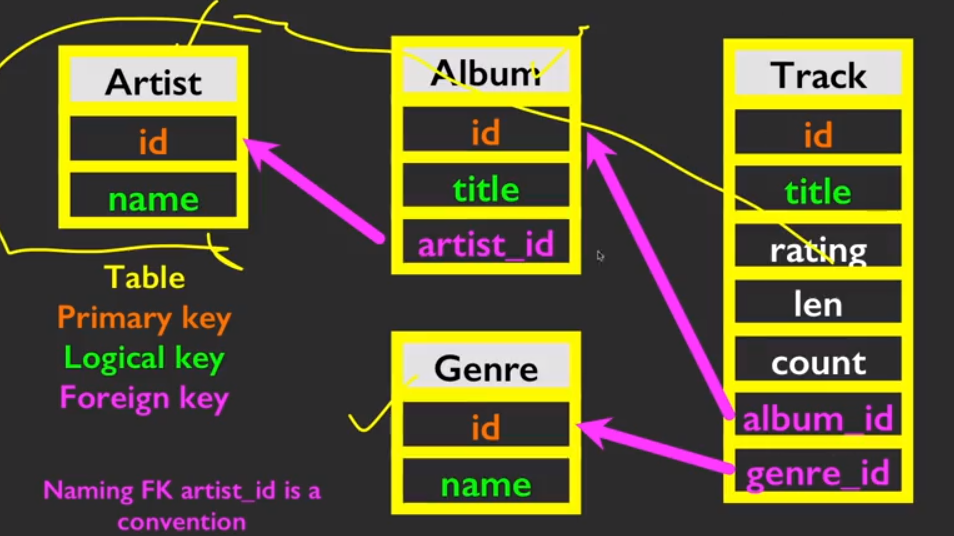
主键(Primary key),指的是一个列或多列的组合,其值能唯一地标识表中的每一行,通过它可强制表的实体完整性。主键主要是用于其他表的外键关联,以及本记录的修改与删除。
外键(Foreign key),作用是保持数据一致性,完整性,主要目的是控制存储在外键表中的数据。 使两张表形成关联,外键只能引用外表中的列的值。
如果我们要构建上面概念模型所表示的数据库,那么我们用到的一些SQL语句有:
CREATE TABLE Genre(

      id INTEGER NOT NULL PRIMARY KEY AUTOINCREMENT UNIQUE,

      name TEXT

)

CREATE TABLE Album(

      id     INTEGER NOT NULL PRIMARY KEY AUTOINCREMENT UNIQUE,

      artist_id INTEGER

      title     TEXT

)

CREATE TABLE Track(

       id     INTEGER NOT NULL PRIMARY KEY

              AUTOINCREMENT UNIQUE,

       title TEXT,

       album_id INTEGER,

       genre_id INTEGER,

       len INTEGER,

       rating INTEGER,

       count INTEGER

)
15.6 Inserting Relational Data
插入数据
insert into Artist(name) values ('Led Zepplin')

insert into Artist(name) values ('AC/DC')
像上面这样就往Artist表中加入了两行数据。
而对于Album表来说,它连接了Artist表,有两列数据要插入,那么这样。
insert into Album(title,artist_id) values ('Who Made Who',2)

insert into Album(title,artist_id) values ('IV',1)
所以这样之后,我们就建立起了数据之间的关系。

15.7 Reconstructing Data with JOIN
JOIN操作像是在几个表之间的SELECT操作。
而我们告诉JOIN怎么使用这些key则需要用到ON语句。有点像WHERE语句。

select Album.title, Artist.name from Album join Artist on Album.artist_id = Artist.id
如果把事情变复杂一些……

Work Example: Tracks.py
import xml.etree.ElementTree as ET

import sqlite3

conn = sqlite3.connect('trackdb.sqlite')

cur = conn.cursor()

# Make some fresh tables using executescript()

cur.executescript('''

DROP TABLE IF EXISTS Artist;

DROP TABLE IF EXISTS Album;

DROP TABLE IF EXISTS Track;

CREATE TABLE Artist (

    id  INTEGER NOT NULL PRIMARY KEY AUTOINCREMENT UNIQUE,

    name    TEXT UNIQUE

);

CREATE TABLE Album (

    id  INTEGER NOT NULL PRIMARY KEY AUTOINCREMENT UNIQUE,

    artist_id  INTEGER,

    title   TEXT UNIQUE

);

CREATE TABLE Track (

    id  INTEGER NOT NULL PRIMARY KEY

        AUTOINCREMENT UNIQUE,

    title TEXT  UNIQUE,

    album_id  INTEGER,

    len INTEGER, rating INTEGER, count INTEGER

);

''')

fname = input('Enter file name: ')

if ( len(fname) < 1 ) : fname = 'Library.xml'

# <key>Track ID</key><integer>369</integer>

# <key>Name</key><string>Another One Bites The Dust</string>

# <key>Artist</key><string>Queen</string>

def lookup(d, key):

    found = False

    for child in d:

        if found : return child.text

        if child.tag == 'key' and child.text == key :

            found = True

    return None

stuff = ET.parse(fname)

all = stuff.findall('dict/dict/dict')

print('Dict count:', len(all))

for entry in all:

    if ( lookup(entry, 'Track ID') is None ) : continue

    name = lookup(entry, 'Name')

    artist = lookup(entry, 'Artist')

    album = lookup(entry, 'Album')

    count = lookup(entry, 'Play Count')

    rating = lookup(entry, 'Rating')

    length = lookup(entry, 'Total Time')

    if name is None or artist is None or album is None :

        continue

    print(name, artist, album, count, rating, length)

    cur.execute('''INSERT OR IGNORE INTO Artist (name)

        VALUES ( ? )''', ( artist, ) )

    cur.execute('SELECT id FROM Artist WHERE name = ? ', (artist, ))

    artist_id = cur.fetchone()[0]

    cur.execute('''INSERT OR IGNORE INTO Album (title, artist_id)

        VALUES ( ?, ? )''', ( album, artist_id ) )

    cur.execute('SELECT id FROM Album WHERE title = ? ', (album, ))

    album_id = cur.fetchone()[0]

    cur.execute('''INSERT OR REPLACE INTO Track

        (title, album_id, len, rating, count)

        VALUES ( ?, ?, ?, ?, ? )''',

        ( name, album_id, length, rating, count ) )

    conn.commit()
使用python脚本建立数据库的过程,注意其中的关键字IGNORE,它的作用是如果当期数据存在,那就不插入,否则插入。在这个地方十分有用,因为索引不能随意变化。
作业代码
import xml.etree.ElementTree as ET

import sqlite3

conn = sqlite3.connect('trackdb.sqlite')

cur = conn.cursor()

# Make some fresh tables using executescript()

cur.executescript('''

DROP TABLE IF EXISTS Artist;

DROP TABLE IF EXISTS Album;

DROP TABLE IF EXISTS Track;

DROP TABLE IF EXISTS Genre;

CREATE TABLE Artist (

    id  INTEGER NOT NULL PRIMARY KEY AUTOINCREMENT UNIQUE,

    name    TEXT UNIQUE

);

CREATE TABLE Genre (

    id  INTEGER NOT NULL PRIMARY KEY AUTOINCREMENT UNIQUE,

    name    TEXT UNIQUE

);

CREATE TABLE Album (

    id  INTEGER NOT NULL PRIMARY KEY AUTOINCREMENT UNIQUE,

    artist_id  INTEGER,

    title   TEXT UNIQUE

);

CREATE TABLE Track (

    id  INTEGER NOT NULL PRIMARY KEY

        AUTOINCREMENT UNIQUE,

    title TEXT  UNIQUE,

    album_id  INTEGER,

    genre_id  INTEGER,

    len INTEGER, rating INTEGER, count INTEGER

);

''')

fname = input('Enter file name: ')

if ( len(fname) < 1 ) : fname = 'Library.xml'

# <key>Track ID</key><integer>369</integer>

# <key>Name</key><string>Another One Bites The Dust</string>

# <key>Artist</key><string>Queen</string>

def lookup(d, key):

    found = False

    for child in d:

        if found : return child.text

        if child.tag == 'key' and child.text == key :

            found = True

    return None

stuff = ET.parse(fname)

all = stuff.findall('dict/dict/dict')

print('Dict count:', len(all))

for entry in all:

    if ( lookup(entry, 'Track ID') is None ) : continue

    name = lookup(entry, 'Name')

    artist = lookup(entry, 'Artist')

    album = lookup(entry, 'Album')

    genre = lookup(entry,'Genre')

    count = lookup(entry, 'Play Count')

    rating = lookup(entry, 'Rating')

    length = lookup(entry, 'Total Time')

    if name is None or artist is None or album is None or genre is None:

        continue

    print(name, artist, album, genre, count, rating, length)

    cur.execute('''INSERT OR IGNORE INTO Artist (name)

        VALUES ( ? )''', ( artist, ) )

    cur.execute('SELECT id FROM Artist WHERE name = ? ', (artist, ))

    artist_id = cur.fetchone()[0]

    cur.execute('''INSERT OR IGNORE INTO Album (title, artist_id)

        VALUES ( ?, ? )''', ( album, artist_id ) )

    cur.execute('SELECT id FROM Album WHERE title = ? ', (album, ))

    album_id = cur.fetchone()[0]

    cur.execute('''INSERT OR IGNORE INTO Genre (name)

        VALUES ( ? )''', ( genre, ) )

    cur.execute('SELECT id FROM Genre WHERE name = ? ', (genre, ))

    genre_id = cur.fetchone()[0]

    cur.execute('''INSERT OR REPLACE INTO Track

        (title, album_id, genre_id, len, rating, count)

        VALUES ( ?, ?, ?, ?, ? ,?)''',

        ( name, album_id, genre_id, length, rating, count ) )

conn.commit()
《Using Databases with Python》Week3 Data Models and Relational SQL 课堂笔记的更多相关文章
- 《Using Databases with Python》 Week2 Basic Structured Query Language 课堂笔记
Coursera课程<Using Databases with Python> 密歇根大学 Week2 Basic Structured Query Language 15.1 Relat ...
- 【Python学习笔记】Coursera课程《Using Databases with Python》 密歇根大学 Charles Severance——Week4 Many-to-Many Relationships in SQL课堂笔记
Coursera课程<Using Databases with Python> 密歇根大学 Week4 Many-to-Many Relationships in SQL 15.8 Man ...
- 《Python Data Structures》Week5 Dictionary 课堂笔记
Coursera课程<Python Data Structures> 密歇根大学 Charles Severance Week5 Dictionary 9.1 Dictionaries 字 ...
- 《Python Data Structures》 Week4 List 课堂笔记
Coursera课程<Python Data Structures> 密歇根大学 Charles Severance Week4 List 8.2 Manipulating Lists 8 ...
- 潭州课堂25班:Ph201805201 python 模块json,os 第六课 (课堂笔记)
json 模块 import json data = { 'name':'aa', 'age':18, 'lis':[1,3,4], 'tupe':(4,5,6), 'None':None } j = ...
- Mongodb Manual阅读笔记:CH3 数据模型(Data Models)
3数据模型(Data Models) Mongodb Manual阅读笔记:CH2 Mongodb CRUD 操作Mongodb Manual阅读笔记:CH3 数据模型(Data Models)Mon ...
- 《Using Databases with Python》Week1 Object Oriented Python 课堂笔记
Coursera课程<Using Databases with Python> 密歇根大学 Charles Severance Week1 Object Oriented Python U ...
- 数据分析---《Python for Data Analysis》学习笔记【04】
<Python for Data Analysis>一书由Wes Mckinney所著,中文译名是<利用Python进行数据分析>.这里记录一下学习过程,其中有些方法和书中不同 ...
- 数据分析---《Python for Data Analysis》学习笔记【03】
<Python for Data Analysis>一书由Wes Mckinney所著,中文译名是<利用Python进行数据分析>.这里记录一下学习过程,其中有些方法和书中不同 ...
随机推荐
- 独家!三代Ryzen国行价格来了:12核3999
5月27日,AMD在2019台北电脑展COMPUTEX展前新闻发布会上举行主题演讲,AMD CEO苏姿丰登台,正式发布了第三代Ryzen锐龙处理器,新品共有3款,分别是Ryzen 7 3700X.Ry ...
- 286-基于6U VPX 的mSATA高性能数据存储板
基于6U VPX 的mSATA高性能数据存储板 一.板卡概述 该产品系我司自主研发.基于标准6U VPX架构. 二.产品特性 最大存储容量8TB 读写方式RAID0 ,读写速 ...
- 模拟赛小结:2014-2015 ACM-ICPC, NEERC, Southern Subregional Contest
2014-2015 ACM-ICPC, NEERC, Southern Subregional Contest 2019年10月11日 15:30-20:30(Solved 6,Penalty 740 ...
- java高并发核心要点|系列3|锁的底层实现原理|ABA问题
继续讲CAS算法,上篇文章我们知道,CAS算法底层实现,是通过CPU的原子指令来实现. 那么这里又有一个情景: 话说,有一个线程one从内存位置V中取出A,这时候另一个线程two也从内存中取出A,并且 ...
- Web Service Demo
有了Web Service的一些基础,具体如何实现,通过亲自写一个Demo来理解一下. 1.创建一个空的Web项目 2.在Web项目下ADD一个Web Service 3.在Web service中写 ...
- AI换脸教程:DeepFaceLab使用教程(2.训练及合成)
如果前期工作已经准备完毕(DeepFaceLab下载(https://www.deepfacelabs.com/list-5-1.html),然后安装相应的显卡驱动,DeepFaceLab使用教程(1 ...
- CentOS 7安装MySQL 8——萌新超详细教程
1.配置MySQL 8.0的安装源: sudo rpm -Uvh https://dev.mysql.com/get/mysql80-community-release-el7-1.n ...
- python基础练习题08
写一个登录程序,让用户输入账号和密码,输入用户和密码输入正确的话,提示你 xxx,欢迎登录,今天的日期是xxx,程序结束.错误的话,提示账号/密码输入错误, 最多输入3次,如果输入3次都没有登录成功, ...
- Apache服务器配置https
https://startssl.com这个网站可以给我们免费提供可信任的https证书,这里简单介绍一下配置的过程. 首先服务器需要安装openssl和apache的mod_ssl.so模块,并且需 ...
- 【Luogu5294】[HNOI2019]序列
题目链接 题意 给定一个序列,要求将它改造成一个非降序列,修改一个数的代价为其改变量的平方. 最小化总代价. 另有\(Q\) 次询问,每次修改一个位置上的数.(询问之间独立,互不影响) Sol 神仙 ...