
Android @1x,@2x,@3x 资源文件自动分包工具
version 1.2
1.修改不用输入扩展名
2.输出路径可选。默认会在输入路径下建文件夹
前沿:
现在开发中ios,android会使用一套图,但是ui设计师给的图命名是以@1x,@2x,@3x这样命名的,android 客户端使用起来就略嫌麻烦了,这个小工具可以实现简单的分包。
原理:
I/o流读取 testPicture中的@1x,@2x,@3x 文件进行整理,按序输出旧文件文字同时,需要输入一个新文件名 + 后缀名,然后动态进行分组到desPicture中的文件夹1,文件夹2,文件夹3。1,2,3文件夹分别对应@1x,@2x,@3x.
Eg:尽量配对出现 @1x,@2x,@3x.
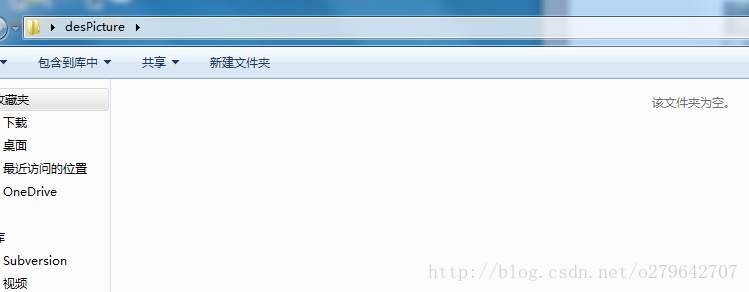
1.首先需要两个文件夹,一个里面存放着待处理的文件,另一个存放处理后的文件

testPicture

desPicture
步骤:
1.进入dos窗口
Window+r —–>cmd
2.进入mutiFile.jar 根目录 输入
java -jar MutiFile-x.x.x.jar srcFile outputDir
其中:MutiFile-x.x.x.jar ,是工具类
srcFile 为待处理文件夹路径
outputDir 为处理后的文件输出路径
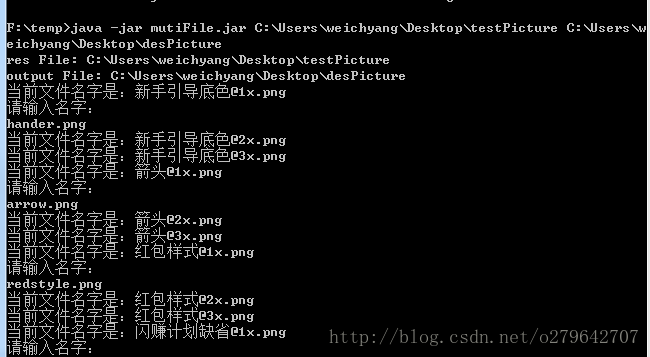
处理后的文件,已经进行分组成 @1x,@2x,@3x

贴出来源码:
package com.nuoyuan.mutiFile;

import java.io.File;

import java.io.FileInputStream;

import java.io.FileNotFoundException;

import java.io.FileOutputStream;

import java.io.IOException;

import java.util.ArrayList;

import java.util.HashMap;

import java.util.List;

import java.util.Map;

import java.util.Scanner;

/**

 * version 1.2

 * 1. 增加支持 不写后缀名字

 * 2. 增加输入输出路径可选

 * @author weichyang

 *

 */

public class MutiFile {

    private static final String USAGE_TEXT = "Usage: java -jar MutiFile-x.x.x.jar srcFile outputDir ";

    private static Map<String, String> onePlus = new HashMap();

    private static Map<String, String> twoPlus = new HashMap();

    private static Map<String, String> threePlus = new HashMap();

    private static List newFilePath = new ArrayList<String>();

    private static String[] spiltName = { "@1x", "@2x", "@3x" };

    private static ArrayList<String> filelist = new ArrayList<String>();

    private static String tempFileName = "xx@xx";

    private static String beforeName = "&6%";

    public static void main(String[] args) throws IOException {

        if (args.length < ) {

            println(USAGE_TEXT);

            return;

        }

        String resPathString = "";

        String desPathString = "";

        if (args.length == ) {

            resPathString = args[];

            desPathString = args[];

        } else {

            resPathString = args[];

            desPathString = args[];

        }

        File resFile = new File(resPathString);

        File desFile = new File(desPathString);

        if (!resFile.exists()) {

            println(" file '" + desPathString

                    + "' is not exists or not readable.");

            println(USAGE_TEXT);

            System.exit();

        }

        if (!desFile.exists()) {

            // desfile.createNewFile();

            println(" file '" + desFile.getAbsolutePath()

                    + "' is not exists or not readable.");

            println(USAGE_TEXT);

            System.exit();

            return;

        } else {

            for (int i = ; i <= ; i++) {

                String newPathString = desPathString + "\\" + i;

                new File(newPathString).mkdirs();

                newFilePath.add(newPathString + "\\");

            }

        }

        // 打印资源文件

        println("res File: " + resFile.getAbsolutePath());

        println("output File: " + desFile.getAbsolutePath());

        // 资源存在是否为null

        getFiles(resFile);

    }

    /*

     * 通过递归得到某一路径下所有的目录及其文件

     */

    public static void getFiles(File filePath) throws FileNotFoundException,

            IOException {

        File[] files = filePath.listFiles();

        if (files.length == ) {

            println(filePath + " is have't file exit!!");

            System.exit();

            return;

        }

        for (File file : files) {

            if (file.isDirectory()) {

                /*

                 * 递归调用

                 */

                getFiles(file);

                filelist.add(file.getAbsolutePath());

                System.out.println("show " + filePath + "下所有子目录及其文件"

                        + file.getAbsolutePath());

            } else {

                String currentFilePath = file.getAbsolutePath().toString();

                String fileName = splitFileName(currentFilePath);

                System.out.println("current file name is:" + fileName);

                if (!fileName.contains("@")) {

                    continue;

                }

                if (fileName.contains(spiltName[])) {

                    onePlus.put(fileName, currentFilePath);

                    String fileNameString = InputCode(fileName);

                    fromToAnotherDes(currentFilePath, newFilePath.get()

                            .toString() + fileNameString);

                } else if (fileName.contains(spiltName[])) {

                    twoPlus.put(fileName, newFilePath.get().toString()

                            + fileName);

                    String fileNameString = InputCode(fileName);

                    fromToAnotherDes(currentFilePath, newFilePath.get()

                            .toString() + fileNameString);

                } else if (fileName.contains(spiltName[])) {

                    threePlus.put(fileName, newFilePath.get().toString()

                            + fileName);

                    String fileNameString = InputCode(fileName);

                    fromToAnotherDes(currentFilePath, newFilePath.get()

                            .toString() + fileNameString);

                }

            }

        }

        System.out.print("/****** File rename Success *********/\n");

        System.out.print("共修改@1x 文件 " + onePlus.size() + "个\n");

        System.out.print("共修改@2x 文件 " + twoPlus.size() + "个\n");

        System.out.print("共修改@3x 文件 " + threePlus.size() + "个\n");

        System.out.print("总共修文件 " + threePlus.size() + onePlus.size()

                + twoPlus.size() + "个\n");

        System.out.print("/**************************************/\n");

    }

    /**

     * 分割文件名字

     *

     * @param str

     * @return

     */

    public static String splitFileName(String str) {

        String[] strs = str.split("\\\\");

        StringBuffer sb = new StringBuffer();

        for (int i = ; i < strs.length; i++) {

            if (i == strs.length - )

                sb.append(strs[i]);

        }

        return sb.toString();

    }

    /**

     * 拷貝一個文件到另一個問價中

     *

     * @param srcFile

     * @param desFile

     * @throws FileNotFoundException

     * @throws IOException

     */

    public static void fromToAnotherDes(String srcFile, String desFile) {

        try {

            FileInputStream fis = new FileInputStream(srcFile);

            FileOutputStream fos = new FileOutputStream(desFile);

            int len = ;

            byte[] buf = new byte[];

            while ((len = fis.read(buf)) != -) {

                fos.write(buf, , len);

            }

            fis.close();

            fos.close();

        } catch (Exception e) {

            // TODO Auto-generated catch block

            e.printStackTrace();

        }

    }

    /**

     * 接受输入的数字进行设置文件名字 一次输入使用三次

     *

     * @return

     */

    public static String InputCode(String fileName) {

        String extNameString = getExtension(fileName);

        String realNameString = fileName.split("@")[];

        if (realNameString.equals(beforeName)) {

            return tempFileName + extNameString;

        }

        Scanner scanner = new Scanner(System.in);// 创建输入流扫描器

        System.out.print("please input file name:\n");// 提示用户输入

        // 获取用户输入的一行文本

        String line = scanner.nextLine();

        // 打印对输入文本的描述

        tempFileName = line;

        beforeName = realNameString;

        return line + extNameString;

    }

    public static void println(String msg) {

        System.out.println(msg);

    }

    /**

     * 截取扩展名字

     *

     * @param filename

     * @param defExt

     * @return

     */

    public static String getExtension(String filename) {

        if ((filename != null) && (filename.length() > )) {

            int i = filename.lastIndexOf('.');

            if ((i > -) && (i < (filename.length() - ))) {

                return filename.substring(i);

            }

        }

        return "";

    }

}
下载地址 http://pan.baidu.com/s/1pK7qdLp
version 1.2 版本:http://pan.baidu.com/s/1boNnLoV
Android @1x,@2x,@3x 资源文件自动分包工具的更多相关文章
- huhamhire-hosts — Hosts文件自动配置工具
https://www.anotherhome.net/1376 推荐配合EasyGoAgent使用: EasyGoAgent — 开箱即用的GoAgent Update 2015.5.15 数据文件 ...
- Android屏幕适配-资源文件夹命名与匹配规则
说明:本文档目的为分析android工程res目录下的资源文件夹(drawable,values,layout等)在屏幕适配方面的限定与适配方法. 1. Res下文件夹命名方式 1. 可用的命名属性 ...
- intellij idea让资源文件自动更新
intellij idea默认文件是自动保存的,但是手头有个项目jsp文件改动后,在tomcat中不能立即响应变化.要jsp文件改动后立刻看到变化,有个配置.在idea tomcat 中server的 ...
- android 修改framework下资源文件后如何编译
在framework/base/core/res/res 下添加资源文件后需要先编译资源 然后编译framework 才可正常引用 进入项目根目录 cd frameworks/base/core/re ...
- 最简单的Android项目(含有资源文件)
上次的项目没有使用资源文件,打包出的apk安装后是系统默认图标,程序标题也是包名加类名. 添加资源需要对编译的命令做一点调整. 首先在项目根目录新建res和assets目录,在res内新建drawab ...
- Android中通过数组资源文件xml与适配器两种方式给ListView列表视图设置数据源
场景 实现效果如下 注: 博客: https://blog.csdn.net/badao_liumang_qizhi 关注公众号 霸道的程序猿 获取编程相关电子书.教程推送与免费下载. 实现 将布局改 ...
- Android学习笔记数组资源文件
在android中我们可以通过数组资源文件,定义数组元素. 数组资源文件是位于values目录下的 array.xml <?xml version="1.0" encodin ...
- SpringMVC+FreeMarker实现静态资源文件自动添加版本号(md5)
近日切换java开发,开始学习springframework.在实现静态资源文件自动计算版本号的实例时,因为不熟悉框架,走了不少弯路,好在最终解决了问题.这里写篇文章记录一下实现,也希望对大家有些用处 ...
- Android反编译获取资源文件-android学习之旅(69)
有时候你看到一些很好看的布局,会考虑别人怎么实现的,回想参考一下,那么这时候反编译一下是很必要的. 要用到的工具apktool.bat和aapt.exe和apktool.jar(要最新版本) 下载前两 ...
随机推荐
- P2117 小Z的矩阵
题意: 给你一个初始01矩阵 三种操作 1.给一个x,把第x行01互换 2.给一个x,把第x列01互换 3.求$(\sum_{i=1}^n\sum_{j=1}^nf[i][j]*f[j][i])%2$ ...
- 模板 可并堆【洛谷P3377】 【模板】左偏树(可并堆)
P3377 [模板]左偏树(可并堆) 如题,一开始有N个小根堆,每个堆包含且仅包含一个数.接下来需要支持两种操作: 操作1: 1 x y 将第x个数和第y个数所在的小根堆合并(若第x或第y个数已经被删 ...
- CoreAnimation 核心动画 / CABasicAnimation/ CAKeyframeAnimation
- (void)createBaseAnimation{ //基础动画 CABasicAnimation *animation = [CABasicAnimation animation]; anim ...
- bashrc 与 profile 环境变量
profile 和 bashrc profile只在登陆的时候使用一次(当我们使用远程登陆上),而bashrc在每次新打开一个bash的时候都会执行(相当于path环境(登陆上了每次打开终端)) pr ...
- 4 Values whose Sum is 0(枚举+二分)
The SUM problem can be formulated as follows: given four lists A, B, C, D of integer values, compute ...
- [转载]jQuery中的html,val,text区别
在jquery中 text() 返回目标元素所包含的所有文本内容,注意不包含html标签 alert($("#shuru").text()); 1 html() 返回目标元素所包含 ...
- Spring Boot学习资料汇总
1. SpringFramework 重点学习 IOC容器,Web MVC framework,AOP 等 官网文档 http://docs.spring.io/spring/docs/cur ...
- python+selenium 元素被定位到而且click()也提示执行成功,但是页面就是没有变化和跳转。
python+selenium 元素被定位到而且click()也提示执行成功,但是页面就是没有变化和跳转. 如果多次定位和click(),有时候会跳转. 我遇到很多次就是很郁闷,有人说,操作太快的,页 ...
- thinkPHP5.0表单令牌使用
表单令牌的作用:避免表单的重复提交(如在tp5提交成功等待跳转页面刷新页面会在次提交表单) 原理:在初始化表单时,生成一个session标识‘token’,提交表单时将这个token一起提交过去,然后 ...
- 将个人博客与github关联
目录 将个人博客与github关联 将个人博客与github关联 #基于svg <a href="https://github.com/chatlotte" class=&q ...