
maven编译问题-maven项目运行时找不到文件,解决方案之一
问题描述:
以上信息是tomcat在启动项目的时候报的错误信息,发现没有找到配置文件,实际上配置文件在项目中是存在的,但是,在编译过程中,配置文件没有能加载到编译后的项目中。
就造成了,找不到这些怕配置文件。
六月 11, 2018 1:58:35 下午 org.apache.tomcat.util.digester.SetPropertiesRule begin

警告: [SetPropertiesRule]{Server/Service/Engine/Host/Context} Setting property 'source' to 'org.eclipse.jst.jee.server:rtda' did not find a matching property.

六月 11, 2018 1:58:35 下午 org.apache.catalina.startup.VersionLoggerListener log

信息: Server version:        Apache Tomcat/7.0.88

六月 11, 2018 1:58:35 下午 org.apache.catalina.startup.VersionLoggerListener log

信息: Server built:          May 7 2018 11:12:57 UTC

六月 11, 2018 1:58:35 下午 org.apache.catalina.startup.VersionLoggerListener log

信息: Server number:         7.0.88.0

六月 11, 2018 1:58:35 下午 org.apache.catalina.startup.VersionLoggerListener log

信息: OS Name:               Windows 7

六月 11, 2018 1:58:35 下午 org.apache.catalina.startup.VersionLoggerListener log

信息: OS Version:            6.1

六月 11, 2018 1:58:35 下午 org.apache.catalina.startup.VersionLoggerListener log

信息: Architecture:          amd64

六月 11, 2018 1:58:35 下午 org.apache.catalina.startup.VersionLoggerListener log

信息: Java Home:             D:\Program Files\Java\jdk1.7.0_80\jre

六月 11, 2018 1:58:35 下午 org.apache.catalina.startup.VersionLoggerListener log

信息: JVM Version:           1.7.0_80-b15

六月 11, 2018 1:58:35 下午 org.apache.catalina.startup.VersionLoggerListener log

信息: JVM Vendor:            Oracle Corporation

六月 11, 2018 1:58:35 下午 org.apache.catalina.startup.VersionLoggerListener log

信息: CATALINA_BASE:         D:\tomcat\apache-tomcat-7.0.88

六月 11, 2018 1:58:35 下午 org.apache.catalina.startup.VersionLoggerListener log

信息: CATALINA_HOME:         D:\tomcat\apache-tomcat-7.0.88

六月 11, 2018 1:58:35 下午 org.apache.catalina.startup.VersionLoggerListener log

信息: Command line argument: -agentlib:jdwp=transport=dt_socket,suspend=y,address=localhost:53060

六月 11, 2018 1:58:35 下午 org.apache.catalina.startup.VersionLoggerListener log

信息: Command line argument: -Dcatalina.base=D:\tomcat\apache-tomcat-7.0.88

六月 11, 2018 1:58:35 下午 org.apache.catalina.startup.VersionLoggerListener log

信息: Command line argument: -Dcatalina.home=D:\tomcat\apache-tomcat-7.0.88

六月 11, 2018 1:58:35 下午 org.apache.catalina.startup.VersionLoggerListener log

信息: Command line argument: -Dwtp.deploy=D:\tomcat\apache-tomcat-7.0.88\webapps

六月 11, 2018 1:58:35 下午 org.apache.catalina.startup.VersionLoggerListener log

信息: Command line argument: -Djava.endorsed.dirs=D:\tomcat\apache-tomcat-7.0.88\endorsed

六月 11, 2018 1:58:35 下午 org.apache.catalina.startup.VersionLoggerListener log

信息: Command line argument: -Dfile.encoding=UTF-8

六月 11, 2018 1:58:35 下午 org.apache.catalina.core.AprLifecycleListener lifecycleEvent

信息: The APR based Apache Tomcat Native library which allows optimal performance in production environments was not found on the java.library.path: D:\Program Files\Java\jdk1.7.0_80\bin;C:\Windows\Sun\Java\bin;C:\Windows\system32;C:\Windows;D:\Program Files\Java\jdk1.7.0_80\jre\bin;D:/Program Files/Java/jdk1.7.0_80/bin/../jre/bin/server;D:/Program Files/Java/jdk1.7.0_80/bin/../jre/bin;D:/Program Files/Java/jdk1.7.0_80/bin/../jre/lib/amd64;D:\maven\apache-maven-3.5.0\bin;D:\Program Files\Java\jdk1.7.0_80\bin;C:\Windows\system32;C:\Windows;C:\Windows\System32\Wbem;C:\Windows\System32\WindowsPowerShell\v1.0\;D:\Program Files\TortoiseSVN\bin;C:\Program Files (x86)\MySQL\MySQL Server 5.5\bin;D:\IDE\eclipse;;.

六月 11, 2018 1:58:35 下午 org.apache.coyote.AbstractProtocol init

信息: Initializing ProtocolHandler ["http-bio-8080"]

六月 11, 2018 1:58:35 下午 org.apache.coyote.AbstractProtocol init

信息: Initializing ProtocolHandler ["ajp-bio-8009"]

六月 11, 2018 1:58:35 下午 org.apache.catalina.startup.Catalina load

信息: Initialization processed in 847 ms

六月 11, 2018 1:58:35 下午 org.apache.catalina.core.StandardService startInternal

信息: Starting service Catalina

六月 11, 2018 1:58:35 下午 org.apache.catalina.core.StandardEngine startInternal

信息: Starting Servlet Engine: Apache Tomcat/7.0.88

六月 11, 2018 1:58:37 下午 org.apache.catalina.startup.TldConfig execute

信息: At least one JAR was scanned for TLDs yet contained no TLDs. Enable debug logging for this logger for a complete list of JARs that were scanned but no TLDs were found in them. Skipping unneeded JARs during scanning can improve startup time and JSP compilation time.

六月 11, 2018 1:58:37 下午 org.apache.catalina.core.ApplicationContext log

信息: No Spring WebApplicationInitializer types detected on classpath

六月 11, 2018 1:58:37 下午 org.apache.catalina.core.ApplicationContext log

信息: Set web app root system property: 'webapp.root' = [D:\tomcat\apache-tomcat-7.0.88\webapps\rtda\]

六月 11, 2018 1:58:37 下午 org.apache.catalina.core.ApplicationContext log

信息: Initializing log4j from [classpath:log4j.xml]

六月 11, 2018 1:58:37 下午 org.apache.catalina.core.StandardContext listenerStart

严重: Exception sending context initialized event to listener instance of class org.springframework.web.util.Log4jConfigListener

java.lang.IllegalArgumentException: Invalid 'log4jConfigLocation' parameter: class path resource [log4j.xml] cannot be resolved to URL because it does not exist

	at org.springframework.web.util.Log4jWebConfigurer.initLogging(Log4jWebConfigurer.java:155)

	at org.springframework.web.util.Log4jConfigListener.contextInitialized(Log4jConfigListener.java:45)

	at org.apache.catalina.core.StandardContext.listenerStart(StandardContext.java:5157)

	at org.apache.catalina.core.StandardContext.startInternal(StandardContext.java:5680)

	at org.apache.catalina.util.LifecycleBase.start(LifecycleBase.java:145)

	at org.apache.catalina.core.ContainerBase$StartChild.call(ContainerBase.java:1702)

	at org.apache.catalina.core.ContainerBase$StartChild.call(ContainerBase.java:1692)

	at java.util.concurrent.FutureTask.run(FutureTask.java:262)

	at java.util.concurrent.ThreadPoolExecutor.runWorker(ThreadPoolExecutor.java:1145)

	at java.util.concurrent.ThreadPoolExecutor$Worker.run(ThreadPoolExecutor.java:615)

	at java.lang.Thread.run(Thread.java:745)

六月 11, 2018 1:58:37 下午 org.apache.catalina.core.ApplicationContext log

信息: Initializing Spring root WebApplicationContext

log4j:WARN No appenders could be found for logger (org.springframework.web.context.ContextLoader).

log4j:WARN Please initialize the log4j system properly.

log4j:WARN See http://logging.apache.org/log4j/1.2/faq.html#noconfig for more info.

六月 11, 2018 1:58:39 下午 org.apache.catalina.core.StandardContext listenerStart

严重: Exception sending context initialized event to listener instance of class org.springframework.web.context.ContextLoaderListener

org.springframework.beans.factory.BeanDefinitionStoreException: Invalid bean definition with name 'dataSource' defined in class path resource [spring/applicationContext.xml]: Could not resolve placeholder 'dbcp.driver'

	at org.springframework.beans.factory.config.PlaceholderConfigurerSupport.doProcessProperties(PlaceholderConfigurerSupport.java:209)

	at org.springframework.beans.factory.config.PropertyPlaceholderConfigurer.processProperties(PropertyPlaceholderConfigurer.java:220)

	at org.springframework.beans.factory.config.PropertyResourceConfigurer.postProcessBeanFactory(PropertyResourceConfigurer.java:84)

	at org.springframework.context.support.AbstractApplicationContext.invokeBeanFactoryPostProcessors(AbstractApplicationContext.java:681)

	at org.springframework.context.support.AbstractApplicationContext.invokeBeanFactoryPostProcessors(AbstractApplicationContext.java:656)

	at org.springframework.context.support.AbstractApplicationContext.refresh(AbstractApplicationContext.java:446)

	at org.springframework.web.context.ContextLoader.configureAndRefreshWebApplicationContext(ContextLoader.java:385)

	at org.springframework.web.context.ContextLoader.initWebApplicationContext(ContextLoader.java:284)

	at org.springframework.web.context.ContextLoaderListener.contextInitialized(ContextLoaderListener.java:111)

	at org.apache.catalina.core.StandardContext.listenerStart(StandardContext.java:5157)

	at org.apache.catalina.core.StandardContext.startInternal(StandardContext.java:5680)

	at org.apache.catalina.util.LifecycleBase.start(LifecycleBase.java:145)

	at org.apache.catalina.core.ContainerBase$StartChild.call(ContainerBase.java:1702)

	at org.apache.catalina.core.ContainerBase$StartChild.call(ContainerBase.java:1692)

	at java.util.concurrent.FutureTask.run(FutureTask.java:262)

	at java.util.concurrent.ThreadPoolExecutor.runWorker(ThreadPoolExecutor.java:1145)

	at java.util.concurrent.ThreadPoolExecutor$Worker.run(ThreadPoolExecutor.java:615)

	at java.lang.Thread.run(Thread.java:745)

六月 11, 2018 1:58:39 下午 org.apache.catalina.core.StandardContext startInternal

严重: One or more listeners failed to start. Full details will be found in the appropriate container log file

六月 11, 2018 1:58:39 下午 org.apache.catalina.util.SessionIdGeneratorBase createSecureRandom

警告: Creation of SecureRandom instance for session ID generation using [SHA1PRNG] took [105] milliseconds.

六月 11, 2018 1:58:39 下午 org.apache.catalina.core.StandardContext startInternal

严重: Context [/rtda] startup failed due to previous errors

六月 11, 2018 1:58:39 下午 org.apache.catalina.core.ApplicationContext log

信息: Closing Spring root WebApplicationContext

六月 11, 2018 1:58:39 下午 org.apache.catalina.core.ApplicationContext log

信息: Shutting down log4j

六月 11, 2018 1:58:39 下午 org.apache.catalina.startup.HostConfig deployDirectory

信息: Deploying web application directory D:\tomcat\apache-tomcat-7.0.88\webapps\docs

六月 11, 2018 1:58:39 下午 org.apache.catalina.startup.HostConfig deployDirectory

信息: Deployment of web application directory D:\tomcat\apache-tomcat-7.0.88\webapps\docs has finished in 86 ms

六月 11, 2018 1:58:39 下午 org.apache.catalina.startup.HostConfig deployDirectory

信息: Deploying web application directory D:\tomcat\apache-tomcat-7.0.88\webapps\examples

六月 11, 2018 1:58:39 下午 org.apache.catalina.core.ApplicationContext log

信息: ContextListener: contextInitialized()

六月 11, 2018 1:58:39 下午 org.apache.catalina.core.ApplicationContext log

信息: SessionListener: contextInitialized()

六月 11, 2018 1:58:39 下午 org.apache.catalina.core.ApplicationContext log

信息: ContextListener: attributeAdded('StockTicker', 'async.Stockticker@4984fd2f')

六月 11, 2018 1:58:39 下午 org.apache.catalina.core.ApplicationContext log

信息: ContextListener: attributeAdded('org.apache.jasper.compiler.TldLocationsCache', 'org.apache.jasper.compiler.TldLocationsCache@34ed0665')

六月 11, 2018 1:58:39 下午 org.apache.catalina.startup.HostConfig deployDirectory

信息: Deployment of web application directory D:\tomcat\apache-tomcat-7.0.88\webapps\examples has finished in 338 ms

六月 11, 2018 1:58:39 下午 org.apache.catalina.startup.HostConfig deployDirectory

信息: Deploying web application directory D:\tomcat\apache-tomcat-7.0.88\webapps\host-manager

六月 11, 2018 1:58:40 下午 org.apache.catalina.startup.HostConfig deployDirectory

信息: Deployment of web application directory D:\tomcat\apache-tomcat-7.0.88\webapps\host-manager has finished in 154 ms

六月 11, 2018 1:58:40 下午 org.apache.catalina.startup.HostConfig deployDirectory

信息: Deploying web application directory D:\tomcat\apache-tomcat-7.0.88\webapps\manager

六月 11, 2018 1:58:40 下午 org.apache.catalina.startup.HostConfig deployDirectory

信息: Deployment of web application directory D:\tomcat\apache-tomcat-7.0.88\webapps\manager has finished in 77 ms

六月 11, 2018 1:58:40 下午 org.apache.catalina.startup.HostConfig deployDirectory

信息: Deploying web application directory D:\tomcat\apache-tomcat-7.0.88\webapps\ROOT

六月 11, 2018 1:58:40 下午 org.apache.catalina.startup.HostConfig deployDirectory

信息: Deployment of web application directory D:\tomcat\apache-tomcat-7.0.88\webapps\ROOT has finished in 67 ms

六月 11, 2018 1:58:40 下午 org.apache.coyote.AbstractProtocol start

信息: Starting ProtocolHandler ["http-bio-8080"]

六月 11, 2018 1:58:40 下午 org.apache.coyote.AbstractProtocol start

信息: Starting ProtocolHandler ["ajp-bio-8009"]

六月 11, 2018 1:58:40 下午 org.apache.catalina.startup.Catalina start

信息: Server startup in 4985 ms
解决方案:
1.在确定jdk和maven没有问题的时候,进行第二步操作;
2.选择项目,右键“Maven”,选择“Select Maven profiles”,勾选dev选项,点击:OK按钮
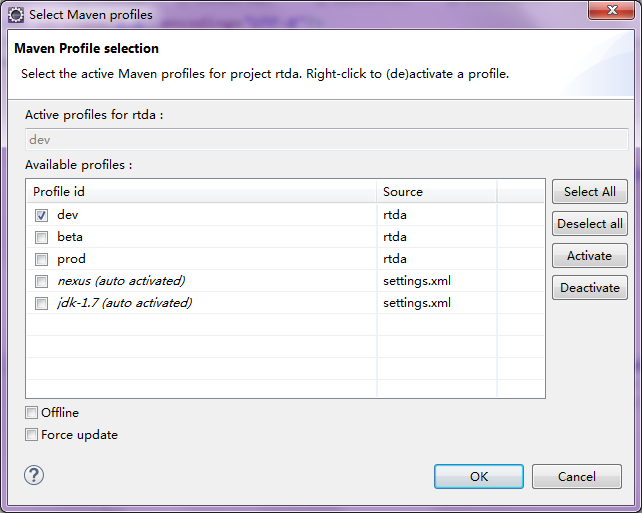
亲测好使。。。
maven编译问题-maven项目运行时找不到文件,解决方案之一的更多相关文章
- ios 引入第三方库 运行时找不到函数实现
今天引入webtrends 这个库,结果一直运行时找不到函数,纳闷了一下午! 后来发现,是other flag没有设置对,对于那些包含category用来扩展ios原始类型的库,链接的时候需要特别的链 ...
- Stack overflow 编译能通过,运行时出现Stack overflow
Stack overflow 编译能通过,运行时出现Stack overflow 大家都知道,Windows程序的内存机制大概是这样的,全局变量(局部的静态变量本质也属于此范围)存储于堆内存,该段内存 ...
- QT运行时加载UI文件
写QT程序里运行时加载UI文件,代码如下: 点击(此处)折叠或打开 #include "keyboard.h" #include <QtUiTools> #incl ...
- Ubuntu16.04下写的Qt程序,调试时没问题,运行时偶现崩溃 (需要在运行时生成core dump文件,QMAKE_CC += -g)
记录一下 Ubuntu16.04下写的Qt程序,调试时没问题,运行时偶现崩溃 需要在运行时生成core dump文件 首先在pro结尾里加入 QMAKE_CC += -g QMAKE_CXX += - ...
- IDEA下Maven项目搭建踩坑记----2.项目编译之后 在service层运行时找不到 com.dao.CarDao
项目写的差不多 想运行一下,然后发现运行到Service层的时候报错说找不到Dao层文件 ,纠结半天之后看了下编译好的项目文件,发现mapper文件下边是空的, 于是就百度找一下原因,结果说是IDEA ...
- Maven运行时找不到xml文件和properties文件的问题解决
使用Maven构建的项目,包下面的xml文件和properties属性文件默认在运行tomcat插件是不会生成文件到target里面的,需要自己配置 一.第一种解决方法也是最常用的解决方法 在pom. ...
- 在虚拟机中使用maven编译signal server项目记录
前言 安装好 mvn Ubuntu 16.04 JDK 我是从 oracle jdk 11 lts download 网站,复制jdk-11.0.4_linux-x64_bin.tar.gz的链接 w ...
- 分享知识-快乐自己:IDEA下maven编译打包Java项目成jar包但是resource下配置文件无法编译
今天在写分布式项目的时候,一直无法编译 resource 下的配置文件:(在target文件夹下的 classes文件查看是否编译) 最后只能通过在POM文件中配置resources配置 得以解决: ...
- qtp 自动化测试--点滴 菜单没有了,有些控件运行时找不到
test项目页签下-没有了 菜单栏:file edit view insert 看不到了 1 解决:在startpage标签下-tool-option-点击 restore layout-确定 2 菜 ...
随机推荐
- Troubles in Building Android Source Code
Some Troubles or problems you may encounter while you setup the Android source code build environmen ...
- A read-only user or a user in a read-only database is not permitted to disable
A read-only user or a user in a read-only database is not permitted to disable 出现如题的问题通常是由于db.lck的所属 ...
- Python全栈之路--Django ORM详解
ORM:(在django中,根据代码中的类自动生成数据库的表也叫--code first) ORM:Object Relational Mapping(关系对象映射) 我们写的类表示数据库中的表 我们 ...
- Navicat Premium 连接 Oracle 数据库
Navicat Premium 是一个可多重连接的数据库管理工具,它可让你以单一程序同時连接到 MySQL.SQLite.Oracle 及 PostgreSQL 数据库,让管理不同类型的数据库更加方便 ...
- bios文字解释
很多笔记本电脑用户由于不熟悉bios,导致在需要设置bios时不知如何下手,其实bios基本大同小异,熟悉了以后再遇到bios设置就手到擒来了. 今天我们以笔记本电脑为例,进行bios界面的解读. 1 ...
- 【hadoop之翊】——windows 7使用eclipse下hadoop应用开发环境搭建
由于一些缘故,这节内容到如今才写.事实上弄hadoop有一段时间了,能够编写一些小程序了,今天来还是来说说环境的搭建.... 说明一下:这篇文章的步骤是接上一篇的hadoop文章的:http://bl ...
- sqlserver修改表主键自增
alter table tname add id int identity(1,1)
- 捕获网络数据包并进行分析的开源库-WinPcap
什么是WinPcap WinPcap是一个基于Win32平台的,用于捕获网络数据包并进行分析的开源库. 大多数网络应用程序通过被广泛使用的操作系统元件来访问网络,比如sockets. 这是一种简单的 ...
- const_cast去除const限制,同一片内存
本质很简单,但一些优化 和 编程上的错误,却让人看不清本质. :const_cast<type_id> (expression) 该运算符用来修改类型的const或volatile属性.除 ...
- 自动清理DataGuard备机日志
>> from zhuhaiqing.info #!/usr/bin/bash #删除DataGuard备机归档日志备份 export ORACLE_HOME=/opt/oracle/pr ...