
使用开源的工具解析erspan流量
Decapsulation ERSPAN Traffic With Open Source Tools
Cisco Encapsulated Remote SPAN (ERSPAN) feature allows to monitor traffic on one or more ports and send the monitored traffic to one or more destination ports. Traffic is encapsulated into GRE tunnel and routed via network to ERSPAN destination. Any device that supports ERSPAN can be used as ERSPAN destination. It might be another Cisco device or Linux with installed software that can decapsulate GRE traffic.
The goal of this article is to show methods and tools for decapsulation of ERSPAN traffic. For this purpose I have built simple lab that consists of a Cisco CSR 1000v router and two Linux boxes. Core Linux represents a network host and generates network traffic (ICMP) that is going to be monitored. It is connected to the port GigabitEthernet1 of the Cisco router. The router is configured to monitor traffic on the port Gi1 and it sends traffic encapsulated in GRE tunneling protocol to IP address 10.230.10.1. It is the IP address of the ERSPAN destination configured on Linux Security Union. Security Onion is a unique Linux distro for intrusion detection, network security monitoring, and log management based on Ubuntu however any other Linux distro can be used.
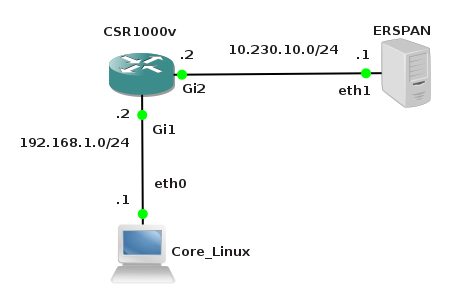
Picture 1 - ERSPAN Lab Topology
Below is an example of ERSPAN configuration on the CSR 1000v router. This is the source ERSPAN type and with configured rspan_id 1. The interface Gi1 is being monitored and the GRE traffic is sent to ERSPAN destination address IP 10.230.10.1.
CSR1000v# show running-config | b monitor
monitor session 1 type erspan-source
description ERSPAN to 10.230.10.1
source interface Gi1
destination
erspan-id 1
mtu 1464
ip address 10.230.10.1
origin ip address 10.230.10.2
You also must issue the command no shutdown after the command monitor session 1 type erspan-source in order to activate session.
1. Capturing ERSPAN Traffic with Wireshark
We are going to capture and analyze ERSPAN traffic with Wireshark packet sniffer. First configure IP address 10.230.10.1 on interface eth1 of the Linux Security Onion.
janosik@onion:~$ sudo su
root@onion# ip address add 10.230.10.1/24 dev eth1
Now use Wireshark to capture GRE traffic on Security Onion on its interface eth1 and ping the router IP address 192.168.1.2 from the Linux Core host (IP 192.168.1.1). If the source ERSPAN is properly configured on router, packets from the subnet 192.168.1.0/24 should appear in Wireshark output.
A closer look at the picture below reveals that the original packet ICMP packet (MAC header, IPv4 header and ICMP header) is now encapsulated as following.
MAC header + IPv4 header (10.230.10.2, 10.230.10.1) + GRE header (Protocol type ERSPAN) + ERPAN header + (original packet)
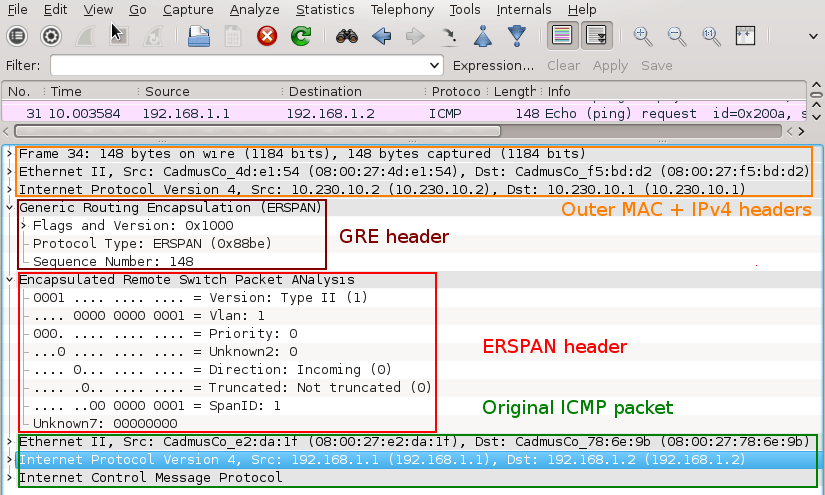
Picture 2 - Encapsulated GRE Traffic Captured on Interface Eth1
An original ICMP packet is encapsulated into GRE tunnel and the new outer MAC and IPv4 + GRE + ERSPAN headers are added to original packets. It allows encapsulated traffic to be forwarded through network to ERSPAN destination. However if we want software application such as IPS/IDS to analyze encapsulated packets, the outer L2 and L3 headers must be striped from packet. This can be done with tools such as RCDCAP which dissects packets from GRE tunnel.
2. Configuring GRE tunnel on ERSPAN Destination Device
If for some reason we do not want to install special software that dissects packets from GRE tunnel we can configure GRE tunnel on ERSPAN destination (Linux Security Onion) and let IDS to listen on a tunneled interface. Thanks to this configuration the outer MAC and IPv4 headers are stripped and do no appear in Wireshark output.
a) Load GRE module to kernel
janosik@onion:~$ sudo su
root@onion# modprobe ip_gre
You can check if GRE module is loaded into a kernel with command below.

Picture 3 - GRE Module Loaded Into Kernel
b) Choose receiving interface and assign IPv4 to it
root@onion# ip addr add 10.230.10.1/24 dev eth1
Set the MTU of the network interface that receives GRE packets larger than 1500 e.g. to 1900. Otherwise we are going to miss some bytes in larger packets.
root@onion# ip link set dev eth1 mtu 1900
c) Create virtual tunnel interface and associate it with IP previously configured on eth1 interface
root@onion# ip tunnel add mon0 mode gre local 10.230.10.1 ttl 8
d) Add IP address to interface mon0 which is not used for anything
root@onion# ip addr add 1.1.1.1/30 dev mon0
e) Change the state of mon0 device to up
root@onion# ip link set mon0 up
Check status of the interface mon0 with the command below. The interface must be in UP state and the Rx counter should increase.
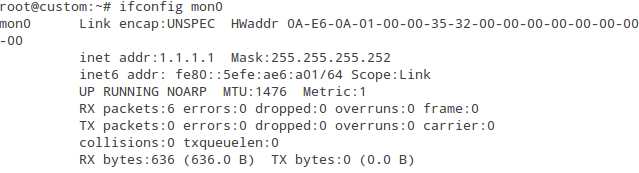
Picture 4 - Status of Interface mon0
Again, generate network traffic in the subnet 192.168.1.0/24 and configure Wireshark to listen on interface mon0. Notice that the outer MAC and Ipv4 header are now stripped from the ICMP packet.
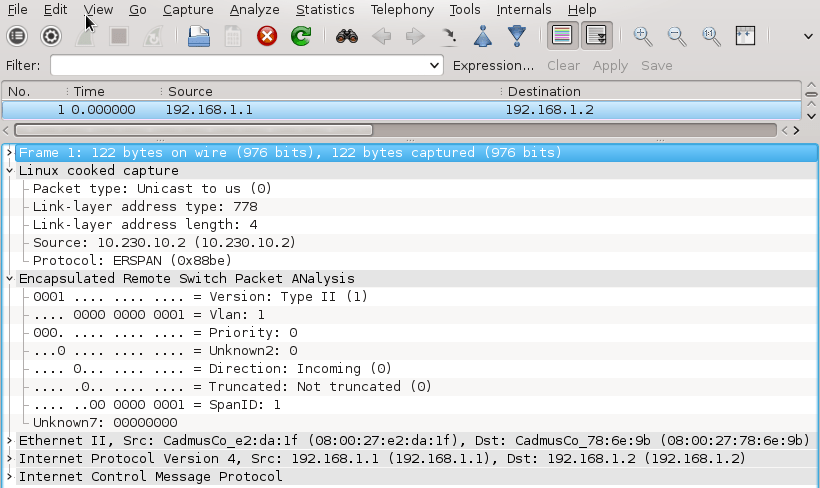
Picture 5 - Decapsulated Traffic Captured on Interface mon0
3. Using RCDCAP for Decapsulating ERSPAN Traffic
RCDCAP is wrapper program that dissects the traffic and creates a virtual interface where the traffic is already decapsulated. The tool is great but an installation process can be somehow tricky. For this reason I have written a script install_rcdcap.sh for Ubuntu 16.04.x. The script downloads and installs RCDCap from Mercurial repository. The actual version of RCDCAP installed from repository and successfully tested in scenario is 0.8. The script cares about all dependencies so basically you should only run the script with the command:
$ bash install_rcdcap.sh.txt
Once RCDCAP is installed configure the interface eth1 for capturing.
user@onion:~$ sudo su
root@onion# ip addr add dev eth1 10.230.10.1/24
root@onion# ip link set dev eth1 mtu 1900
root@onion# ip link set dev eth1 up
Start RCDCAP with the command below and let Wireshark to listen on interface mon1.
root@onion# rcdcap -i eth1 --erspan --tap-persist --tap-device mon1 --expression "host 10.230.10.1"
We can see that RCDCAP have dissected monitored traffic from GRE and only original MAC + IPv4 + ICMP headers and pyaload are presented in Wireshark output.
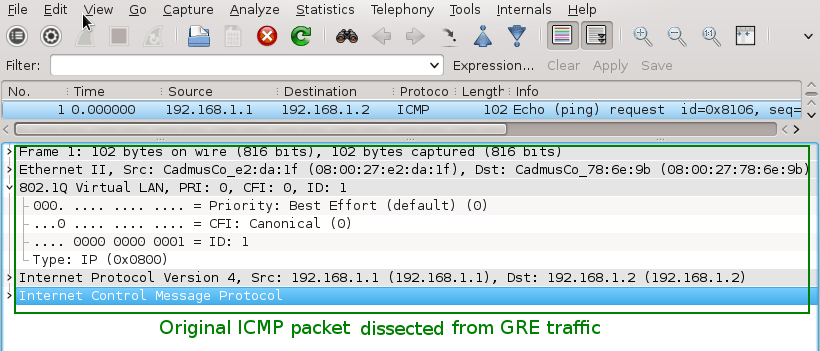
Picture 6 - Decapsulated Traffic Captured on Interface Mon1
Note: To test RCDCAP on Ubuntu Server OS (without GUI), issue the command below.
root@onion# rcdcap -i eth1 --erspan --tap-persist --tap-device mon1 --expression "host 10.230.10.1" &
Afterwards, start capturing a network traffic with tcpdump on the interface mon1 with the following command.
root@onion# tcpdump -i mon1 -v
End.
Reference:
http://packetpushers.net/erspan-new-favorite-packet-capturing-trick/
http://networkengineering.stackexchange.com/questions/3274/remote-sniffing-with-erspan-to-the-desktop
使用开源的工具解析erspan流量的更多相关文章
- GitHub 上的十一款热门开源安全工具
作为开源开发领域的基石,“所有漏洞皆属浅表”已经成为一条著名的原则甚至是信条.作为广为人知的Linus定律,当讨论开源模式在安全方面的优势时,开放代码能够提高项目漏洞检测效率的理论也被IT专业人士们所 ...
- 资源:开源Fuzzers工具列表 (以及其它fuzzing工具)
开源fuzzers / 开源fuzzing工具的最新列表(Fuzzers,没有标准中文翻译,可以理解为模糊测试工具或者模糊器) 如果你知道有需要添加的部分,那么请在这里或在推特上@Peerlyst来 ...
- 开源UML工具推荐
1.StarUML StarUML是一个开源UML项目,可以开发快速,灵活,可扩展,多功能并且免费的UML/MDA平台.此项目运行在Win32平台之上.StarUML项目的目标是成为RationalR ...
- 【转】开源性能测试工具 - Apache ab 介绍
版权声明:本文可以被转载,但是在未经本人许可前,不得用于任何商业用途或其他以盈利为目的的用途.本人保留对本文的一切权利.如需转载,请在转载是保留此版权声明,并保证本文的完整性.也请转贴者理解创作的辛劳 ...
- Sqoop是一款开源的工具,主要用于在HADOOP(Hive)与传统的数据库(mysql、oracle...)间进行数据的传递
http://niuzhenxin.iteye.com/blog/1706203 Sqoop是一款开源的工具,主要用于在HADOOP(Hive)与传统的数据库(mysql.postgresql.. ...
- 开源小工具 酷狗、网易音乐缓存文件转mp3工具
发布一个开源小工具,支持将酷狗和网易云音乐的缓存文件转码为MP3文件. 以前写过kgtemp文件转mp3工具,正好当前又有网易云音乐缓存文件需求,因此就在原来小工具的基础上做了一点修改,增加了对网易云 ...
- Babelfish 开源通用代码解析服务
Babelfish 是一个开源的代码解析服务 参考架构 支持的语言 bash go java javascript php ruby c++ typescript 功能 我们可以使用此工具,进行大规模 ...
- 开源ETL工具kettle系列之常见问题
开源ETL工具kettle系列之常见问题 摘要:本文主要介绍使用kettle设计一些ETL任务时一些常见问题,这些问题大部分都不在官方FAQ上,你可以在kettle的论坛上找到一些问题的答案 1. J ...
- 【年度开源、工具合集】牛津计划,DMTK,Graph Engine…提高你的工作效率!
本篇合集包括以下三个部分的内容: 1.微软亚洲研究院过去一年的所有开源合集,如分布式机器学习工具包DMTK等. 2.利用微软研究院的技术提高工作效率的工具合集,如让没有机器学习背景的开发人员也能开发出 ...
随机推荐
- Nginx搭建hls流媒体服务器
第一种方案:ffmpeg+nginx 新的ffmpeg已经支持HLS.(本人也参与了代码供献,给自己做个广告:)) 点播: 生成hls分片: ffmpeg -i <媒体文件> ...
- 同时启动多个Tomcat 和 Linux部署多个tomcat
a.减压2份tomcat文件 b.修改其中一个tomcat 的http访问端口(默认为8080端口,这里改为8091) c.修改其中一个tomcat 的Shutdown端口(默认为8005端口,这里改 ...
- Eureka 剔除失效服务
Spring Cloud 版本: Dalston.SR5 服务端配置: # 关闭保护机制 eureka.server.enable-self-preservation=false #剔除失效服务间隔 ...
- Numeric Type Attributes
[Numeric Type Attributes] INT(4) specifies an INT with a display width of four digits. This optiona ...
- Could not open Selected VM debug port (8700) (转)
版权声明:本文为博主原创文章,未经博主允许不得转载. 在运行项目的时候,eclipse弹出提示框“Could not open Selected VM debug port (8700). Make ...
- 【python】安装pymongo时出错
在python2.7的环境下,使用pip install pymongo安装模块报以下错误: Could not install packages due to an EnvironmentError ...
- html position定位
一.fixed居中 css样式代码:{ position:fixed left: 0; right: 0; margin:0 auto; width:300px } 二.Position属性有四个值: ...
- centos7 搭建keepalived+Nginx+tomcat
准备1台 192.168.2.224 安装Nginx,2台安装tomcat 192.168.2.222 192.168.2.223 1.安装Nginx: 上传pcre-8.36.tar.gz ...
- PHP从规定字符中生成固定位数随即串
}
- vue-cli 配置 proxyTable pathRewrite
vue-config-index.js中,proxyTable中的pathRewrite有什么用呢? 首先,在ProxyTable模块中设置了‘/api’,target中设置服务器地址,也就是接口的开 ...