
对于devexpress gridview 内插图加加进度条等的一点解读
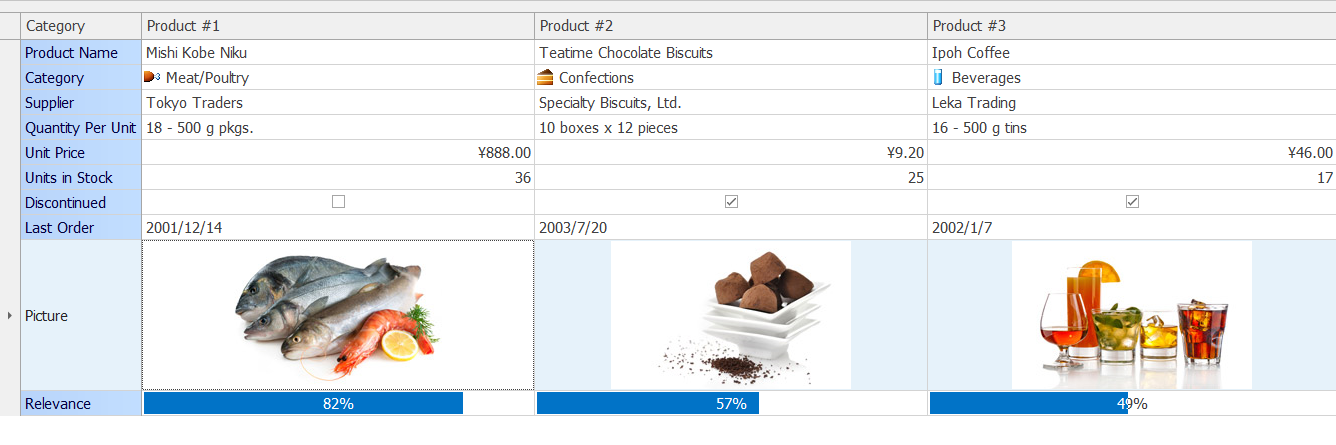
如上图,gategory 加了小图标, 其他行内还有计算器,大图片 进度条等
using System;

using System.Drawing;

using System.Collections;

using System.ComponentModel;

using System.Windows.Forms;

using System.Data;

namespace DevExpress.XtraEditors.Demos {

    /// <summary>

    /// Summary description for MultiEditors.

    /// </summary>

    public partial class MultiEditors : TutorialControl {

        public MultiEditors() {

            //

            // Required for Windows Form Designer support

            //

            InitializeComponent();

            //TutorialInfo.WhatsThisCodeFile = "CS\\GridMainDemo\\Modules\\MultiEditors.cs";

            //TutorialInfo.WhatsThisXMLFile = "DevExpress.XtraEditors.Demos.CodeInfo.MultiEditors.xml";

            gridControl1.ForceInitialize();

            InitData();

            //

            // TODO: Add any constructor code after InitializeComponent call

            //

        }

        #region Init

        private Image GetImage(string name) {

            System.IO.Stream str = System.Reflection.Assembly.GetExecutingAssembly().GetManifestResourceStream("DevExpress.XtraEditors.Demos.Images." + name);

            if (str != null)

                return Bitmap.FromStream(str);

            return null;

        }

        private byte[] ImageToByteArray(Image image) {

            System.IO.MemoryStream mStream = new System.IO.MemoryStream();

            image.Save(mStream, System.Drawing.Imaging.ImageFormat.Jpeg);

            byte[] ret = mStream.ToArray();

            mStream.Close();

            return ret;

        }

        private void InitData() {

            RecordOrder[] records = new RecordOrder[];

            records[] = new RecordOrder(Properties.Resources.ProductName, "Mishi Kobe Niku", "Teatime Chocolate Biscuits", "Ipoh Coffee");  //第一行纯字符串

            records[] = new RecordOrder(Properties.Resources.Category, , , ); //第二行带小图标 后边的 6 3 1 是imagelist 控件添加进去 的小图标的顺序号 .从1开始.

            records[] = new RecordOrder(Properties.Resources.Supplier, "Tokyo Traders", "Specialty Biscuits, Ltd.", "Leka Trading");

            records[] = new RecordOrder(Properties.Resources.QuantityPerUnit, "18 - 500 g pkgs.", "10 boxes x 12 pieces", "16 - 500 g tins");

            records[] = new RecordOrder(Properties.Resources.UnitPrice, 97.00, 9.20, 46.00);

            records[] = new RecordOrder(Properties.Resources.UnitsInStock, , , );

            records[] = new RecordOrder(Properties.Resources.Discontinued, false, true, true);

            records[] = new RecordOrder(Properties.Resources.LastOrder, new DateTime(, , ), new DateTime(, , ), new DateTime(, , ));

            records[] = new RecordOrder(Properties.Resources.Picture, Properties.Resources.product1, Properties.Resources.product2, Properties.Resources.product3);

            records[] = new RecordOrder(Properties.Resources.Relevance, , , );

            gridControl1.DataSource = records;

        }

        #endregion

        #region Grid events

        //<gridControl1>
// Properties.Resources.Category 此处用了属性资源字符串
gridView1_CustomRowCellEdit 是指定格子里的按钮等控件 比如repositoryItemImageComboBox1 是通过repository 入口进行设置
        private void gridView1_CustomRowCellEdit(object sender, DevExpress.XtraGrid.Views.Grid.CustomRowCellEditEventArgs e) {

            if (e.Column.FieldName != "Category") {

                RecordOrder rec = gridView1.GetRow(e.RowHandle) as RecordOrder;

                if (rec.Category == Properties.Resources.Category) e.RepositoryItem = repositoryItemImageComboBox1;

                if (rec.Category == Properties.Resources.Supplier) e.RepositoryItem = repositoryItemComboBox1;

                if (rec.Category == Properties.Resources.UnitPrice) e.RepositoryItem = repositoryItemCalcEdit1;

                if (rec.Category == Properties.Resources.UnitsInStock) e.RepositoryItem = repositoryItemSpinEdit1;

                if (rec.Category == Properties.Resources.Discontinued) e.RepositoryItem = repositoryItemCheckEdit1;

                if (rec.Category == Properties.Resources.Discontinued) e.RepositoryItem = repositoryItemCheckEdit1;

                if (rec.Category == Properties.Resources.LastOrder) e.RepositoryItem = repositoryItemDateEdit1;

                if (rec.Category == Properties.Resources.Picture) e.RepositoryItem = repositoryItemPictureEdit1;

                if (rec.Category == Properties.Resources.Relevance) e.RepositoryItem = repositoryItemProgressBar1;

            }

        }

        //</gridControl1>

        private void gridView1_RowCellDefaultAlignment(object sender, DevExpress.XtraGrid.Views.Base.RowCellAlignmentEventArgs e) {

            if (e.Column.FieldName != "Category") {

                if (e.RowHandle ==  || e.RowHandle == )

                    e.HorzAlignment = DevExpress.Utils.HorzAlignment.Far;

                if (e.RowHandle == )

                    e.HorzAlignment = DevExpress.Utils.HorzAlignment.Center;

            }

        }

        //<gridControl1>

        /*

         ~Set custom height for row 8:

         */

        private void gridView1_CalcRowHeight(object sender, DevExpress.XtraGrid.Views.Grid.RowHeightEventArgs e) {

            if (e.RowHandle == ) e.RowHeight = ;

        }

        //</gridControl1>

        #endregion

        #region RepositoryItems events

        private void repositoryItemProgressBar1_KeyPress(object sender, System.Windows.Forms.KeyPressEventArgs e) {

            int i = ;

            if (gridView1.ActiveEditor == null) return;

            if (e.KeyChar == '+') {

                i = (int)gridView1.ActiveEditor.EditValue;

                if (i < )

                    gridView1.ActiveEditor.EditValue = i + ;

            }

            if (e.KeyChar == '-') {

                i = (int)gridView1.ActiveEditor.EditValue;

                if (i > )

                    gridView1.ActiveEditor.EditValue = i - ;

            }

        }

        #endregion

    }

}
using System;

namespace DevExpress.XtraEditors.Demos {

    public class RecordOrder {

        private string fcategory;

        private object fproduct1;

        private object fproduct2;

        private object fproduct3;

        public RecordOrder(string fcategory, object fproduct1, object fproduct2, object fproduct3) {

            this.fcategory = fcategory;

            this.fproduct1 = fproduct1;

            this.fproduct2 = fproduct2;

            this.fproduct3 = fproduct3;

        }

        public string Category {

            get { return fcategory; }

        }

        public object Product1 {

            get { return fproduct1; }

            set { fproduct1 = value; }

        }

        public object Product2 {

            get { return fproduct2; }

            set { fproduct2 = value; }

        }

        public object Product3 {

            get { return fproduct3; }

            set { fproduct3 = value; }

        }

    }

}
对于devexpress gridview 内插图加加进度条等的一点解读的更多相关文章
- DevExpress GridControl 单元格添加进度条(ProgressBar)
首先可以使用DevExpress GridControl 自带的进度条控件. 但是我要用一个方法来设置所以的单元格进度,而不是每个单元格都要设置一遍,同时我想要根据进度值不同,进度条显示不同的颜色. ...
- jquery 实现拖动文件上传加进度条
通过对文件的拖动实现文件的上传,主要用到的是HTML5的ondrop事件,上传内容通道FormData传输: //进度条 <div class="parent-dlg" &g ...
- easyui datagrid 单元格加进度条(亲测可用)
{field: 'DataItemNum', title: '数据完整度', width: 100, formatter: function (v, r, i) { var p = (v / 27) ...
- layui 文件上传加进度条
1.页面 <div class="layui-row layui-col-space5"> <div class="layui-form-item&qu ...
- 微信小程序-上传多张图片加进度条(支持预览、删除)
2018-12-24 详情示例见:https://www.cnblogs.com/cisum/p/9564898.html 2018-12-29 组件下载见:https://www.cnblogs.c ...
- Js异步上传加进度条
http://www.ruanyifeng.com/blog/2012/09/xmlhttprequest_level_2.html http://www.cnblogs.com/yuanlong10 ...
- 纯H5 AJAX文件上传加进度条功能
上传代码js部分 //包上传 $('.up_apk').change(function () { var obj = $(this); var form_data = new FormData(); ...
- 在DevExpress GridControl中添加进度条控件 z
首先可以使用 DevExpress GridControl 自带的进度条控件. 但是我要用一个方法来设置所有的单元格进度,而不是每个单元格都要设置一遍,同时我想要根据进度值不同,进度条显示不同的颜色. ...
- 关于JFace中的进度条对话框(ProgressMonitorDialog类)
在Windows操作系统中,最常用的进度条对话框就是文件复制时的弹出框,如果想让用户愉快的使用你开发 的软件,那么在执行某个较长时间的操作时候,就应该弹出一个进度条提示框,告诉用户程序正在做什么. 做 ...
随机推荐
- SQL Server 用角色(Role)管理数据库权限
当数据库越来越多,连接到数据库的应用程序,服务器,账号越来越多的时候,为了既能达到满足账号操作数据权限需求,又不扩大其操作权限,保证数据库的安全性,有时候需要用角色来参与到权限管理中,通过角色做一个权 ...
- HttpWatch Professional Edition 7.2.13下载含( license.lic )
下载地址: http://download.httpwatch.com/httpwatchpro.exe httpwatch.lic # program. # # You ca ...
- centos 卸载和安装软件
rpm -qa 列出所有已安装软件包 rpm -e packagename 删除软件包 rpm -e --nodeps packagename 强制删除软件和依赖包 rpm -q 包名 查 ...
- 源码编译安装Python3及问题解决
https://chowyi.com/%E6%BA%90%E7%A0%81%E7%BC%96%E8%AF%91%E5%AE%89%E8%A3%85Python3%E5%8F%8A%E9%97%AE%E ...
- java.lang.StringIndexOutOfBoundsException: String index out of range: 0
hibernet 报错 java.lang.StringIndexOutOfBoundsException: String index out of range: 0 处理方法 数据表字段为char ...
- centos远程连接putty工具配置
Putty工具连接与使用步骤 作者:jason 登陆linux 一.关闭防火墙 输入命令 setup 完成后: 二.关闭selinux 输入命令 cd /etc/selinux 输入命令 vi co ...
- 嵌入式 Web Server 温度检测系统
1. Web Server 服务器后台表单处理程序:使用 CGI 程序接口编写后台程序的 Web 服务器. 2. Boa 服务器
- git---远程仓库版本回滚
开发中,发现有错误版本提交带远程分支master,怎么处理? 1 简介 最近在使用git时遇到了远程分支需要版本回滚的情况,于是做了一下研究,写下这篇博客. 2 问题 如果提交了一个错误的版本,怎么回 ...
- Spring beanFactory ApplicationContext
一.BeanFactoryBeanFactory 是 Spring 的“心脏”.它就是 Spring IoC 容器的真面目.Spring 使用 BeanFactory 来实例化.配置和管理 Bean. ...
- azkaban编译以及安装(调度系统)
编译源码 下载azkaban源码 git clone https://github.com/azkaban/azkaban.git jdk要求是1.8以上版本 export JAVA_HOME=/ ...