
CFDA
cfda数据抓取
1.网站数据是加密的,需要浏览器进行数据解析

2.网址url有js加密
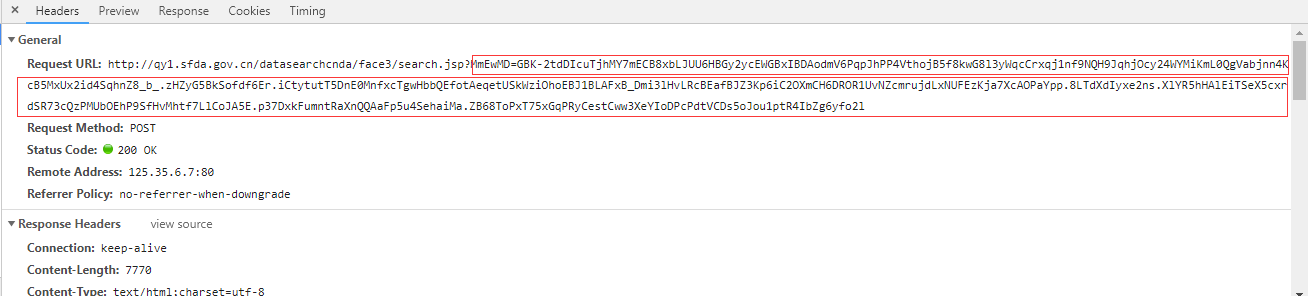
3.PhantomJS无法解析数据, chrome无法获取数据,所有最终选择用Firefox浏览器
import pymysql

import time

import uuid

from lxml import etree

import logging

from selenium import webdriver

import threading

import queue

import re

logging.basicConfig(filename='shengchan.log', filemode="w", level=logging.INFO)

class App1Spider(object):

    def __init__(self):

        self.db = pymysql.connect(host='', port=, database='', user='',

                                  password='', charset='utf8')

        self.cursor = self.db.cursor()

        self.options = webdriver.FirefoxOptions()

        self.options.add_argument('--headless')

        # 谷歌文档提到需要加上这个属性来规避bug

        self.options.add_argument('--disable-gpu')

        # 设置默认编码为utf-8

        self.options.add_argument('lang=zh_CN.UTF-8')

        # 隐藏滚动条, 应对一些特殊页面

        self.options.add_argument('--hide-scrollbars')

        # 禁止加载图片

        self.options.add_argument('blink-settings=imagesEnabled=false')

        # 指定浏览器分辨率

        self.options.add_argument('window-size=1440x900')

        self.browser = webdriver.Firefox(firefox_options=self.options)

    def main(self):

        """

        入口函数

        :param response:

        :return:

        """

        start = 1

        while True:

            browser = self.go_index()

            if browser:

                for i in range(start, 520):

                    browser = self.go_page(browser, i)

                    if browser:

                        for j in range(15):

                            if i > 511:

                                detail_html = self.go_detail(browser, j)

                                if detail_html:

                                    id = (i - 1) * 15 + j + 1

                                    self.parse_detail(detail_html, id)

                                else:

                                    break

                    else:

                        start = i - 1

                        break

            else:

                continue

    def go_index(self):

        """

        访问主页

        :return: 浏览器对象

        """

        # print("!-- start index --!")

        index_url = "http://app1.sfda.gov.cn/datasearch/face3/base.jsp?tableId=34&tableName=TABLE34&title=%D2%A9%C6%B7%C9%FA%B2%FA%C6%F3%D2%B5&bcId=118103348874362715907884020353"

        try:

            self.browser.get(index_url)

            time.sleep(3)

        except:

            # print("!-- error to get index page --!")

            # print("网速不太好,休息1分钟")

            time.sleep(30)

            return None

        else:

            html = self.browser.page_source

            condition = re.search(r"管理局--数据查询", html)

            if condition:

                # print("!-- success to get index page --!")

                return self.browser

            else:

                # print("!-- error to get index page --!----")

                # print("网速不太好,休息1分钟------")

                time.sleep(30)

                return None

    def go_page(self, browser, page):

        """

        跳转到指定页面

        :param browser: 浏览器对象

        :param page: 要跳转的页码

        :return: 跳转后的浏览器对象

        """

        # logging.info("!-- start page %s --!" % page)

        print("!-- start page %s --!" % page)

        go_page_js = 'location.href="javascript:devPage(%s)";' % page

        try:

            browser.execute_script(go_page_js)

            # 需要等待firefox页面加载完成

            time.sleep(2)

        except Exception as e:

            print("!-- error to go page %s --!" % page)

            # logging.info("!-- error to go page %s --!" % page)

            return None

        else:

            html = browser.page_source

            condition = re.search(r"第 %s 页" % page, html)

            if condition:

                logging.info("!-- success to go page %s --!" % page)

                return browser

            else:

                logging.info("!-- error to go page %s --!" % page)

                return None

    def go_detail(self, browser, number):

        """

        包含了提取详情页面数据信息,保存数据信息。

        :param browser: 浏览器对象

        :return: 详细数据生成器

        """

        # logging.info("!-- go detail %s --!" % number)

        print("!-- go detail %s --!" % number)

        go_detail_js = "var div=document.getElementById('content');" \

                       "var c=div.getElementsByTagName('a')[{detail_num}].click();"

        return_list_js = 'location.href = "javascript:viewList();"'

        _go_detail_js = go_detail_js.format(detail_num=number)

        browser.execute_script(_go_detail_js)

        time.sleep(2)

        detail_html = browser.page_source

        condition = re.search(r"javascript:viewList", detail_html)

        if condition:

            browser.execute_script(return_list_js)

            time.sleep(2)

            return detail_html

        else:

            # logging.info("!-- error to get detail --! %s" % number)

            print("!-- error to get detail --! %s" % number)

            return None

    def parse_detail(self, detail_html, id):

        # print(id)

        """

        详情页面提取规则

        :param html: 被提取页面的html

        :return: data

        """

        response = etree.HTML(detail_html)

        try:

            # 厂家编号

            number = response.xpath('//*[@id="content"]/div/div/table[1]/tbody/tr[2]/td[2]/text()')[0].strip().replace("'", "‘")

        except:

            number = '00000000'

        try:

            # 生产地址

            manufactureAddress = response.xpath('//*[@id="content"]/div/div/table[1]/tbody/tr[11]/td[2]/text()')[0].strip().replace("'", "‘")

        except:

            manufactureAddress = ''

        try:

            # 生产范围

            manufactureRange = response.xpath('//*[@id="content"]/div/div/table[1]/tbody/tr[12]/td[2]/text()')[0].strip().replace("'", "‘")

        except:

            manufactureRange = ''

        try:

            # 发证日期

            certificateDate = response.xpath('//*[@id="content"]/div/div/table[1]/tbody/tr[13]/td[2]/text()')[0].strip().replace("'", "‘")

        except:

            certificateDate = '2018-01-01'

        try:

            # 有效期

            validityDate = response.xpath('//*[@id="content"]/div/div/table[1]/tbody/tr[14]/td[2]/text()')[0].strip().replace("'", "‘")

        except:

            validityDate = '2018-01-01'

        try:

            # 发证机关

            certificateOrgan = response.xpath('//*[@id="content"]/div/div/table[1]/tbody/tr[15]/td[2]/text()')[0].strip().replace("'", "‘")

        except:

            certificateOrgan = ''

        try:

            # 签发人

            Signer = response.xpath('//*[@id="content"]/div/div/table[1]/tbody/tr[16]/td[2]/text()')[0].strip().replace("'", "‘")

        except:

            Signer = ''

        try:

            # 日常监管机构

            superviseAgency = response.xpath('//*[@id="content"]/div/div/table[1]/tbody/tr[17]/td[2]/text()')[0].strip().replace("'", "‘")

        except:

            superviseAgency = ''

        try:

            # 日常监管人员

            superviser = response.xpath('//*[@id="content"]/div/div/table[1]/tbody/tr[18]/td[2]/text()')[0].strip().replace("'", "‘")

        except:

            superviser = ''

        try:

            # 社会信用代码/组织机构代码

            socialCreditCode = response.xpath('//*[@id="content"]/div/div/table[1]/tbody/tr[3]/td[2]/text()')[0].strip().replace("'", "‘")

        except:

            socialCreditCode = ''

        try:

            # 监督举报电话

            reportTel = response.xpath('//*[@id="content"]/div/div/table[1]/tbody/tr[19]/td[2]/text()')[0].strip().replace("'", "‘")

        except:

            reportTel = ''

        try:

            # 备注

            comment = response.xpath('//*[@id="content"]/div/div/table[1]/tbody/tr[20]/td[2]/text()')[0].strip().replace("'", "‘")

        except:

            comment = ''

        try:

            # 分类码

            classificationCode = response.xpath('//*[@id="content"]/div/div/table[1]/tbody/tr[4]/td[2]/text()')[0].strip().replace("'", "‘")

        except:

            classificationCode = ''

        try:

            # 省份

            province = response.xpath('//*[@id="content"]/div/div/table[1]/tbody/tr[5]/td[2]/text()')[0].strip().replace("'", "‘")

        except:

            province = ''

        try:

            # 企业名称

            companyName = response.xpath('//*[@id="content"]/div/div/table[1]/tbody/tr[6]/td[2]/text()')[0].strip().replace("'", "‘")

        except:

            companyName = ''

        try:

            # 法定代表人

            legalPeople = response.xpath('//*[@id="content"]/div/div/table[1]/tbody/tr[7]/td[2]/text()')[0].strip().replace("'", "‘")

        except:

            legalPeople = ''

        try:

            # 企业负责人

            companyResponsioner = response.xpath('//*[@id="content"]/div/div/table[1]/tbody/tr[8]/td[2]/text()')[0].strip().replace("'", "‘")

        except:

            companyResponsioner = ''

        try:

            # 质量负责人

            qualityResponsioner = response.xpath('//*[@id="content"]/div/div/table[1]/tbody/tr[9]/td[2]/text()')[0].strip().replace("'", "‘")

        except:

            qualityResponsioner = ''

        try:

            # 注册地址

            registerAddress = response.xpath('//*[@id="content"]/div/div/table[1]/tbody/tr[10]/td[2]/text()')[0].strip().replace("'", "‘")

        except:

            registerAddress = ''

        cjrepetition = self.cursor.execute("select id from cfda_drug_company20181205 where numbers = %s" % id)

        if not cjrepetition:

            cjsql = "insert into cfda_drug_company20181205(number, manufactureAddress,  manufactureRange, certificateDate, validityDate, certificateOrgan, Signer, superviseAgency, superviser, socialCreditCode, reportTel, comment, classificationCode, province, companyName, legalPeople, companyResponsioner, qualityResponsioner, registerAddress, numbers) values('{}', '{}', '{}', '{}', '{}', '{}', '{}', '{}', '{}', '{}', '{}', '{}', '{}', '{}', '{}', '{}', '{}', '{}', '{}', {})"

            cjsql_data = cjsql.format(number, manufactureAddress, manufactureRange,

                                      certificateDate, validityDate, certificateOrgan,

                                      Signer, superviseAgency, superviser,

                                      socialCreditCode, reportTel, comment,

                                      classificationCode, province, companyName,

                                      legalPeople, companyResponsioner, qualityResponsioner,

                                      registerAddress, int(id))

            try:

                self.cursor.execute(cjsql_data)

                self.db.commit()

            except Exception as e:

                print('id:%s   e:%s' % (id, e))

if __name__ == '__main__':

    sheng = App1Spider()

    sheng.main()
CFDA的更多相关文章
- JS base64 加密和 后台 base64解密(防止中文乱码)
直接上代码 1,js(2个文件,网上找的) 不要觉的长,直接复制下来就OK //UnicodeAnsi.js文件 //把Unicode转成Ansi和把Ansi转换成Unicode function ...
- OpenGL阴影,Shadow Volumes(附源程序,使用 VCGlib )
实验平台:Win7,VS2010 先上结果截图: 本文是我前一篇博客:OpenGL阴影,Shadow Mapping(附源程序)的下篇,描述两个最常用的阴影技术中的第二个,Shadow Volu ...
- C++ stringstream
C++ 引入了ostringstream.istringstream.stringstream这三个类,这三个类包含在sstream.h头文件中.三个类中 1)istringstream类用于执行C+ ...
- 基于nodejs实现js后端化处理
今天D哥给我提了个问题,"用php执行过js没"?咋一听,没戏~~毕竟常规情况下,js是依赖浏览器运行的.想在php后端采集的同时利用js运行结果并传递给php使用,没戏! 然后回 ...
- uva 10129 play on words——yhx
aaarticlea/png;base64,iVBORw0KGgoAAAANSUhEUgAABNUAAANeCAYAAAA1BjiHAAAgAElEQVR4nOydabWsuhaFywIasIAHJK
- 第一部分 CLR基础:第2章 生成、打包、部署和管理应用程序及类型
2.1.NET Framework部署目标 Microsoft Windows多年来因不稳定和复杂而口碑不佳.造成的原因:1.应用程序都使用来自微软和厂商的动态链接库(dynamic-link lib ...
- Michael Kors - Wikipedia, the free encyclopedia
Michael Kors - Wikipedia, the free encyclopedia Michael Kors From Wikipedia, the free encyclopedia ...
- Html5模拟通讯录人员排序(sen.js)
// JavaScript Document var PY_Json_Str = ""; var PY_Str_1 = ""; var PY_Str_2 = & ...
- 爬虫之scrapy-redis
redis分布式部署 scrapy框架是否可以自己实现分布式? 不可以原因有两点 其一:因为多台机器上部署的scrapy会各自拥有各自的调度器,这样就使得多台机器无法分配start_urls列表中的u ...
随机推荐
- requests模块学习
- 基于如下5点展开requests模块的学习 什么是requests模块 requests模块是python中原生的基于网络请求的模块,其主要作用是用来模拟浏览器发起请求.功能强大,用法简洁高效.在 ...
- tp5 post接到的json被转义怎么解决???
$data =input('post.');//用户唯一标识$goods = $data['goods']; $shopcuxiao=$data['shopcuxiao']; $goods=htmls ...
- linux中使用pip命令遇到的一些问题
一 安装readline包之后python3.6导入模块异常退出 Type "help", "copyright", "credits" o ...
- IDEA下载Git中项目
一. 打开idea,点击File>Settings,搜索git(安装系统默认设置即可) 二. 选择git 三. Git中项目的路径粘贴到ID ...
- 判断B是不是A的子结构
题目描述 输入两棵二叉树A,B,判断B是不是A的子结构.(ps:我们约定空树不是任意一个树的子结构) 解答: class Solution: def HasSubtree(self, pRo ...
- 我练就数据分析技能从HR转型为产品经理
本文转自知乎 作者:空白白白白 ----------------------------------------------------- 空白白白白写在前面:当我在奥兰多的时候,一位漂亮的女学员(看 ...
- py库: PIL 、pillow(图像处理)
https://www.liaoxuefeng.com/wiki/0014316089557264a6b348958f449949df42a6d3a2e542c000/0014320027235877 ...
- 链接(跳转)<router-link> 和 路由实例Router
<router-link>和<router-link>传入的对象参数中包含path路径.name命名路由.params路径参数.query ?查询,并且如果提供了 path,p ...
- ssh-keygen生成git ssh密钥
title: ssh-keygen生成git ssh密钥 date: 2018-05-07 08:49:21 tags: [git,ssh-keygen] --- ssh-keygen生成git ss ...
- HTML 圆心节点
<!DOCTYPE html> <html lang="en"> <head> <meta charset="UTF-8&quo ...