
Linux环境下MySQL5.7安装记录
参考文档
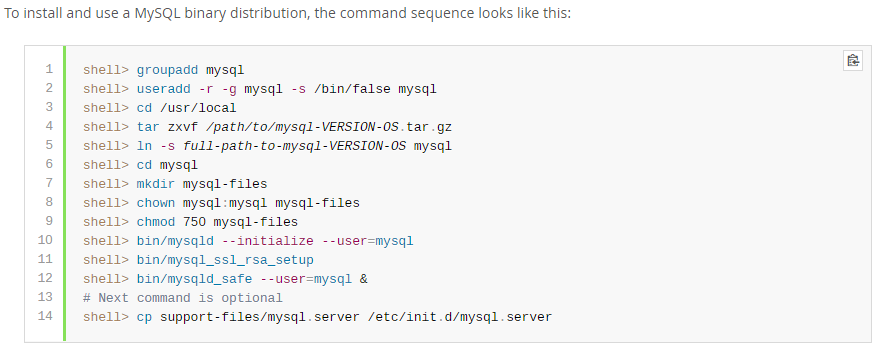
《Installing MySQL on Unix/Linux Using Generic Binaries》
https://dev.mysql.com/doc/refman/5.7/en/binary-installation.html
卸载旧版本MySQL
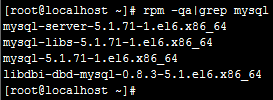
查看当前Linux环境中是否已经安装了MySQL。
执行命令:rpm -qa|grep mysql
查看状态:service mysqld status

停止服务:service mysqld stop
卸载MySQL:
[root@localhost ~]# rpm -e mysql-server-5.1.71-1.el6.x86_64 --nodeps
[root@localhost ~]# rpm -e mysql-libs-5.1.71-1.el6.x86_64 --nodeps
[root@localhost ~]# rpm -e mysql-5.1.71-1.el6.x86_64 --nodeps
[root@localhost ~]# rpm -e libdbi-dbd-mysql-0.8.3-5.1.el6.x86_64 --nodeps
创建MySQL组和用户
查看是否已经具有mysql用户。
[root@iZ88rvassw1Z opt]# cat /etc/group | grep mysql
[root@iZ88rvassw1Z opt]# cat /etc/passwd | grep mysql
添加组和用户
[root@iZ88rvassw1Z opt]# groupadd mysql
[root@iZ88rvassw1Z opt]# useradd -r -g mysql mysql
[root@iZ88rvassw1Z opt]# cat /etc/group | grep mysql
mysql:x:500:
[root@iZ88rvassw1Z opt]# cat /etc/passwd | grep mysql
mysql:x:498:500::/home/mysql:/bin/bash
[root@iZ88rvassw1Z opt]#
下载MySQL安装介质
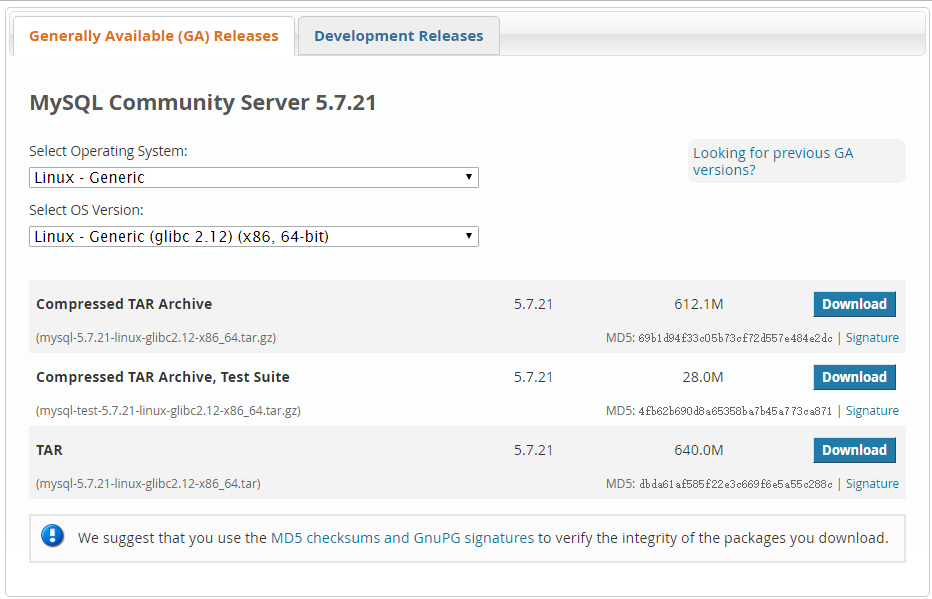
下载地址:
https://dev.mysql.com/downloads/mysql/
选择Linux-Generic,X86,64-bit;下载TAR。
上传MySQL安装介质
使用XFTP或者其他工具将安装介质上传至服务器。
本示例上传至“/opt/”目录。
[root@iZ88rvassw1Z opt]# ll
total 1310816
-rw-r--r-- 1 root root 671129600 Feb 5 16:48 mysql-5.7.21-linux-glibc2.12-x86_64.tar
MySQL安装过程
解压tar包:
[root@iZ88rvassw1Z opt]# tar xvf mysql-5.7.21-linux-glibc2.12-x86_64.tar

[root@iZ88rvassw1Z opt]# ll

total 1310816

-rw-r--r-- 1 root root 671129600 Feb 5 16:48 mysql-5.7.21-linux-glibc2.12-x86_64.tar

-rw-r--r-- 1 7161 31415 641798603 Dec 28 12:20 mysql-5.7.21-linux-glibc2.12-x86_64.tar.gz

-rw-r--r-- 1 7161 31415 29328152 Dec 28 12:18 mysql-test-5.7.21-linux-glibc2.12-x86_64.tar.gz
解压tar.gz包:
[root@iZ88rvassw1Z opt]# tar zxvf mysql-5.7.21-linux-glibc2.12-x86_64.tar.gz

[root@iZ88rvassw1Z opt]# ll

total 1310820

drwxr-xr-x 9 root root 4096 Feb 5 20:03 mysql-5.7.21-linux-glibc2.12-x86_64

-rw-r--r-- 1 root root 671129600 Feb 5 16:48 mysql-5.7.21-linux-glibc2.12-x86_64.tar

-rw-r--r-- 1 7161 31415 641798603 Dec 28 12:20 mysql-5.7.21-linux-glibc2.12-x86_64.tar.gz

-rw-r--r-- 1 7161 31415 29328152 Dec 28 12:18 mysql-test-5.7.21-linux-glibc2.12-x86_64.tar.gz

drwxr-xr-x. 2 root root 4096 Nov 22 2013 rh
修改文件夹名称:
[root@iZ88rvassw1Z opt]# mv mysql-5.7.21-linux-glibc2.12-x86_64 mysql
移动文件夹目录:
[root@iZ88rvassw1Z opt]# mv mysql /usr/local/
查看文件夹目录:
[root@iZ88rvassw1Z local]# ll

total 60

drwxr-xr-x  7 root root 4096 Nov  1 17:24 aegis

drwxr-xr-x. 2 root root 4096 Sep 23  2011 bin

drwxr-xr-x. 2 root root 4096 Sep 23  2011 etc

drwxr-xr-x. 2 root root 4096 Sep 23  2011 games

drwxr-xr-x. 2 root root 4096 Sep 23  2011 include

drwxr-xr-x  8 uucp  143 4096 Sep 27  2014 jdk1.7.0_71

drwxr-xr-x. 2 root root 4096 Sep 23  2011 lib

drwxr-xr-x. 2 root root 4096 Sep 23  2011 lib64

drwxr-xr-x. 2 root root 4096 Sep 23  2011 libexec

drwxr-xr-x  9 root root 4096 Feb  5 20:03 mysql

drwxr-xr-x. 2 root root 4096 Sep 23  2011 sbin

drwxr-xr-x. 5 root root 4096 Aug 14  2014 share

drwxr-xr-x. 2 root root 4096 Sep 23  2011 src

drwxr-xr-x  9 root root 4096 Jan 28 15:53 tomcat_gxwp

drwxr-xr-x  2 root root 4096 Jan 28 15:52 tools

[root@iZ88rvassw1Z local]#
修改文件所属权:
[root@iZ88rvassw1Z local]# chown -R mysql:mysql mysql/

[root@iZ88rvassw1Z local]# ll

total 60

drwxr-xr-x  7 root  root  4096 Nov  1 17:24 aegis

drwxr-xr-x. 2 root  root  4096 Sep 23  2011 bin

drwxr-xr-x. 2 root  root  4096 Sep 23  2011 etc

drwxr-xr-x. 2 root  root  4096 Sep 23  2011 games

drwxr-xr-x. 2 root  root  4096 Sep 23  2011 include

drwxr-xr-x  8 uucp    143 4096 Sep 27  2014 jdk1.7.0_71

drwxr-xr-x. 2 root  root  4096 Sep 23  2011 lib

drwxr-xr-x. 2 root  root  4096 Sep 23  2011 lib64

drwxr-xr-x. 2 root  root  4096 Sep 23  2011 libexec

drwxr-xr-x  9 mysql mysql 4096 Feb  5 20:03 mysql

drwxr-xr-x. 2 root  root  4096 Sep 23  2011 sbin

drwxr-xr-x. 5 root  root  4096 Aug 14  2014 share

drwxr-xr-x. 2 root  root  4096 Sep 23  2011 src

drwxr-xr-x  9 root  root  4096 Jan 28 15:53 tomcat_gxwp

drwxr-xr-x  2 root  root  4096 Jan 28 15:52 tools

[root@iZ88rvassw1Z local]#
开始执行安装:
安装命令:
mysqld --initialize --user=mysql --basedir=/usr/local/mysql --datadir=/usr/local/mysql/data
[root@iZ88rvassw1Z bin]# ./mysqld --initialize --user=mysql --basedir=/usr/local/mysql --datadir=/usr/local/mysql/data

2018-02-05T12:06:22.319404Z 0 [Warning] TIMESTAMP with implicit DEFAULT value is deprecated. Please use --explicit_defaults_for_timestamp server option (see documentation for more details).

2018-02-05T12:06:23.991371Z 0 [Warning] InnoDB: New log files created, LSN=45790

2018-02-05T12:06:24.235099Z 0 [Warning] InnoDB: Creating foreign key constraint system tables.

2018-02-05T12:06:24.333502Z 0 [Warning] No existing UUID has been found, so we assume that this is the first time that this server has been started. Generating a new UUID: fc7902f7-0a6c-11e8-9528-00163e00016c.

2018-02-05T12:06:24.336727Z 0 [Warning] Gtid table is not ready to be used. Table 'mysql.gtid_executed' cannot be opened.

2018-02-05T12:06:24.337416Z 1 [Note] A temporary password is generated for root@localhost: UdW3pJf4c+ko

[root@iZ88rvassw1Z bin]#

[Note] A temporary password is generated for root@localhost: UdW3pJf4c+ko
默认生成一个临时密码,通过该密码登录MySQL。
配置MySQL
登录MySQL控制台:
mysql -u root -p
输入刚才的临时密码后登录MySQL控制台。
修改root用户密码:
登录控制台后执行SQL发现报如下错误。
ERROR 1820 (HY000): You must reset your password using ALTER USER statement before executing this statement.
SET PASSWORD = PASSWORD('passw0rd');

mysql> flush privileges;
Query OK, 0 rows affected (0.00 sec)
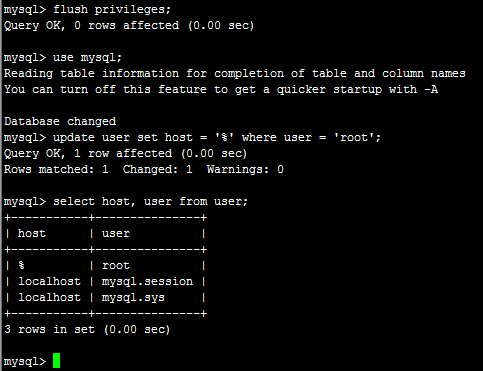
允许root用户远程访问:
mysql> use mysql;
Reading table information for completion of table and column names
You can turn off this feature to get a quicker startup with -A
Database changed
mysql> update user set host = '%' where user = 'root';
Query OK, 1 row affected (0.00 sec)
Rows matched: 1 Changed: 1 Warnings: 0
mysql> select host, user from user;
+-----------+---------------+
| host | user |
+-----------+---------------+
| % | root |
| localhost | mysql.session |
| localhost | mysql.sys |
+-----------+---------------+
3 rows in set (0.00 sec)
配置MySQL为服务
在/usr/local/mysql/目录下执行:
cp support-files/mysql.server /etc/init.d/mysqld
经过以上操作即可实现通过服务方式启动、停止MySQL。
启动:service mysqld start
停止:service mysqld stop
状态:service mysqld status
使用MySQL
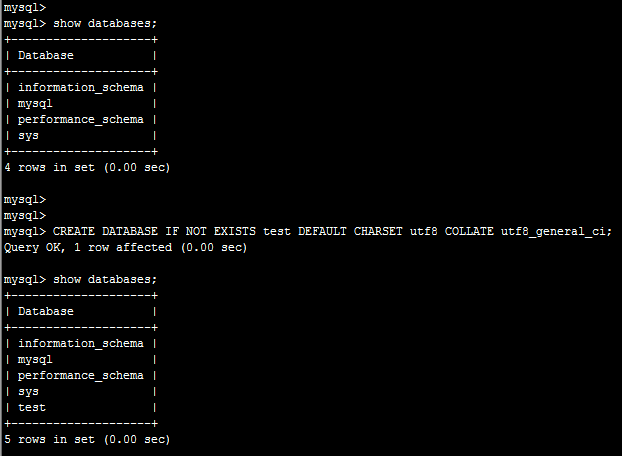
创建数据库:
CREATE DATABASE IF NOT EXISTS test DEFAULT CHARSET utf8 COLLATE utf8_general_ci;
导入数据:
source /opt/t_analy_act_act.sql
完成。
Linux环境下MySQL5.7安装记录的更多相关文章
- Linux环境下Python的安装过程
Linux环境下Python的安装过程 前言 一般情况下,Linux都会预装 Python了,但是这个预装的Python版本一般都非常低,很多 Python的新特性都没有,必须重新安装新一点的版本,从 ...
- Linux环境下NodeJS的安装配置(HelloWorld)
Linux环境下NodeJS的安装配置(HelloWorld) 最简单的环境安装,测试helloworld.给初学者!! 安装脚本,请仔细阅读逐行执行: #!/bin/bash #检查是否已经安装 r ...
- Linux环境下使用yum安装zip和unzip
Linux环境下使用yum安装zip和unzip. yum install zip yum install unzip
- PCL库在Linux环境下的编译安装
PCL库在Linux环境下的编译安装 PCL库的源码库:https://github.com/PointCloudLibrary/pcl 下载完了之后解压下来 编译库的几个步骤 mkdir build ...
- Linux环境下卸载、安装及配置MySQL5.1
Linux环境下卸载原有MySQL5.1数据库,并重新安装MySQL数据库的示例记录. 一.卸载MySQL 查看主机中是否安装了MySQL数据库: [root@RD-viPORTAL- ~]# rpm ...
- mosquitto在Linux环境下的部署/安装/使用/测试
mosquitto在Linux环境下的部署 看了有三四天的的源码,(当然没怎么好好看了),突然发现对mosquitto的源码有了一点点感觉,于是在第五天决定在Linux环境下部署mosquitto. ...
- Linux环境下:vmware安装Windows报错误-缺少所需的CD/DVD驱动器设备驱动程序
解决方法:将硬盘格式从SCSI改为IDE. 方法如下: 右键点击你新建的虚拟机名,点击最下面的setting,看到左侧第二行是hard disk 了么,你那里肯定是SCSI的,选中它,点最下面的rem ...
- Redis学习——Linux环境下Redis的安装(一)
一.关于Redis Redis最为一款开源的key-value存储系统,自推出到现在一直受到编程人员的喜爱.它支持存储多种value类型,String .List .Set .Zset .Hash.这 ...
- Linux 环境下为VirtualBox安装增强功能
VirtualBox安装CentOS后,再安装增强功能就可以共享文件夹.粘贴板以及鼠标无缝移动,主要步骤如下: 1.yum -y update 2.yum -y install g++ gcc gcc ...
随机推荐
- Navicat for MySQL无法连接到数据库怎么办
注意端口就是3306,不要改成80之类的,访问数据库就是从这个端口过去的
- 微信小程序之 Swiper(轮播图)
1.逻辑层 mine.js // pages/mine/mine.js Page({ /** * 页面的初始数据 */ data: { /*轮播图 配置*/ imgUrls: [ 'http://im ...
- VTMagic的使用
// VTMagic的使用 // CFOrderViewController.m // qifuyuniOS //// /** * @author 李洪强, 16-08-30 10:08:50 ...
- ffmpeg转码本地文件(一)
ffmpeg转码本地文件(一) 实现目标:输入本地文件.实现本地文件转码,里面包括mux层转码,codec层转码,视频格式转换,音频重採样等功能,功能点请看凝视.注意:凝视非常重要. #ifndef ...
- 局域网内PC通过笔记本共享上网
现实:PC.笔记本都通过网线接在局域网内,局域网无法上网:笔记本有无线网卡,可连WIFI上网. 现在想让PC通过笔记本来共享上网. 步骤: 1.笔记本开启DHCP.方法是开启"服务" ...
- ora-12541无监听的一种场景
项目上突然出现无法连接Oracle数据库的情况,提示无监听程序. 现象: 查看 listener.ora配置无问题,用Net Configuration Assistant重建监听,NCA也处于假死状 ...
- Hackrank Candies DP
题目链接:传送门 题意: n个学生站一行,老师给每个学生发至少一个糖 相邻学生,a[i] > a[i-1] 的话,那么右边学生的糖一定要发得比左边学生的糖多 问你满足条件这个老师总共最少的发多少 ...
- 如何完成dedecms外部数据库调用|跨数据库数据调用
第1步:打开网站include\taglib文件夹中找到sql.lib.php文件,并直接复制一些此文件出来,并把复制出来的这个文件重命名为mysql.lib.php. 注:mysql.lib.php ...
- 深度学习 dns tunnel检测 使用统计特征 全连接网络——精度99.8%
代码如下: import numpy as np import tflearn from tflearn.layers.core import dropout from tflearn.layers. ...
- P3398 仓鼠找sugar 又一次血的教训
做什么题都要注意数组的大小,不要犯下数组越界的错误(温馨(狠心)提示): 做了好多遍就是不对,原来是[20]的数组,在for下循环1——>20,神奇爆零: 链接:https://www.luog ...