
ubuntu使用git时,终端不显示git分支。
1:问题描述:
在Windows环境下习惯使用git bash操作git分支,最近学习linux环境,发现linux环境终端不显示git分支,相关现象如下:
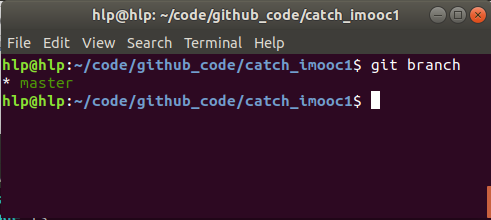
期望效果是:
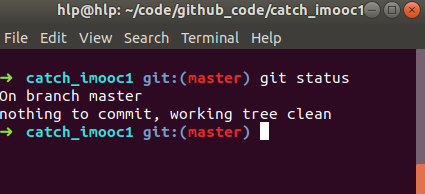
我的linux环境版本是:Ubuntu 18.04 LTS
系统默认的终端是:Terminal
2:修改方案:
通过百度,找到解决方案:oh-my-zsh
1:oh-my-zsh介绍:
oh-my-zsh是基于Zsh(Zsh是一个Linux用户很少使用的power-shell,这是由于大多数Linux产品安装,以及默认使用bash shell)的功能作了一个扩展,方便插件管理、主体自定义等。
oh-my-zsh源码在 https://github.com/robbyrussell/oh-my-zsh ,它的License为MIT。
2:oh-my-zsh安装:
安装zsh:
hlp@hlp:~/code/github_code/git_mytest$ sudo apt install zsh
查看安装成功:
hlp@hlp:~/code/github_code/git_mytest$ zsh --version
zsh 5.4.2 (x86_64-ubuntu-linux-gnu)
安装oh-my-zsh:
hlp@hlp:~/code/github_code/git_mytest$ sh -c "$(wget https://raw.githubusercontent.com/robbyrussell/oh-my-zsh/master/tools/install.sh -O -)"
附图:安装成功的标志:
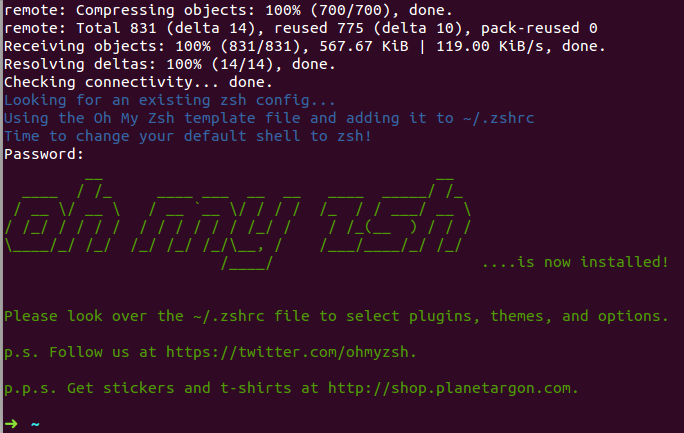
3:结果验证:
启动zsh终端:
hlp@hlp:~/code/github_code/git_mytest$ zsh

➜  git_mytest git:(master) ls    ------》成功显示了分支

doc      LICENSE       README.md  src         webpack.config.js

example  package.json  release    SUMMARY.md

➜  git_mytest git:(master) exit   -----》退出zsh终端

hlp@hlp:~/code/github_code/git_mytest$
4:配置修改:
分支显示颜色修改:
进入配置文件:
hlp@hlp:~/code/github_code/git_mytest$ vi ~/.oh-my-zsh/themes/robbyrussell.zsh-theme

修改后的配置文件:
hlp@hlp:~/code/github_code/git_mytest$ cat ~/.oh-my-zsh/themes/robbyrussell.zsh-theme

local ret_status="%(?:%{$fg_bold[green]%}➜ :%{$fg_bold[red]%}➜ )"

PROMPT='${ret_status} %{$fg[cyan]%}%c%{$reset_color%} $(git_prompt_info)'

ZSH_THEME_GIT_PROMPT_PREFIX="%{$fg_bold[blue]%}git:(%{$fg[green]%}"

ZSH_THEME_GIT_PROMPT_SUFFIX="%{$reset_color%} "

ZSH_THEME_GIT_PROMPT_DIRTY="%{$fg[blue]%}) %{$fg[yellow]%}✗"

ZSH_THEME_GIT_PROMPT_CLEAN="%{$fg[blue]%})"

配置文件生效查看:
hlp@hlp:~/code/github_code/git_mytest$ zsh
➜  git_mytest git:(master) ls

zsh主题修改:

查看自带默认主题:
hlp@hlp:~/code/github_code/git_mytest$ ls ~/.oh-my-zsh/themes -----》这里没有输出显示结果

修改主题:
hlp@hlp:~/code/github_code/git_mytest$ vi ~/.zshrc
hlp@hlp:~/code/github_code/git_mytest$ cat ~/.zshrc
# If you come from bash you might have to change your $PATH.
# export PATH=$HOME/bin:/usr/local/bin:$PATH

# Path to your oh-my-zsh installation.
  export ZSH="/home/hlp/.oh-my-zsh"

# Set name of the theme to load. Optionally, if you set this to "random"
# it'll load a random theme each time that oh-my-zsh is loaded.
# See https://github.com/robbyrussell/oh-my-zsh/wiki/Themes
ZSH_THEME="robbyrussell"     ------》修改该字段即可修改主题,相关主题可以参考:https://github.com/robbyrussell/oh-my-zsh/wiki/Themes

# Set list of themes to load
# Setting this variable when ZSH_THEME=random
# cause zsh load theme from this variable instead of
zsh插件修改:(zsh默认只有git插件)
查看系统默认插件:
hlp@hlp:~/.oh-my-zsh/plugins$ ls ~/.oh-my-zsh/plugins

修改插件配置文件:
hlp@hlp:~/code/github_code/git_mytest$ vi ~/.zshrc
hlp@hlp:~/code/github_code/git_mytest$ cat ~/.zshrc
。。。。。。
# Which plugins would you like to load? (plugins can be found in ~/.oh-my-zsh/plugins/*)
# Custom plugins may be added to ~/.oh-my-zsh/custom/plugins/
# Example format: plugins=(rails git textmate ruby lighthouse)
# Add wisely, as too many plugins slow down shell startup.
plugins=(
  git wd web-search history history-substring-search  ------》增加想要的插件,插件介绍:https://github.com/robbyrussell/oh-my-zsh/wiki/Plugins
)
。。。。。

除此之外,~/.zshrc文件中其他注释掉的配置信息,可以参考相关文档自行修改达到自己想要的效果。
例如给history增加时间:
- $ vim ~/.zshrc
- HIST_STAMPS="yyyy-mm-dd"
- source ~/.zshrc
卸载:
直接在终端中,运行uninstall_oh_my_zsh既可以卸载。
3:参考文献:(有照抄的嫌疑,太详细了)
主要参考:http://www.mamicode.com/info-detail-2163847.html
https://blog.csdn.net/czg13548930186/article/details/72858289
4:声明:
该博文只是为了规范自己的习惯,总结遇到过的问题,如有问题或者建议,请谅解。
5:遗留小问题(待处理):
进入zsh终端后,我用git branch查看分支的时候,发现会打开新的界面显示结果,使用很不方便。
ubuntu使用git时,终端不显示git分支。的更多相关文章
- git Eclipse项目不显示当前分支
问题: 在Eclipse中,导入新的git项目,在项目上不再显示当前所处的分支,也不再显示修改了哪些文件 解决: 右键选中项目 --> Team --> Share Project ...
- git入门(3)git checkout 和git branch分支的创建和删除
在一个项目中,需要多人同时开发,协同coding 要求: 开发时请用开发分支daily/0.0.1, 禁止直接使用master分支开发新建分支 git checkout -b daily/0.0.1 ...
- git常用命令,学git代码管理
下面是我整理的常用 Git 命令清单.几个专用名词的译名如下. Workspace:工作区 Index / Stage:暂存区 Repository:仓库区(或本地仓库) Remote:远程仓库 一. ...
- Git详解之十 Git常用命令
下面是我整理的常用 Git 命令清单.几个专用名词的译名如下. Workspace:工作区 Index / Stage:暂存区 Repository:仓库区(或本地仓库) Remote:远程仓库 一. ...
- 10年阿里自动化测试架构师帮您收集的:git常用命令大全以及git原理图【泣血推荐,建议收藏】
一.Git分布式版本控制简介 Git 是一个很强大的分布式版本控制系统.它不但适用于管理大型开源软件的源代码,管理私人的文档和源代码也有很多优势.本来想着只把最有用.最常用的 Git 命令记下来, ...
- 01 . Git常用命令及方法和分支管理
原理 # Workspace:工作区 # Index / Stage:暂存区 # Repository:仓库区(或本地仓库) # Remote:远程仓库 本地分支关联远程 git branch --s ...
- linux显示git commit id,同时解决insmod模块时版本不一致导致无法加载问题
linux内核默认会包含git的commit ID. 而linux的内核在insmod模块时,会对模块和内核本身的版本做严格的校验.在开发产品时,改动内核后,由于commit ID变更,会导致linu ...
- MacBook设置终端颜色,补全忽略大小写,设置命令别名alias,设置vim,设置显示git分支
1.启用终端颜色 修改配置文件 $ vim .bash_profile #enables colorin the terminal bash shell export export CLICOLOR= ...
- 能显示git分支的终端提示配置
之前都是跟随潮流,安装zsh然后oh-my-zsh,选一个看起来顺眼的主题,一通瞎配置,很酷炫. 可是即使只有一个git插件,oh-my-zsh每次启动的时候都很慢,起码有好几秒,而且有时候zsh还会 ...
随机推荐
- POJ1150he Last Non-zero Digit(组合)
链接 题意从尾部找第一个非0的数 这样就可以考虑下怎样会形成0 这个都知道 只有因子2和因子5相遇会形成0 那这样可以先把所有的2和5先抽出来,这样就保证了其它的数相乘就不会再出现0了 这样就可以转 ...
- [转]利用telnet进行SMTP的验证
本文转自:http://www.cnblogs.com/rootq/articles/1320266.html [crazywill@localhost crazywill]$ telnet #tel ...
- js操作css样式、js的兼容问题
一.js操作css样式 div . style . width="200px" 在div标签内我们添加了一个style属性,并设定width值.这种写法会给标签带来大量的style ...
- chrome inspect出现白屏的解决方案
点inspect后 弹出框,可是里面一片白色 PS:原效果不是这样,只是图找不到随便p的 原因可以看这个:http://www.cnblogs.com/slmk/p/7591126.html 大概意思 ...
- iOS 开发App捕获异常, 反馈给服务器, 提高用户体验
在我们开发的app中, 不可避免的, 有时候用户使用软件会崩溃. 我们就需要捕获异常, 可以在入口类中加入相应的代码, 可以在每次用户打开程序的时候, 检查一下沙盒中是否有崩溃日志, 如果有, 可以 ...
- centos6上安装mysql8.0版本
本博客是采用yum源的方式安装,非常的方便和快捷.(redhat 与centos7 等操作系统都可以采用此方法,步骤大体一致) mysql官网地址: https://dev.mysql.com 开 ...
- numpy次方计算
>>> 2**np.arange(3, 6) array([ 8, 16, 32])
- CentOS7.6 静态IP配置
1:选中安装好的虚拟机,点击“编辑”,然后选择“虚拟网络编辑器(N…)”,如下图所示: 2:选择桥接模式,在桥接到指定的本地网卡即可."确定"保存 3:选中虚拟机,右击虚拟机,选择 ...
- python interview questions
referce:python interview questions top 50 refercence:python interview questions top 15 summary Q: wh ...
- vue计算属性computed和methods的区别
computed和methods的区别 在new Vue的配置参数中的computed和methods都可以处理大量的逻辑代码,但是什么时候用哪个属性,要好好区分一下才能做到正确的运用vue. com ...