
AngularJS小练习20170508
首先可能需要安装npm,并且配置环境.
1.打开Dos(命令提示符).按Windows徽标键+R组合键,输入cmd然后按回车键进入Dos.
2.安装Yeoman.在Dos下输入npm install -g yo.
3.安装Grunt.在Dos下输入npm install -g grunt-cli.
4.安装Bower.在Dos下输入npm install -g bower.
5.安装Generator-angular的0.9.8版本.在Dos下输入npm install -g generator-angular@0.9.8
6.安装Generator-karma.在Dos下输入npm install -g generator-karma.
7.安装Angular-strap.在Dos下输入npm install -g angular-strap.
8.安装Bootstrap.在Dos下输入npm install -g bootstrap.
9.进入AngularJs的项目文件夹,我的是:D:\AngularJsItem,在这里新建TemplateItem文件夹.然后在Dos下进入文件夹,先输入d:回车,先复制路径,然后输入cd+空白+鼠标右键粘贴,然后回车,再输入yo angular TemplateItem,按用户要求自动生成项目.第一个问题是:Would you like to use Sass(With Compass)?这个输入n然后回车就好.暂时没用上.
第二个问题是:Would you like to include Bootstrap?输入y然后回车,因为项目之后要使用BootStrap.第三个问题是:Which modules would you like to include?(Press <space> to select)... .这个选中全部,然后按回车就好了(如果前面括号里面有*,就是已选中状态).
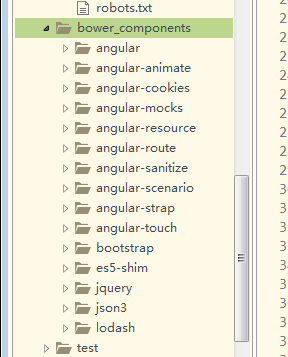
10.如果缺少以上图片中的文件夹.需要将这些也安装.在Dos下输入npm install -g 文件夹名称.缺少哪个就安装哪个.
11.接下来在项目里面添加bower_components文件夹,如果有就不用新建.直接到npm目录,我的是D:\NodeJs\Install\node_global.-g都是安装到这个目录.找到node_modules目录,将里面的文件夹复制到bower_components目录下.
12.在项目添加一个app文件夹(和bower_components同级),如果有就直接在app目录下新建文件夹bootstrap,然后在bootstrap下面新建index.html文件.
下面是我的index.html的页面代码:
<!DOCTYPE html PUBLIC "-//W3C//DTD HTML 4.01//EN"
"http://www.w3.org/TR/html4/strict.dtd">
<html xmlns="http://www.w3.org/1999/xhtml" lang="en">
<head>
<meta http-equiv="Content-Type" content="text/html; charset=UTF-8" />
<title></title>
<link href="../../bower_components/bootstrap/dist/css/bootstrap.css" rel="stylesheet"/>
</head>
<body ng-app="userApp">
<stk-userlist-panel></stk-userlist-panel>
<script src = "../../bower_components/jquery/dist/jquery.js"></script>
<script src = "../../bower_components/angular/angular.js"></script>
<script src = "../../bower_components/angular-animate/angular-animate.js"></script>
<script src = "../../bower_components/angular-cookies/angular-cookies.js"></script>
<script src = "../../bower_components/angular-resource/angular-resource.js"></script>
<script src = "../../bower_components/angular-route/angular-route.js"></script>
<script src = "../../bower_components/angular-sanitize/angular-sanitize.js"></script>
<script src = "../../bower_components/angular-touch/angular-touch.js"></script>
<script src = "../../bower_components/angular-strap/dist/angular-strap.js"></script>
<script src = "../../bower_components/lodash/dist/lodash.js"></script>
<script type="text/javascript">
var app = angular.module('userApp', [
'ngAnimate',
'ngCookies',
'ngResource',
'ngRoute',
'ngSanitize',
'ngTouch',
'mgcrea.ngStrap'
]);
app.service('userService', function userService() {
// AngularJS will instantiate a singleton by calling "new" on this function
//1辅助方法: 从localStorage中加载监视列表
var loadModel = function(){
var model = {
userList: localStorage['userManager.userList'] ?
JSON.parse(localStorage['userManager.userList']) : []
};
return model;
};
//2辅助方法: 将监视列表保存到localStorage中
var saveModel = function(){
localStorage['userManager.userList'] =
JSON.stringify(Model.userList);
};
//3辅助方法: 使用lodash找到指定ID的监视列表
var findById = function(cid){
return _.find(Model.userList, function(user){
return parseInt(user.cid) === parseInt(cid);
});
};
//4辅助方法:以编号查找编号是否存在,因为编号是来标志对象的(唯一的)
var findIndexByCid = function(cid){
var index = -1;
var userArr = JSON.parse(localStorage['userManager.userList']);
for(var i = 0; i < userArr.length; i++){
if(parseInt(userArr[i].cid) === parseInt(cid)){
index = i;
break;
}
}
return index;
}
//4返回所有监视列表或者按指定的ID进行查找
this.query = function(cid){
if(cid){
return findById(cid);
}else{
return Model.userList;
}
};
//5在监视列表模型中保存一个新的监视列表
this.save = function(user){
if(findIndexByCid(user.cid) > 0){
alert('编号已存在,编号是唯一的,请换一个编号!');
return 'failed';
}else{
Model.userList.push(user);
saveModel();
return 'success';
}
};
//6从监视列表模型中移除指定的监视列表
this.remove = function(user){
_.remove(Model.userList, function(userModel){
return userModel.cid === user.cid;
});
saveModel();
};
//修改方法
this.update = function(user){
var userArr = JSON.parse(localStorage['userManager.userList']);
var index = findIndexByCid(user.cid);
userArr[index] = user;
saveModel();
}
//7为这个单例服务初始化模型
var Model = loadModel();
});
//指令
app.directive('stkUserlistPanel', function ($location, $modal, userService) {
return {
templateUrl: 'templates/userlist-panel.html',
restrict: 'E',
cache: false,
scope: {},
link: function($scope){
//2初始化变量
$scope.user = {};
//添加页面
var addListModal = $modal({
scope: $scope,
templateUrl: 'templates/addlist-modal.html',
show: false
});
//修改页面
var updateListModal = $modal({
scope: $scope,
templateUrl: 'templates/updatelist-modal.html',
show: false
});
//3将服务中的模型绑定到该作用域
$scope.userList = userService.query();
//4显示addlist modal
$scope.showModal = function(){
$scope.user = {};
addListModal.$promise.then(addListModal.show);
};
//5根据模态框中的字段创建一个新的列表
$scope.createUser = function(){
var status = userService.save($scope.user);
if(status == 'success'){
addListModal.hide();
$scope.user = {};
}
};
//6删除目标列表并重定向至主页
$scope.deleteList = function(user){
userService.remove(user);
$location.path('/');
};
//进入修改页面的函数
$scope.showUpdateModal = function(user){
$scope.user = user;
updateListModal.$promise.then(updateListModal.show);
}
//修改的函数
$scope.updateUser = function(user){
userService.update(user);
updateListModal.hide();
};
}
};
});
</script>
</body>
</html>
13.在bootstrap下新建一个文件夹templates,在里面新建三个html文件.
userlist-panel.html
<!DOCTYPE html>
<html lang="en">
<head>
<meta charset="utf-8">
<title>userlist-panel</title>
<style>
</style>
</head>
<body>
<div class = "panel panel-info">
<div class = "panel-heading">
<span class = "glyphicon glyphicon-eye-open"></span>
UserList
<!-- 1在单击时调用showModal()处理器 -->
<button type = "button"
class = "btn btn-success btn-xs pull-right"
ng-click = "showModal();"
>
<span class = "glyphicon glyphicon-plus"></span>
</button>
</div>
<div class = "panel-body">
<!-- 2如果没有监视列表存在,就显示帮助文本 -->
<div ng-if = "!userList.length" class = "text-center">
Use
<span class = "glyphicon glyphicon-plus">
</span>
to create a user
</div>
<div class = "list-group">
<!-- 3重复监视列表中的每个列表,并创建链接 -->
<div class="list-group-item"
ng-repeat = "u in userList track by $index">
<a ng-click = "showUpdateModal(u);">
{{ u.cid }}
</a>
<a ng-click = "showUpdateModal(u);">
{{ u.name }}
</a>
<a ng-click = "showUpdateModal(u);">
{{ u.description }}
</a>
<a>
<!-- 4调用deleteList()处理器删除该列表 -->
<button type = "button" class = "close"
ng-click = "deleteList(u);"
>
×
</button>
</a>
</div>
</div>
</div>
</div>
</body>
</html>
addlist-modal.html文件代码:
<!DOCTYPE html>
<html lang="en">
<head>
<meta charset="utf-8">
<title>addlist-modal</title>
<style>
</style>
</head>
<body>
<div class = "modal" tabindex = "-1" role = "dialog">
<div class = "modal-dialog">
<div class = "modal-content">
<div class = "modal-header">
<!-- 1在单击时调用$modal.$hide() -->
<button type = "button" class = "close"
ng-click = "$hide();"
>
×
</button>
<h4 class = "modal-title">
Create New User
</h4>
</div>
<!-- 2命名该表单用于验证过程 -->
<form role = "form" id = "add-user" name = "listForm">
<div class = "modal-body">
<div class = "form-group">
<label for = "user-name">
编号
</label>
<!-- 3将输入绑定到userList.firstname -->
<input type = "text"
class = "form-control"
id = "user-cid"
placeholder = "cid this user"
ng-model = "user.cid"
required
/>
</div>
<div class = "form-group">
<label for = "user-name">
姓名(昵称)
</label>
<!-- 3将输入绑定到userList.firstname -->
<input type = "text"
class = "form-control"
id = "user-name"
placeholder = "name this user"
ng-model = "user.name"
required
/>
</div>
<div class = "form-group">
<label for = "user-description">
描述
</label>
<!-- 4将输入绑定到userlist.lastname -->
<input type = "text"
class = "form-control"
id = "user-description"
maxlength = "40"
placeholder = "description this user"
ng-model = "user.description"
required
/>
</div>
</div>
<div class = "modal-footer">
<!-- 5在单击时创建列表,但如果表单是无效的,那么它将处于禁用状态 -->
<button type = "submit"
class = "btn btn-success"
ng-click = "createUser();"
ng-disabled = "!listForm.$valid"
>
Create
</button>
<button type = "button"
class = "btn btn-danger"
ng-click = "$hide();"
>
Cancel
</button>
</div>
</form>
</div>
</div>
</div>
</body>
</html>
updatelist-modal.html
<!DOCTYPE html>
<html lang="en">
<head>
<meta charset="utf-8">
<title>updatelist-modal</title>
<link href="../../bower_components/bootstrap/dist/css/bootstrap.css" rel="stylesheet"/>
<style>
</style>
</head>
<body>
<div class = "modal" tabindex = "-1" role = "dialog">
<div class = "modal-dialog">
<div class = "modal-content">
<div class = "modal-header">
<!-- 1在单击时调用$modal.$hide() -->
<button type = "button" class = "close"
ng-click = "$hide();"
>
×
</button>
<h4 class = "modal-title">
Update Old User
</h4>
</div>
<!-- 2命名该表单用于验证过程 -->
<form role = "form" id = "add-user" name = "listForm">
<div class = "modal-body">
<div class = "form-group">
<label for = "user-name">
编号
</label>
<!-- 3将输入绑定到userList.firstname -->
<input type = "text"
class = "form-control"
id = "user-cid"
placeholder = "cid this user"
ng-model = "user.cid"
ng-disabled="true"
required
/>
</div>
<div class = "form-group">
<label for = "user-name">
姓名(昵称)
</label>
<!-- 3将输入绑定到userList.firstname -->
<input type = "text"
class = "form-control"
id = "user-name"
placeholder = "name this user"
ng-model = "user.name"
required
/>
</div>
<div class = "form-group">
<label for = "user-description">
描述
</label>
<!-- 4将输入绑定到userlist.lastname -->
<input type = "text"
class = "form-control"
id = "user-description"
maxlength = "40"
placeholder = "description this user"
ng-model = "user.description"
required
/>
</div>
</div>
<div class = "modal-footer">
<!-- 5在单击时创建列表,但如果表单是无效的,那么它将处于禁用状态 -->
<button type = "submit"
class = "btn btn-success"
ng-click = "updateUser(user);"
ng-disabled = "!listForm.$valid"
>
Update
</button>
<button type = "button"
class = "btn btn-danger"
ng-click = "$hide();"
>
Cancel
</button>
</div>
</form>
</div>
</div>
</div>
</body>
</html>
最后的效果图:

AngularJS小练习20170508的更多相关文章
- 【AngularJS】—— 3 我的第一个AngularJS小程序
通过前面两篇的学习,基本上对AngularJS的使用有了一定的了解. 本篇将会自己手动写一个小程序,巩固下理解. 首先要注意的是,引用AngularJS的资源文件angular.min.js文件. 由 ...
- AngularJS小知识点一
AngularJS是由谷歌公司及一个由开发者组成的个人社区共同打造.其主要优势在于帮助使用者在web应用程序中实现必要的动态视图.它是通过原生的MVC(模型-视图-控制器)功能来增强HTML. PS: ...
- (四)Angularjs - 小实例(2)
自定义指令编写时钟 模板 <!-- 模板文件 --><html> <!-- 内置的ng-app指令通知编译器启动AngularJS框架--> <body ng ...
- (三)Angularjs - 小实例
AngularJS处理数据表格 使用 np-repeat 指令 <table> ... <!-- 这里使用ng-repeat指令来重复数据生成表格 --> <tr ng- ...
- angularjs小知识
字符串和对象的转化 :angular.fromJson(jsonStr) 对象转字符串 :angular.toJson(obj) jsonStr:json字符串 obj:对象
- angularjs小练习(分别通过ng-repeat和ng-option动态生成select下拉框)
本次做一个简单的关于动态生成select的练习 在实现上有两种方式: 其一.通过ng-repeat来实现 其二.通过ng-option来实现 在页面效果上,两种实现的效果都一样 但是在数据选择的数据从 ...
- AngularJS 技术总结
学习AngularJS,并且能在工作中使用到,算是很幸运了.因此本篇也会搜集各种资料,进行分享. 书籍分享 AngularJS权威指南 常用链接 AngularJS API文档 AngularJS 用 ...
- angularJS 二
angularJS 2.1 ngForm <!DOCTYPE html> <html lang="zh-cn" ng-app> <head> ...
- vue学习笔记
来公司以后就一直在用vue框架,不管是业务代码,还是做vue组件.关于vue有一些点是文档中没有提及的,记录一下以便以后查询- 一.Vue的特点 新一代 Vue.js 框架非常关注如何用极少的外部特性 ...
随机推荐
- java计算时间差及比较时间大小(转)
比如:现在是2004-03-26 13:31:40 过去是:2004-01-02 11:30:24 我现在要获得两个日期差,差的形式为:XX天XX小时XX分XX秒 方法一: DateFo ...
- Linux系统挂载NTFS文件系统(转载)
转自:http://hermesbox.blogbus.com/logs/47386987.html 今天尝试并成功的将一块500G的移动硬盘挂载到了RHEL5的系统上,甚感欣慰.想到也许以后自己或其 ...
- 在selenium中一些相对常用的JavaScript事件
输入框输入: 1.找到输入框的id,然后进行输入操作 ordinal :输入框的id parameter :需要输入的内容 browser.execute_script("document. ...
- python 面向对象九 定制类
一.定制类,实质就是我们自己重写特殊函数 看到类似__slots__这种形如__xxx__的变量或者函数名就要注意,这些在Python中是有特殊用途的. __slots__我们已经知道怎么用了,__l ...
- Linux 常用命令十 which cal date
一.which命令 查找一个目录所在的路径: wang@wang:~/workpalce/python$ which ls /bin/ls 二.cal命令 wang@wang:~/workpalce/ ...
- 洛谷 P3622 [APIO2007]动物园【状压dp】
看成网络流建图想了好久... 实际上5个是可以状压的 设f[i][k]为到第i个围栏状态为k的方案数,因为考虑到重复,设g[i][k]记录i开始,状态为k的孩子有几个 状态转移很好想:f[j][k]= ...
- (2)css的复合选择器与特性
css的复合选择器与特性 在本篇学习资料中,将深入了解css的相关概念,上一篇介绍的3种基本选择器的基础上,学习3种由基本选择器复合构成的选择器,然后再介绍css的两个重要的特性. 1.复合选择器 复 ...
- centos6.5 系统-搭建lamp(php7)环境--(yum在线安装)
1.查看当前服务器的版本 #方法1 cat /etc/redhat-release #方法2 rpm -q centos-release 2.安装apache #一键安装apache yum inst ...
- 7步教你使用git命令上传本地代码至github仓库(小白向)
前言 1:首先你需要知道github和git分别是什么?(众所周知github是全球最大同性交友网站233333) github:国外一个免费托管代码的开源网站,每位注册用户都拥有专属的个人仓库(个人 ...
- CF449D Jzzhu and Numbers
题解 刚刚学习了高维前缀和 这道题就肥肠简单了 高维前缀和其实原理肥肠简单 就是每次只考虑一维,然后只做这一维的前缀和 最后求出的就是总前缀和了 那么对于这道题 也就很简单了 发现选择的所有数每一位都 ...