
[Maid] Write Tasks in Markdown with Maid
Maid enables you to write your tasks in Markdown. Create a maidfile.md or a README.mdthen add Headers to list out your tasks with codeblocks including the tasks to run. This lesson walks you through creating a few tasks in either a maidfile.md or a README.md and how to execute the tasks from the command line.
Install:
npm install maid --save-dev
Create a maidfile.md
## hello

```bash

echo "hi"

```
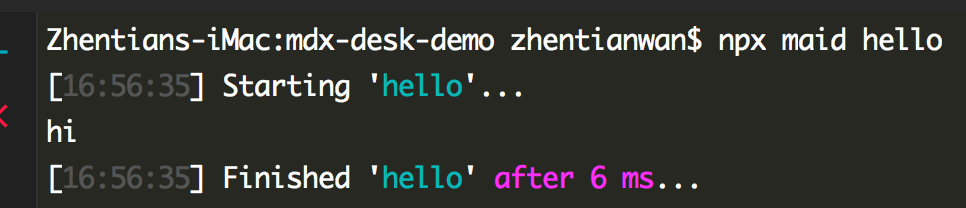
Then run:
npx maid hello
-----
A more realworld example can be that we can use maid to run build process
Install:
npm i -D parcel
## build

```bash

npx parcel build index.html

```

## dev

```bash

npx parcel index.html

```
npx maid build

npx maid dev
----
We can also run another task before or after the build task:
## build

Run task `start`.

Run task `end` after.

```bash

npx parcel build index.html

```

## dev

```bash

npx parcel index.html

```

## start

```js

console.log("task start")

```

## end

```js

console.log("task end")

```

---
Add description for the tasks:
## build

This build the project

Run task `start`.

Run task `end` after.

```bash

npx parcel build index.html

```

## dev

This is for development

```bash

npx parcel index.html

```

## start

This run before the build

```js

console.log("task start")

```

## end

This run after the build

```js

console.log("task end")

```
Run:
npx maid help

----
Using README.md:
in README file, we just need to add
<!-- maid-tasks -->
Before the tasks we want to run, and all those tasks should have "###".
# DEMOs

    * mdx-deck

    *react-live

    *maid

## Tasks

<!-- maid-tasks -->

### build

This build the project

Run task `start`.

Run task `end` after.

```bash

npx parcel build index.html

```

### dev

This is for development

```bash

npx parcel index.html

```

### start

This run before the build

```js

console.log("task start")

```

### end

This run after the build

```js

console.log("task end")

```
[Maid] Write Tasks in Markdown with Maid的更多相关文章
- 【推理】UVa 10771 - Barbarian tribes
Barbarian tribes In a lost land two primitive tribes coexist: Gareds and Kekas. Every summer sols ...
- 项目开发笔记-传单下发 名片替换 文件复制上传/html静态内容替换/json解析/html解析
//////////////////////////// 注意: 此博客是个人工作笔记 非独立demo////////////////////////////////// .............. ...
- Echarts基于动态数据初步使用 及问题 代码记录.
ECHARTS 插件 基本的动态数据展示(横向图) 下载 echarts.commn.min.js文件 在页面中进行引用, 并为Echarts图形准备一个div盒子 <!-- 引入插件 --&g ...
- 好文推荐系列--------(3)GruntJS 在线重载 提升生产率至新境界
好文原文地址:http://segmentfault.com/a/1190000000354555 本文将首先介绍grunt-markdown插件如何配合HTML模板使用,接着我将介绍如何使用grun ...
- MarkDown入门指南
标题 标题是每篇文章必备而且最常用的格式. 在Markdown中,如果想将一段文字定义为标题,只需要在这段文字前面加上 #,再在 # 后加一个空格即可.还可增加二.三.四.五.六级标题,总共六级,只需 ...
- 网易云免费OSS服务用做Markdown图床或博客图片外链
我使用据说是Windows下最好用的Markdown编辑器“MarkdownPad2”(个人感觉还是Visual Code+Markdown插件666)写Markdown,在贴图方面遇到一个问题,于是 ...
- markdown绘图插件----mermaid简介
作者:黄永刚 mermaid简介 当撰写文档的时候,对于流程图的生成大多使用Visio等繁重的工具,没有一种轻便的工具能够画图从而简化文档的编写,就像markdown那样. mermaid解决这个痛点 ...
- 配置 Sublime Text 3 作为Python R LaTeX Markdown IDE
配置 Sublime Text 3 作为Python R LaTeX Markdown IDE 配置 Sublime Text 3 作为Python IDE IDE的基本功能:代码提醒.补全:编译文件 ...
- 掌握Markdown
翻译自 https://guides.github.com/features/mastering-markdown/ 转载请注明链接 掌握Markdown Markdown是Github平台上一种轻量 ...
随机推荐
- console.log()与console.dir()
console.log()可以取代alert()或document.write(),在网页脚本中使用console.log()时,会在浏览器控制台打印出信息. console.dir()可以显示一个对 ...
- oracle分析函数系列之sum(col1) over(partition by col2 order by col3):实现分组汇总或递增汇总
语法:sum(col1) over(partition by col2 order by col3 ) 准备数据: DEPT_ID ENAME SAL1 1000 ...
- Visual Studio 2013/2015/2017快捷键(转载)
本文为转载文章,原文:[心存善念] [Fonour] 项目相关的快捷键 Ctrl + Shift + B = 生成项目 Ctrl + Alt + L = 显示 Solution Explorer(解 ...
- [Python3网络爬虫开发实战] 1.5.1-PyMySQL的安装
在Python 3中,如果想要将数据存储到MySQL中,就需要借助PyMySQL来操作,本节中我们介绍一下它的安装方式. 1. 相关链接 GitHub:https://github.com/PyMyS ...
- SQL中带有NOT IN 子查询改写
报表程序中的一段SQL运行很慢,代码如下: 优化前: 耗时:1337s INSERT INTO PER_LTE_ZIB_PB_COMMISSION_07 SELECT P.TOPACTUALID, Q ...
- docker push
一.确保docker hub上有账号 二.确认要提交的镜像的命名空间为自己账号名称 三.在本地登录docker: docker login 四.提交镜像: docker push zhengchuzh ...
- Go:map
一.map的创建方式 func main() { // map创建方式1 // 声明后再make var stu1 map[int]string stu1 = make(map[int]string, ...
- PHP导出超大的CSV格式的Excel表方案
场景和痛点 说明 我们工作场景都常会导出相关的excel数据,有时候需要大量的数据,10W,100W都有可能 我们现有方案都是直接利用phpexcel等类库来操作,phpexcel的load加载或是写 ...
- maven运行出现错误:Caused by: org.apache.catalina.LifecycleException: Failed to start component [StandardEngine[Tomcat].StandardHost[localhost].StandardContext[]](xjl456852原创)
maven在使用tomcat插件tomcat7-maven-plugin:2.2:run运行项目,出现下面错误: 严重: A child container failed during start j ...
- Python字典(Dictionary)
Python字典 字典的每个键值(key=>value)对用冒号(:)分割,每个对之间用逗号(,)分割,整个字典包括在花括号({})中 ,格式如下所示: d = {key1 : value1, ...