
ES--在windows上快速安装
环境准备
java环境部署:
Java安装的时候,我使用的是默认安装,一路下一步即可;亦可自定义安装路径;
ES下载路径:
https://www.elastic.co/downloads/past-releases/elasticsearch-5-2-0
Kinaba下载路径
https://www.elastic.co/downloads/past-releases/kibana-5-2-0
Java安装完成后,接下来设置Java环境变量
我这里使用的是默认安装路径:C:\Program Files\Java\jdk1.8.0_181
设置步骤:如下图所示(右键单击计算机,打开属性)
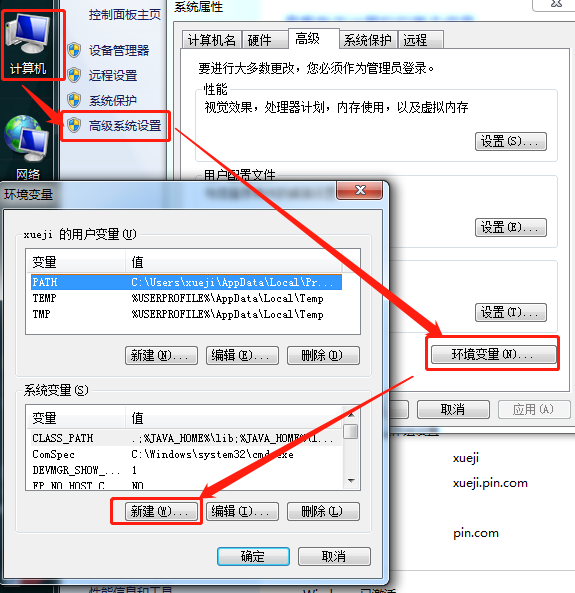
新建内容:
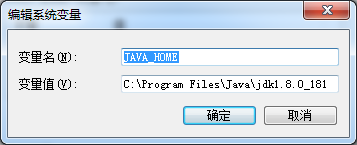
再次新建
变量名:CLASS_PATH
变量值:.;%JAVA_HOME%\lib;%JAVA_HOME%\lib\dt.jar;%JAVA_HOME%\lib\tools.jar;(一定要注意;前面的“.”)
设置PATH:
在PATH的值中,前面加上:%JAVA_HOME%\bin;%JAVA_HOME%\jre\bin;
设置完成后的path的变量内容如下图:

验证:

安装ES及kinaba
将下载下来的压缩包解压(我这里解压的是在D:\ES\elasticsearch-5.2.0),kinaba解压的目录是在(D:\ES\kibana-5.2.0-windows-x86)
在dos命令行下查看并启动ES及kinaba

启动成功的时候看下图:

启动kinaba

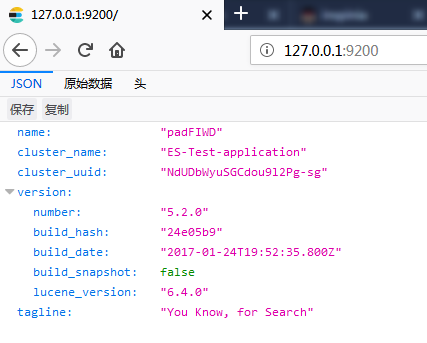
浏览器访问
Elsticsearch的网页状态
kinaba的网页状态
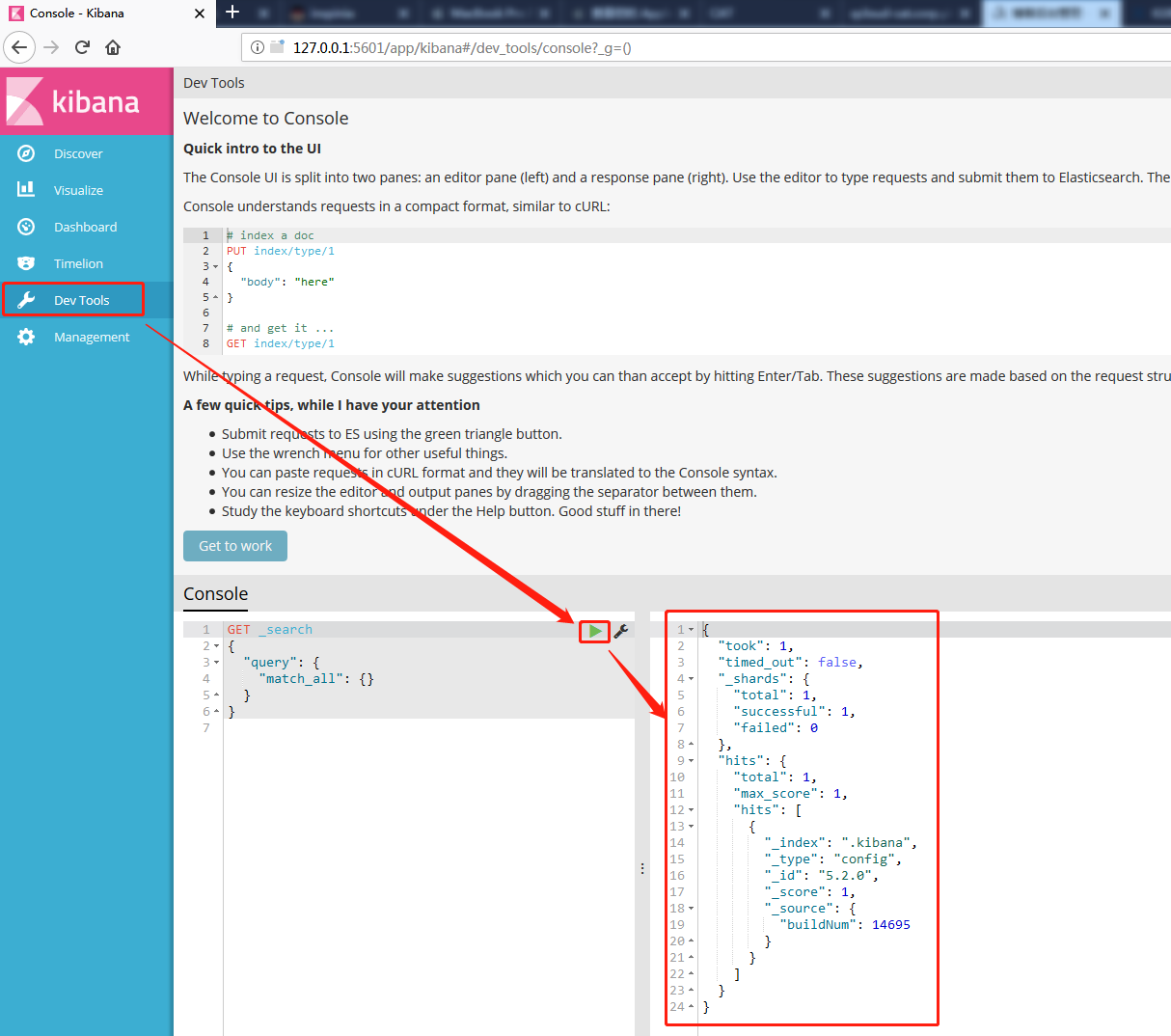
到此安装结束,接下来顺便说下ES及kinaba的一些操作和配置文件
首先在kinaba上可以查看ES集群的健康状态

ES的配置文件
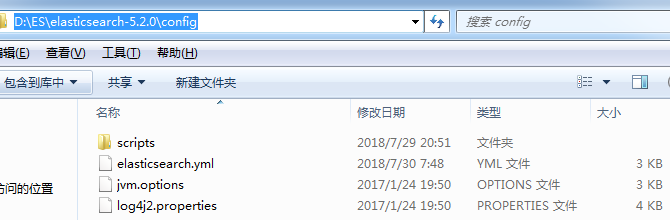
elasticsearch.yml的内容
# ======================== Elasticsearch Configuration =========================

#

# NOTE: Elasticsearch comes with reasonable defaults for most settings.

#       Before you set out to tweak and tune the configuration, make sure you

#       understand what are you trying to accomplish and the consequences.

#

# The primary way of configuring a node is via this file. This template lists

# the most important settings you may want to configure for a production cluster.

#

# Please consult the documentation for further information on configuration options:

# https://www.elastic.co/guide/en/elasticsearch/reference/index.html

#

# ---------------------------------- Cluster -----------------------------------

#

# Use a descriptive name for your cluster:

#

#cluster.name: my-application #这里可以修改集群的名字

cluster.name: ES-Test-application

#

# ------------------------------------ Node ------------------------------------

#

# Use a descriptive name for the node:

#

#node.name: node-1  #节点的名字

#

# Add custom attributes to the node:

#

#node.attr.rack: r1

#

# ----------------------------------- Paths ------------------------------------

#

# Path to directory where to store the data (separate multiple locations by comma):

#

#path.data: /path/to/data #数据存放路径

#

# Path to log files:

#

#path.logs: /path/to/logs #日志路径

#

# ----------------------------------- Memory -----------------------------------

#

# Lock the memory on startup:

#

#bootstrap.memory_lock: true

#

# Make sure that the heap size is set to about half the memory available

# on the system and that the owner of the process is allowed to use this

# limit.

#

# Elasticsearch performs poorly when the system is swapping the memory.

#

# ---------------------------------- Network -----------------------------------

#

# Set the bind address to a specific IP (IPv4 or IPv6):

#

#network.host: 192.168.0.1

#

# Set a custom port for HTTP:

#

#http.port: 9200   #端口号

#

# For more information, consult the network module documentation.

#

# --------------------------------- Discovery ----------------------------------

#

# Pass an initial list of hosts to perform discovery when new node is started:

# The default list of hosts is ["127.0.0.1", "[::1]"]

#

#discovery.zen.ping.unicast.hosts: ["host1", "host2"]

#

# Prevent the "split brain" by configuring the majority of nodes (total number of master-eligible nodes / 2 + 1):

#

#discovery.zen.minimum_master_nodes: 3

#

# For more information, consult the zen discovery module documentation.

#

# ---------------------------------- Gateway -----------------------------------

#

# Block initial recovery after a full cluster restart until N nodes are started:

#

#gateway.recover_after_nodes: 3

#

# For more information, consult the gateway module documentation.

#

# ---------------------------------- Various -----------------------------------

#

# Require explicit names when deleting indices:

#

#action.destructive_requires_name: true
其他配置及操作见下一篇!
ES--在windows上快速安装的更多相关文章
- 在 Windows 上快速安装并运行 Laravel 5.x
安装 PHP 注意一:Laravel 5.0 开始对 PHP 版本的要求是 >=5.4,Laravel 5.1 要求 PHP 版本>=5.5.9,所以,建议大家尽量安装 5.5.x 的最新 ...
- laravel5.2/laravel5.3入门指南 Windows 上快速安装并运行 Laravel 5.x
1 首先要搭建本地服务器环境推荐phpstudy2016及wampServer3.0.6 下载链接可参考 http://www.cnblogs.com/zzcit/p/5823742.html 注意一 ...
- Windows上快速编译caffe CPU版本
windows上快速安装配置Caffe的 cpu_only环境. 一:安装环境: 1.windows10: 2.Visual Studio2013: 3.Caffe版本:http://github.c ...
- WAMP Server助你在Windows上快速搭建PHP集成环境
WAMP Server助你在Windows上快速搭建PHP集成环境 原文地址 我想只要爬过几天网的同学都会知道PHP吧,异次元的新版本就是基于PHP的WordPress程序制造出来的,还有国内绝大部分 ...
- Windows下快速安装CACTI流量监控
Windows下快速安装CACTI流量监控 原文 http://os.51cto.com/art/201111/300977.htm CACTI是一套PHP程序,它利用SNMPGET采集数据,使用R ...
- jinkins在windows上的安装 配置C#编译
首先jinkins在windows上的安装就不说,安装只需要下载相应安装包就可以了,后有些时候经常需要修改端口号.修改如下: 然后重启jenkins服务 首次运行界面 个人建议插件按需安装. 建立一个 ...
- (转)windows上virtualenv 安装及使用
[注意]要在某个含有空格的目录下面创建virtualenv环境,就要安装 win32api . 原文地址:http://blog.csdn.net/liuchunming033/article/det ...
- 一步步实现windows版ijkplayer系列文章之六——SDL2源码分析之OpenGL ES在windows上的渲染过程
一步步实现windows版ijkplayer系列文章之一--Windows10平台编译ffmpeg 4.0.2,生成ffplay 一步步实现windows版ijkplayer系列文章之二--Ijkpl ...
- git在windows上的安装和简单使用
git在windows上的安装和简单使用. 参考: https://git-scm.com/book/zh/v1/Git-%E5%9F%BA%E7%A1%80-%E8%BF%9C%E7%A8%8B%E ...
- Windows上PostgreSQL安装配置教程
Windows上PostgreSQL安装配置教程 这篇文章主要为大家详细介绍了Windows上PostgreSQL安装配置教程,具有一定的参考价值,感兴趣的小伙伴们可以参考一下 PostgreSQL的 ...
随机推荐
- HBase协处理器同步二级索引到Solr
一. 背景二. 什么是HBase的协处理器三. HBase协处理器同步数据到Solr四. 添加协处理器五. 测试六. 协处理器动态加载 一. 背景 在实际生产中,HBase往往不能满足多维度分析,我们 ...
- 在安卓6.0(及以上)设备上无法获取无线网卡MAC地址的解决方案
在安卓6.0以下的设备上,通过WifiManager.getConnectionInfo().getMacAddress()即可获取WLAN物理地址, 而在6.0及以上,以此方式获取到的MAC地址为固 ...
- JS中prototype,js原型扩展
作者:轩脉刃(yjf512)出处:(http://www.cnblogs.com/yjf512/)版权声明:本文的版权归作者与博客园共有.欢迎转载阅读,转载时须注明本文的详细链接. 原文 http:/ ...
- GPS格式标准
GPS接收机串行通信标准摘要 参考NMEA-0183 美国国家海洋电子协会(NMEA—The NationalMarine Electronics Association) 为了在不同的GPS导航设备 ...
- Oracle备份与恢复:冷备份恢复
模拟数据库数据文件丢失的情况下,通过丢失之前的数据文件物理备份做恢复: 说明:数据文件丢失前一刻的所有归档日志都存在. 环境:oracle10g +rhel5 1.关闭数据库,copy system0 ...
- 1Q84 BOOK 1-3 笔记
1Q84 BOOK 1-3 村上春树 18个笔记 ◆ 第2章 青豆 不要被外表迷惑 >> 在这三十年的人生中,究竟听过多少次同样的台词?为了这个姓氏,曾经多少次遭人调侃?如果不 ...
- linux oracle命令行窗口命令上下翻阅
1.上传rlwrap-0.37.tar.gz到/stage cd /stage/ 解压tar xzvf rlwrap-0.37.tar.gz cd rlwrap-0.37 ./configure ...
- 「ZJOI2008」「LuoguP2590」树的统计(树链剖分
题目描述 一棵树上有n个节点,编号分别为1到n,每个节点都有一个权值w. 我们将以下面的形式来要求你对这棵树完成一些操作: I. CHANGE u t : 把结点u的权值改为t II. QMAX u ...
- 【hdu 2222】Keywords Search
[题目链接] 点击打开链接 [算法] 此题是AC自动机模板题 AC自动机是很神奇的算法,简单点来说,就是在一棵字典树上进行KMP,它的应用范围很广,非常实用 这篇博客写得很好,推荐阅读 : http: ...
- Two
Time Limit: 2000/1000 MS (Java/Others) Memory Limit: 65536/65536 K (Java/Others)Total Submission( ...