
apiCloud手动检测更新
有时候需要给用户一个自主的权利,自主检测app是否是最新版本。
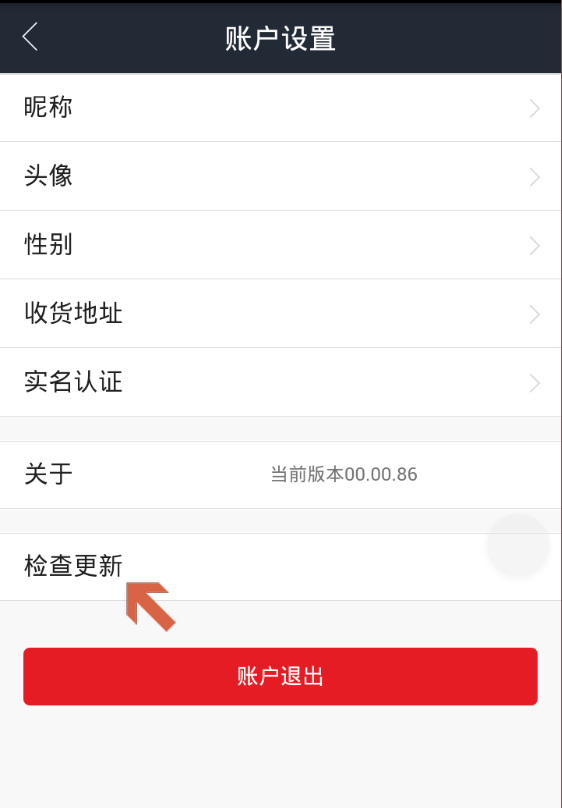
如何实现?
1.点击调用接口,检测是否有更新。
默认APICloud会自动检测版本更新,用户也可以在config.xml里配置autoUpdate为false,然后使用mam模块来检测更新,mam模块还提供自定义事件功能
示例代码:
var mam = api.require('mam');

mam.checkUpdate(function( ret, err ){

    if (ret) {

        alert( JSON.stringify( ret ) );

    } else{

        alert( JSON.stringify( err ) );

    }

});
返回数据:
{

    status:true,                //操作成功状态值

    result:

    {

        update:true,            //是否有更新

        closed:true,            //设备上当前版本是否被强行关闭

        version:'1.0',            //新版本版本号

        versionDes:'',            //新版本更新描述

        closeTip:'',            //提示用户应用版本被强行关闭时弹框的提示语

        updateTip:'',            //提示用户有更新时弹框的提示语

        source:'',                //新版本安装包的下载地址

        time:''                    //新版本的发布时间

    }

}
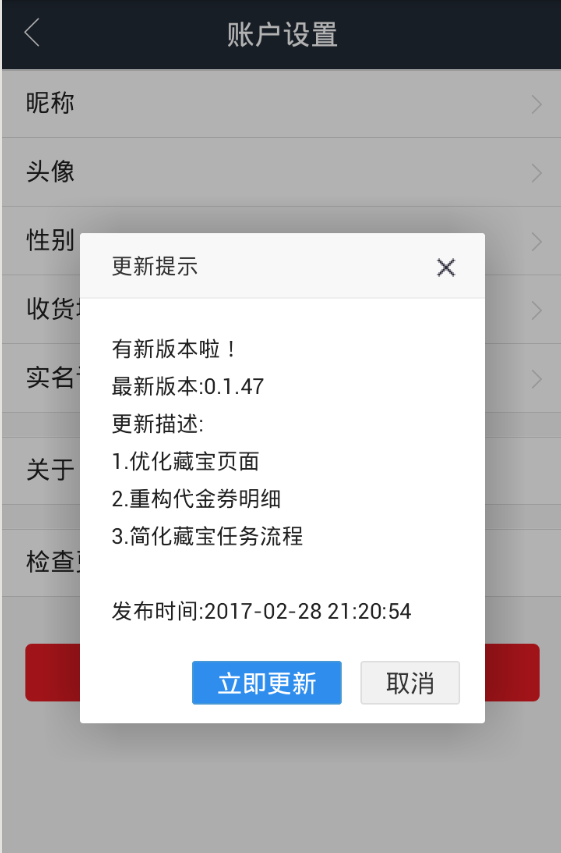
2.弹出comfirm框,让用户选择是否升级
layer.confirm('有新版本啦!<br/>最新版本:'+ret.result.version+'<br/>更新描述:<br/>'+updateTip+'<br/>发布时间:'+ret.result.time,

{

    title:'更新提示',

    btn: ['立即更新','取消'] //按钮

}, function(){

}, function(){

});
3.执行下载操作,api中有download方法
api.download({

    url: url,

    savePath: 'fs://test.rar',

    report: true,

    cache: true,

    allowResume: true

}, function(ret, err) {

    if (ret.state == 1) {

        //下载成功

    } else {

    }

});
4.执行安装installApp方法
//Android用法:

api.installApp({

    appUri: 'file://xxx.apk'

});

//iOS用法:

api.installApp({

    appUri: 'https://list.kuaiapp.cn/list/KuaiAppZv7.1.plist' //安装包对应plist地址

});
整合如下:
// 检查更新

function checkUpdate() {

    var mam = api.require('mam');

    mam.checkUpdate(function( ret, err ){

        if (ret) {

            if (!ret.status) {

                toast('服务器繁忙,请稍后再试');

                return;

            }

            if (ret.result.update) {

                var updateTip;

                updateTip = ret.result.updateTip.replace(/\r\n/g,"<BR>");

                updateTip =updateTip.replace(/\n/g,"<BR>");

                layer.confirm('有新版本啦!<br/>最新版本:'+ret.result.version+'<br/>更新描述:<br/>'+updateTip+'<br/>发布时间:'+ret.result.time,

                {

                    title:'更新提示',

                    btn: ['立即更新','取消'] //按钮

                }, function(){

                        if (api.systemType == "android") {

                            api.download({

                                url : ret.result.source,

                                report : true

                            }, function(retdownload, err) {

                                if (retdownload && 0 == retdownload.state) {/* 下载进度 */

                                    api.toast({

                                        msg : "正在下载应用" + retdownload.percent + "%",

                                        duration : 2000

                                    });

                                }

                                if (retdownload && 1 == retdownload.state) {/* 下载完成 */

                                    var savePath = retdownload.savePath;

                                    api.installApp({

                                        appUri : savePath

                                    });

                                }

                            });

                        }

                        if (api.systemType == "ios") {

                            api.installApp({

                                appUri : ret.result.source

                            });

                        }

                }, function(){

                });

                return;

            } else {

                toast('当前已是最新版本');

                return;

            }

        } else{

            toast('服务器繁忙,请稍后再试');

            return;

        }

    });

}
apiCloud手动检测更新的更多相关文章
- IOS开发中如何实现自动检测更新APP
自动检测更新实现逻辑: 先上github地址:https://github.com/wolfhous/HSUpdateApp 1,获取当前项目APP版本号 2,拿到AppStore项目版本号 3,对比 ...
- iOS 开发笔记 - 开发中如何实现自动检测更新APP
1.获取当前项目APP版本号 2.拿到AppStore项目版本号 3.对比版本号,实现更新功能 直接上代码: #import "ViewController.h" //1一定要先配 ...
- 关于window10更新之后,15.5版本虚拟机不能使用的情况:检测更新版本
1.用了四五年的虚拟机,最近居然老提示检测更新版本,嗯,我将我的虚拟机由10版本,更新到了15.5版本,这也是网友说的,然而并灭有什么乱弄.window10系统自动更新,自动更新以后虚拟机就打不开了, ...
- Nexus5如何手动OTA更新系统到4.4.3、4.4.4及常见问题回答
这里将记录一套行之有效的Nexus5手动升级方法,以帮助看见这篇文章的朋友成功将手头的Nexus5升级到4.4.4. 因为谷歌服务器的事,我的这次OTA更新起来走了很多弯路.我试过挂VPN等待系统来更 ...
- iOS 检测更新版本
获取app版本URL 数字是appID,在开发者账号app信息中可以找到 #define APP_URL @"http://itunes.apple.com/cn/lookup?id=116 ...
- apicloud 上传/更新App版本到 ios store 流程步骤
app更新 上传APP的地址: https://itunesconnect.apple.com/login 苹果开发者中心: https://developer.apple.com/ app正式包更新 ...
- IOS 通过苹果开放API检测更新
#define APPID @"1067207206" -(void)onCheckVersion { NSDictionary *infoDic = [[NSBundle mai ...
- sublime text3入门笔记以及屏蔽sublime自动升级检测更新
两个月前学习python的时候,有人推荐这个程序员最好用的编辑器,我下载了之后,发现比notepad++要好用很多,目前来说,网上成熟的版本是sublime text2简体中文版,插件也是很兼容,我用 ...
- 关闭sublime自动检测更新提示
在使用sublime text 3的时候,有自动更新的话再打开的时候总是提醒更新,这让我这个强迫症重度患者非常难受,要取消自动检查更新,点击菜单栏"Preferences"=> ...
随机推荐
- How Javascript works (Javascript工作原理) (三) 内存管理及如何处理 4 类常见的内存泄漏问题
个人总结: 1.两种垃圾回收机制: 1)引用标记算法:如果检测到一个对象没有被引用了,就清除它. ***这种算法不能处理循环引用的情况*** 2)标记—清除算法:从根(全局变量)开始向后代变量检测,任 ...
- UE4自学随笔(一)
本文及后续均为个人学习记录所用,难免毫无章法零零碎碎,希望看到此文的诸君勿怪. 一.Actor与Pawn Actor类 在UE4中,Actor类是可以放到游戏场景中的游戏对象的基本类型.你如果想放置任 ...
- redhat7.5 升级OpenSSH_7.8p1
1:拷贝编译好rpm安装包 [root@liwm ~]# scp -r root@192.168.31.130:/home/openssh7.8 /home/ root@192.168.31.130' ...
- Mysql学习总结(28)——MySQL建表规范与常见问题
一. 表设计 库名.表名.字段名必须使用小写字母,"_"分割. 库名.表名.字段名必须不超过12个字符. 库名.表名.字段名见名知意,建议使用名词而不是动词. 建议使用InnoDB ...
- Java多线程-基础知识
一. 进程是执行中的程序,程序是静态的(我们写完以后不运行就一直放在那里),进程是执行中的程序,是动态概念的.一个进程可以有多个线程. 二. 多线程包含两个或两个以上并发运行的部分,把程序中每个这样并 ...
- mysql-过程与函数
一.过程与函数简介 过程与函数是命名的PL/SQL块(也是用户的方案对象),被编译后存储在数据库中,以备执行.因此,其他PL/SQL块可以按名称来使用他们.所以可以将商业逻辑.企业规划写成函数或过程保 ...
- Angry IP Scanner 获取设备的IP
给大家介绍一款软件Angry IP scanner,这款软件最大的用处就是能够扫描某一网段的各个主机的ip.通过使用发现,原理就是通过高速的ping每一个ip,假设有主机存在.就获取这个主机的user ...
- CorePlot学习六---点击scatterPlot中的symbol点时弹出对应的凝视
因为项目须要用到用户点击 symbol时,弹出对应的具体信息,发现国内解说的比較少,经过一番搜索验证最终解决,先看效果图: 详细须要改动的代码例如以下: 首先要引用托付方法:CPTScatterPlo ...
- nyoj-673-悟空的难题(数组标记)
悟空的难题 时间限制:1000 ms | 内存限制:65535 KB 难度:2 描写叙述 自从悟空当上了齐天大圣.花果山上的猴子猴孙们便也能够尝到天上的各种仙果神酒,所以猴子猴孙们的体质也得到了非 ...
- POJ 题目3321 Apple Tree(线段树)
Apple Tree Time Limit: 2000MS Memory Limit: 65536K Total Submissions: 21566 Accepted: 6548 Descr ...