
zabbix部署监控端(server)以及页面优化
实验环境准备
172.20.10.2 server.zabbix.com
172.20.10.3 agent.zabbix.com
172.20.10.8 windows10
Server 端
[root@localhost ~]# vim /etc/hostname
server.zabbix.com
[root@localhost ~]# nslookup www.baidu.com
[root@localhost ~]# hostname server.zabbix.com
[root@localhost ~]# bash
[root@server ~]# vim /etc/hosts
172.20.10.2 server.zabbix.com
172.20.10.3 agent.zabbix.com
172.20.10.8 windows10
[root@server ~]# scp /etc/hosts root@172.20.10.3:/etc/hosts
[root@server ~]# systemctl stop firewalld
[root@server ~]# setenforce 0
[root@server ~]# iptables -F
Agent 端
[root@localhost ~]# vim /etc/hosts
172.20.10.2 server.zabbix.com
172.20.10.3 agent.zabbix.com
172.20.10.8 windows10
[root@localhost ~]# systemctl stop firewalld
[root@localhost ~]# setenforce 0
[root@localhost ~]# iptables -F
[root@localhost ~]# vim /etc/hostname
agent.zabbix.com
[root@localhost ~]# hostname agent.zabbix.com
[root@localhost ~]# bash
[root@agent ~]# ping server.zabbix.com -c 4
Server 端
配置阿里云yum源
[root@server ~]# cd /etc/yum.repos.d/
[root@server yum.repos.d]# wget http://mirrors.aliyun.com/repo/Centos-7.repo
[root@server yum.repos.d]# ls
bak Centos-7.repo CentOS-Media.repo
[root@server ~]# yum -y install httpd mariadb-server mariadb mariadb-devel php php-mbstring php-mysql php-bcmath php-gd php-xmlrpc php-ldap php-xml libevent libevent-devel net-snmp net-snmp-devel libxml2 libxml2-devel ntpdate
[root@server ~]# ntpdate us.pool.ntp.org
启动lamp 对应服务
[root@server ~]# systemctl start mariadb
[root@server ~]# systemctl enable mariadb
Created symlink from /etc/systemd/system/multi-user.target.wants/mariadb.service to /usr/lib/systemd/system/mariadb.service.
[root@server ~]# systemctl start httpd
[root@server ~]# systemctl enable httpd
Created symlink from /etc/systemd/system/multi-user.target.wants/httpd.service to /usr/lib/systemd/system/httpd.service.
[root@server ~]# mysqladmin -u root password 123123
准备java环境
[root@server ~]# java -version
openjdk version "1.8.0_161"
OpenJDK Runtime Environment (build 1.8.0_161-b14)
OpenJDK 64-Bit Server VM (build 25.161-b14, mixed mode)
[root@server ~]# javac -version
bash: javac: 未找到命令...
相似命令是: 'java'
[root@server ~]# which java
/usr/bin/java
[root@server ~]# rm -rf /usr/bin/java
[root@server ~]# ls
anaconda-ks.cfg redis-3.2.5 公共 图片 音乐
initial-setup-ks.cfg redis-3.2.5.tar.gz 模板 文档 桌面
jdk-8u91-linux-x64.tar.gz yum.sh 视频 下载
[root@server ~]# tar xf jdk-8u91-linux-x64.tar.gz
[root@server ~]# mv jdk1.8.0_91/ /usr/local/java
[root@server ~]# vim /etc/profile
export JAVA_HOME=/usr/local/java
export PATH=$PATH:$JAVA_HOME/bin
[root@server ~]# source /etc/profile
[root@server ~]# java -version
java version "1.8.0_91"
Java(TM) SE Runtime Environment (build 1.8.0_91-b14)
Java HotSpot(TM) 64-Bit Server VM (build 25.91-b14, mixed mode)
[root@server ~]# javac -version
javac 1.8.0_91
[root@server ~]# which java
/usr/local/java/bin/java
源码安装zabbix
[root@server ~]# ls
anaconda-ks.cfg redis-3.2.5 zabbix-3.4.11.tar.gz 视频 下载
initial-setup-ks.cfg redis-3.2.5.tar.gz 公共 图片 音乐
jdk-8u91-linux-x64.tar.gz yum.sh 模板 文档 桌面
[root@server ~]# tar xf zabbix-3.4.11.tar.gz -C /usr/src
[root@server ~]# cd /usr/src/zabbix-3.4.11/
[root@server ~]# yum -y install curl-devel
[root@server zabbix-3.4.11]# ./configure --prefix=/usr/local/zabbix --enable-server --enable-agent --with-mysql --enable-ipv6 --with-net-snmp --with-libcurl --with-libxml2 --enable-java && make -j2 && make install
Mariadb 数据库授权
[root@server ~]# mysql -u root -p123123
MariaDB [(none)]> create database zabbix character set utf8;
MariaDB [(none)]> grant all on zabbix.* to zabbix@localhost identified by 'zabbix';
MariaDB [(none)]> grant all on zabbix.* to zabbix@'172.20.10.2'identified by 'zabbix';
MariaDB [(none)]> flush privileges;
MariaDB [(none)]> exit
[root@server ~]# cd /usr/src/zabbix-3.4.11/
[root@server zabbix-3.4.11]# mysql -uzabbix -pzabbix zabbix < database/mysql/schema.sql
[root@server zabbix-3.4.11]# mysql -uzabbix -pzabbix zabbix < database/mysql/images.sql
[root@server zabbix-3.4.11]# mysql -uzabbix -pzabbix zabbix < database/mysql/data.sql
[root@server zabbix-3.4.11]# mysql -u root -p123123
MariaDB [(none)]> use zabbix;
MariaDB [zabbix]> show tables;
+----------------------------+
| Tables_in_zabbix |
+----------------------------+
| acknowledges |
| actions |
| alerts |
| application_discovery |
| application_prototype |
| valuemaps |
| widget |
| widget_field |
+----------------------------+
140 rows in set (0.00 sec)
MariaDB [zabbix]> \q
创建zabbix 程序用户并授权防止权限报错
[root@server ~]# useradd -M -s /sbin/nologin zabbix
[root@server ~]# cd /usr/local
[root@server local]# chown -R zabbix:zabbix zabbix/
[root@server local]# cd ./zabbix/
[root@server zabbix]# pwd
/usr/local/zabbix
[root@server zabbix]# mkdir logs
[root@server zabbix]# chown zabbix:zabbix logs
[root@server zabbix]# cp -p etc/zabbix_server.conf{,.bak}
[root@server zabbix]# cp -p etc/zabbix_agentd.conf{,.bak}
修改zabbix 配置文件
[root@server zabbix]# cd /usr/local/zabbix/etc/
[root@server etc]# ls
zabbix_agentd.conf zabbix_agentd.conf.d zabbix_server.conf.bak
zabbix_agentd.conf.bak zabbix_server.conf zabbix_server.conf.d
[root@server etc]# cd /usr/local/zabbix/etc/
[root@server etc]# vim zabbix_server.conf
LogFile=/usr/local/zabbix/logs/zabbix_server.log
PidFile=/tmp/zabbix_server.pid
DBHost=172.20.10.2
DBName=zabbix
DBUser=zabbix
DBPassword=zabbix
DBSocket=/var/lib/mysql/mysql.sock
Include=/usr/local/zabbix/etc/zabbix_server.conf.d/*.conf
[root@server etc]# vim zabbix_agentd.conf
PidFile=/tmp/zabbix_agentd.pid
Server=127.0.0.1,172.20.10.2
ServerActive=172.20.10.2
Hostname=server.zabbix.com
LogFile=/usr/local/zabbix/logs/zabbix_agentd.log
Include=/usr/local/zabbix/etc/zabbix_agentd.conf.d/*.conf
[root@server etc]# ln -s /usr/local/zabbix/sbin/* /usr/local/bin
[root@server etc]# zabbix_server
[root@server etc]# zabbix_agentd
配置php 与apache
[root@server ~]# mv /usr/src/zabbix-3.4.11/frontends/php/ /var/www/html/zabbix
[root@server ~]# chown -R apache:apache /var/www/html/zabbix
[root@server ~]# vim /etc/php.ini
878 date.timezone = Asia/Shanghai
384 max_execution_time = 300
394 max_input_time = 300
672 post_max_size =32M
405 memory_limit = 128M
854 extension=bcmath.so
[root@server ~]# systemctl restart httpd 确保10050和10051 和80 端口成功开启
[root@server etc]# netstat -anpt |egrep ':10050|:10051|:80'
tcp 0 0 0.0.0.0:10050 0.0.0.0:* LISTEN 14391/zabbix_agentd
tcp 0 0 0.0.0.0:10051 0.0.0.0:* LISTEN 14329/zabbix_server
tcp6 0 0 :::10050 :::* LISTEN 14391/zabbix_agentd
tcp6 0 0 :::10051 :::* LISTEN 14329/zabbix_server
tcp6 0 0 :::80 :::* LISTEN 14437/httpd
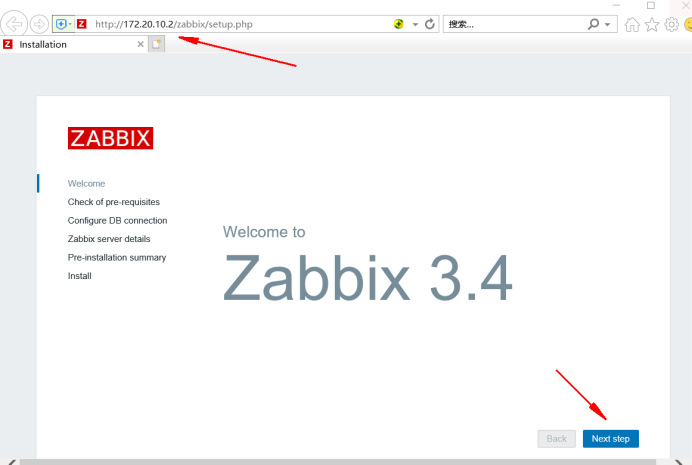
如果php databases support 出现fail 需要解决依赖关系
[root@server zabbix-3.4.11]# yum -y install php-mysql.x86_64
[root@server zabbix-3.4.11]# systemctl restart mariadb
[root@server zabbix-3.4.11]# systemctl restart httpd
确保下面全是OK,哪个不OK解决哪个

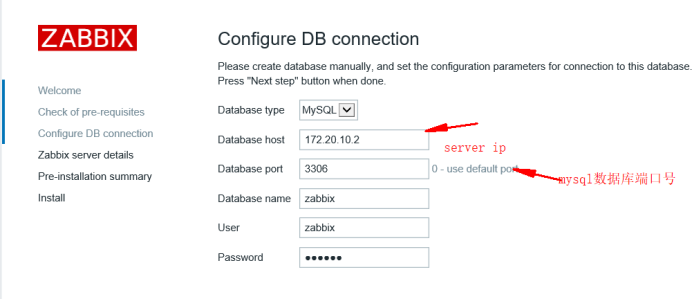


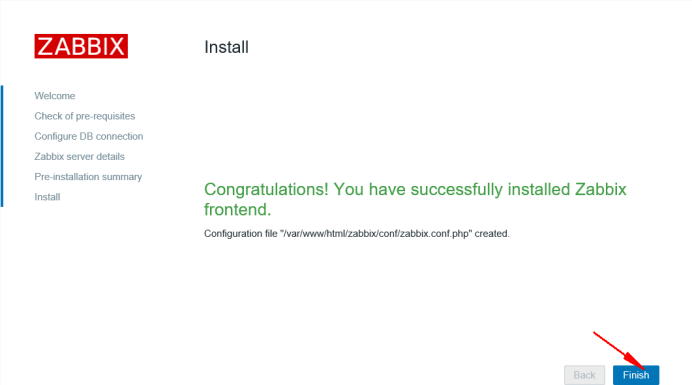
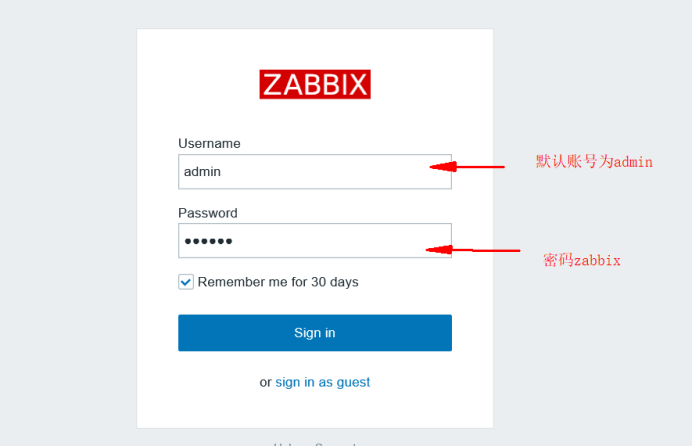
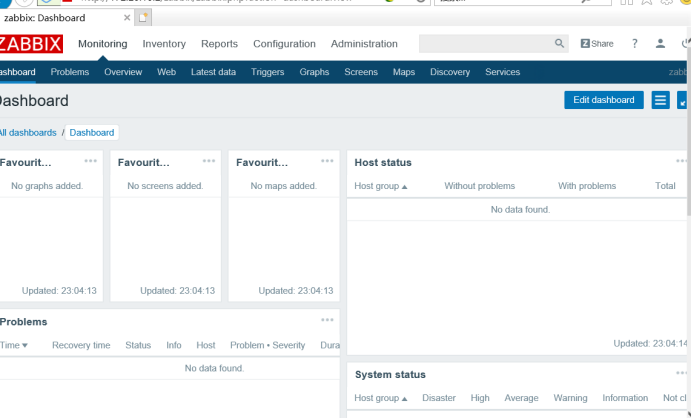
启动成功默认英文,开启中文页面
开始优化页面
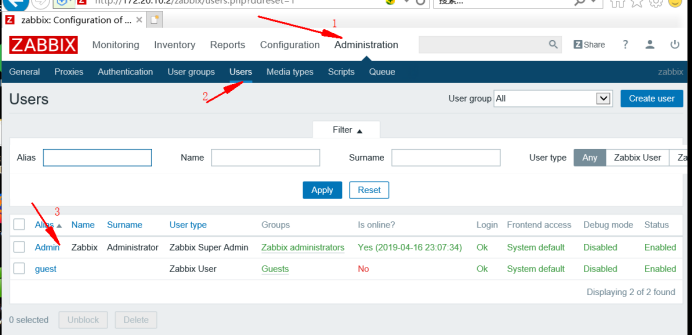

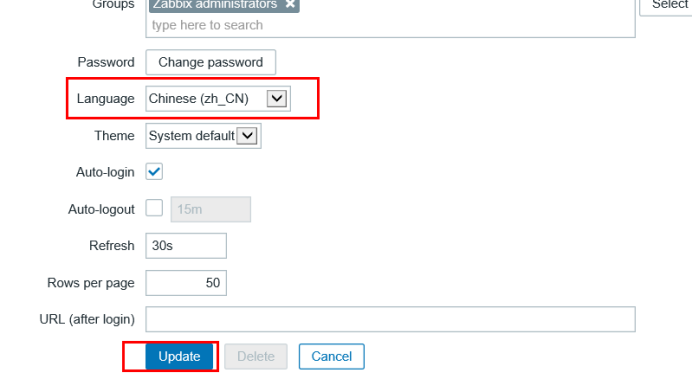
完成后F5加载页面就会中文显示
更改admin 密码
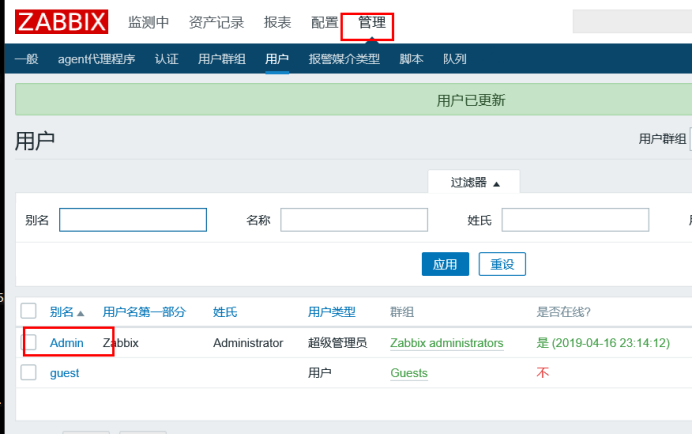

改完密码登录下次需要按新密码登录,退出在右上角
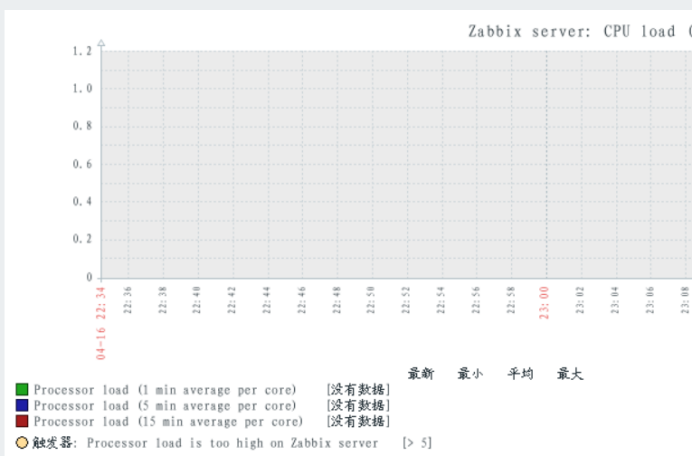
解决中文乱码问题
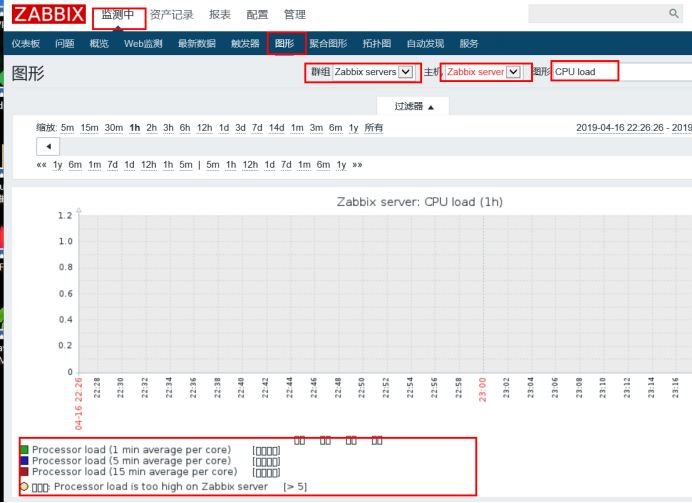
这里我是自己下载的字体,并替换原字体(没有字体的可以去下载放到指定目录下就可以)
[root@server ~]# cd /var/www/html/zabbix/fonts/
[root@server fonts]# ls
DejaVuSans.ttf
[root@server fonts]# mv DejaVuSans.ttf DejaVuSans.ttf.bak
[root@server fonts]# rz -E
rz waiting to receive.
[root@server fonts]# ls
DejaVuSans.ttf.bak simkai.ttf
[root@server fonts]# mv simkai.ttf DejaVuSans.ttf
[root@server fonts]# ls
DejaVuSans.ttf DejaVuSans.ttf.bak
[root@server fonts]# ll
总用量 4780
-rw-r--r--. 1 root root 4135804 9月 22 2017 DejaVuSans.ttf
-rw-r--r--. 1 apache apache 756072 6月 25 2018 DejaVuSans.ttf.bak
[root@server fonts]# chown -R apache:apache *
[root@server fonts]# ll
总用量 4780
-rw-r--r--. 1 apache apache 4135804 9月 22 2017 DejaVuSans.ttf
-rw-r--r--. 1 apache apache 756072 6月 25 2018 DejaVuSans.ttf.bak
zabbix部署监控端(server)以及页面优化的更多相关文章
- zabbix被监控端代理设置
zabbix被监控端代理设置 安装zabbix-agent客户端 rpm -ivh https://repo.zabbix.com/zabbix/4.0/rhel/7/x86_64/zabbix-re ...
- CentOS7下搭建zabbix监控(二)——Zabbix被监控端配置
Zabbix监控端配置请查看:CentOS7下搭建zabbix监控(一)——Zabbix监控端配置 (1).在CentOS7(被监控端)上部署Zabbix Agent 主机名:youxi2 IP地址: ...
- centos6.8 搭建zabbix被监控端
System:Centos 6.8 Zabbix-agent:3.2.1 1 安装对应版本的zabbix的yum源,官方网站中没有找到zabbix3.0支持的centos6的源,所以用的3.2 #rp ...
- 监控服务zabbix部署
目录 1. zabbix介绍 2. zabbix特点 3. zabbix配置文件 4. 部署zabbix 4.1 zabbix服务端安装 4.2 zabbix服务端配置 4.3 zabbix服务端we ...
- zabbix部署文档
环境:zabbix server centos 7 1611最小化安装 172.16.103.2 zabbix client Centos 7 1611 最小化安装 172.16.103.3 1,配置 ...
- zabbix企业监控
第一节.系统初始化 1.前期环境 主机名 IP地址 操作系统 备注 zabbix-10 192.168.2.10 CentOS Linux release 7.4 zabbix服务端 agent-15 ...
- Zabbix——部署(DB与web分离)
前提条件: 两台centos7设备 两台设备可以相互访问 Zabbix-Servser版本为4.0 mysql版本为8.0 关闭防火墙 Zabbix部署(包含server,web,agent) rpm ...
- zabbix分布式监控的部署与win被控端
zabbix是一个分布式监视,管理系统,基于server-clinet架构,可用于监视各种网络服务,服务器和网络机器等状态. server端基于C语言,web管理端Frontend则是基于PHPA制作 ...
- zabbix 3.2.2 server端(源码包)安装部署 (一)【转】
环境准备: 操作系统 CentOS 6.8 2.6.32-642.11.1.el6.x86_64 zabbix server 172.16.10.150 zabbix agent 172.16.10. ...
随机推荐
- redis RDB快照和AOF日志持久化配置
Redis持久化配置 Redis的持久化有2种方式 1快照 2是日志 Rdb快照的配置选项: save 900 1 // 900内,有1条写入,则产生快照 save 300 1000 ...
- Java导出Excel文件的两种方法
将数据以Excel表格的形式导出:首先下载poi的jar包,导入项目中,或者使用maven仓库管理,在pom文件添加:<dependency> <groupId>org. ...
- windows mongodb启动
D:\MongoDB\bin\mongod.exe --service --dbpath D:\MongoDB\data --logpath=D:\MongoDB\logs\mongodb.log - ...
- 复习MySQL①创建数据库及数据表
• 创建数据库:create database 数据库名称; – 例:创建名为test的测试数据库 create database test; • 查看创建好的数据库:show create data ...
- elasticsearch的mapping
PUT /website/article/1 { "post_date": "2017-01-01", "title": "my ...
- UML类图解析
上面是UML的语法. 在画类图的时候,理清类和类之间的关系是重点.类的关系有泛化(Generalization).实现(Realization).依赖(Dependency)和关联(Associati ...
- mplayer configure选项中文注释
mplayer configure选项中文注释(MPlayer-1.0rc2) http://blogold.chinaunix.net/u3/104581/showart_2322466.html ...
- 基于redis的分布式锁实现方案--redisson
实例代码地址,请前往:https://gitee.com/GuoqingLee/distributed-seckill redis官方文档地址,请前往:http://www.redis.cn/topi ...
- Python爬虫之正則表達式
1.经常使用符号 . :匹配随意字符,换行符 \n 除外 * :匹配前一个字符0次或无限次 ? :匹配前一个字符0次或1次 .* :贪心算法.尽可能的匹配多的字符 .*? :非贪心算法 () ...
- “XXX.Index”不扩展类“System.Web.UI.Page”,因此此处不同意的问题
"XXX.Index"不扩展类"System.Web.UI.Page",因此此处不同意的问题 原因:设计页面继承的路径和后台.cs页面类的路径不一致造成的 看下 ...