
yum 安装nginx(配置开机启动)
yum install -y nginx通过yum安装的时候提示下面的错误
[root@localhost yum.repos.d]# yum install nginx

已加载插件:fastestmirror, langpacks

Loading mirror speeds from cached hostfile

没有可用软件包 nginx。

错误:无须任何处理
需要添加nginx的源
[root@localhost yum.repos.d]# rpm -ivh http://nginx.org/packages/centos/7/noarch/RPMS/nginx-release-centos-7-0.el7.ngx.noarch.rpm该命令执行之后,会在/etc/yum.respos.d下面多出一个nginx.repo
[root@localhost yum.repos.d]# ll

总用量 40

-rw-r--r--. 1 root root 1572 12月  1 2016 CentOS-Base.repo

-rw-r--r--. 1 root root 1572 12月  1 2016 CentOS-Base.repo.backup

-rw-r--r--. 1 root root 1664 10月 24 10:36 CentOS-Base.repo.bak

-rw-r--r--. 1 root root 1309 8月  30 2017 CentOS-CR.repo

-rw-r--r--. 1 root root  649 8月  30 2017 CentOS-Debuginfo.repo

-rw-r--r--. 1 root root  314 8月  30 2017 CentOS-fasttrack.repo

-rw-r--r--. 1 root root  630 8月  30 2017 CentOS-Media.repo

-rw-r--r--. 1 root root 1331 8月  30 2017 CentOS-Sources.repo

-rw-r--r--. 1 root root 3830 8月  30 2017 CentOS-Vault.repo

-rw-r--r--. 1 root root  113 7月  15 2014 nginx.repo
然后再执行安装命令
yum install -y nginx安装之后,可以查看nginx的默认安装目录
[root@localhost yum.repos.d]# whereis nginx

nginx: /usr/sbin/nginx /usr/lib64/nginx /etc/nginx /usr/share/nginx /usr/share/man/man8/nginx.8.gz

[root@localhost yum.repos.d]# pwd

/etc/yum.repos.d
以下是Nginx的默认路径:
(1) Nginx配置路径:/etc/nginx/
(2) PID目录:/var/run/nginx.pid
(3) 错误日志:/var/log/nginx/error.log
(4) 访问日志:/var/log/nginx/access.log
(5) 默认站点目录:/usr/share/nginx/html
事实上,只需知道Nginx配置路径,其他路径均可在/etc/nginx/nginx.conf 以及/etc/nginx/conf.d/default.conf 中查询到
nginx相关的验证命令及启动命令
[root@localhost yum.repos.d]# nginx

[root@localhost yum.repos.d]# nginx -t

nginx: the configuration file /etc/nginx/nginx.conf syntax is ok

nginx: configuration file /etc/nginx/nginx.conf test is successful

[root@localhost yum.repos.d]# nginx -s reload
nginx 启动
nginx -t 测试命令
nginx -s relaod 修改nginx.conf之后,可以重载
有些源经常失效,下面放上最新链接 直接去里面下载 rpm -Uvh 下载的rpm 就好了
http://nginx.org/packages/centos/7/noarch/RPMS/(源链接)
 http://nginx.org/packages/centos/7/noarch/RPMS/nginx-release-centos-7-0.el7.ngx.noarch.rpm
进入到/etc/init.d/目录下,创建文件nginx
cd /etc/init.d/
vim nginx
nginx文件具体配置信息如下:

#!/bin/bash

# nginx Startup script for the Nginx HTTP Server

# it is v.0.0.2 version.

# chkconfig: - 85 15

# description: Nginx is a high-performance web and proxy server.

#              It has a lot of features, but it's not for everyone.

# processname: nginx

# pidfile: /var/run/nginx.pid

# config: /usr/local/nginx/conf/nginx.conf

nginxd=/usr/local/nginx/sbin/nginx        # 你的nginx真实启动文件路径

nginx_config=/usr/local/nginx/conf/nginx.conf    # nginx相关配置文件路径

nginx_pid=/var/run/nginx.pid

RETVAL=0

prog="nginx"

# Source function library.

. /etc/rc.d/init.d/functions

# Source networking configuration.

. /etc/sysconfig/network

# Check that networking is up.

[ ${NETWORKING} = "no" ] && exit 0

[ -x $nginxd ] || exit 0

# Start nginx daemons functions.

start() {

    if [ -e $nginx_pid ];then

       echo "nginx already running...."

   exit 1

    fi

       echo -n $"Starting $prog: "

       daemon $nginxd -c ${nginx_config}

   RETVAL=$?

   echo

       [ $RETVAL = 0 ] && touch /var/lock/subsys/nginx

   return $RETVAL

}

# Stop nginx daemons functions.

stop() {

    echo -n $"Stopping $prog: "

    killproc $nginxd

    RETVAL=$?

    echo

    [ $RETVAL = 0 ] && rm -f /var/lock/subsys/nginx /var/run/nginx.pid

}

# reload nginx service functions.

reload() {

    echo -n $"Reloading $prog: "

    #kill -HUP `cat ${nginx_pid}`

    killproc $nginxd -HUP

    RETVAL=$?

    echo

}

# See how we were called.

    case "$1" in

start)

    start

    ;;

stop)

    stop

    ;;

reload)

    reload

    ;;

restart)

    stop

    start

    ;;

status)

    status $prog

    RETVAL=$?

    ;;

*)

    echo $"Usage: $prog {start|stop|restart|reload|status|help}"

    exit 1

esac

exit $RETVAL

保存nginx文件并赋权

chmod 755 nginx

将nginx权限设置为自己可以read、write、exec,其他用户只能有read、exec权限,没有write权限

为nginx加上service相关命令权限

chkconfig --add nginx

chkconfig nginx on

开启nginx的service命令
校验nginx的service命令是否成功
service nginx start 执行不报错表示nginx已经启动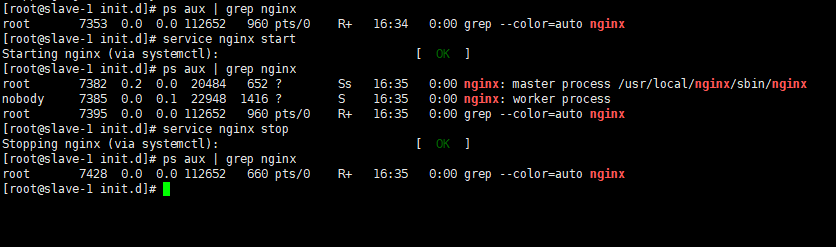
重启centos服务器再次验证是否nginx已经启动

重启之前service nginx stop停止nginx服务,之后执行reboot,开机之后执行ps aux | grep nginx如果后台显示nginx已经启动,那么表示nginx的安装和开机自启动已经成功配置

本文章旨在记录自己的平时学习过程,有不正确的和值得改进的真诚希望园友提出意见或建议,一起学习一起进步。yum 安装nginx(配置开机启动)的更多相关文章
- Windows 安装nginx并开机启动
Win安装nginx并 开机启动 下载nginx安装包 nginx-1.12.2.zip,解压到D盘. https://pan.baidu.com/s/1InQa527yq35Q68c73RBb-A# ...
- CentOS7.3编译安装Nginx设置开机启动
起因 最近想玩nginx了,本来用yum -y install nginx安装也启动好了,但是买了本<Nginx高性能Web服务器详解>,我咋能辜负我的书费呢?于是我就直接ps -ef | ...
- nginx配置开机启动及配置sudo授权启动
1.https://www.cnblogs.com/whatmiss/p/7091220.html 配置开机启动nginx 2.sudo授权其它用户启动 (1)root用户编辑 visu ...
- 【Web】Nginx配置开机启动
在添加nginx服务之后,大家会希望开机伴随启动nginx,避免手动路径输入启动: nginx官方提供了启动脚本:https://www.nginx.com/resources/wiki/start/ ...
- linux下安装nginx后开机启动篇
众所周知nginx安装后需要手动去启动,每次开机之后都要执行nginx的启动命令很蛋疼.那么我们来让nginx开机启动吧 1.先創建一個nginx文件把 [root@localhost ~]# vi ...
- Ubuntu安装sysv-rc-conf配置开机启动服务
ubuntu下chkconfig的替代方案: 第一步:在终端键入sudo apt-get install sysv-rc-conf安装sysv-rc-conf服务. 第二步:检查设置系统开机自启动服务 ...
- 【RabbitMQ】 RabbitMQ配置开机启动
环境 系统:Linux(CentOS 7.2) Erlang环境:21.1(安装参考[Erlang]源码安装) RabbitMQ:3.7.9(安装参考[RabbitMQ] RabbitMQ安装) 配置 ...
- [转]CENTOS 6.5 配置YUM安装NGINX+服务器负载均衡
原文连接: CENTOS 6.5 配置YUM安装NGINX http://blog.sina.com.cn/s/blog_69f467b70102uyux.html 参考博文: Centos下安装. ...
- centos7系统下nginx安装并配置开机自启动操作
准备工作 我的centos7系统是最小化安装的, 缺很多库, 首先安装必须的运行库 ? 1 2 3 4 5 6 7 8 9 10 11 yum install wget gcc gcc-c++ pcr ...
随机推荐
- js获取数组中任意一项
1.获取数组任一项 在一些实际应用场景中,会要求实现一个随机的需求,随机获取某一项,来展示出来,都知道要通过javaScript的Math.random()方法来实现,这里我在Array的原型上添加了 ...
- 将会改变未来IT世界的十种编程语言
这里要说的都是革新,说这些的目的就是要保持关注最新技术.如果你是一个程序员,想要探寻未来技术,那这篇文章就是你的必读之选.我们这里列出了10种编程语言,10种将会改变IT世界工作方式的编程语言.这些语 ...
- 元素类型为 "session-factory" 的内容必须匹配 "(property*,mapping*,(class-cach....解决方法
http://www.cnblogs.com/kisso143/p/3642057.html property必须写在mapping的上面.
- Nikita and stack
Nikita and stack time limit per test 2 seconds memory limit per test 256 megabytes input standard in ...
- CODEVS——T 1297 硬币
http://www.codevs.cn/problem/1297/ 时间限制: 1 s 空间限制: 128000 KB 题目等级 : 黄金 Gold 题解 题目描述 Descrip ...
- Git用<<<<<<<,=======,>>>>>>>标记出不同分支的内容
Git用<<<<<<<,=======,>>>>>>>标记出不同分支的内容 当Git无法自动合并分支时,就必须首先解 ...
- POJ 3678
这道题唯一一个注意的地方是,如出现X\/Y=0这种关系时,X=0,Y=0.已经是可以肯定的关系了,所以可以连边X->-X. 我也错了上面这地方.看来,还不够.以后要细心才好. #include ...
- Hadoop版本:CDH, HDP, MapR
Hadoop版本:CDH, HDP, MapR 学习了:http://dongxicheng.org/mapreduce-nextgen/hadoop-distribution-selection/ ...
- C# SortedDictionary<TKey, TValue> 类
表示依据键进行排序的键/值对的集合. https://msdn.microsoft.com/zh-cn/library/f7fta44c.aspx
- Linux内核中网络数据包的接收-第二部分 select/poll/epoll
和前面文章的第一部分一样,这些文字是为了帮别人或者自己理清思路的.而不是所谓的源代码分析.想分析源代码的,还是直接debug源代码最好,看不论什么文档以及书都是下策. 因此这类帮人理清思路的文章尽可能 ...