
12、NIO、AIO、BIO二
一、NIO2快速读写文件
写完之后记得flush一下,NIO2不能自行创建文件,需要在文件中判断一下。
package com.zxc.L;

import org.junit.Test;

import java.io.BufferedWriter;

import java.io.IOException;

import java.nio.charset.StandardCharsets;

import java.nio.file.Files;

import java.nio.file.Path;

import java.nio.file.Paths;

import java.nio.file.StandardOpenOption;

import java.util.List;

/**

 * Created by Administrator on 2018/2/6 0006.

 */

public class E {

    @Test

    public void writeFile(){

        Path path1= Paths.get("src/com/zxc/L/456.txt");

        try {

            if(!Files.exists(path1)){

                Files.createFile(path1);

            }

            BufferedWriter bw=Files.newBufferedWriter(path1,StandardCharsets.UTF_8, StandardOpenOption.WRITE);

            bw.write("我是谁");

            bw.flush();

        } catch (IOException e) {

            e.printStackTrace();

        }

    }

    @Test

    public void readFile(){

        Path path1= Paths.get("src/com/zxc/L/456.txt");

        try {

            List <String>list=Files.readAllLines(path1, StandardCharsets.UTF_8);

            for(String s:list){

                System.out.println(s);

            }

        } catch (IOException e) {

            e.printStackTrace();

        }

    }

}
二、监听器
记得重置监听器
import java.io.IOException;

import java.nio.file.*;

/**

 * Created by Administrator on 2018/2/6 0006.

 */

public class F {

    public static void main(String[] args) {

        try {

            WatchService ws=  FileSystems.getDefault().newWatchService();

            Path path=FileSystems.getDefault().getPath("D://");

            WatchKey key=path.register(ws,StandardWatchEventKinds.ENTRY_MODIFY);

            boolean shutdown=true;

            while(shutdown){

                try {

                    key = ws.take();

                    for(WatchEvent<?> e:key.pollEvents()){

                        if (e.kind()==StandardWatchEventKinds.ENTRY_MODIFY){

                            System.out.println("修改了");

                        }

                    }

                } catch (InterruptedException e) {

                    e.printStackTrace();

                }

                key.reset();

                shutdown=false;

            }

        } catch (IOException e) {

            e.printStackTrace();

        }

    }

}
三、通道读写
package com.zxc.L;

import org.junit.Test;

import java.io.IOException;

import java.nio.ByteBuffer;

import java.nio.channels.FileChannel;

import java.nio.charset.Charset;

import java.nio.file.Path;

import java.nio.file.Paths;

import java.nio.file.StandardOpenOption;

/**

 * Created by Administrator on 2018/2/6 0006.

 */

public class G {

    public static void main(String[] args) {

        write();

    }

    private static void write() {

        Path path1= Paths.get("d://456.txt");

        try {

            FileChannel fc= FileChannel.open(path1, StandardOpenOption.WRITE);

            fc.write(ByteBuffer.wrap("sad".getBytes()));

            fc.close();

        } catch (IOException e) {

            e.printStackTrace();

        }

    }

@Test

        public  void read(){

            Path path1= Paths.get("d://456.txt");

            ByteBuffer buffer=ByteBuffer.allocate(1024);

            try {

                FileChannel fc= FileChannel.open(path1, StandardOpenOption.READ);

                fc.read(buffer,1);

                buffer.flip();//使指针返回到缓冲区第一个位置,在读取之前调用。

                Charset c=Charset.forName("UTF-8");

                System.out.println(c.decode(buffer));

                fc.close();

            } catch (IOException e) {

                e.printStackTrace();

            }

        }

}
四、异步IO读写基础
NIO2的异步能力使用于套接字和文件IO操作,其实异步IO只是一种在读写操作结束前允许进行其他操作的IO处理
java7中有三个新的异步通道:
AsynchronousFileChannel -用于文件IO
AsynchronousSocketChannel -用于套接字IO,支持超时
AsynchronousServerSocketChannel -用于套接字接受异步连接
使用异步API,主要形式:将来式、回调式
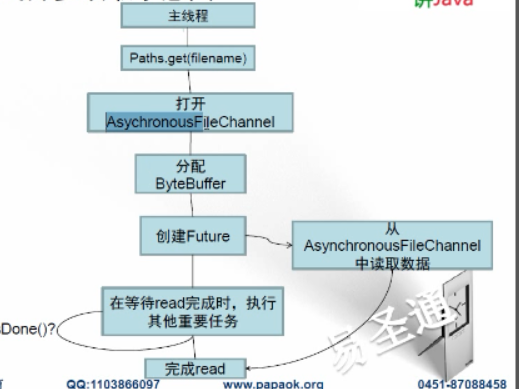
将来式:使用java.util.concurrent.Future接口
使用场合:当你希望由主控线程发起IO操作并轮询等到结果时使用将来式异步处理。
1、打开一个AsynchronousFileChannel来读写文件
2、采用了AsynchronousFileChannel,并用Future保存读取结果,所以会自动采用并发IO处理
3、在读取数据时,主线程可以继续执行其他任务。
4、当任务读取完成时,检查数据读取结果。
package com.weikun.A;

import java.nio.ByteBuffer;

import java.nio.channels.AsynchronousFileChannel;

import java.nio.file.Path;

import java.nio.file.Paths;

import java.util.concurrent.Future;

public class H {

    public static void main(String[] args) {

        // TODO Auto-generated method stub

        try {

            //1异步打开文件

            Path file=Paths.get("g://video//0528///流1.wmv");//找一个比较大的文件

            AsynchronousFileChannel channel=AsynchronousFileChannel.open(file);

            //2读取1000000字节

            ByteBuffer buffer=ByteBuffer.allocate(1024*10);

            Future<Integer> result=channel.read(buffer, 0);

            while(!result.isDone()){//3可以干点别的事情

                System.out.println("卫老师");//主线程可以打印些别的

            }

            Integer bytesRead=result.get();

            System.out.println("read:["+bytesRead+"]");

        } catch (Exception e) {

            // TODO: handle exception

            e.printStackTrace();

        }

    }

}
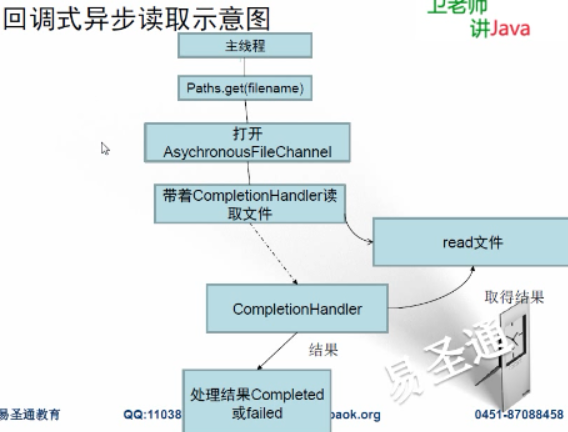
回调式:匿名内部类中可以分块处理io操作时遇到的情况,并不是向将来式一样可以在io同时主线程做其他的事
import java.io.IOException;

import java.nio.ByteBuffer;

import java.nio.channels.AsynchronousFileChannel;

import java.nio.channels.CompletionHandler;

import java.nio.file.Path;

import java.nio.file.Paths;

import java.util.concurrent.ExecutionException;

import java.util.concurrent.Future;

public class J {

    public static void main(String[] args) throws IOException, InterruptedException, ExecutionException {

        Path filePath = Paths.get("1.sql");

        AsynchronousFileChannel afc = AsynchronousFileChannel.open(filePath);

        ByteBuffer byteBuffer = ByteBuffer.allocate(16 * 1024);  //??个数有关

        //使用FutureDemo时,请注释掉completionHandlerDemo,反之亦然

        //futureDemo(afc, byteBuffer);

        afc.read(byteBuffer, 0, null, new CompletionHandler<Integer, Object>() {

            @Override

            public void completed(Integer result, Object attachment) {

                System.out.println("Bytes Read = " + result);

            }

            @Override

            public void failed(Throwable exc, Object attachment) {

                System.out.println(exc.getCause());

            }

        });

        System.out.println("Waiting for completion...");

        System.out.println("End");

        afc.close();

    }
12、NIO、AIO、BIO二的更多相关文章
- NIO,AIO,BIO
同步和异步:同步和异步关注的是消息通信机制, 同步:就是在发出一个“调用”时,在没有得到结果之前,该“调用”就不返回,但是一旦调用返回,就得到返回值了;换句话说:就是由“调用者”主动等待“调用”结果 ...
- BIO NIO AIO 简介
原文: https://github.com/zhongmingmao/nio_demo 简介 NIO与AIO的简单使用 基本概念 同步与异步 同步和异步是针对应用程序和内核的交互而言的:同步指的是用 ...
- IO回忆录之怎样过目不忘(BIO/NIO/AIO/Netty)
有热心的网友加我微信,时不时问我一些技术的或者学习技术的问题.有时候我回微信的时候都是半夜了.但是我很乐意解答他们的问题.因为这些年轻人都是很有上进心的,所以在我心里他们就是很优秀的,我愿意多和努力的 ...
- I/O模型系列之三:IO通信模型BIO NIO AIO
一.传统的BIO 网络编程的基本模型是Client/Server模型,也就是两个进程之间进行相互通信,其中服务端提供位置信息(绑定的IP地址和监听端口),客户端通过连接操作向服务端监听的地址发起连接请 ...
- 【netty】(1)---BIO NIO AIO演变
BIO NIO AIO演变 Netty是一个提供异步事件驱动的网络应用框架,用以快速开发高性能.高可靠的网络服务器和客户端程序.Netty简化了网络程序的开发,是很多框架和公司都在使用的技术. Net ...
- IO复用,AIO,BIO,NIO,同步,异步,阻塞和非阻塞 区别参考
参考https://www.cnblogs.com/aspirant/p/6877350.html?utm_source=itdadao&utm_medium=referral IO复用,AI ...
- java BIO/NIO/AIO 学习
一.了解Unix网络编程5种I/O模型 1.1.阻塞式I/O模型 阻塞I/O(blocking I/O)模型,进程调用recvfrom,其系统调用直到数据报到达且被拷贝到应用进程的缓冲区中或者发生错误 ...
- IO复用,AIO,BIO,NIO,同步,异步,阻塞和非阻塞 区别(百度)
如果面试问到IO操作,这篇文章提到的问题,基本是必问,百度的面试官问我三个问题 (1)什么是NIO(Non-blocked IO),AIO,BIO (2) java IO 与 NIO(New IO)的 ...
- 转载:BIO | NIO | AIO
http://my.oschina.net/bluesky0leon/blog/132361 也谈BIO | NIO | AIO (Java版) 转载自:zheng-lee博客 发布时间: 201 ...
- (转)IO复用,AIO,BIO,NIO,同步,异步,阻塞和非阻塞 区别
本文来自:https://www.cnblogs.com/aspirant/p/6877350.html?utm_source=itdadao&utm_medium=referral,非常感谢 ...
随机推荐
- 利用 ST-LINK Utility软件下载程序
先在电脑上安装STM32 ST-LINK Utility,软件安装一路Next就可以了,安装好软件之后界面如下: 下载程序只需要使用3个图标就可以了 第一个图标Connect to the ta ...
- 设计模式实例(Lua)笔记之七(Decorator模式)
1.描写叙述 就说说"我"上小学的的糗事吧. 我上小学的时候学习成绩非常的差,班级上 40 多个同学,我基本上都是在排名 45 名以后,依照老师给我的定义就是"不是读书的 ...
- java语言中的多态概述
多态:一个对象相应着不同类型 多态在代码中的体现:父类或接口的引用指向其子类对象. 多态的优点: 提高了代码的扩展性,前期定义的代码能够使用后期的内容. 多态的弊端: 前期定义的内容不能使用后期子类中 ...
- 【Android】Android程序自己主动更新
App自己主动更新的步骤可分为三步: 检查更新(假设有更新进行第2步,否则返回) 下载新版的APK安装包 安装APK 以下对这三步进行解释.当中会穿插相应代码.App自己主动更新的这三步所有被封装到了 ...
- iOS 手势识别器概述
手势识别器 iOS 手势识别器(UIGestureRecognizer) 点击手势(UITapGestureRecognizer) 滑动手势(UISwipeGestureRecognizer) 旋转手 ...
- Android基础新手教程——1.5.2 Git之使用GitHub搭建远程仓库
Android基础新手教程--1.5.2 Git之使用GitHub搭建远程仓库 标签(空格分隔): Android基础新手教程 本节引言: 在上一节中.我们学习了怎样使用Git.构建我们的本地仓库.轻 ...
- iOS对象方法和类方法的区别与调用方式
作为一个iOS程序员初学者,会搞不清楚对象方法和类方法的区别 -(void)duixiangfangfa ; +(void)leifangfa; - 代表实例方法,它在类的一个具体实例范围内执行,也就 ...
- nyoj--1237--最大岛屿(dfs+数据处理)
最大岛屿 时间限制:1000 ms | 内存限制:65535 KB 难度: 描述 神秘的海洋,惊险的探险之路,打捞海底宝藏,激烈的海战,海盗劫富等等.加勒比海盗,你知道吧?杰克船长驾驶着自己的的战 ...
- oracle日常维护语句
1.如何查看数据库的状态 unix下 ps -ef | grep ora windows下 看服务是否起来 是否可以连上数据库 SQL> select status, instance_r ...
- [poj 2185] Milking Grid 解题报告(KMP+最小循环节)
题目链接:http://poj.org/problem?id=2185 题目: Description Every morning when they are milked, the Farmer J ...