
利用POi3.8导出excel产生大量xml临时文件怎么办?
在实际项目中,经常会用到POI3.8来导出excel。而导出excel的时候,会因为残留大量以.xml结尾的文件而导致服务器存储空间急剧增长,最后导致系统挂了。为此,该怎么办呢?
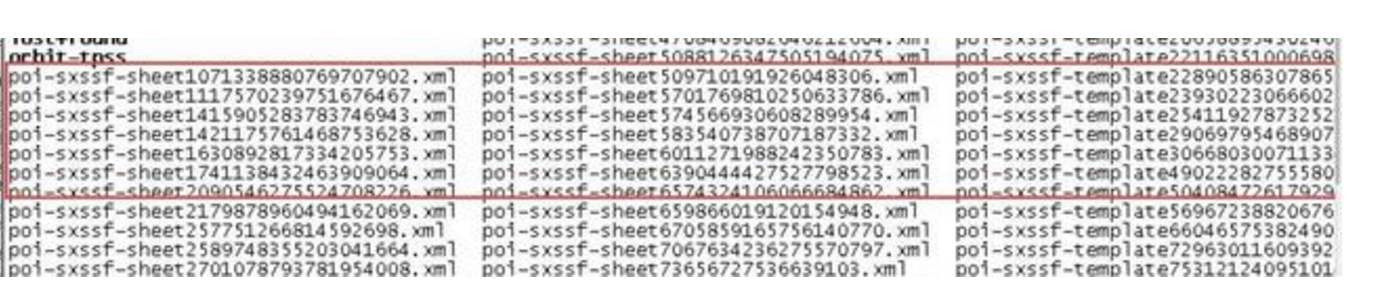
.xml后缀残留文件示例
通过大量的翻阅资料,目前有两种解决方式:
方式1:手动清除临时文件
POI3.8并没有提供方法来清除临时文件,为此,这里可以自己手动进行清除:
    <dependency>

            <groupId>org.apache.poi</groupId>

            <artifactId>poi</artifactId>

            <version>3.8</version>

        </dependency>

        <dependency>

            <groupId>org.apache.poi</groupId>

            <artifactId>poi-ooxml</artifactId>

            <version>3.8</version>

        </dependency>
package com.jack.shx.MySpringBoot;

import java.io.File;

import java.lang.reflect.Field;

import org.apache.poi.ss.usermodel.Sheet;

import org.apache.poi.xssf.streaming.SXSSFSheet;

import org.apache.poi.xssf.streaming.SXSSFWorkbook;

import org.apache.poi.xssf.streaming.SheetDataWriter;

public class SXSSFTempFilesDelete {

    /***

     * Returns a private attribute of a class

     * @param containingClass The class that contains the private attribute to retrieve

     * @param fieldToGet  the name of the attribute to get

     * @return The private attribute

     * @throws NoSuchFieldException

     * @throws IllegalAccessException

     */

    public static Object getPrivateAttribute(

            Object containingClass, String fieldToGet)

            throws NoSuchFieldException, IllegalAccessException

    {

        // get the field of the containingClass instance

        Field declaredField = containingClass.getClass().getDeclaredField(fieldToGet);

        declaredField.setAccessible(true); // access it

        Object get = declaredField.get(containingClass); // return it!

        return get;

    }

    /***

     * Deletes all temporary files of the SXSSFWorkbook instance

     * @param workbook

     * @throws NoSuchFieldException

     * @throws IllegalAccessException

     */

    public static void deleteSXSSFTempFiles(SXSSFWorkbook workbook)

            throws NoSuchFieldException, IllegalAccessException {

        int numberOfSheets = workbook.getNumberOfSheets();

        // iterate through all sheets (each sheet as a temp file)

        for (int i = 0; i <= numberOfSheets; i++) {

            Sheet sheetAt = workbook.getSheetAt(i);

            // delete only if the sheet is written by stream

            if (sheetAt instanceof SXSSFSheet) {

                SheetDataWriter sdw = (SheetDataWriter) getPrivateAttribute(sheetAt, "_writer");

                File f = (File) getPrivateAttribute(sdw, "_fd");

                try {

                    f.delete();

                } catch (Exception ex) {

                    // could not delete the file

                }

            }

        }

    }

}
或者
方式2:将POI3.8替换成更高的版本,并利用dispose方法清除临时文件
目前,更高版本的POI已经提供了清除临时文件的方法,具体可以参考官网:http://poi.apache.org/apidocs/org/apache/poi/xssf/streaming/SXSSFWorkbook.html
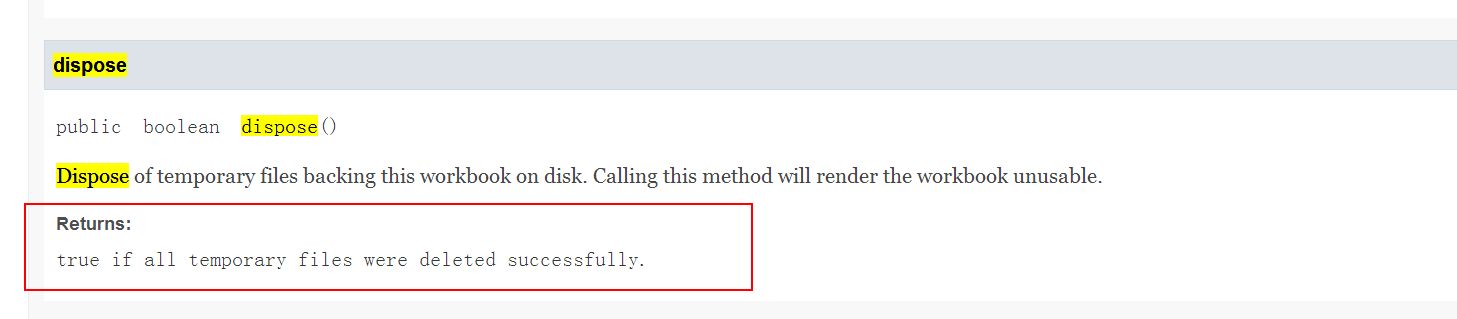
此时,我们在使用的时候就可以方便的清除临时文件,避免空间爆满了:
/**

     * 大数据量导出

     * @throws IOException

     */

    @Test

    public void text2() throws IOException {

        XSSFWorkbook xssfWorkbook = new   XSSFWorkbook(Thread.currentThread().getContextClassLoader().getResourceAsStream("bigdata.xlsx"));

        SXSSFWorkbook wb = new SXSSFWorkbook(xssfWorkbook, 1000); //内存中保留 1000 条数据,以免内存溢出,其余写入 硬盘  专门处理大数据

        Sheet sh = wb.getSheetAt(0);

        for(int rownum = 1; rownum < 75537; rownum++){

            Row row = sh.createRow(rownum);

            for(int cellnum = 0; cellnum < 10; cellnum++){

                Cell cell = row.createCell(cellnum);

                String address = new CellReference(cell).formatAsString();

                cell.setCellValue(address);

            }

        }

//        // Rows with rownum < 900 are flushed and not accessible

//        for(int rownum = 0; rownum < 900; rownum++){

//            Assert.assertNull(sh.getRow(rownum));

//        }

//

//        // ther last 100 rows are still in memory

//        for(int rownum = 900; rownum < 1000; rownum++){

//            Assert.assertNotNull(sh.getRow(rownum));

//        }

        FileOutputStream out = new FileOutputStream("D:\\sxssf.xlsx");

        wb.write(out);

        out.close();

        // dispose of temporary files backing this workbook on disk

        wb.dispose();
请注意 就这个一句话 wb.dispose();
利用POi3.8导出excel产生大量xml临时文件怎么办?的更多相关文章
- Java利用POI导入导出Excel中的数据
首先谈一下今天发生的一件开心的事,本着一颗android的心我被分配到了PB组,身在曹营心在汉啊!好吧,今天要记录和分享的是Java利用POI导入导出Excel中的数据.下面POI包的下载地 ...
- .net mvc利用NPOI导入导出excel
1.导出Excel :首先引用NPOI包(Action一定要用FileResult) /// <summary> /// 批量导出需要导出的列表 /// </summary> ...
- ASP.Net MVC利用NPOI导入导出Excel
因近期项目遇到所以记录一下: 首先导出Excel: 首先引用NPOI包 http://pan.baidu.com/s/1i3Fosux (Action一定要用FileResult) /// <s ...
- net mvc 利用NPOI导入导出excel
1.导出Excel : 首先引用NPOI包(Action一定要用FileResult) /// <summary> /// 批量导出需要导出的列表 /// </summary> ...
- 海量数据Excel报表利器——EasyExcel(一 利用反射机制导出Excel)
EasyExcel 写入(导出) 互联网的精髓就是共享,可以共享技术.共享经验.共享情感.共享快乐~ 很多年前就有这个想法了,从事IT行业时间也不短了,应该把自己工作和业余所学习的东西记录并分享出来, ...
- Springmvc和poi3.9导出excel并弹出下载框
Springmvc 和 poi3.9 用java程序从数据库导出数据到excel(在博客园的第一篇原创博客) @RequestMapping(value = "/importexcel.ht ...
- .net利用NPOI导入导出Excel
NPOI在.net中的操作Excel 1.读取 using (FileStream stream = new FileStream(@"c:\客户资料.xls", FileMode ...
- asp.net利用剪切板导出excel
public enum ClipboardFormats : uint { CF_TEXT = 1, CF_BITMAP = 2, CF_METAFILEPICT = 3, CF_SYLK = 4, ...
- 导出excel(利用工具类导出excel)
/** * 添加导出功能 * @param creditPageResult * @param request * @param response */ @RequestMapping(value = ...
随机推荐
- 初探python+selenium
由于公司网络管管控严格,服务器上访问外网需要进行身份认证(按理说递交个申请给开放相关域名外网访问就好,无奈不给通过,又想马儿跑又不给马吃草),正好前一阵撸课程的时候看到selenium可以实现自动化, ...
- javascript常用的基础函数或方法——写给新手的我(持续补充)
1常用基础函数 alert函数:显示一个警告对话框,包括一个OK按钮.这就是传说中的警告框,此框一弹,世界就清静了.举例: alert("我一旦出现,之前出现的就算了,我屁股后面你们就歇 ...
- VS解决方案文件格式说明
作者:朱金灿 来源:http://blog.csdn.net/clever101 VS解决方案文件本质是一个文件文件,这个用记事本或者Node++之类的文本编辑软件打开一个VS解决方案文件就知道了.了 ...
- 利用tcpdump抓包工具监控TCP连接的三次握手和断开连接的四次挥手
TCP传输控制协议是面向连接的可靠的传输层协议,在进行数据传输之前,需要在传输数据的两端(客户端和服务器端)创建一个连接,这个连接由一对插口地址唯一标识,即是在IP报文首部的源IP地址.目的IP地址, ...
- PMP项目经理认证
PMP认证是由美国项目管理学会(PMI)在全球范围内推出的针对项目经理的资格认证体系,通过该认证的项目经理叫"PMP",即Project Management Profession ...
- 从hadoop 要删除字符串匹配指定的任务
我们都知道,假设 hadoop job -list 获取当前正在执行的hadoop 任务,返回的结果例如以下: watermark/2/text/aHR0cDovL2Jsb2cuY3Nkbi5uZXQ ...
- kendo ui gird温馨提示(使用本地数据) 一个
加入js引用 <link href="http://cdn.kendostatic.com/2014.2.716/styles/kendo.common.min.css" r ...
- Emgu-WPF 激光雷达研究-绘制雷达图
原文:Emgu-WPF 激光雷达研究-绘制雷达图 硬件:Hokuyo URG04LX 环境:VS2017- win10- 64 Emgu_3.2.0.2682 语言:C# WPF 数据解析参考 ...
- Emgu-WPF学习使用-阈值化
原文:Emgu-WPF学习使用-阈值化 环境:Win8 64位 Vs2015 Emgu 版本:emgucv-windesktop 3.2.0.2682 上图为常用阈值化处理效果.不同阈值设置可呈现不同 ...
- WPF编游戏系列 之二 图标效果
原文:WPF编游戏系列 之二 图标效果 本篇将要实现图标的两个效果:1. 显示图标标签,2. 图标模糊效果.在上一篇中提到Image没有HTML <img>的Title属性( ...