
Spring Boot:整合Spring Data JPA
综合概述
JPA是Java Persistence API的简称,是一套Sun官方提出的Java持久化规范。其设计目标主要是为了简化现有的持久化开发工作和整合ORM技术,它为Java开发人员提供了一种ORM工具来管理Java应用中的关系数据。 简而言之,JPA提供了使用面向对象的方式操作数据库的功能。JPA充分吸收了现有Hibernate,TopLink,JDO等ORM框架的优势,具有易于使用、伸缩性强等优点。
Spring Data JPA是Spring基于Spring Data框架对于JPA规范的一套具体实现方案,使用Spring Data JPA可以极大地简化JPA 的写法,几乎可以在不写具体实现的情况下完成对数据库的操作,并且除了基础的CRUD操作外,Spring Data JPA还提供了诸如分页和排序等常用功能的实现方案。合理的使用Spring Data JPA可以极大的提高我们的日常开发效率和有效的降低项目开发成本。
实现案例
接下来,我们就通过实际案例来讲解Spring Data JPA的整合,以及提供JPA相关操作的一些示例。
生成项目模板
为方便我们初始化项目,Spring Boot给我们提供一个项目模板生成网站。
1. 打开浏览器,访问:https://start.spring.io/
2. 根据页面提示,选择构建工具,开发语言,项目信息等。
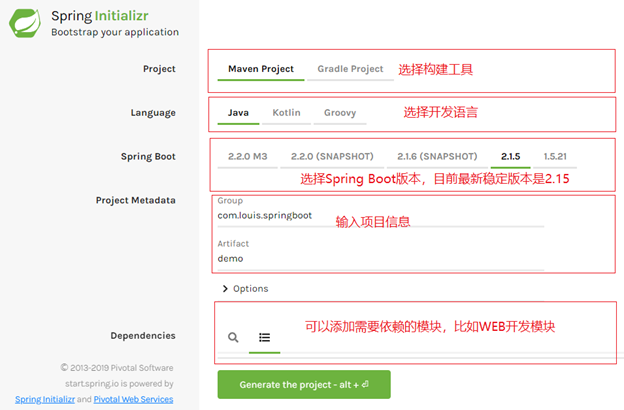
3. 点击 Generate the project,生成项目模板,生成之后会将压缩包下载到本地。
4. 使用IDE导入项目,我这里使用Eclipse,通过导入Maven项目的方式导入。
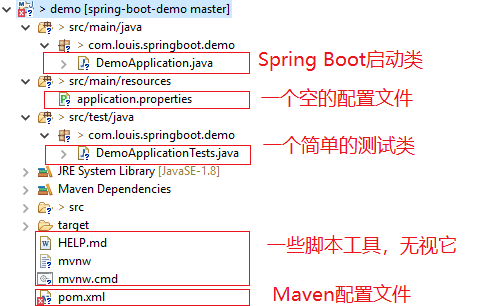
添加相关依赖
清理掉不需要的测试类及测试依赖,添加 Maven 相关依赖,这里需要添加上WEB和Swagger和JPA的依赖,Swagger的添加是为了方便接口测试。
<?xml version="1.0" encoding="UTF-8"?>

<project xmlns="http://maven.apache.org/POM/4.0.0" xmlns:xsi="http://www.w3.org/2001/XMLSchema-instance"

    xsi:schemaLocation="http://maven.apache.org/POM/4.0.0 http://maven.apache.org/xsd/maven-4.0.0.xsd">

    <modelVersion>4.0.</modelVersion>

    <parent>

        <groupId>org.springframework.boot</groupId>

        <artifactId>spring-boot-starter-parent</artifactId>

        <version>2.1..RELEASE</version>

        <relativePath/> <!-- lookup parent from repository -->

    </parent>

    <groupId>com.louis.springboot</groupId>

    <artifactId>demo</artifactId>

    <version>0.0.-SNAPSHOT</version>

    <name>demo</name>

    <description>Demo project for Spring Boot</description>

    <properties>

        <java.version>1.8</java.version>

    </properties>

    <dependencies>

        <!-- web -->

        <dependency>

                <groupId>org.springframework.boot</groupId>

                <artifactId>spring-boot-starter-web</artifactId>

         </dependency>

        <!-- swagger -->

        <dependency>

            <groupId>io.springfox</groupId>

            <artifactId>springfox-swagger2</artifactId>

            <version>2.9.</version>

        </dependency>

        <dependency>

            <groupId>io.springfox</groupId>

            <artifactId>springfox-swagger-ui</artifactId>

            <version>2.9.</version>

        </dependency>

        <!-- jpa -->

        <dependency>

            <groupId>org.springframework.boot</groupId>

            <artifactId>spring-boot-starter-data-jpa</artifactId>

        </dependency>

        <!-- mysql -->

        <dependency>

            <groupId>mysql</groupId>

            <artifactId>mysql-connector-java</artifactId>

        </dependency>

    </dependencies>

    <build>

        <plugins>

            <plugin>

                <groupId>org.springframework.boot</groupId>

                <artifactId>spring-boot-maven-plugin</artifactId>

            </plugin>

        </plugins>

        <!-- 打包时拷贝MyBatis的映射文件 -->

        <resources>

            <resource>

                <directory>src/main/java</directory>

                <includes>

                    <include>**/sqlmap/*.xml</include>

                </includes>

                <filtering>false</filtering>

            </resource>

            <resource>

                <directory>src/main/resources</directory>

                    <includes>

                        <include>**/*.*</include>

                    </includes>

                    <filtering>true</filtering>

            </resource>

        </resources>

    </build>

</project>
添加相关配置
1.添加数据源配置
将application.properties文件改名为application.yml ,并在其中添加MySQL数据源连接信息。
注意:
这里需要首先创建一个MySQL数据库,并输入自己的用户名和密码。这里的数据库是springboot。
另外,如果你使用的是MySQL 5.x及以前版本,驱动配置driverClassName是com.mysql.jdbc.Driver。
application.yml
server:

  port:

spring:

  datasource:

    driverClassName: com.mysql.cj.jdbc.Driver

    url: jdbc:mysql://localhost:3306/springboot?useUnicode=true&zeroDateTimeBehavior=convertToNull&autoReconnect=true&characterEncoding=utf-8

    username: root

    password:

  jpa:

    show-sql: true # 默认false,在日志里显示执行的sql语句

    database: mysql

    hibernate.ddl-auto: update #指定为update,每次启动项目检测表结构有变化的时候会新增字段,表不存在时会新建,如果指定create,则每次启动项目都会清空数据并删除表,再新建

    properties.hibernate.dialect: org.hibernate.dialect.MySQL5Dialect

    database-platform: org.hibernate.dialect.MySQL5Dialect

    hibernate:

      naming:

        implicit-strategy: org.hibernate.boot.model.naming.ImplicitNamingStrategyLegacyJpaImpl #指定jpa的自动表生成策略,驼峰自动映射为下划线格式

        #physical-strategy: org.hibernate.boot.model.naming.PhysicalNamingStrategyStandardImpl
2. 添加swagger 配置
添加一个swagger 配置类,在工程下新建 config 包并添加一个 SwaggerConfig 配置类。
SwaggerConfig.java

import org.springframework.context.annotation.Bean;

import org.springframework.context.annotation.Configuration;

import springfox.documentation.builders.ApiInfoBuilder;

import springfox.documentation.builders.PathSelectors;

import springfox.documentation.builders.RequestHandlerSelectors;

import springfox.documentation.service.ApiInfo;

import springfox.documentation.spi.DocumentationType;

import springfox.documentation.spring.web.plugins.Docket;

import springfox.documentation.swagger2.annotations.EnableSwagger2;

@Configuration

@EnableSwagger2

public class SwaggerConfig {

    @Bean

    public Docket createRestApi(){

        return new Docket(DocumentationType.SWAGGER_2).apiInfo(apiInfo())

                .select()

                .apis(RequestHandlerSelectors.any())

                .paths(PathSelectors.any()).build();

    }

    private ApiInfo apiInfo(){

        return new ApiInfoBuilder()

                .title("SpringBoot API Doc")

                .description("This is a restful api document of Spring Boot.")

                .version("1.0")

                .build();

    }

}
编写业务代码
首先,编写一个实体类,并添加相关注解,具体注解说明参见代码。
SysUser.java
package com.louis.springboot.demo.model;

import javax.persistence.Column;

import javax.persistence.Entity;

import javax.persistence.GeneratedValue;

import javax.persistence.GenerationType;

import javax.persistence.Id;

import javax.persistence.Index;

import javax.persistence.Table;

@Entity    // @Entity: 实体类, 必须

// @Table: 对应数据库中的表, 必须, name=表名, Indexes是声明表里的索引, columnList是索引的列, 同时声明此索引列是否唯一, 默认false

@Table(name = "sys_user", indexes = {@Index(name = "id", columnList = "id", unique = true), @Index(name = "name", columnList = "name", unique = true)})

public class SysUser {

    @Id // @Id: 指明id列, 必须

    @GeneratedValue(strategy = GenerationType.IDENTITY) // @GeneratedValue: 表明是否自动生成, 必须, strategy也是必写, 指明主键生成策略, 默认是Oracle

    private Long id;

    @Column(name = "name", nullable = false) // @Column: 对应数据库列名,可选, nullable 是否可以为空, 默认true

    private String name;

    private String password;

    private String email;

    public Long getId() {

        return id;

    }

    public void setId(Long id) {

        this.id = id;

    }

    public String getName() {

        return name;

    }

    public void setName(String name) {

        this.name = name;

    }

    public String getPassword() {

        return password;

    }

    public void setPassword(String password) {

        this.password = password;

    }

    public String getEmail() {

        return email;

    }

    public void setEmail(String email) {

        this.email = email;

    }

}
然后,编写一个SysUserDao并继承JpaRepository,由此我们已经继承了大部分可用的CURD操作,针对基础操作,DAO完全不用写任何方法。
SysUserDao.java
package com.louis.springboot.demo.dao;

import java.io.Serializable;

import org.springframework.data.jpa.repository.JpaRepository;

import com.louis.springboot.demo.model.SysUser;

public interface SysUserDao extends JpaRepository<SysUser, Long>, Serializable {

}
使用Spring Data JPA,可以通过两种方式使用 JPA 进行数据持久化。
方式一:使用Spring Data JPA 提供的接口默认实现,如上面我们的DAO实现。
方式二:自定义符合Spring Data JPA规则的查询方法,由框架将其自动解析为SQL。
Spring Data JPA提供了一些实现了基本的数据库操作的接口类,这些接口和类的关系如下。
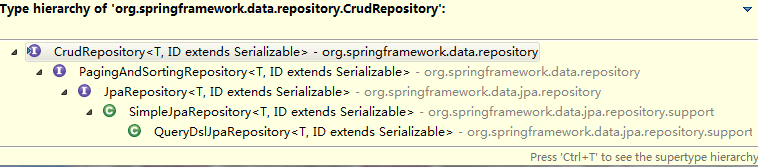
其中CrudRepository是顶层CURD接口,提供了一些简单的增删查改功能,接口定义如下。
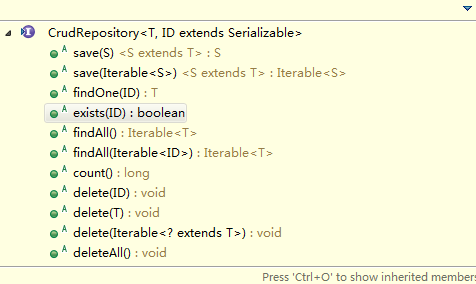
CrudRepository.java
package org.springframework.data.repository;

import java.util.Optional;

/**

 * Interface for generic CRUD operations on a repository for a specific type.

 * @author Oliver Gierke

 * @author Eberhard Wolff

 */

@NoRepositoryBean

public interface CrudRepository<T, ID> extends Repository<T, ID> {

    /**

     * Saves a given entity. Use the returned instance for further operations as the save operation might have changed the

     * entity instance completely.

     *

     * @param entity must not be {@literal null}.

     * @return the saved entity will never be {@literal null}.

     */

    <S extends T> S save(S entity);

    /**

     * Saves all given entities.

     *

     * @param entities must not be {@literal null}.

     * @return the saved entities will never be {@literal null}.

     * @throws IllegalArgumentException in case the given entity is {@literal null}.

     */

    <S extends T> Iterable<S> saveAll(Iterable<S> entities);

    /**

     * Retrieves an entity by its id.

     *

     * @param id must not be {@literal null}.

     * @return the entity with the given id or {@literal Optional#empty()} if none found

     * @throws IllegalArgumentException if {@code id} is {@literal null}.

     */

    Optional<T> findById(ID id);

    /**

     * Returns whether an entity with the given id exists.

     *

     * @param id must not be {@literal null}.

     * @return {@literal true} if an entity with the given id exists, {@literal false} otherwise.

     * @throws IllegalArgumentException if {@code id} is {@literal null}.

     */

    boolean existsById(ID id);

    /**

     * Returns all instances of the type.

     *

     * @return all entities

     */

    Iterable<T> findAll();

    /**

     * Returns all instances of the type with the given IDs.

     *

     * @param ids

     * @return

     */

    Iterable<T> findAllById(Iterable<ID> ids);

    /**

     * Returns the number of entities available.

     *

     * @return the number of entities

     */

    long count();

    /**

     * Deletes the entity with the given id.

     *

     * @param id must not be {@literal null}.

     * @throws IllegalArgumentException in case the given {@code id} is {@literal null}

     */

    void deleteById(ID id);

    /**

     * Deletes a given entity.

     *

     * @param entity

     * @throws IllegalArgumentException in case the given entity is {@literal null}.

     */

    void delete(T entity);

    /**

     * Deletes the given entities.

     *

     * @param entities

     * @throws IllegalArgumentException in case the given {@link Iterable} is {@literal null}.

     */

    void deleteAll(Iterable<? extends T> entities);

    /**

     * Deletes all entities managed by the repository.

     */

    void deleteAll();

}
PagingAndSortingRepository在继承了CrudRepository基础上实现了排序和分页的方法。
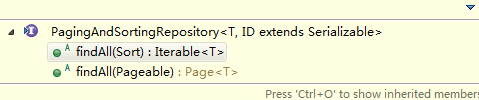
PagingAndSortingRepository.java
package org.springframework.data.repository;

import org.springframework.data.domain.Page;

import org.springframework.data.domain.Pageable;

import org.springframework.data.domain.Sort;

/**

 * Extension of {@link CrudRepository} to provide additional methods to retrieve entities using the pagination and

 * sorting abstraction.

 *

 * @author Oliver Gierke

 * @see Sort

 * @see Pageable

 * @see Page

 */

@NoRepositoryBean

public interface PagingAndSortingRepository<T, ID> extends CrudRepository<T, ID> {

    /**

     * Returns all entities sorted by the given options.

     *

     * @param sort

     * @return all entities sorted by the given options

     */

    Iterable<T> findAll(Sort sort);

    /**

     * Returns a {@link Page} of entities meeting the paging restriction provided in the {@code Pageable} object.

     *

     * @param pageable

     * @return a page of entities

     */

    Page<T> findAll(Pageable pageable);

}
JpaRepository又在继承PagingAndSortingRepository的基础上,同时继承了QueryByExampleExecutor接口,使其拥有了匹配指定样例查询的能力。
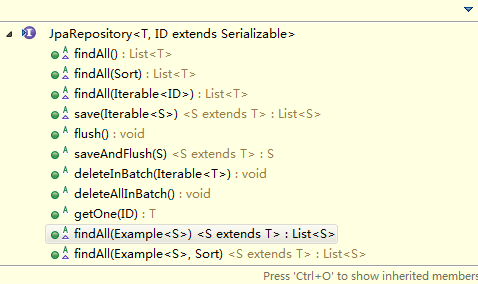
JpaRepository.java
package org.springframework.data.jpa.repository;

import java.util.List;

import javax.persistence.EntityManager;

import org.springframework.data.domain.Example;

import org.springframework.data.domain.Sort;

import org.springframework.data.repository.NoRepositoryBean;

import org.springframework.data.repository.PagingAndSortingRepository;

import org.springframework.data.repository.query.QueryByExampleExecutor;

/**

 * JPA specific extension of {@link org.springframework.data.repository.Repository}.

 *

 * @author Oliver Gierke

 * @author Christoph Strobl

 * @author Mark Paluch

 */

@NoRepositoryBean

public interface JpaRepository<T, ID> extends PagingAndSortingRepository<T, ID>, QueryByExampleExecutor<T> {

    /*

     * (non-Javadoc)

     * @see org.springframework.data.repository.CrudRepository#findAll()

     */

    List<T> findAll();

    /*

     * (non-Javadoc)

     * @see org.springframework.data.repository.PagingAndSortingRepository#findAll(org.springframework.data.domain.Sort)

     */

    List<T> findAll(Sort sort);

    /*

     * (non-Javadoc)

     * @see org.springframework.data.repository.CrudRepository#findAll(java.lang.Iterable)

     */

    List<T> findAllById(Iterable<ID> ids);

    /*

     * (non-Javadoc)

     * @see org.springframework.data.repository.CrudRepository#save(java.lang.Iterable)

     */

    <S extends T> List<S> saveAll(Iterable<S> entities);

    /**

     * Flushes all pending changes to the database.

     */

    void flush();

    /**

     * Saves an entity and flushes changes instantly.

     *

     * @param entity

     * @return the saved entity

     */

    <S extends T> S saveAndFlush(S entity);

    /**

     * Deletes the given entities in a batch which means it will create a single {@link Query}. Assume that we will clear

     * the {@link javax.persistence.EntityManager} after the call.

     *

     * @param entities

     */

    void deleteInBatch(Iterable<T> entities);

    /**

     * Deletes all entities in a batch call.

     */

    void deleteAllInBatch();

    /**

     * Returns a reference to the entity with the given identifier. Depending on how the JPA persistence provider is

     * implemented this is very likely to always return an instance and throw an

     * {@link javax.persistence.EntityNotFoundException} on first access. Some of them will reject invalid identifiers

     * immediately.

     *

     * @param id must not be {@literal null}.

     * @return a reference to the entity with the given identifier.

     * @see EntityManager#getReference(Class, Object) for details on when an exception is thrown.

     */

    T getOne(ID id);

    /*

     * (non-Javadoc)

     * @see org.springframework.data.repository.query.QueryByExampleExecutor#findAll(org.springframework.data.domain.Example)

     */

    @Override

    <S extends T> List<S> findAll(Example<S> example);

    /*

     * (non-Javadoc)

     * @see org.springframework.data.repository.query.QueryByExampleExecutor#findAll(org.springframework.data.domain.Example, org.springframework.data.domain.Sort)

     */

    @Override

    <S extends T> List<S> findAll(Example<S> example, Sort sort);

}
上面因为我们的SysUserDao直接继承了JpaRepository,所以上述所有的接口SysUserDao都是可以直接使用的,当然,除了可以直接使用默认提供的基础接口外,Spring Data JPA还允许我们自定义查询方法,对于符合以下命名规则的方法,Spring Data JPA能够根据其方法名为其自动生成SQL,除了使用示例中的 find 关键字,还支持的关键字有:query、get、read、count、delete等。
只要按照以下命名规范的定义的方法,Spring Data JPA都能够帮我们自动生成SQL,无需自己实现。
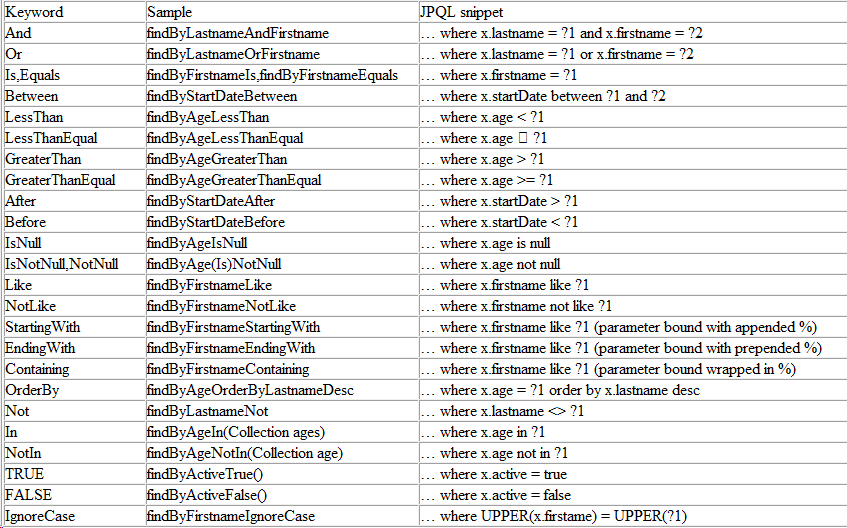
接着编写一个服务接口,添加用户保存、删除、查询全部和分页查询的方法。
SysUserService.java
package com.louis.springboot.demo.service;

import java.util.List;

import com.louis.springboot.demo.model.SysUser;

import com.louis.springboot.demo.util.PageQuery;

public interface SysUserService {

    /**

     * 保存用户

     * @param user

     */

    public void save(SysUser user);

    /**

     * 删除用户

     * @param id

     */

    public void delete(SysUser user);

    /**

     * 查询全部用户

     * @return

     */

    public List<SysUser> findAll();

    /**

     * 查询分页数据

     * @return

     */

    public Object findPage(PageQuery pageQuery);

}
继续编写服务实现类并调用DAO实现相应功能,以下DAO方法都是继承而来的,除此之后,JPA还提供了大量的API可用。
SysUserServiceImpl.java
package com.louis.springboot.demo.service.impl;

import java.util.List;

import org.springframework.beans.factory.annotation.Autowired;

import org.springframework.data.domain.PageRequest;

import org.springframework.stereotype.Service;

import com.louis.springboot.demo.dao.SysUserDao;

import com.louis.springboot.demo.model.SysUser;

import com.louis.springboot.demo.service.SysUserService;

import com.louis.springboot.demo.util.PageQuery;

@Service

public class SysUserServiceImpl implements SysUserService {

    @Autowired

    private SysUserDao sysUserDao;

    @Override

    public void save(SysUser user) {

        sysUserDao.save(user);

    }

    @Override

    public void delete(SysUser user) {

        sysUserDao.delete(user);

    }

    @Override

    public List<SysUser> findAll() {

        return sysUserDao.findAll();

    }

    @Override

    public Object findPage(PageQuery pageQuery) {

        return sysUserDao.findAll(PageRequest.of(pageQuery.getPage(), pageQuery.getSize()));

    }

}
接着编写一个用户控制器,调用服务接口实现对应功能。
SysUserController.java
package com.louis.springboot.demo.controller;

import org.springframework.beans.factory.annotation.Autowired;

import org.springframework.web.bind.annotation.GetMapping;

import org.springframework.web.bind.annotation.PostMapping;

import org.springframework.web.bind.annotation.RequestBody;

import org.springframework.web.bind.annotation.RequestMapping;

import org.springframework.web.bind.annotation.RestController;

import com.louis.springboot.demo.model.SysUser;

import com.louis.springboot.demo.service.SysUserService;

import com.louis.springboot.demo.util.PageQuery;

@RestController

@RequestMapping("user")

public class SysUserController {

    @Autowired

    private SysUserService sysUserService;

    @PostMapping(value="/save")

    public Object save(@RequestBody SysUser user) {

        sysUserService.save(user);

        return ;

    }

    @PostMapping(value="/delete")

    public Object delete(@RequestBody SysUser user) {

        sysUserService.delete(user);

        return ;

    }

    @GetMapping(value="/findAll")

    public Object findAll() {

        return sysUserService.findAll();

    }

    @PostMapping(value="/findPage")

    public Object findPage(@RequestBody PageQuery pageQuery) {

        return sysUserService.findPage(pageQuery);

    }

}
上面对分页请求进行了简单的封装,主要包含查询页码和每页数量两个属性。
PageQuery.java
package com.louis.springboot.demo.util;

public class PageQuery {

    private int page;

    private int size;

    public int getPage() {

        return page;

    }

    public void setPage(int page) {

        this.page = page;

    }

    public int getSize() {

        return size;

    }

    public void setSize(int size) {

        this.size = size;

    }

}
编译测试运行
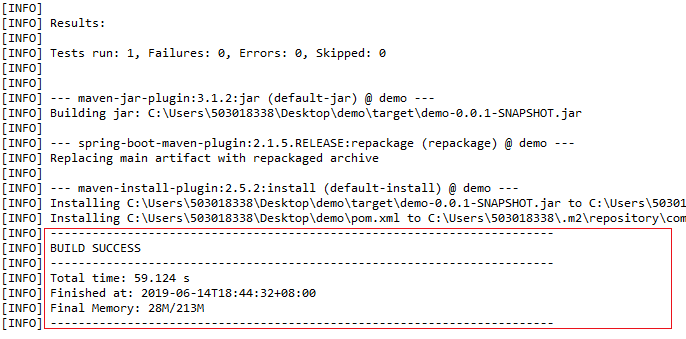
1. 右键项目 -> Run as -> Maven install,开始执行Maven构建,第一次会下载Maven依赖,可能需要点时间,如果出现如下信息,就说明项目编译打包成功了。
2. 打开数据库,创建一个springboot数据库,然后右键文件 DemoApplication.java -> Run as -> Java Application,开始启动应用,如果一开始数据库没有对应的表,在应用启动时会创建,我们可以通过控制台查看到对应的SQL语句。
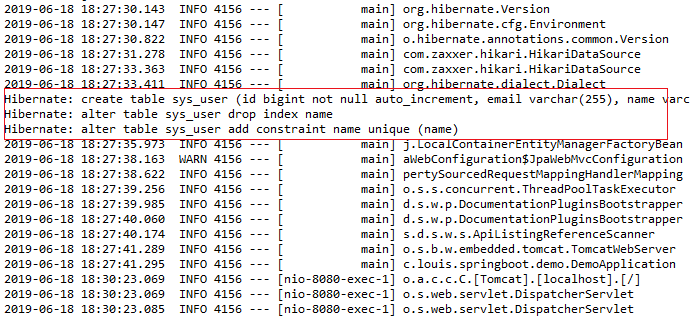
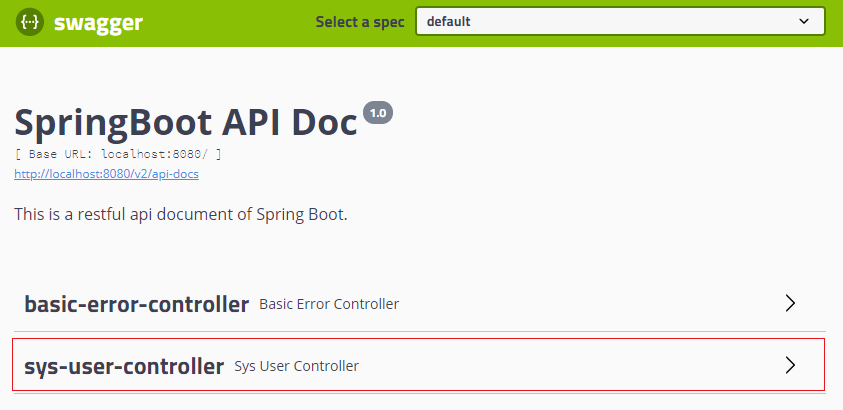
3. 打开浏览器,访问:http://localhost:8080/swagger-ui.html,进入swagger接口文档界面。
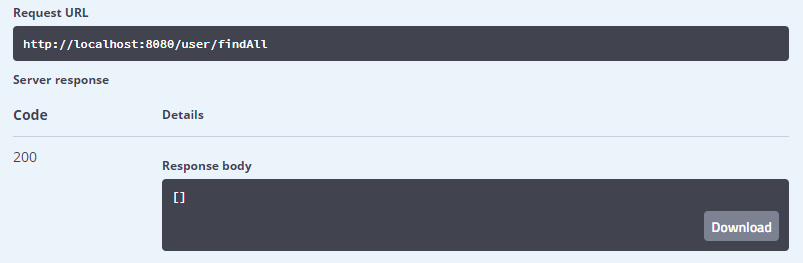
4. 首先访问findAll接口,此时并没有数据,所以返回结果为空。
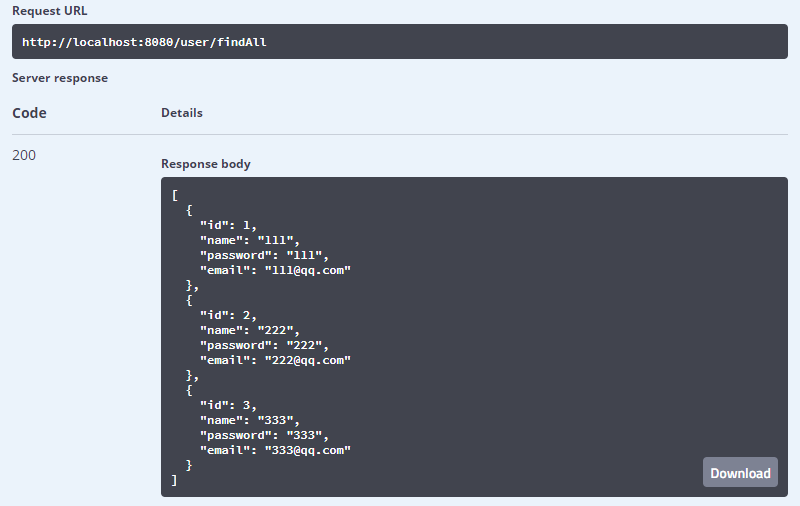
然后调用save接口,分别插入以下三条数据。
{

  "id": ,

  "name": "",

  "email": "111@qq.com",

  "password": ""

}
{

  "id": ,

  "name": "",

  "email": "222@qq.com",

  "password": ""

}
{

  "id": ,

  "name": "",

  "email": "333@qq.com",

  "password": ""

}
接着回来继续调用findAll接口,可以看到我们已经成功的插入了三条数据。
接着测试分页查询接口findPage,输入{ "page": 0, "size": 2 },标识查询第一页,每页显示两条记录,下面返回正确的分页查询数据。
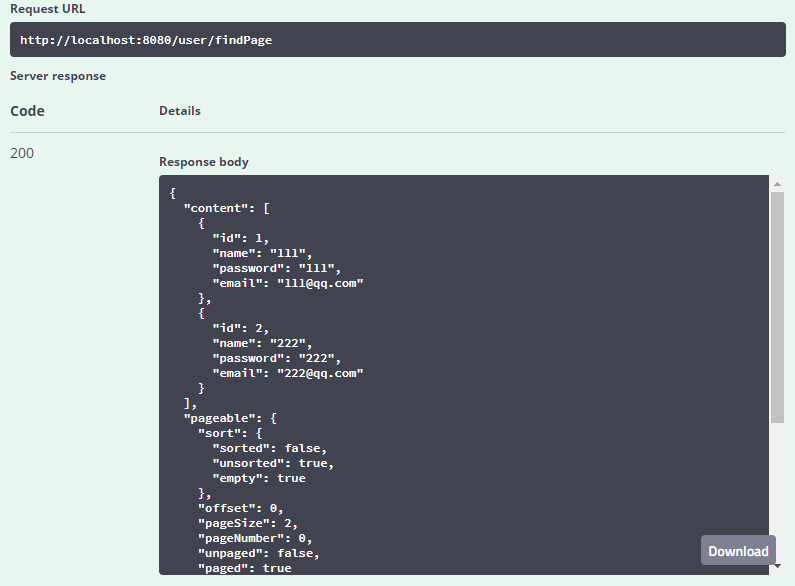
最后我们测试一下删除接口delete,删除掉id为1的数据,再次调用findAll接口,我们发现目标记录已经成功被删除。

参考资料
项目主页:https://spring.io/projects/spring-data-jpa
参考文档:https://docs.spring.io/spring-data/jpa/docs/current/reference/html/
网上资料:http://www.360doc.com/content/17/0801/09/16915_675758662.shtml
网上资料:https://www.ibm.com/developerworks/cn/opensource/os-cn-spring-jpa/index.html
相关导航
源码下载
码云:https://gitee.com/liuge1988/spring-boot-demo.git
作者:朝雨忆轻尘
出处:https://www.cnblogs.com/xifengxiaoma/
版权所有,欢迎转载,转载请注明原文作者及出处。
Spring Boot:整合Spring Data JPA的更多相关文章
- Spring Boot 整合Spring Data JPA
Spring Boot整合Spring Data JPA 1)加入依赖 <dependency> <groupId>org.springframework.boot</g ...
- Spring boot 整合spring Data JPA+Spring Security+Thymeleaf框架(上)
近期上班太忙所以耽搁了给大家分享实战springboot 框架的使用. 以下是spring boot 整合多个框架的使用. 首先是准备工作要做好. 第一 导入框架所需的包,我们用的事maven 进行 ...
- spring boot整合spring Data JPA和freemarker
1.spring Data JPA简介 是一个替代hibernate的一个作用于数据库的框架. 2.整合 1.导入依赖 <dependency> <groupId>org.sp ...
- Spring Boot整合Spring Data JPA
1.JPA 2.Spring Data JPA 3.导入依赖 4.连接数据库 5.实体类 6.Repository 7.测试 1.JPA JPA是Java Persistence API的简称,中文名 ...
- Spring Boot 整合Spring Data以及rabbitmq,thymeleaf,向qq邮箱发送信息
首先得将自己的qq开启qq邮箱的POP3/SMTP服务 说明: p,e为路由key. 用户系统完成登录的时候,将{手机号-时间-IP}保存到队列Phone-queue中,msg-sys系统获得消息打印 ...
- Spring Boot整合Spring Security
Spring Boot对于该家族的框架支持良好,但是当中本人作为小白配置还是有一点点的小问题,这里分享一下.这个项目是使用之前发布的Spring Boot会员管理系统重新改装,将之前filter登录验 ...
- Spring Boot整合Spring Security自定义登录实战
本文主要介绍在Spring Boot中整合Spring Security,对于Spring Boot配置及使用不做过多介绍,还不了解的同学可以先学习下Spring Boot. 本demo所用Sprin ...
- Spring Boot整合Spring Security总结
一.创建Spring Boot项目 引入Thymeleaf和Web模块以及Spring Security模块方便进行测试,先在pom文件中将 spring-boot-starter-security ...
- Spring Boot整合Spring Batch
引言 Spring Batch是处理大量数据操作的一个框架,主要用来读取大量数据,然后进行一定的处理后输出指定的形式.比如我们可以将csv文件中的数据(数据量几百万甚至几千万都是没问题的)批处理插入保 ...
- Spring Boot整合Spring Session实战
传统java web应用session都是由应用服务器(如tomcat)保存在内存中,这对应但节点应用来说没问题:但对于应用集群来说会造成各节点之间的session无法共享,一个节点挂掉后,其他节点接 ...
随机推荐
- windows 10 使用 tricks
全新的环境变量编辑界面, 全新的[任务管理器]⇒ [性能] 0. 添加开机启动项 将要添加的开机自启动软件的快捷方式添加到如下的路径: C:\Users\hasee\AppData\Roaming\M ...
- SharePoint Iframe 一个错误此内容不能显示在一帧<继续>
在之前的SharePoint网站iframe引用中,我们遇到过以下的问题,就是其他系统或者不通环境的SharePoint网站,引用SharePoint页面会报错"此内容不能显示在一个框架中& ...
- 【转载】如何使用docker部署c/c++程序
原文地址:https://blog.csdn.net/len_yue_mo_fu/article/details/80189035 Docker介绍 Docker是一个开源的容器引擎,它有助于更快地交 ...
- JS超链接动态显示图片
<!DOCTYPE html><html><head><meta http-equiv="Content-Type" content=&q ...
- HTTP协议学习 - 9 Method Definitions
# 前言 官方文档简略翻译.9 不是代表第九篇,而是在 RFC2616 中是第九篇.重要加粗,龟速翻译. # Method 9.3 GET The GET method means retrieve ...
- 树莓派3B 无显示器,无键盘,无Linux系统,无网线 配置WIFI连接
#1.基本需求#2.烧写镜像#3.用有线网(网线)连接PC,实现远程操作树莓派#4.接入无线网,通过其它电脑远程控制树莓派#5.使用PC共享的热点Wifi远程控制树莓派 #1.基本需求 树莓派 USB ...
- 细谈unity资源管理的设计
一.概要 本文主要说说Unity是如何管理的,基于何种方式,基于这种管理方式,又该如何规划资源管理,以及构建bundle,是后面需要详细讨论的. 二.Unity的资源管理方式 2.1 资源分类 uni ...
- Delphi Android 将Google ZXing 整合(调用Jar文件)
前篇文章介绍了在delphi App(以下简称App)中可使用intent来调用Google ZXing 条码扫描器(以下简称zx),其各有优缺点,优点是我们不需关注zx本身的细节,只需调用其接口即可 ...
- 零元学Expression Blend 4 - Chapter 7 什麽?影片不再是印象中的方框框!!!看Blend 4如何把影片镶入字里
原文:零元学Expression Blend 4 - Chapter 7 什麽?影片不再是印象中的方框框!!!看Blend 4如何把影片镶入字里 本章将教大家如何在Blend 4里新增Media El ...
- HUSTOJ的Windows版评判内核(限制内存使用)
HUSTOJ的Windows版评判内核(一) 作者:游蓝海 个人主页:http://blog.csdn.net/you_lan_hai 2013.4.9 注:最新版本项目地址:https://gith ...