
c# ServiceStack web 搭建
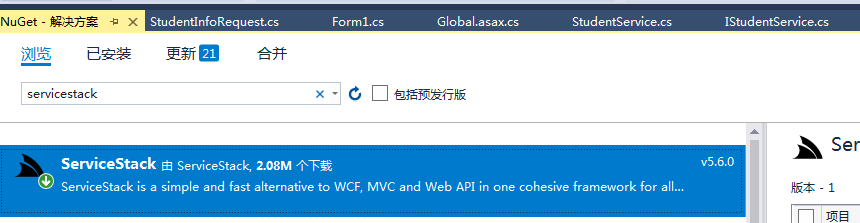
用的是4.5的.net版本
构建model
    /// <summary>

    /// 通过id获取资料

    /// </summary>

    //[Route("/GetStudentInfo", "POST")]

    public class StudentInfoRequest : IReturn<StudentInfo>

    {

        public int id { get; set; }

    }

    /// <summary>

    /// 获取所有用户信息

    /// </summary>

    [Route("/GetAllStudentInfo", "POST")]

    public class GetAllStudentInfoRequest : IReturn<StudentInfo>

    {

    }

   public class StudentInfo

    {

        public int id { get; set; }

        public string name { get; set; }

        public int age { get; set; }

        public string grade { get; set; }

    }
添加mvc web应用,创建service
public interface IStudentService

    {

        int Post(StudentInfo model);

        StudentInfo Get(StudentInfoRequest request);

        bool Delete(StudentInfoRequest request);

        List<StudentInfo> Any(GetAllStudentInfoRequest request);

        bool Put(StudentInfo model);

    }

 public class StudentService : Service, IStudentService

    {

        private static List<StudentInfo> data = new List<StudentInfo>();

        public int Post(StudentInfo model)

        {

            if (data.Count <= )

            {

                model.id = ;

                data.Add(model);

            }

            else

            {

                model.id = data.Select(it => it.id).Max() + ;

                data.Add(model);

            }

            return model.id;

        }

        public bool Delete(StudentInfoRequest request)

        {

            var selectData = data.Where(it => it.id == request.id).FirstOrDefault();

            if (selectData == null)

            {

                return false;

            }

            else

            {

                data.Remove(selectData);

                return true;

            }

        }

        public StudentInfo Get(StudentInfoRequest request)

        {

            return data.Where(it => it.id == request.id).FirstOrDefault();

        }

        public List<StudentInfo> Any(GetAllStudentInfoRequest request)

        {

            return data;

        }

        public bool Put(StudentInfo model)

        {

            var selectData = data.Where(it => it.id == model.id).FirstOrDefault();

            if (selectData == null)

            {

                data.Add(model);

            }

            else

            {

                data.Remove(selectData);

                data.Add(model);

            }

            return true;

        }

    }
web全局文件配置
protected void Application_Start()

        {

            new APIServiceHost().Init();

        }

        public class APIServiceHost : AppHostBase

        {

            //Register your web service with ServiceStack.

            public APIServiceHost()

                : base("API服务", typeof(APIServiceHost).Assembly)

            {

                //Routes.Add(typeof(int), "/Student", "POST", "添加学生信息", "");

                //Routes.Add(typeof(bool), "/Student", "DELETE", "删除学生信息", "");

                //Routes.Add<StudentInfo>("/Student", "GET");

                //Routes.Add<List<StudentInfo>>("/Student", "GET");

                //Routes.Add<bool>("/Student", "PUT");

                //Routes.Add<int>("/Grade", "POST")

                //      .Add<bool>("/Grade/{Id}", "DELETE")

                //      .Add<GradeInfo>("/Grade/{Id}", "GET")

                //      .Add<List<GradeInfo>>("/Grade", "GET")

                //      .Add<bool>("/Grade", "PUT");

                //启用请求参数合法性验证功能:

                Plugins.Add(new ValidationFeature());

                //Plugins.Add(new ProtoBufFormat());

                //JsConfig.EmitCamelCaseNames = false;

                //Plugins.Add(new SwaggerFeature());

                Plugins.Add(new CorsFeature("*.test.com"));

            }

            public override void Configure(Funq.Container container)

            {

                //Register any dependencies your services use here.

            }

        }
web.config的配置文件必须加上 红色标记的路径
<system.webServer>

    <modules>

      <remove name="TelemetryCorrelationHttpModule" />

      <add name="TelemetryCorrelationHttpModule" type="Microsoft.AspNet.TelemetryCorrelation.TelemetryCorrelationHttpModule, Microsoft.AspNet.TelemetryCorrelation" preCondition="integratedMode,managedHandler" />

      <remove name="ApplicationInsightsWebTracking" />

      <add name="ApplicationInsightsWebTracking" type="Microsoft.ApplicationInsights.Web.ApplicationInsightsHttpModule, Microsoft.AI.Web" preCondition="managedHandler" />

    </modules>

    <validation validateIntegratedModeConfiguration="false" />

    <handlers>

      <!--<add path="*.aspx" name="DefaultHttpApplication" type="System.Web.UI.PageHandlerFactory" verb="*" ></add>-->

      <add path="*" name="ServiceStack.Factory" type="ServiceStack.HttpHandlerFactory, ServiceStack" verb="*" preCondition="integratedMode" resourceType="Unspecified" allowPathInfo="true" />

    </handlers>

  </system.webServer>
然后对接服务
 protected const string listenOnUrl = "http://localhost:2285/";//web的连接

对接接口

StudentInfo model = new StudentInfo();

            GetStudent(model);

            using (JsonServiceClient client = new JsonServiceClient(listenOnUrl))

            {

                model.id = client.Post<int>(model);

            }
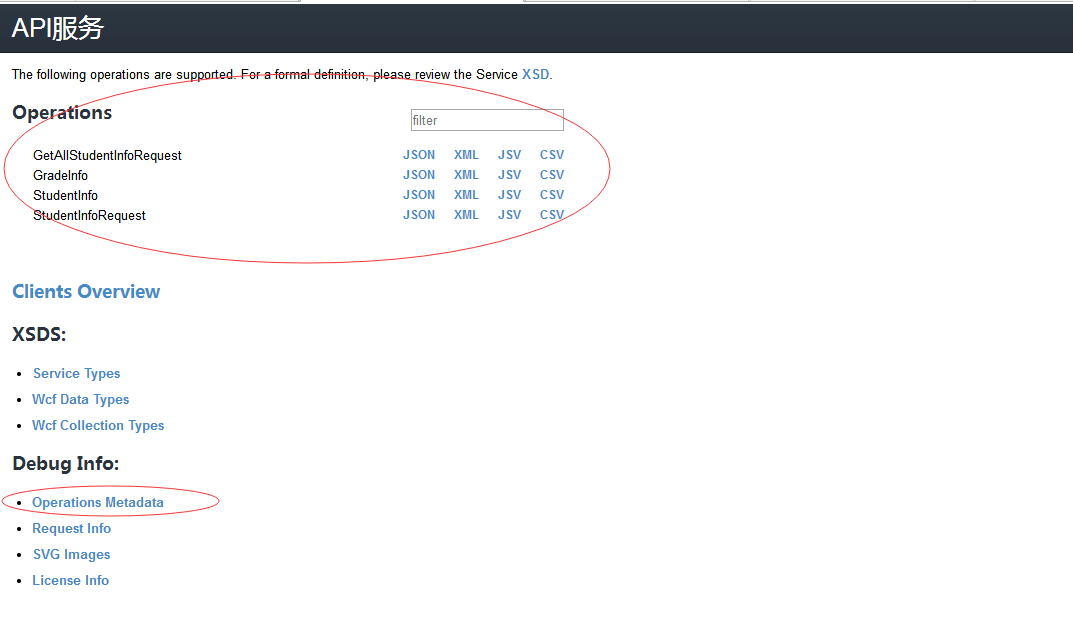
启动后的样子
c# ServiceStack web 搭建的更多相关文章
- ServiceStack Web Service 创建与调用简单示列
目录 ServiceStack 概念 ServiceStack Web Service 创建与调用简单示列 上篇文章介绍了ServiceStack是什么,本章进入主题,如何快速简单的搭建Service ...
- IIS web搭建之虚拟主机
IIS web搭建之虚拟主机 虚拟目录:能将一个网站的文件分散存储在同一个计算机的不同目录和其他计算机. 使用虚拟目录的好处: 1.将数据分散保存到不同的磁盘或者计算机上,便于分别开发和维护. 2.当 ...
- Shiro的原理及Web搭建
shiro(java安全框架) 以下都是综合之前的人加上自己的一些小总结 Apache Shiro是一个强大且易用的Java安全框架,执行身份验证.授权.密码学和会话管理.使用Shiro的易于理解的A ...
- Tomcat WEB搭建+Nginx负载均衡动静分离+DNS解析的实验
实验拓扑图: 实验环境: 在VMware workstation搭建虚拟环境,利用网络适配器的Nat和桥接模式模拟内网和外网环境. 实验过程中需要安装的工具包包括:vim unzip lrzsz ls ...
- Flask 使用pycharm 创建项目,一个简单的web 搭建
1:新建项目后 2:Flask web 项目重要的就是app 所有每个都需要app app=Flask(__name__) 3:Flask 的路径是有app.route('path')装饰决定, ...
- pycharm环境下用Python+Django开发web搭建
1.安装pycharm: 2.安装Python: 3.安装mysql: 4.安装Django; pip3 install django 5.创建Django工程命令方式: # 创建Django程序 d ...
- 使用 ServiceStack 构建跨平台 Web 服务
本文主要来自MSDN杂志<Building Cross-Platform Web Services with ServiceStack>,Windows Communication Fou ...
- 使用 ServiceStack 构建跨平台 Web 服务(转)
出处:http://www.cnblogs.com/shanyou/p/3348347.html 本文主要来自MSDN杂志<Building Cross-Platform Web Service ...
- Win7下Python WEB环境搭建
环境介绍: Win7 64位 SP1 Python:2.7.6 网关接口:flup Nginx安装:http://blog.csdn.net/jacson_bai/article/details/46 ...
随机推荐
- 转:C++何时调用构造函数,何时调用析构函数
版权声明:本文为博主原创文章,遵循 CC 4.0 BY-SA 版权协议,转载请附上原文出处链接和本声明.本文链接:https://blog.csdn.net/wjf1997/article/detai ...
- Flutter移动电商实战 --(24)Provide状态管理基础
Flutter | 状态管理特别篇 —— Provide:https://juejin.im/post/5c6d4b52f265da2dc675b407?tdsourcetag=s_pcqq_aiom ...
- jmeter-Charles抓包显示的请求方式错误了,难道
抓包显示的请求方式为get,但是get一直报错见上图 将get修改为post就正确了
- BUUCTF-writeup
Reverse RSA 使用openssl模块 rsa -pubin -text -modulus -in pub.key得到n值,在 factordb.com上分解大素数得到p,q值,脚本生成pri ...
- 数学建模python matlab 编程(喷泉模拟)
在无风情况下的喷泉模拟 我的python代码 import numpy as np import random import matplotlib matplotlib.rcParams['font. ...
- vue定时器
mounted(){ setInterval(this.getasks,1000 * 120); },
- Re0:在 .NetCore中 EF的基本使用
整理一下目前在用的EFCore 记得好像是因为懒得写sql,于是开始试着用EF 先根据数据库生成一个好东西,嗯 Scaffold-DbContext "Data Source=localho ...
- 【ARM-Linux开发】Gstreamer+QT+摄像头 编程总结
1,gstreamer开发手册,gstreamer官网(这些都不用说了吧) 2,gst-launch的用法,这也不用说了吧.(白菜,鸡蛋,西红柿,砖头,鼠标--..) 3,http://blog.ch ...
- 【DSP开发】硬件信号量在多核处理器核间通信中的应用
硬件信号量在多核处理器核间通信中的应用 刘德保1,汪安民1,韩道文2 1.同方电子科技有限公司研究所,九江 332009:2.解放军电子工程学院 摘要: 在多核处理器的软件设计中,核间通信机制是关键所 ...
- Hanlp-地名识别调试方法详解
HanLP收词特别是实体比较多,因此特别容易造成误识别.下边举几个地名误识别的例子,需要指出的是,后边的机构名识别也以地名识别为基础,因此,如果地名识别不准确,也会导致机构名识别不准确. 类型1 数字 ...