
springboot学习入门简易版三---springboot2.0启动方式
2.4使用@componentscan方式启动
2.4.1 @EnableAutoConfiguration 默认只扫描当前类
@EnableAutoConfiguration 默认只扫描当前类,如果再新建一个indexcontroller类,将无法被扫描。
新建indexcontroller类:
/**
* 测试index类
* @author admin
*
*/
@RestController
public class IndexController {
@RequestMapping("/index")
public String index() {
return "index info";
}
}
启动TestController类中的main函数,首先访问http://localhost:8080/test
没有问题,再访问http://localhost:8080/index
报错信息如下:
Whitelabel Error Page
This application has no explicit mapping for /error, so you are seeing this as a fallback.
Sun Apr 14 22:25:20 CST 2019
There was an unexpected error (type=Not Found, status=404).
No message available
2.4.2 @ComponentScan指定扫描范围(7)
为了方便维护和规范化,将启动类和controller类分离开,新建一个IndexController类。启动类修改如下:
//@RestController

//@SpringBootApplication //或使用@EnableAutoConfiguration配置

@EnableAutoConfiguration //自动配置,根据pom文件引入的依赖信息,自动配置对应的组件;扫包范围,默认在当前类中

@ComponentScan("com.springboot2demo") //指定扫描范围

public class FirstApplication {

    /**

     * 程序入口

     *  SpringApplication.run 相当于java代码创建内置tomcat,加载springmvc注解启动

     * @param args

     */

    public static void main(String[] args) {

        SpringApplication.run(FirstApplication.class, args);

    }

}
IndexController为:
/**

 * 仅 @EnableAutoConfiguration注解方式下启动(默认只扫描当前类),/index 访问报错

 * @author admin

 */

@RestController

public class IndexController {

    @RequestMapping("/index")

    public String index() {

        return "index info";

    }

    @RequestMapping("/test")

    public String test(){

        return "springboot2.0 first application";

    }

}
启动springboot启动类
访问http://localhost:8080/index 成功返回:index info
访问http://localhost:8080/test成功返回:springboot2.0 first application
2.4.3 @SpringBootApplication方式启动(8)
1多个controller包的@componentscan多包扫描
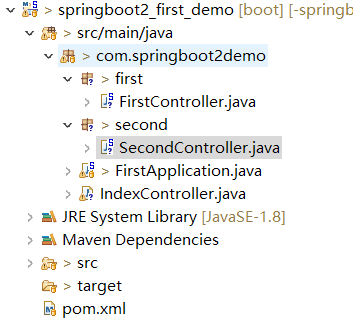
FirstController类:
@RestController

public class FirstController {

    @RequestMapping("/firstIndex")

    public String index() {

        return "firstIndex info";

    }

}
SecondController类:
@RestController

public class SecondController {

    @RequestMapping("/secondIndex")

    public String index() {

        return "secondIndex info";

    }

}
启动类修改为:
//@RestController

//@SpringBootApplication //或使用@EnableAutoConfiguration配置

@EnableAutoConfiguration //自动配置,根据pom文件引入的依赖信息,自动配置对应的组件;扫包范围,默认在当前类中

//@ComponentScan("com.springboot2demo") //指定扫描范围

@ComponentScan(basePackages= {"com.springboot2demo.first","com.springboot2demo.second"}) //多包扫描

public class FirstApplication {
2 @SpringbootApplication注解启动
等同于@EnableAutoConfiguation+@ComponentScan
且扫描范围默认为类所在当前包下所有包(包括子包)
在原有代码基础上修改启动类
//@RestController

//@EnableAutoConfiguration //自动配置,根据pom文件引入的依赖信息,自动配置对应的组件;扫包范围,默认在当前类中

//@ComponentScan("com.springboot2demo") //指定扫描范围

//@ComponentScan(basePackages= {"com.springboot2demo.first","com.springboot2demo.second"}) //多包扫描

@SpringBootApplication //或使用@EnableAutoConfiguration+@ComponentScan配置

public class FirstApplication {
git代码:https://github.com/cslj2013/-springboot2.0_first_demo.git
springboot学习入门简易版三---springboot2.0启动方式的更多相关文章
- springboot学习入门简易版二---springboot2.0项目创建
2 springboot项目创建(5) 环境要求:jdk1.8+ 项目结构: 2.1创建maven工程 Group id :com.springbootdemo Artifact id: spring ...
- springboot学习入门简易版八---springboot2.0多环境配置、整合mybatis mysql8+(19-20)
2.11 SpringBoot多环境配置(19) application.properties中配置 Spring.profiles.active=prd 配置环境: Application-dev ...
- springboot学习入门简易版六---springboot2.0整合全局捕获异常及log4j日志(12-13)
使用Aop实现 1创建异常请求 在原有项目基础上,jspController中创建一个可能发生异常的请求: /** * 全局捕获异常测试 * @param i * @return */ @Reques ...
- springboot学习入门简易版五---springboot2.0整合jsp(11)
springboot对jsp支持不友好,内部tomcat对jsp不支持,需要使用外部tomcat,且必须打包为war包. 1 创建maven项目 注意:必须为war类型,否则找不到页面. 且不要把js ...
- springboot学习入门简易版九---springboot2.0整合多数据源mybatis mysql8+(22)
一个项目中配置多个数据源(链接不同库jdbc),无限大,具体多少根据内存大小 项目中多数据源如何划分:分包名(业务)或注解方式.分包名方式类似多个不同的jar,同业务需求放一个包中. 分包方式配置多数 ...
- springboot学习入门简易版四---springboot2.0静态资源访问及整合freemarker视图层
2.4.4 SpringBoot静态资源访问(9) Springboot默认提供静态资源目录位置需放在classpath下,目录名需要符合如下规则 /static /public /resourc ...
- springboot学习入门简易版一---springboot2.0介绍
1.1为什么用springboot(2) 传统项目,整合ssm或ssh,配置文件,jar冲突,整合麻烦.Tomcat容器加载web.xml配置内容 springboot完全采用注解化(使用注解方式启动 ...
- springboot学习入门简易版七---springboot2.0使用@Async异步执行方法(17)
1启动类开启异步调用注解 @SpringBootApplication @EnableAsync //开启异步调用 public class StartApplication { 不开启则异步调用无效 ...
- SpringBoot学习入门之Hello项目的构建、单元测试和热部署等(配图文,配置信息详解,附案例源码)
前言: 本文章主要是个人在学习SpringBoot框架时做的一些准备,参考老师讲解进行完善对SpringBoot构建简单项目的学习汇集成本篇文章,作为自己对SpringBoot框架的总结与笔记. 你将 ...
随机推荐
- 【Dart学习】--Dart之数组(List)的相关方法总结
一,初始化List 非固定长度list var testList = List(); print(testList.length);//输出0 固定长度List var testList2 = Lis ...
- python locust--Setups, Teardowns, on_start, and on_stop .
创建一个locust测试脚本,如下: from locust import HttpLocust, TaskSet, task class UserBehavior(TaskSet): def set ...
- Spring MVC初始化
整个Spring MVC的初始化,配置了DispatcherServlet和ContextLoaderListener,那么它们是如何初始化Spring IoC容器上下文和映射请求上下文的呢?所以 ...
- HtmlHelper介绍
目录 什么是HtmlHelper? 为什么要使用HtmlHelper? 清爽简单 修改路由不用改连接 很早就知道这个了,但是我一直不用.今天看了看书,准备以后都使用这个 什么是HtmlHelper? ...
- array_map
<?php //对数组中的每个元素做函数处理 $arr = array(,,,,,); function cheng($hah){ ; } var_dump(array_map('cheng', ...
- 解决nginx端口占用问题
1.键入命令:netstat -ano | findstr 80 查看80端口被哪个程序占用: 2.键入命令:netsh http show servicestate 查看http服务状态(注:解决后 ...
- charles Windows 安装
本文参考:charles Windows 安装 在实际开发.测试中需要通过代理截取 app 的网络请求报文来快速定位问题.https 双向认证的 app 越来越多,fiddler在这方面并不好用.由于 ...
- 树莓派3B安装arm64操作系统
pi64 pi64基于Debian 9,地址如下https://github.com/bamarni/pi64 烧录过程还是用SDFormatter格式化,用Win32DiskImager写入即可,没 ...
- Image Perimeters
Description 给出一张由"x"和"."组成的矩阵.每个"x"可以向上下左右及两个斜对角进行连通,请问由某个点开始的"x& ...
- dotnet core use Redis to publish and subscribe
安装Redis 同样我这边再次使用Docker, 方便快捷: # 拉取镜像 docker pull redis # 运行镜像 docker run -d -p 6379:6379 --name red ...