
smarty建的mvc环境
================================
搭建MVC结构
================================
基于MVC,解耦合 (高内聚,低耦合),优点:易维护、易扩展
本MVC模式采用的是单一入口:
如:http://localhost/lamp45/mvc/index.php?m=stu&a=add //打开学生信息的添加界面
其中m的值stu表示访问的是StuAction a的值add表示是方法(动作)
就是访问StuAction的add方法。
1. 创建目录:
ORG 第三方扩展类
model M(模型)层目录
action A(控制)层目录
view V(视图) 层目录(smarty的模板目录)
public 公共资源目录
libs Smarty库(解压到这里即可)
view_c Smarty模板编译目录
cache Smarty静态缓存目录
configs 配置文件目录
2. 将自己写好的model类放到model目录下
model/db.class.php
3. 在ORG目录下创建一个tpl.class.php的smarty子类,用于初始化smarty(等同于以前的init.php)
代码如下:
//Smarty信息的初始化类
class Tpl extends Smarty{
public function __construct(){
parent::__construct(); //构造父类
//初始化Smarty对象中属性:
$this->template_dir = "view"; //smarty模板目录
$this->compile_dir = "view_c"; //smarty模板编译目录
$this->config_dir = "configs"; //smarty配置文件目录
$this->cache_dir = "cache"; //smarty模板静态缓存目录
//$this->caching = true; //是否开启静态缓存
//$this->cache_lifetime = 3600; //静态缓存时间(秒)
//指定定界符
$this->left_delimiter="<{"; //左定界符
$this->right_delimiter="}>"; //右定界符
}
}
4. 在action目录下创建Action类,继承Tpl类,文件名叫:action.class.php
代码如下:
//Action的控制基类
class Action extends Tpl{
public function __construct(){
parent::__construct();
}
/**
*action初始化方法(在这个方法里根据参数a的值决定调用对应的方法)
*
*/
public function init(){
//获取a参数的值
$a = isset($_GET["a"])?$_GET["a"]:"index"; //默认值为index
//判断当前Action是否存在此方法
if(method_exists($this,$a)){
//调用此方法
$this->$a();
}else{
die("没有找到{$a}对应的方法");
}
}
}
5. 在最外层,创建一个index.php的入口文件
<?php
//网站的主入口程序
//自动加载类
function __autoload($name){
$name = strtolower($name);//转成小写
if(file_exists("./action/{$name}.class.php")){
require("./action/{$name}.class.php");
}elseif(file_exists("./model/{$name}.class.php")){
require("./model/{$name}.class.php");
}elseif(file_exists("./ORG/{$name}.class.php")){
require("./ORG/{$name}.class.php");
}elseif(file_exists("./libs/".ucfirst($name).".class.php")){
require("./libs/".ucfirst($name).".class.php");
}elseif(file_exists("./libs/sysplugins/{$name}.php")){
require("./libs/sysplugins/{$name}.php");
}else{
die("错误:没有找到对应{$name}类!");
}
}
//数据连接配置文件
require("./configs/config.php");
//获取参数m的值,并创建对应的Action对象
$mod = isset($_GET['m'])?$_GET['m']:"index";
//拼装action类名
$classname = ucfirst($mod)."Action";
//创建对应的Action对象
$action = new $classname();
//执行action的初始化(action入口)
$action->init();
6. 在configs的目录下创建一个config.php的配置文件
7. 测试:
-------------------------------------------------------------
1. 在action目录下创建一个indexaction.class.php文件
/**
* 网站入口的主Action类
*/
class IndexAction extends Action{
//默认入口方法
public function index(){
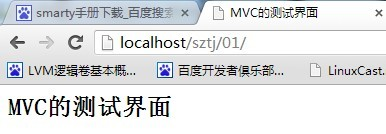
$this->assign("title","MVC的测试界面");
$this->display("index.html");
}
}
2. 在view目录下创建index.html模板页面
<html>
<head>
<title><{$title}></title>
</head>
<body>
<h2><{$title}></h2>
</body>
</html>
smarty建的mvc环境的更多相关文章
- 在ASP.NET非MVC环境中(WebForm中)构造MVC的URL参数
目前项目中有个需求,需要在WebForm中去构造MVC的URL信息,这里写了一个帮助类可以在ASP.NET非MVC环境中(WebForm中)构造MVC的URL信息,主要就是借助当前Http上下文去构造 ...
- Spring MVC 环境搭建(二)
在Spring MVC 环境搭建(一)中我们知道 spring 的配置是通过 urlmapping 映射到控制器,然后通过实现Controller接口的handlerequest方法转向页面. 但这存 ...
- Spring MVC 环境搭建(一)
一.建立 JavaWeb 项目 1.建立一个 Java 项目. 2.在项目下新建一个文件夹 webapp (命名可自取,这个目录即是网站根目录),再在该文件夹下新建一个 WEB-INF 文件夹(命名固 ...
- Windows Server2008 R2 MVC 环境配置
*:first-child { margin-top: 0 !important; } body>*:last-child { margin-bottom: 0 !important; } /* ...
- Spring MVC 环境搭建(maven+SpringMVC+mybatis+Freemarker)
Spring MVC 环境搭建(maven+SpringMVC+mybatis+Freemarker) 一.准备工作 1.Eclipse Java EE IDE(4.4.1) 2.JDK 3.Tomc ...
- 详细的图文介绍如何利用XAMPP本地建站的环境配置教程
原文:详细的图文介绍如何利用XAMPP本地建站的环境配置教程 WordPress 是一个简便快捷,用途广,人气旺的一个开源的博客建站程序.很有很多等您去发现. 简便快捷:在性能上易于操作.易于浏览: ...
- multipath多路径实验01-构建iscsi模拟环境
multipath多路径实验01-构建iscsi模拟环境 前几天跟同事网上闲聊技术,吐槽之前自己没有配置过多路径的经历,虽然多路径的配置过程很简单,职责划分也应是主机或存储工程师来搞定,DBA只需要直 ...
- 在ASP.NET非MVC环境中(WebForm中)构造MVC的URL参数,以及如何根据URL解析出匹配到MVC路由的Controller和Action
目前项目中有个需求,需要在WebForm中去构造MVC的URL信息,这里写了一个帮助类可以在ASP.NET非MVC环境中(WebForm中)构造MVC的URL信息,主要就是借助当前Http上下文去构造 ...
- XE10 塔建 Android 开发环境 (已测试通过)
XE10 塔建 Android 开发环境 1. E:\DevCSS\Android\adt-bundle-windows-x86-20131030\adt-bundle-windows-x86-201 ...
随机推荐
- Spark2 jar存档
spark.yarn.archive需要手动将spark应用依赖jar上传到hdfs,该属性可以避免每一次运行spark应用时都重复打zip包上传到hdfs. 官网http://spark.apach ...
- Java字节码方法表与属性表深度剖析
方法表: 在上一次咱们已经分析到了字段信息了,如下: 紧接着就是方法相关的信息了: 而它展开之后的结构为: 所以往后数2个字节,看一下方法的总数: 3个方法,可咱们只定义了两个方法呀: 因为编译器会为 ...
- mysql修改表字段顺序
修改字段排列位置 ALTER TABLE 表名 MODIFY 字段名1 数据类型 FIRST|AFTER 字段名2 参数说明 FIRST,可选参数 将字段1,修改为表的第一个字段. AFTER 字段名 ...
- golang 2 ways to delete an element from a slice
2 ways to delete an element from a slice yourbasic.org/golang Fast version (changes order) a := []st ...
- vue3.0脚手架 创建项目
1.下载node最新稳定版本,并且安装 2.安装好之后,在cmd或者terminal下, 使用npm -v 查看当前npm版本,验证是否安装成功 3.安装成功后,运行 npm i -g @vue/cl ...
- ActiveMQ之JMS及保证消息的可靠性<持久化、事务、签收>(三)
1.JAVAEE 是一套使用Java 进行企业级开发的13 个核心规范工业标准 , 包括: JDBC 数据库连接 JNDI Java的命名和目录接口 EJB Enterprise java b ...
- delphi TAdoQuery组件的close方法可能导致”列名无效“错误
1,故障现象 一次程序运行,出现如下错误: 对应代码如下: 2,故障分析 Query_alert_2的语句在查询分析器中单独执行是正常的.排除语句出错. 如果注解掉Query_alert_1,则错误变 ...
- Java中程序初始化的顺序
1,在一个类的内部(不考虑它是另一个类的派生类):很多人认为,类的成员变量是在构造方法调用之后再初始化的,先不考虑这种观点的正确性,先看一下下面的代码: class Test01...{ public ...
- 利用tycho插件自动生成pom文件
mvn org.eclipse.tycho:tycho-pomgenerator-plugin:generate-poms -DgroupId=com.vogella.tychoexample com ...
- C#中的@符号的使用
一 字符串中的用法 字符@表示,其后的字符串是个“逐字字符串”(verbatim string). @只能对字符串常量作用. 1.用于文件路径 string s_FilePath ="C:\ ...