
linux centos Supervisor守护.netcore进程安装配置
场景:当部署完.netcore程序后 使用dotnet xx.dll 后可以运行,但关闭shell或隔断时间会自动断开,此时部署的.netcore程序就不能访问了,此时需要用到Supervisor了
Supervisor(http://supervisord.org/)是用Python开发的一个client/server服务,是Linux/Unix系统下的一个进程管理工具,不支持Windows系统。它可以很方便的监听、启动、停止、重启一个或多个进程。用Supervisor管理的进程,当一个进程意外被杀死,supervisort监听到进程死后,会自动将它重新拉起,很方便的做到进程自动恢复的功能,不再需要自己写shell脚本来控制。
1、安装Python
yum install python-setuptools

easy_install supervisor
2、新建supervisor文件夹
mkdir /etc/supervisor
3、在该目录下,生成supervisord.conf文件
echo_supervisord_conf > /etc/supervisor/supervisord.conf
4、新建conf.d文件夹
mkdir /etc/supervisor/conf.d
此时的目录结构:
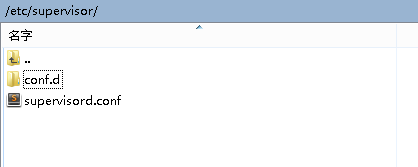
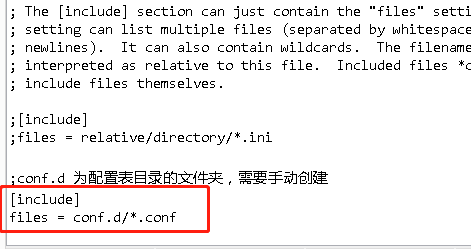
5、编辑supervisord.conf文件,在文件中末尾添加
[include]

files=conf.d/*.conf
6、在conf.d中添加文件test.conf
文件内容:
[program:testservice] ;程序名称,终端控制时需要的标识

command=dotnet test2.dll ; 运行程序的命令

directory=/home/website/test/ ; 命令执行的目录

autorestart=true ; 程序意外退出是否自动重启

stderr_logfile=/var/log/testservice.err.log ; 错误日志文件

stdout_logfile=/var/log/testservice.out.log ; 输出日志文件

environment=ASPNETCORE_ENVIRONMENT=Production ; 进程环境变量

user=root ; 进程执行的用户身份

stopsignal=INT
startsecs=1 ; 自动重启间隔
7、指定supervisor配置文件
supervisord -c /etc/supervisor/supervisord.conf
8、Supervisor开机自启动
在目录/usr/lib/systemd/system 中新建文件supervisord.service
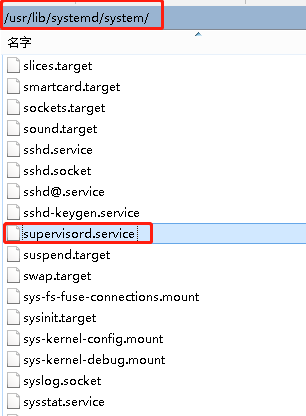
文件内容:
#supervisord.service

[Unit]

Description=Supervisor daemon

[Service]

Type=forking

ExecStart=/usr/bin/supervisord -c /etc/supervisor/supervisord.conf

ExecStop=/usr/bin/supervisorctl shutdown

ExecReload=/usr/bin/supervisorctl reload

KillMode=process

Restart=on-failure

RestartSec=42s

[Install]

WantedBy=multi-user.target
9、使配置生效
systemctl daemon-reload
重启supervisor服务
$ supervisorctl reread
如果重启的时候报错:
error: <class 'socket.error'>, [Errno 111] Connection refused: file: /usr/lib64/python2.6/socket.py line: 567
则说明服务尚未启动,先启动即可:
sudo supervisord -c /etc/supervisor/supervisord.conf
sudo supervisorctl -c /etc/supervisor/supervisord.conf
如果修改了 /etc/supervisord.conf ,需要执行 supervisorctl reload 来重新加载配置文件,否则不会生效。
10、设置服务开机启动
systemctl enable supervisor.service
11、验证一下是否为开机启动
systemctl is-enabled supervisord
12、启动服务
systemctl start supervisor.service
至此完成
参考文章:
https://www.cnblogs.com/hobinly/p/7382038.html
https://my.oschina.net/lichaoqiang/blog/1861791
https://www.cnblogs.com/sundahua/p/9149692.html
https://blog.csdn.net/chivalrousli/article/details/60324140
linux centos Supervisor守护.netcore进程安装配置的更多相关文章
- .Net Core 项目发布到Linux - CentOS 7(二)用Supervisor守护netcore进程
简介 supervisor可以保证程序崩溃后,可以重新把程序启动起来等相关功能. 安装 yum install -y supervisor 安装好后在/etc/会生成一个supervisord.con ...
- 在Linux(CentOS 6.6)服务器上安装并配置基于Apache的SVN服务器
#!/bin/bash # # 在Linux(CentOS 6.6)服务器上安装并配置基于Apache的SVN服务器: # # .安装服务 # .创建svn版本库 # .创建svn用户 # .配置sv ...
- Linux(CentOS 7)命令行模式安装VMware Tools 详解
本篇文章主要介绍了如何在Linux(CentOS 7)命令行模式安装VMware Tools,具有一定的参考价值,感兴趣的小伙伴们可以参考一下. 本例中为在Linux(以CentOS 7为例)安装VM ...
- CentOS 6.3下NFS安装配置
CentOS 6.3下NFS安装配置 一.环境介绍 NFS服务器:CentOS6.3 192.168.8.20 NFS客户端:CentOS6.5 192.168.8.39 二.服务器端安装配置 ...
- CentOS 6.8 ftp服务安装配置 基于本地用户和虚拟用户
CentOS 6.8 ftp服务安装配置 基于本地用户和虚拟用户 一.安装ftp服务 1.检查是否已经安装 # rpm -qa | grep ftp ftp-0.17-54.el6.x86_64 vs ...
- 【转载】基于Linux命令行KVM虚拟机的安装配置与基本使用
基于Linux命令行KVM虚拟机的安装配置与基本使用 https://alex0227.github.io/2018/06/06/%E5%9F%BA%E4%BA%8ELinux%E5%91%BD%E4 ...
- Linux CentOS 7 & JDK 1.7 安装与配置
前言 简单记录一下在CentOS 7中安装配置JDK 1.7的全过程~ 下载 首先是jdk 1.7 64bit & 32bit的下载地址: jdk-7u79-linux-x64.tar.gz ...
- CentOS 6.3 NFS的安装配置、启动及mount挂载方法
一.环境介绍: 服务器:centos 192.168.1.225 客户端:centos 192.168.1.226 二.安装: NFS的安装配置: centos 5 : yum -y install ...
- 阿里云服务器CentOS 5.7(64位)安装配置LAMP服务器(Apache+PHP5+MySQL)
一.快速安装Apache+PHP5+MySql ----------------------------------------------------- 补充:由于163的yum源上只有php5.1 ...
随机推荐
- scala的wordcount
import org.apache.spark.{SparkConf, SparkContext} import org.apache.spark.sql.SparkSession object Wo ...
- Mac下给sublime text3配置Nodejs
传送门: http://blog.csdn.net/phil_young/article/details/50950206
- 【动手学深度学习】Jupyter notebook中 import mxnet出错
问题描述 打开d2l-zh目录,使用jupyter notebook打开文件运行,import mxnet 出现无法导入mxnet模块的问题, 但是命令行运行是可以导入mxnet模块的. 原因: 激活 ...
- JS实现使用Math.random()函数生成n到m间的随机数字
Math.random()函数返回0和1之间的伪随机数,可能为0,但总是小于1,[0,1) 生成n-m,包含n但不包含m的整数: 第一步算出 m-n的值,假设等于w 第二步Math.random()w ...
- 人工智能_2_特征处理.py
# 特征处理 # 特征预处理:通过统计方法将数据转换为算法需要的数据 # 数值型数据:标准缩放 # 规依法,标准化(常用,适用于当前大数据),缺失值处理(删除,填补中位数平均数,通常按照列填补) # ...
- php 生成32位随机字符串 用于支付验证 用户注册
//32位随机字符串 function randstrpay($length=32) { $rand=''; $randstr= 'ABCDEFGHIJKLMNOPQRSTUVWXYZ01234567 ...
- 移动架构-手写ButterKnife框架
ButterKnife在实际开发中有着大量运用,其强大的view绑定和click事件处理,使得开发效率大大提高,同时增加了代码的阅读性又不影响其执行效率 注解的分类 注解主要有两种分类,一个是运行时, ...
- JS CSS写下拉菜单 竖行
<!DOCTYPE html> <html lang="en"> <head> <meta charset="UTF-8&quo ...
- Python函数或者类的时间参数的默认值设为datetime.date.today()引起的问题
定义了函数def main(start_date=datetime.date.today(), end_date=datetime.date.today()): pass 函数在项目启动后, end_ ...
- Oracle 表的导入与导出
周末任务:将一个表从一个库导到另一个库大致思路:用expdp 将表从一个实例导出 ,再用impdp将导出的 .dmp文件导入到另一个实例1.在实例 orcl 中准备一个用于导出的表: 进入实例为orc ...