
Laravel API Errors and Exceptions: How to Return Responses
Laravel API Errors and Exceptions: How to Return Responses
API-based projects are more and more popular, and they are pretty easy to create in Laravel. But one topic is less talked about – it’s error handling for various exceptions. API consumers often complain that they get “Server error” but no valuable messages. So, how to handle API errors gracefully? How to return them in “readable” form?
Main Goal: Status Code + Readable Message
For APIs, correct errors are even more important than for web-only browser projects. As people, we can understand the error from browser message and then decide what to do, but for APIs – they are usually consumed by other software and not by people, so returned result should be “readable by machines”. And that means HTTP status codes.
Every request to the API returns some status code, for successful requests it’s usually 200, or 2xx with XX as other number.
If you return an error response, it should not contain 2xx code, here are most popular ones for errors:
| Status Code | Meaning |
| 404 | Not Found (page or other resource doesn’t exist) |
| 401 | Not authorized (not logged in) |
| 403 | Logged in but access to requested area is forbidden |
| 400 | Bad request (something wrong with URL or parameters) |
| 422 | Unprocessable Entity (validation failed) |
| 500 | General server error |
Notice that if we don’t specify the status code for return, Laravel will do it automatically for us, and that may be incorrect. So it is advisable to specify codes whenever possible.
In addition to that, we need to take care of human-readable messages. So typical good response should contain HTTP error code and JSON result with something like this:
{

    "error": "Resource not found"

}
Ideally, it should contain even more details, to help API consumer to deal with the error. Here’s an example of how Facebook API returns error:
{

  "error": {

    "message": "Error validating access token: Session has expired on Wednesday, 14-Feb-18 18:00:00 PST. The current time is Thursday, 15-Feb-18 13:46:35 PST.",

    "type": "OAuthException",

    "code": 190,

    "error_subcode": 463,

    "fbtrace_id": "H2il2t5bn4e"

  }

}
Usually, “error” contents is what is shown back to the browser or mobile app. So that’s what will be read by humans, therefore we need to take care of that to be clear, and with as many details as needed.
Now, let’s get to real tips how to make API errors better.
Tip 1. Switch APP_DEBUG=false Even Locally
There’s one important setting in .env file of Laravel – it’s APP_DEBUG which can be false or true.
If you turn it on as true, then all your errors will be shown with all the details, including names of the classes, DB tables etc.

It is a huge security issue, so in production environment it’s strictly advised to set this to false.
But I would advise to turn it off for API projects even locally, here’s why.
By turning off actual errors, you will be forced to think like API consumer who would receive just “Server error” and no more information. In other words, you will be forced to think how to handle errors and provide useful messages from the API.
Tip 2. Unhandled Routes – Fallback Method
First situation – what if someone calls API route that doesn’t exist, it can be really possible if someone even made a typo in URL. By default, you get this response from API:
Request URL: http://q1.test/api/v1/offices

Request Method: GET

Status Code: 404 Not Found

{

    "message": ""

}
And it is OK-ish message, at least 404 code is passed correctly. But you can do a better job and explain the error with some message.
To do that, you can specify Route::fallback() method at the end of routes/api.php, handling all the routes that weren’t matched.
Route::fallback(function(){

    return response()->json([

        'message' => 'Page Not Found. If error persists, contact info@website.com'], 404);

});
The result will be the same 404 response, but now with error message that give some more information about what to do with this error.
Tip 3. Override 404 ModelNotFoundException
One of the most often exceptions is that some model object is not found, usually thrown by Model::findOrFail($id). If we leave it at that, here’s the typical message your API will show:
{

    "message": "No query results for model [App\\Office] 2",

    "exception": "Symfony\\Component\\HttpKernel\\Exception\\NotFoundHttpException",

    ...

}
It is correct, but not a very pretty message to show to the end user, right? Therefore my advice is to override the handling for that particular exception.
We can do that in app/Exceptions/Handler.php (remember that file, we will come back to it multiple times later), in render() method:
// Don't forget this in the beginning of file

use Illuminate\Database\Eloquent\ModelNotFoundException;

// ...

public function render($request, Exception $exception)

{

    if ($exception instanceof ModelNotFoundException) {

        return response()->json([

            'error' => 'Entry for '.str_replace('App\\', '', $exception->getModel()).' not found'], 404);

    }

    return parent::render($request, $exception);

}
We can catch any number of exceptions in this method. In this case, we’re returning the same 404 code but with a more readable message like this:
{

    "error": "Entry for Office not found"

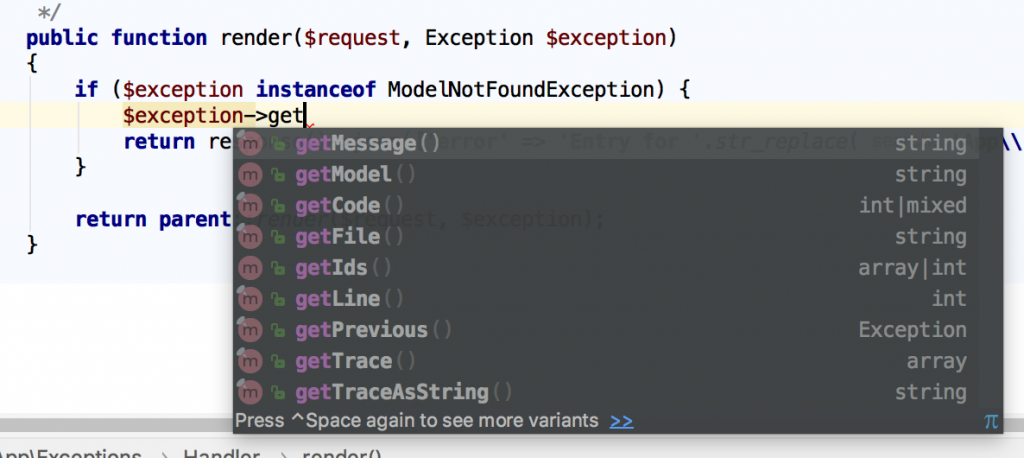
}Notice: have you noticed an interesting method $exception->getModel()? There’s a lot of very useful information we can get from the $exception object, here’s a screenshot from PhpStorm auto-complete:
Tip 4. Catch As Much As Possible in Validation
In typical projects, developers don’t overthink validation rules, stick mostly with simple ones like “required”, “date”, “email” etc. But for APIs it’s actually the most typical cause of errors – that consumer posts invalid data, and then stuff breaks.
If we don’t put extra effort in catching bad data, then API will pass the back-end validation and throw just simple “Server error” without any details (which actually would mean DB query error).
Let’s look at this example – we have a store() method in Controller:
public function store(StoreOfficesRequest $request)

{

    $office = Office::create($request->all());

    return (new OfficeResource($office))

        ->response()

        ->setStatusCode(201);

}
Our FormRequest file app/Http/Requests/StoreOfficesRequest.php contains two rules:
public function rules()

{

    return [

        'city_id' => 'required|integer|exists:cities,id',

        'address' => 'required'

    ];

}
If we miss both of those parameters and pass empty values there, API will return a pretty readable error with 422 status code (this code is produced by default by Laravel validation failure):
{

    "message": "The given data was invalid.",

    "errors": {

        "city_id": ["The city id must be an integer.", "The city id field is required."],

        "address": ["The address field is required."]

    }

}
As you can see, it lists all fields errors, also mentioning all errors for each field, not just the first that was caught.
Now, if we don’t specify those validation rules and allow validation to pass, here’s the API return:
{

    "message": "Server Error"

}
That’s it. Server error. No other useful information about what went wrong, what field is missing or incorrect. So API consumer will get lost and won’t know what to do.
So I will repeat my point here – please, try to catch as many possible situations as possible within validation rules. Check for field existence, its type, min-max values, duplication etc.
Tip 5. Generally Avoid Empty 500 Server Error with Try-Catch
Continuing on the example above, just empty errors are the worst thing when using API. But harsh reality is that anything can go wrong, especially in big projects, so we can’t fix or predict random bugs.
On the other hand, we can catch them! With try-catch PHP block, obviously.
Imagine this Controller code:
public function store(StoreOfficesRequest $request)

{

    $admin = User::find($request->email);

    $office = Office::create($request->all() + ['admin_id' => $admin->id]);

    (new UserService())->assignAdminToOffice($office);

    return (new OfficeResource($office))

        ->response()

        ->setStatusCode(201);

}
It’s a fictional example, but pretty realistic. Searching for a user with email, then creating a record, then doing something with that record. And on any step, something wrong may happen. Email may be empty, admin may be not found (or wrong admin found), service method may throw any other error or exception etc.
There are many way to handle it and to use try-catch, but one of the most popular is to just have one big try-catch, with catching various exceptions:
try {

    $admin = User::find($request->email);

    $office = Office::create($request->all() + ['admin_id' => $admin->id]);

    (new UserService())->assignAdminToOffice($office);

} catch (ModelNotFoundException $ex) { // User not found

    abort(422, 'Invalid email: administrator not found');

} catch (Exception $ex) { // Anything that went wrong

    abort(500, 'Could not create office or assign it to administrator');

}
As you can see, we can call abort() at any time, and add an error message we want. If we do that in every controller (or majority of them), then our API will return same 500 as “Server error”, but with much more actionable error messages.
Tip 6. Handle 3rd Party API Errors by Catching Their Exceptions
These days, web-project use a lot of external APIs, and they may also fail. If their API is good, then they will provide a proper exception and error mechanism (ironically, that’s kinda the point of this whole article), so let’s use it in our applications.
As an example, let’s try to make a Guzzle curl request to some URL and catch the exception.
Code is simple:
$client = new \GuzzleHttp\Client();

$response = $client->request('GET', 'https://api.github.com/repos/guzzle/guzzle123456');

// ... Do something with that response
As you may have noticed, the Github URL is invalid and this repository doesn’t exist. And if we leave the code as it is, our API will throw.. guess what.. Yup, “500 Server error” with no other details. But we can catch the exception and provide more details to the consumer:
// at the top

use GuzzleHttp\Exception\RequestException;

// ...

try {

    $client = new \GuzzleHttp\Client();

    $response = $client->request('GET', 'https://api.github.com/repos/guzzle/guzzle123456');

} catch (RequestException $ex) {

    abort(404, 'Github Repository not found');

}
Tip 6.1. Create Your Own Exceptions
We can even go one step further, and create our own exception, related specifically to some 3rd party API errors.
php artisan make:exception GithubAPIExceptionThen, our newly generated file app/Exceptions/GithubAPIException.php will look like this:
namespace App\Exceptions;

use Exception;

class GithubAPIException extends Exception

{

    public function render()

    {

        // ...

    }

}
We can even leave it empty, but still throw it as exception. Even the exception name may help API user to avoid the errors in the future. So we do this:
try {

    $client = new \GuzzleHttp\Client();

    $response = $client->request('GET', 'https://api.github.com/repos/guzzle/guzzle123456');

} catch (RequestException $ex) {

    throw new GithubAPIException('Github API failed in Offices Controller');

}
Not only that – we can move that error handling into app/Exceptions/Handler.php file (remember above?), like this:
public function render($request, Exception $exception)

{

    if ($exception instanceof ModelNotFoundException) {

        return response()->json(['error' => 'Entry for '.str_replace('App\\', '', $exception->getModel()).' not found'], 404);

    } else if ($exception instanceof GithubAPIException) {

        return response()->json(['error' => $exception->getMessage()], 500);

    } else if ($exception instanceof RequestException) {

        return response()->json(['error' => 'External API call failed.'], 500);

    }

    return parent::render($request, $exception);

}
Final Notes
So, here were my tips to handle API errors, but they are not strict rules. People work with errors in quite different ways, so you may find other suggestions or opinions, feel free to comment below and let’s discuss.
Finally, I want to encourage you to do two things, in addition to error handling:
- Provide detailed API documentation for your users, use packages like API Generator for it;
- While returning API errors, handle them in the background with some 3rd party service like Bugsnag / Sentry / Rollbar. They are not free, but they save massive amount of time while debugging. Our team uses Bugsnag, here’s a video example.
Laravel API Errors and Exceptions: How to Return Responses的更多相关文章
- Laravel API Tutorial: How to Build and Test a RESTful API
With the rise of mobile development and JavaScript frameworks, using a RESTful API is the best optio ...
- Python Tutorial 学习(八)--Errors and Exceptions
Python Tutorial 学习(八)--Errors and Exceptions恢复 Errors and Exceptions 错误与异常 此前,我们还没有开始着眼于错误信息.不过如果你是一 ...
- [译]The Python Tutorial#8. Errors and Exceptions
[译]The Python Tutorial#Errors and Exceptions 到现在为止都没有过多介绍错误信息,但是已经在一些示例中使用过错误信息.Python至少有两种类型的错误:语法错 ...
- Laravel API跨域访问的实现步骤
本篇文章给大家带来的内容是关于Laravel API跨域访问的实现步骤,有一定的参考价值,有需要的朋友可以参考一下,希望对你有所帮助. 服务器A请求服务器B的接口,那么一般会出现跨域问题. 1 XML ...
- Handling Errors and Exceptions
http://delphi.about.com/od/objectpascalide/a/errorexception.htm Unfortunately, building applications ...
- 《The Python Tutorial》——Errors and Exceptions 阅读笔记
Errors and Exceptions 官方文档:https://docs.python.org/3.5/tutorial/errors.html python中所有的异常都继承自BaseExce ...
- iBrand 开源电商小程序 (Laravel API+ webpack + gulp + 原生小程序)
iBrand 社交电商产品正式进入开源过程中了,我们制定了详细的开源计划,目前已经发布了 V1 的版本,后续的版本也在陆续整理完善中. 各个版本功能明细如下图: 3 个版本计划在今年春节前全部完成,可 ...
- 笔记-python-tutorial-8.errors and exceptions
笔记-python-tutorial-8.errors and exceptions 1. errors and exceptions 1.1. syntax errors >& ...
- 如何让 Laravel API 永远返回 JSON 格式响应?
当你在编写完全为 API 服务的 Laravel 应用时,你希望所有响应都是 JSON 格式的,而不是例如说授权错误会重定向到 /home 或 /login,最终重定向会变成 InvalidArgum ...
随机推荐
- Laravel安装和composer安装
下载地址:https://getcomposer.org/download/ 他会自动找到你的php目录,如果没有记得手动修改 一直点下一步,即可. 如果安装不成功,可能是之前安装过composer ...
- MongoDB 聚合函数及排序
聚合函数 最大值 $max db.mycol.aggregate([{$group : {_id : "$by_user", num_max : {$max: "$li ...
- asp.net core-2.在vs2017中创建asp.net core应用程序
今天我们用vs2017创建一个asp.net core 的应用程序,打开vs2017 点击:文件—>项目,选择asp.net core web 应用程序 点击确定 红框内就昨天用控制台去创建的应 ...
- (五)Struts之Action类基础(二)
上一章节末((三)Struts之Action类基础(一))介绍了如何获取用户输入数据的获取.接着就是在Struts中怎么把数据响应给用户端,这就必须要求我们把数据放到作用域中,然后才能显示到用户浏览器 ...
- 安装Nvida 显示环境
查看是否能正确加载nvidia 驱动 在终端输入 (glxinfo 需要安装mesa-utils) 如果可以正确加载了nvidia驱动 那么在输入的内容中可以看到NVIDIA 字样 如果GPU是Int ...
- wepy全局拦截器
wepy有支持全局拦截器,但是请求需要使用wepy.request().then(): 在app.wpy文件中配置以下内容,与data同级 constructor(){ super(); this.u ...
- Java 面向对象(四)继承
一.继承的概述(Inherited) 1.由来 多个类中存在相同属性和行为时,将这些内容抽取到单独一个类中,那么多个类无需再定义这些属性和行为,只要继承那个类即可. 其中,多个类可以称为 子类(派生类 ...
- 微服务、SOA、ESB比较
很多时候会听到微服务.SOA.ESB之间有着联系也有着区别,有时候了解了一下,过段时间有混肴模糊了今天看了一篇文章写的很好,特地记录一下. 原文地址:https://mp.weixin.qq.com/ ...
- harbor小结
1.harbor是什么? docker容器是集装箱,harbor就是放集装箱的港湾. docker工具下有:①自带镜像库房:image ②容器管理清单 :container ③doc ...
- windows 下sublime text 3 配置python 环境详解
这我们的环境已经安装了python 3.7.1解释器和sublime text 3 编辑器 一.package control 安装 首先我们打开sublime text 3 ——>Tools— ...