
[ML] Load and preview large scale data
Ref: [Feature] Preprocessing tutorial
主要是 “无量纲化” 之前的部分。
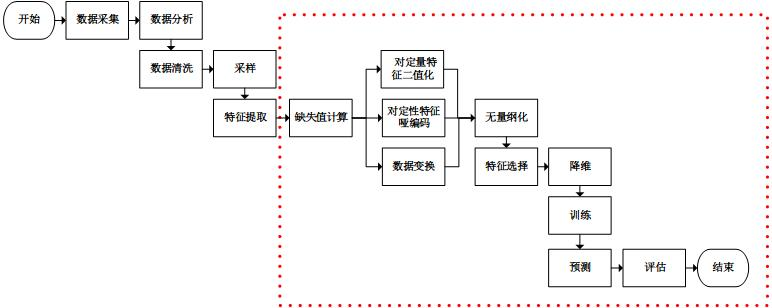
加载数据
一、大数据源
http://archive.ics.uci.edu/ml/
http://aws.amazon.com/publicdatasets/
http://www.kaggle.com/
http://www.kdnuggets.com/datasets/index.html
二、初步查看
了解需求
Swipejobs is all about matching Jobs to Workers. Your challenge is to analyse the data provided and answer the questions below.

You can access the data by opening the following S3 bucket:

/* somewhere */

Please note that Worker (worker parquet files) has one or more job tickets (jobticket parquet files) associated with it.

Using these parquet files:

求相关性

1. Is there a co-relation between jobticket.jobTicketState, jobticket.clickedCalloff and jobticket.assignedBySwipeJobs values across workers.

预测

2. Looking at Worker.profileLastUpdatedDate values, calculate an estimation for workers who will update their profile in the next two weeks.

requirement
Requirement
粗看数据
head -5 <file>

less <file>
三、数据读取
python读取txt文件
没有格式,就要split出格式,还是建议之后转到df格式,操作方便些。
PATH = "/home/ubuntu/work/rajdeepd-spark-ml/spark-ml/data"

user_data = sc.textFile("%s/ml-100k/u.user" % PATH)

user_fields = user_data.map(lambda line: line.split("|"))

print(user_fields)

user_fields.take(5)


PythonRDD[29] at RDD at PythonRDD.scala:53

  Out[19]:

[['', '', 'M', 'technician', ''],

 ['', '', 'F', 'other', ''],

 ['', '', 'M', 'writer', ''],

 ['', '', 'M', 'technician', ''],

 ['', '', 'F', 'other', '']]
python读取parquet文件
Spark SQL还是作为首选工具,参见:[Spark] 03 - Spark SQL
Ref: 读写parquet格式文件的几种方式
本文将介绍常用parquet文件读写的几种方式
2. 用 sparkSql 读写hive中的parquet。
3. 用新旧MapReduce读写parquet格式文件。
Ref: How to read parquet data from S3 to spark dataframe Python?
spark = SparkSession.builder

                        .master("local")

                        .appName("app name")

                        .config("spark.some.config.option", true).getOrCreate()

df = spark.read.parquet("s3://path/to/parquet/file.parquet")
python读取csv文件
# define the schema, corresponding to a line in the csv data file.

schema = StructType([

    StructField("long", FloatType(), nullable=True),

    StructField("lat", FloatType(), nullable=True),

    StructField("medage", FloatType(), nullable=True),

    StructField("totrooms", FloatType(), nullable=True),

    StructField("totbdrms", FloatType(), nullable=True),

    StructField("pop", FloatType(), nullable=True),

    StructField("houshlds", FloatType(), nullable=True),

    StructField("medinc", FloatType(), nullable=True),

    StructField("medhv", FloatType(), nullable=True)]

)
schema
# 参数中包含了column的定义
housing_df = spark.read.csv(path=HOUSING_DATA, schema=schema).cache()


# User-friendly的表格显示

housing_df.show(5)


# 包括了列的性质

housing_df.printSchema()
四、数据库到HBase
MySQL (binlog) --> Maxwell --> Kafka --> HBase --> Parquet.
抛出问题
对应方案
(1) MySQL到HBase
(2) HBase到Parquet
Ref: How to move HBase tables to HDFS in Parquet format?
Ref: spark 读 hbase parquet 哪个快
Spark读hbase,生成task受所查询table的region个数限制,任务数有限,例如查询的40G数据,10G一个region,很可能就4~6个region,初始的task数就只有4~6个左右,RDD后续可以partition设置task数;spark读parquet按默认的bolck个数生成task个数,例如128M一个bolck,差不多就是300多个task,初始载入情况就比hbase快,而且直接载入parquet文件到spark的内存,而hbase还需要同regionserver交互把数据传到spark的内存也是需要消耗时间的。
总体来说,读parquet更快。
了解数据
—— RDD方式,以及正统的高阶方法:[Spark] 03 - Spark SQL
一、初步清理数据
前期发现缺失数据、不合格的数据。
# 可用于检查“空数据”、“不合格的数据”
def convert_year(x):

    try:

        return int(x[-4:])

    except:

        return 1900 # there is a 'bad' data point with a blank year, which we set to 1900 and will filter out later

movie_fields = movie_data.map(lambda lines: lines.split("|"))

years = movie_fields.map(lambda fields: fields[2]).map(lambda x: convert_year(x))
二、特征内部类别数
num_genders     = user_fields.map(lambda fields: fields[2]).distinct().count()

num_occupations = user_fields.map(lambda fields: fields[3]).distinct().count()

num_zipcodes    = user_fields.map(lambda fields: fields[4]).distinct().count()
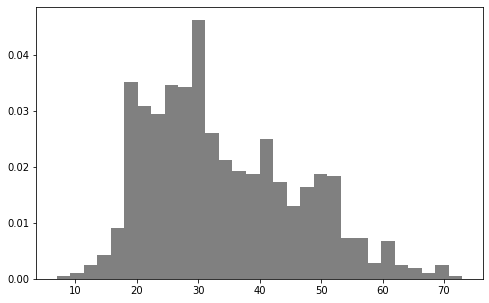
也就是下图中惨素hist中的bins的原始值。
三、某个特征可视化
是否符合正态分布,可视化后甄别“异常值”。
数据如果有偏,可以通过log转换。
plt.hist 方法
简单地,使用hist直接得到柱状图;如果数据量太大,可以先抽样,再显示。
import matplotlib.pyplot as plt

ages = user_fields.map(lambda x: int(x[1])).collect()

plt.hist(ages, bins=30, color='gray', normed=True)

fig = matplotlib.pyplot.gcf()

fig.set_size_inches(8, 5)
* Pandas.plot 方法
显示特征列 “medage" 的直方图。
result_df.toPandas().plot.bar(x='medage',figsize=(14, 6))
reduceByKey 方法
import numpy as np

count_by_occupation = user_fields.map(lambda fields: (fields[3], 1)).reduceByKey(lambda x, y: x + y).collect()

# count_by_occupation2 = user_fields.map(lambda fields: fields[3]).countByValue()

#######################################################
# 以下怎么用了 np 这个处理小数据的东东。
#######################################################
x_axis1 = np.array([c[0] for c in count_by_occupation])
y_axis1 = np.array([c[1] for c in count_by_occupation])

# sort by y_axis1
x_axis = x_axis1[np.argsort(y_axis1)]

y_axis = y_axis1[np.argsort(y_axis1)]

pos = np.arange(len(x_axis))

width = 1.0

ax = plt.axes()

ax.set_xticks(pos + (width / 2))

ax.set_xticklabels(x_axis)

plt.bar(pos, y_axis, width, color='lightblue')

plt.xticks(rotation=30)

fig = matplotlib.pyplot.gcf()

fig.set_size_inches(16, 5)

四、特征统计量
RDD 获取一列
rating_data   = rating_data_raw.map(lambda line: line.split("\t"))

ratings       = rating_data.map(lambda fields: int(fields[2]))

max_rating    = ratings.reduce(lambda x, y: max(x, y))

min_rating    = ratings.reduce(lambda x, y: min(x, y))

mean_rating   = ratings.reduce(lambda x, y: x + y) / float(num_ratings)

median_rating = np.median(ratings.collect())
We can also use the stats function to get some similar information to the above.
ratings.stats()

Out[11]:

(count: 100000, mean: 3.52986, stdev: 1.12566797076, max: 5.0, min: 1.0)
* Summary Statistics
(housing_df.describe().select(

                    "summary",

                    F.round("medage", 4).alias("medage"),

                    F.round("totrooms", 4).alias("totrooms"),

                    F.round("totbdrms", 4).alias("totbdrms"),

                    F.round("pop", 4).alias("pop"),

                    F.round("houshlds", 4).alias("houshlds"),

                    F.round("medinc", 4).alias("medinc"),

                    F.round("medhv", 4).alias("medhv"))

                    .show())
+-------+-------+---------+--------+---------+--------+-------+-----------+

|summary| medage| totrooms|totbdrms|      pop|houshlds| medinc|      medhv|

+-------+-------+---------+--------+---------+--------+-------+-----------+

|  count|20640.0|  20640.0| 20640.0|  20640.0| 20640.0|20640.0|    20640.0|

|   mean|28.6395|2635.7631| 537.898|1425.4767|499.5397| 3.8707|206855.8169|

| stddev|12.5856|2181.6153|421.2479|1132.4621|382.3298| 1.8998|115395.6159|

|    min|    1.0|      2.0|     1.0|      3.0|     1.0| 0.4999|    14999.0|

|    max|   52.0|  39320.0|  6445.0|  35682.0|  6082.0|15.0001|   500001.0|

+-------+-------+---------+--------+---------+--------+-------+-----------+
清洗数据
—— Spark SQL's DataFrame为主力工具,参考: [Spark] 03 - Spark SQL
一、重复数据
Ref: https://github.com/drabastomek/learningPySpark/blob/master/Chapter04/LearningPySpark_Chapter04.ipynb
df可以通过rdd转变而来。
1. 找重复的行
print('Count of rows: {0}'.format(df.count()))

print('Count of distinct rows: {0}'.format(df.distinct().count()))  # 所有列的集合

print('Count of distinct ids: {0}'.format(df.select([c for c in df.columns if c != 'id']).distinct().count()))  # 自定义某些列的集合
2. 去除 "完全相同的 row",包括 index
df = df.dropDuplicates()

df.show()
3. 去除 "相同的 row",不包括 index
df = df.dropDuplicates(subset=[c for c in df.columns if c != 'id'])

df.show()
二、缺失值
构造一个典型的 “问题数据表”。
df_miss = spark.createDataFrame([

        (1, 143.5, 5.6, 28,   'M',  100000),

        (2, 167.2, 5.4, 45,   'M',  None),

        (3, None , 5.2, None, None, None),

        (4, 144.5, 5.9, 33,   'M',  None),

        (5, 133.2, 5.7, 54,   'F',  None),

        (6, 124.1, 5.2, None, 'F',  None),

        (7, 129.2, 5.3, 42,   'M',  76000),

    ], ['id', 'weight', 'height', 'age', 'gender', 'income'])
(1) 哪些行有缺失值?
df_miss.rdd.map(

    lambda row: (row['id'], sum([c == None for c in row]))

).collect()
[(1, 0), (2, 1), (3, 4), (4, 1), (5, 1), (6, 2), (7, 0)]
(2) 瞧瞧细节
df_miss.where('id == 3').show()
+---+------+------+----+------+------+

| id|weight|height| age|gender|income|

+---+------+------+----+------+------+

|  3|  null|   5.2|null|  null|  null|

+---+------+------+----+------+------+
(3) 每列的缺失率如何?
df_miss.agg(*[

    (1 - (fn.count(c) / fn.count('*'))).alias(c + '_missing')

    for c in df_miss.columns

]).show()
+----------+------------------+--------------+------------------+------------------+------------------+

|id_missing|    weight_missing|height_missing|       age_missing|    gender_missing|    income_missing|

+----------+------------------+--------------+------------------+------------------+------------------+

|       0.0|0.1428571428571429|           0.0|0.2857142857142857|0.1428571428571429|0.7142857142857143|

+----------+------------------+--------------+------------------+------------------+------------------+
(4) 缺失太多的特征,则“废”
df_miss_no_income = df_miss.select([c for c in df_miss.columns if c != 'income'])

df_miss_no_income.show()
+---+------+------+----+------+

| id|weight|height| age|gender|

+---+------+------+----+------+

|  1| 143.5|   5.6|  28|     M|

|  2| 167.2|   5.4|  45|     M|

|  3|  null|   5.2|null|  null|

|  4| 144.5|   5.9|  33|     M|

|  5| 133.2|   5.7|  54|     F|

|  6| 124.1|   5.2|null|     F|

|  7| 129.2|   5.3|  42|     M|

+---+------+------+----+------+
(5) 缺失太多的行,则“废”
df_miss_no_income.dropna(thresh=3).show()
+---+------+------+----+------+

| id|weight|height| age|gender|

+---+------+------+----+------+

|  1| 143.5|   5.6|  28|     M|

|  2| 167.2|   5.4|  45|     M|

|  4| 144.5|   5.9|  33|     M|

|  5| 133.2|   5.7|  54|     F|

|  6| 124.1|   5.2|null|     F|

|  7| 129.2|   5.3|  42|     M|

+---+------+------+----+------+
(6) 填补缺失值
means = df_miss_no_income.agg(

    *[fn.mean(c).alias(c) for c in df_miss_no_income.columns if c != 'gender']

).toPandas().to_dict('records')[0]

means['gender'] = 'missing'

df_miss_no_income.fillna(means).show()
+---+------------------+------+---+-------+

| id|            weight|height|age| gender|

+---+------------------+------+---+-------+

|  1|             143.5|   5.6| 28|      M|

|  2|             167.2|   5.4| 45|      M|

|  3|140.28333333333333|   5.2| 40|missing|

|  4|             144.5|   5.9| 33|      M|

|  5|             133.2|   5.7| 54|      F|

|  6|             124.1|   5.2| 40|      F|

|  7|             129.2|   5.3| 42|      M|

+---+------------------+------+---+-------+
或者,通过 Imputer 填补缺失值,如下。
from pyspark.ml.feature import Imputer

df = spark.createDataFrame([

    (1.0, float("nan")),

    (2.0, float("nan")),

    (float("nan"), 3.0),

    (4.0, 4.0),

    (5.0, 5.0)

], ["a", "b"])

imputer = Imputer(inputCols=["a", "b"], outputCols=["out_a", "out_b"])

model = imputer.fit(df)

model.transform(df).show()
三、异常值
1. 基本策略
- 判定为“outlier”,首先要通过统计描述可视化数据。
- 常识以外的数据点也可以直接祛除,比如:age = 300
df_outliers = spark.createDataFrame([

        (1, 143.5, 5.3, 28),

        (2, 154.2, 5.5, 45),

        (3, 342.3, 5.1, 99),

        (4, 144.5, 5.5, 33),

        (5, 133.2, 5.4, 54),

        (6, 124.1, 5.1, 21),

        (7, 129.2, 5.3, 42),

    ], ['id', 'weight', 'height', 'age'])
2. 定义有效区间
cols = ['weight', 'height', 'age']

bounds = {}

for col in cols:

    quantiles = df_outliers.approxQuantile(col, [0.25, 0.75], 0.05)

    IQR = quantiles[1] - quantiles[0]

    bounds[col] = [quantiles[0] - 1.5 * IQR, quantiles[1] + 1.5 * IQR]

bounds
{'age': [-11.0, 93.0],

 'height': [4.499999999999999, 6.1000000000000005],

 'weight': [91.69999999999999, 191.7]}
3. filter有效区间
outliers = df_outliers.select(*['id'] + [

    (

        (df_outliers[c] < bounds[c][0]) |

        (df_outliers[c] > bounds[c][1])

    ).alias(c + '_o') for c in cols

])

outliers.show()
+---+--------+--------+-----+

| id|weight_o|height_o|age_o|

+---+--------+--------+-----+

|  1|   false|   false|false|

|  2|   false|   false|false|

|  3|    true|   false| true|

|  4|   false|   false|false|

|  5|   false|   false|false|

|  6|   false|   false|false|

|  7|   false|   false|false|

+---+--------+--------+-----+
并查看细节,如下。
df_outliers = df_outliers.join(outliers, on='id')

df_outliers.filter('weight_o').select('id', 'weight').show()

df_outliers.filter('age_o').select('id', 'age').show()
+---+------+

| id|weight|

+---+------+

|  3| 342.3|

+---+------+

+---+---+

| id|age|

+---+---+

|  3| 99|

+---+---+
[ML] Load and preview large scale data的更多相关文章
- Introducing DataFrames in Apache Spark for Large Scale Data Science(中英双语)
文章标题 Introducing DataFrames in Apache Spark for Large Scale Data Science 一个用于大规模数据科学的API——DataFrame ...
- 论文笔记之:Large Scale Distributed Semi-Supervised Learning Using Streaming Approximation
Large Scale Distributed Semi-Supervised Learning Using Streaming Approximation Google 2016.10.06 官方 ...
- 大规模视觉识别挑战赛ILSVRC2015各团队结果和方法 Large Scale Visual Recognition Challenge 2015
Large Scale Visual Recognition Challenge 2015 (ILSVRC2015) Legend: Yellow background = winner in thi ...
- Lessons learned developing a practical large scale machine learning system
原文:http://googleresearch.blogspot.jp/2010/04/lessons-learned-developing-practical.html Lessons learn ...
- 【原】Coursera—Andrew Ng机器学习—课程笔记 Lecture 17—Large Scale Machine Learning 大规模机器学习
Lecture17 Large Scale Machine Learning大规模机器学习 17.1 大型数据集的学习 Learning With Large Datasets 如果有一个低方差的模型 ...
- [C12] 大规模机器学习(Large Scale Machine Learning)
大规模机器学习(Large Scale Machine Learning) 大型数据集的学习(Learning With Large Datasets) 如果你回顾一下最近5年或10年的机器学习历史. ...
- Could not load file or assembly 'MySql.Data.CF,
Could not load file or assembly 'MySql.Data.CF, Version=6.4.4.0, Culture=neutral, PublicKeyToken=c56 ...
- Could not load file or assembly 'System.Data.SQLite' or one of its dependencies
试图加载格式不正确的程 异常类型 异常消息Could not load file or assembly 'System.Data.SQLite' or one of its dependencies ...
- SQLite 解决:Could not load file or assembly 'System.Data.SQLite ... 试图加载格式不正确的程序/or one of its dependencies. 找不到指定的模块。
Could not load file or assembly 'System.Data.SQLite.dll' or one of its dependencies. 找不到指定的模块. 错误提示 ...
随机推荐
- 图像处理---《Canny 边缘检测》
图像处理---<Canny 边缘检测> 很想系统的把图像处理之边缘检测部分详细的过一遍,对比一个各个算子的优良性能.时间紧,精力有限,现在只能走哪补哪,随手记. 有几个简单的场景,有需要, ...
- LoadRunner(7)
一.参数化策略 1.Select next row(How? 如何取?)取值方式 选择下一行 1)Sequential:顺序的 每个VU都从第一行开始,顺序依次向下取值: 数据取完可以从头循环重复使用 ...
- JavaScript教程——函数(arguments 对象)
arguments 对象 定义 由于 JavaScript 允许函数有不定数目的参数,所以需要一种机制,可以在函数体内部读取所有参数.这就是arguments对象的由来. arguments对象包含了 ...
- wmware虚拟化的启动问题
2019-05-09,14点14 vmware出现VMware提示:已将该虚拟机配置为使用 64 位客户机操作系统.但是,无法执行 64 位操作.解决方案 进入bios里面intel 虚拟化技术 先设 ...
- kettle 数据抽取时会出现 无法插入NULL
kettle 数据抽取时会出现 无法插入NULL,其实是空字符串,原因是kettle默认不区分空字符串和NULL. 解决办法: 修改kettle.properties 文件:
- hlslcc
https://cdn2.unrealengine.com/Resources/files/UE4_OpenGL4_GDC2014-514746542.pdf ue的跨平台编译器 hlsl cross ...
- BZOJ 2759 一个动态树好题 (LCT)
PoPoQQQ 再一次orz-没看得特别明白的可以回来看看蒟蒻的补充口胡 我这里提一下关于splaysplaysplay维护的子树信息- 在原树上考虑,对于每一个点iii都有这样一个信息xi=ki∗x ...
- HDU 6042 - Journey with Knapsack | 2017 Multi-University Training Contest 1
/* HDU 6042 - Journey with Knapsack [ 生成函数,五边形定理 ] | 2017 Multi-University Training Contest 1 题意: n种 ...
- B/S架构大文件上传问题
核心原理: 该项目核心就是文件分块上传.前后端要高度配合,需要双方约定好一些数据,才能完成大文件分块,我们在项目中要重点解决的以下问题. * 如何分片: * 如何合成一个文件: * 中断了从哪个分片开 ...
- 51 Nod 1070 Bash游戏v4(斐波那契博弈)
这题的证明看不太懂,日后再重做... 1070 Bash游戏 V4 基准时间限制:1 秒 空间限制:131072 KB 分值: 40 难度:4级算法题 收藏 关注 有一堆石子共有N个.A B两个 ...