
(十一)Centos之帮助命令
帮助命令man (manual)
比如我们可以看下man命令的解释
[root@localhost ~]# man man
MAN(1) Manual pager utils MAN(1)
NAME
man - an interface to the on-line reference manuals
SYNOPSIS
man [-C file] [-d] [-D] [--warnings[=warnings]] [-R encoding] [-L locale] [-m system[,...]] [-M path] [-S list] [-e exten‐
sion] [-i|-I] [--regex|--wildcard] [--names-only] [-a] [-u] [--no-subpages] [-P pager] [-r prompt] [-7] [-E encoding]
[--no-hyphenation] [--no-justification] [-p string] [-t] [-T[device]] [-H[browser]] [-X[dpi]] [-Z] [[section]
page ...] ...
man -k [apropos options] regexp ...
man -K [-w|-W] [-S list] [-i|-I] [--regex] [section] term ...
man -f [whatis options] page ...
man -l [-C file] [-d] [-D] [--warnings[=warnings]] [-R encoding] [-L locale] [-P pager] [-r prompt] [-7] [-E encoding] [-p
string] [-t] [-T[device]] [-H[browser]] [-X[dpi]] [-Z] file ...
man -w|-W [-C file] [-d] [-D] page ...
man -c [-C file] [-d] [-D] page ...
man [-?V]
DESCRIPTION
man is the system's manual pager. Each page argument given to man is normally the name of a program, utility or function.
The manual page associated with each of these arguments is then found and displayed. A section, if provided, will direct
man to look only in that section of the manual. The default action is to search in all of the available sections, follow‐
Manual page man(1) line 1 (press h for help or q to quit)
查看完 按 "q"键,离开
我们看下ls
man ls
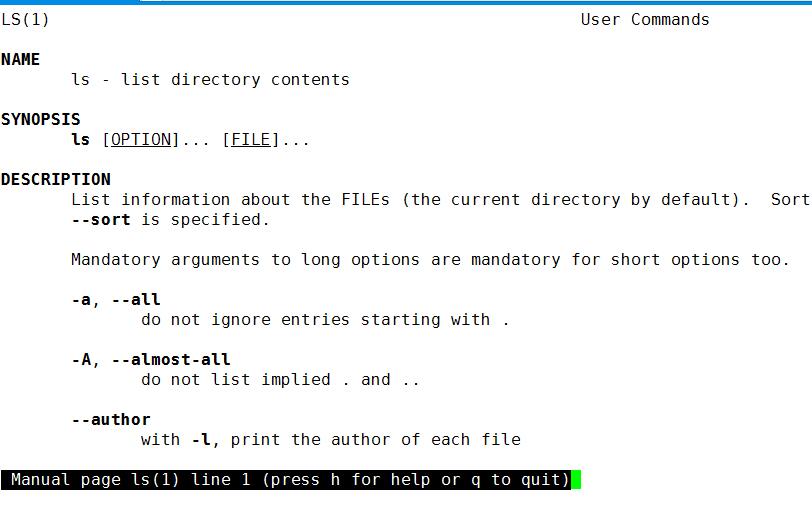
这里其实有很多行 我们可以按键盘的向下键盘,来显示下方隐藏的内容;
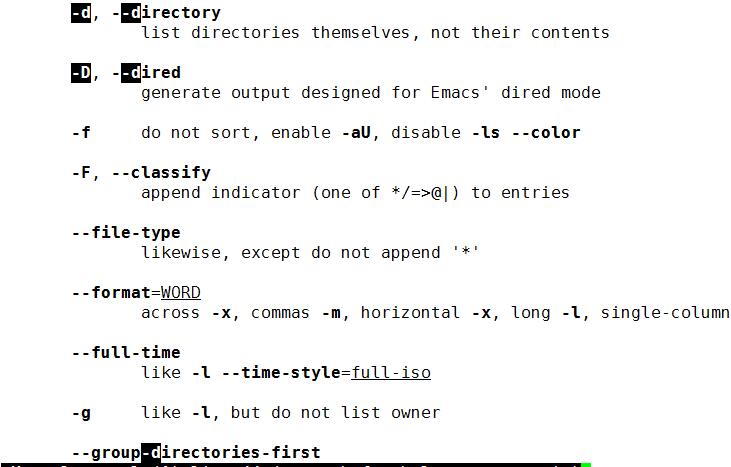
当然也可以搜索
/ 加搜索内容
比如搜索 -d
/-d
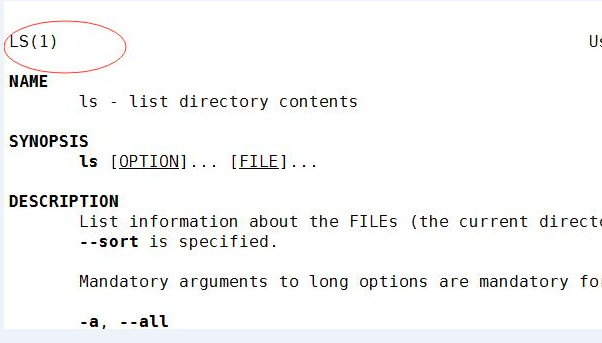
这里的1是man的级别; 这里的1是查看命令的帮助
1:查看命令的帮助
2:查看可被内核调用的函数的函数的版主
3:查看函数和函数库的帮助
4:查看特殊文件的帮助(主要是/dev目录下的文件)
5:查看配置文件的帮助
6:查看游戏的帮助
7:查看其他杂项的帮助
8:查看系统管理员可用命令的帮助
9:查看和内核相关文件的帮助
查看命令拥有哪个级别的帮助
man -f 命令
相当于
whatis 命令
举例
man -5 passwd
man -4 null
man -8 ip
比如查看ls的命令级别
[root@localhost ~]# man -f ls
ls (1) - list directory contents
[root@localhost ~]#
只有1个
[root@localhost ~]# man -f ip
ip (8) - show / manipulate routing, devices, policy routing...
[root@localhost ~]#
查看和命令相关的所有帮助
man -k 命令
相当于
appropos 命令
例如
apropos passwd
[root@localhost ~]# man -k passwd
chpasswd (8) - 批量更新密码
gpasswd (1) - 管理员 /etc/group 和 /etc/gshadow
grub2-mkpasswd-pbkdf2 (1) - Generate a PBKDF2 password hash.
lpasswd (1) - Change group or user password
pam_localuser (8) - require users to be listed in /etc/passwd
passwd (1) - update user's authentication tokens
sslpasswd (1ssl) - compute password hashes
pwhistory_helper (8) - Helper binary that transfers password hashes from ...
[root@localhost ~]#
能把相关的命令都查询出来;
(十一)Centos之帮助命令的更多相关文章
- CentOS最常用命令及快捷键整理
CentOS最常用命令及快捷键整理 整理了Linux常用命令及快捷键. 常用命令: 文件和目录: # cd /home 进入 '/home' 目录 # ...
- centos的常用命令
公司服务器主要是centos,第一篇就从centos的常用命令开始吧. 转载自:http://www.cnblogs.com/zitsing/archive/2012/05/02/2479009.ht ...
- CentOS 使用yum命令安装Java SDK(openjdk)
CentOS 6.X 和 5.X 自带有OpenJDK runtime environment (openjdk).它是一个在linux上实现开源的java 平台.CentOS yum 命令 安装 ...
- CentOS基本的命令与快捷建
由于我的计算机在安装linux系统时,计算机出现了问题,并没有安装ubuntu而是安装的centos.虽然两者属于linux的不同版本,但是在具体的操作上大同小异.在学习linux的各种指令和快捷键的 ...
- CentOS中service命令与/etc/init.d的关系以及centos7的变化
缘由 由于个人经常在ubuntu和centos 系统中切换,习惯了以前的 ubuntu中 通过 /etc/init.d/xxx 进行软件服务控制.后来发现centos7中换了服务的控制方式:servi ...
- CentOS下rpm命令详解
CentOS下rpm命令详解 rpm,Redhat Package Manager,即为红帽公司为RHEL开发的专用包管理器,后来更改为RPM Package Manager,类似于GNU项目,使用递 ...
- CentOS 使用yum命令安装出现错误提示”could not retrieve mirrorlist http://mirrorlist.centos.org
CentOS 使用yum命令安装出现错误提示"could not retrieve mirrorlist http://mirrorlist.centos.org这个错误, 在网上找了好多, ...
- centos安装tree命令
centos安装tree命令 sudo yum -y install tree windows安装tree命令 我的另一篇
- CentOS下yum命令详解
CentOS下yum命令详解 Yum: 即Yellowdog Update Modifier,是一种基于rpm的包管理工具 yum命令使用示例 显示yum仓库 显示所有仓库 yum repolist ...
- Centos 配置ifconfig命令
刚装完CentOS 后ifconfig命令可能是不可用的,那么需要以下配置 ip addr vi /etc/sysconfig/network-scripts/ifcfg-xx (ONBOOT=yes ...
随机推荐
- Javascript基础(1)
1 Javascript介绍 1.1 js是一款运行在客户端的网页编程语言 1.2 组成部分 (1)ECMAScript:ECMAScript不是一门语言,而是一个标准.符合这个标准的比较常见的有:J ...
- mysqlcheck(MyISAM表维护工具)
mysqlheck [option] db_name [tables] -c --check(检查表) -r --repair(修复表) -a --analyze(分析表) -o --optim ...
- 聊聊rocketmq的sendBatchMessage
序 本文主要研究一下rocketmq的sendBatchMessage SendMessageRequestHeader rocketmq-all-4.6.0-source-release/commo ...
- HDU 6000 - Wash
/* HDU 6000 - Wash [ 贪心 ] 题意: L 件衣服,N 个洗衣机,M 个烘干机,给出每个洗衣机洗一件衣服的时间和烘干机烘干一件衣服的时间,问需要的最少时间是多少 分析: 先求出L件 ...
- centos 安装mysql5.7.18.tar.gz
1.解压mysql.tar.gz tar -zxvf mysql--linux-glibc2.-x86_64.tar.gz 2.添加mysql用户组和mysql用户,命令如下: groupadd m ...
- linux系列(六):rmdir命令
1.命令格式: rmdir [选项] 目录名 2.命令功能: 该命令从一个目录中删除一个或多个子目录项,删除某目录时也必须具有对父目录的写权限. 3.命令参数: - p 删除指定目录后,若该目录的上层 ...
- macOs下安装Android SDK
首先下载 Android SDK for mac 配置安装 1.进入存放 android-sdk-macosx 的目录,然后输入./android sdk就可以调出SDK Manager的图形界面 A ...
- mac 登陆phpmyadmin 提示 mysqli_real_connect(): (HY000/2002): No such file or directory
我们将下载的phpmyadmin 放在apache目录中,进入phpmyadmin目录, 首先将这个目录中的配置文件改名 sudo mv config.sample.inc.php config.in ...
- Windows下的apache maven安装与配置
去到官网http://maven.apache.org/download.cgi下载压缩包我选择的是二进制zip压缩文件. 解压并配置压缩文件的目录到MAVEN_HOME环境变量,添加解压文件下的bi ...
- 小福bbs——项目需求分析
# 一.简单了解 这个作业属于哪个课程 班级链接 这个作业要求在哪里 作业要求的链接 团队名称 小福bbs 这个作业的目标 第一个版本,根据项目预期情况形成 作业的正文 小福bbs--项目需求分析 其 ...