
Spring Cloud Gateway(五):路由定位器 RouteLocator
本文基于 spring cloud gateway 2.0.1
1、简介
直接 获取 路 由 的 方法 是 通过 RouteLocator 接口 获取。 同样, 该 顶 级 接口 有多 个 实现 类,
RouteLocator 路由定位器,顾名思义就是用来获取路由的方法。该路由定位器为顶级接口有多个实现类,如类图所示,本节会对其实现类一一进行介绍。
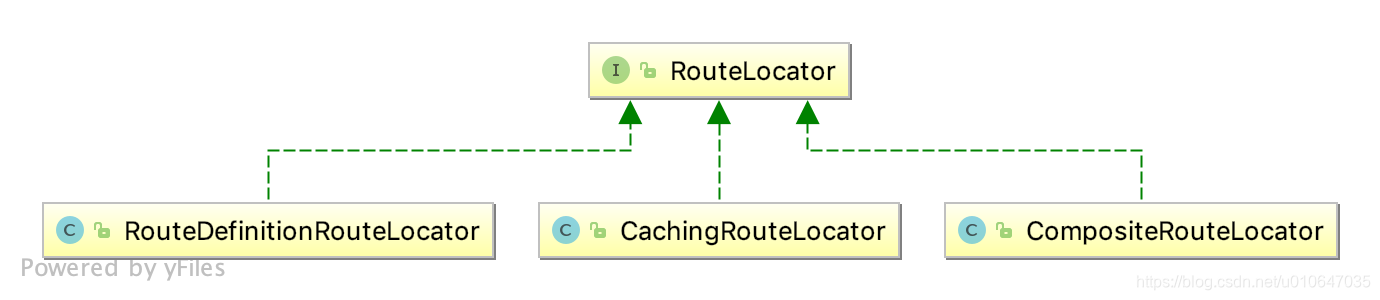
通过类图可知,路由定位器接口有三种实现方法:
- RouteDefinitionRouteLocator 基于路由定义的定位器
- CachingRouteLocator 基于缓存的路由定位器
- CompositeRouteLocator 基于组合方式的路由定位器
2、RouteLocator 路由定位器
与上节学习的路由定义定位器接口类似,RouteLocator 路由定位器只有一个 getRoutes 方法,用来获取路由信息。
public interface RouteLocator {

    //获取路由对象

	Flux<Route> getRoutes();

}
2.1、Route 路由对象
Route 路由定义了路由断言、过滤器、路由地址及路由优先级等信息。当请求到达时,在转发到代理服务之前,会依次经过路由断言匹配路由 和 网关过滤器处理。
public class Route implements Ordered {

    //路由 Id

    private final String id;

    //路由地址

    private final URI uri;

    //路由的优先级

    private final int order;

    //路由断言,判断请求路径是否匹配

	private final AsyncPredicate<ServerWebExchange> predicate;

    //网关过滤器

	private final List<GatewayFilter> gatewayFilters;

    -----------------------省略-------------------------

}
3、 RouteDefinitionRouteLocator 基于路由定义的定位器
3.1、初始化
RouteDefinitionRouteLocator 构造函数有多个参数:路由定义定位器、路由断言工厂、网关过滤器及网关配置对象。 根据传入的参数,设置 routeDefinitionLocator 和 网关配置,并初始化路由断言 和 网关过滤器。 RouteDefinitionRouteLocator 的实现方式是基于路由定义来获取路由,它实现了 RouteLocator 接口,用来获取路由信息。
public class RouteDefinitionRouteLocator implements RouteLocator, BeanFactoryAware, ApplicationEventPublisherAware {

	protected final Log logger = LogFactory.getLog(getClass());

	private final RouteDefinitionLocator routeDefinitionLocator;

	private final Map<String, RoutePredicateFactory> predicates = new LinkedHashMap<>();

	private final Map<String, GatewayFilterFactory> gatewayFilterFactories = new HashMap<>();

	private final GatewayProperties gatewayProperties;

	private final SpelExpressionParser parser = new SpelExpressionParser();

	private BeanFactory beanFactory;

	private ApplicationEventPublisher publisher;

	public RouteDefinitionRouteLocator(RouteDefinitionLocator routeDefinitionLocator,

									   List<RoutePredicateFactory> predicates,

									   List<GatewayFilterFactory> gatewayFilterFactories,

									   GatewayProperties gatewayProperties) {

		//设置路由定义定位器

		this.routeDefinitionLocator = routeDefinitionLocator;

		//初始化路由断言工厂

		initFactories(predicates);

		//初始化网关过滤器

		gatewayFilterFactories.forEach(factory -> this.gatewayFilterFactories.put(factory.name(), factory));

		this.gatewayProperties = gatewayProperties;

	}

	@Autowired

	private Validator validator;

	@Override

	public void setBeanFactory(BeanFactory beanFactory) throws BeansException {

		this.beanFactory = beanFactory;

	}

	@Override

	public void setApplicationEventPublisher(ApplicationEventPublisher publisher) {

		this.publisher = publisher;

	}

	private void initFactories(List<RoutePredicateFactory> predicates) {

		predicates.forEach(factory -> {

			String key = factory.name();

			if (this.predicates.containsKey(key)) {

				this.logger.warn("A RoutePredicateFactory named "+ key

						+ " already exists, class: " + this.predicates.get(key)

						+ ". It will be overwritten.");

			}

			this.predicates.put(key, factory);

			if (logger.isInfoEnabled()) {

				logger.info("Loaded RoutePredicateFactory [" + key + "]");

			}

		});

	}

    --------------------------------省略---------------------------------

}
- 此种方式的路由获取是通过 RouteDefinitionRouteLocator 获取 RouteDefinition 并将路由定义转换成路由对象
- 这里的routeDefinitionLocator是CompositeRouteDefinitionLocator,它组合了InMemoryRouteDefinitionRepository、PropertiesRouteDefinitionLocator、DiscoveryClientRouteDefinitionLocator三个RouteDefinitionLocator。
- PropertiesRouteDefinitionLocator是直接使用GatewayProperties的getRoutes()获取,其是通过spring.cloud.gateway.routes配置得来。
3.2、RouteDefinition 转换成 Route 的流程

// RouteDefinitionRouteLocator.java
@Override

	public Flux<Route> getRoutes() {

		return this.routeDefinitionLocator.getRouteDefinitions()

				.map(this::convertToRoute)

				//TODO: error handling

				.map(route -> {

					if (logger.isDebugEnabled()) {

						logger.debug("RouteDefinition matched: " + route.getId());

					}

					return route;

				});

		/* TODO: trace logging

			if (logger.isTraceEnabled()) {

				logger.trace("RouteDefinition did not match: " + routeDefinition.getId());

			}*/

	}

	private Route convertToRoute(RouteDefinition routeDefinition) {

		AsyncPredicate<ServerWebExchange> predicate = combinePredicates(routeDefinition);

		List<GatewayFilter> gatewayFilters = getFilters(routeDefinition);

		return Route.async(routeDefinition)

				.asyncPredicate(predicate)

				.replaceFilters(gatewayFilters)

				.build();

	}
getRoutes() :根据传入的 RouteDefinitionLocator 获取路由定义对象,使用map方法将每个 RouteDefinition 转换为 Route。
RouteDefinitionLocator#convertToRoute :是具体的转换方法,转换过程中涉及到路由断言 和 网关过滤器的处理,最后构建为Route 对象。
此处网关过滤器处理包括两种,一种是默认过滤器,作用于所有路由;一种是指定路由的自定义过滤器。首先获取默认过滤器,根据过滤器名称获取对应的过滤器,最终转换成有优先级的OrderedGatewayFilter。
3.2.1、convertToRoute##combinePredicates
combinePredicates主要是对找出来的predicate进行and操作
private AsyncPredicate<ServerWebExchange> combinePredicates(RouteDefinition routeDefinition) {

		List<PredicateDefinition> predicates = routeDefinition.getPredicates();

		AsyncPredicate<ServerWebExchange> predicate = lookup(routeDefinition, predicates.get(0));

		for (PredicateDefinition andPredicate : predicates.subList(1, predicates.size())) {

			AsyncPredicate<ServerWebExchange> found = lookup(routeDefinition, andPredicate);

			predicate = predicate.and(found);

		}

		return predicate;

	}

	@SuppressWarnings("unchecked")

	private AsyncPredicate<ServerWebExchange> lookup(RouteDefinition route, PredicateDefinition predicate) {

		RoutePredicateFactory<Object> factory = this.predicates.get(predicate.getName());

		if (factory == null) {

            throw new IllegalArgumentException("Unable to find RoutePredicateFactory with name " + predicate.getName());

		}

		Map<String, String> args = predicate.getArgs();

		if (logger.isDebugEnabled()) {

			logger.debug("RouteDefinition " + route.getId() + " applying "

					+ args + " to " + predicate.getName());

		}

        Map<String, Object> properties = factory.shortcutType().normalize(args, factory, this.parser, this.beanFactory);

        Object config = factory.newConfig();

        ConfigurationUtils.bind(config, properties,

                factory.shortcutFieldPrefix(), predicate.getName(), validator);

        if (this.publisher != null) {

            this.publisher.publishEvent(new PredicateArgsEvent(this, route.getId(), properties));

        }

        return factory.applyAsync(config);

	}
3.2.2、convertToRoute##getFilters
getFilters 主要是利用loadGatewayFilters获取filter,使用AnnotationAwareOrderComparator进行排序
loadGatewayFilters利用工厂方法,使用GatewayFilterFactory根据config 获取具体的GatewayFilter实例
@SuppressWarnings("unchecked")

	private List<GatewayFilter> loadGatewayFilters(String id, List<FilterDefinition> filterDefinitions) {

		List<GatewayFilter> filters = filterDefinitions.stream()

				.map(definition -> {

					GatewayFilterFactory factory = this.gatewayFilterFactories.get(definition.getName());

					if (factory == null) {

                        throw new IllegalArgumentException("Unable to find GatewayFilterFactory with name " + definition.getName());

					}

					Map<String, String> args = definition.getArgs();

					if (logger.isDebugEnabled()) {

						logger.debug("RouteDefinition " + id + " applying filter " + args + " to " + definition.getName());

					}

                    Map<String, Object> properties = factory.shortcutType().normalize(args, factory, this.parser, this.beanFactory);

                    Object configuration = factory.newConfig();

                    ConfigurationUtils.bind(configuration, properties,

                            factory.shortcutFieldPrefix(), definition.getName(), validator);

                    GatewayFilter gatewayFilter = factory.apply(configuration);

                    if (this.publisher != null) {

                        this.publisher.publishEvent(new FilterArgsEvent(this, id, properties));

                    }

                    return gatewayFilter;

				})

				.collect(Collectors.toList());

		ArrayList<GatewayFilter> ordered = new ArrayList<>(filters.size());

		for (int i = 0; i < filters.size(); i++) {

			GatewayFilter gatewayFilter = filters.get(i);

			if (gatewayFilter instanceof Ordered) {

				ordered.add(gatewayFilter);

			}

			else {

				ordered.add(new OrderedGatewayFilter(gatewayFilter, i + 1));

			}

		}

		return ordered;

	}

	private List<GatewayFilter> getFilters(RouteDefinition routeDefinition) {

		List<GatewayFilter> filters = new ArrayList<>();

		//TODO: support option to apply defaults after route specific filters?

		if (!this.gatewayProperties.getDefaultFilters().isEmpty()) {

			filters.addAll(loadGatewayFilters("defaultFilters",

					this.gatewayProperties.getDefaultFilters()));

		}

		if (!routeDefinition.getFilters().isEmpty()) {

			filters.addAll(loadGatewayFilters(routeDefinition.getId(), routeDefinition.getFilters()));

		}

		AnnotationAwareOrderComparator.sort(filters);

		return filters;

	}
4、 CachingRouteLocator 基于缓存的路由定位器
public class CachingRouteLocator implements RouteLocator {

	private final RouteLocator delegate;

	private final Flux<Route> routes;

	private final Map<String, List> cache = new HashMap<>();

	public CachingRouteLocator(RouteLocator delegate) {

		this.delegate = delegate;

		routes = CacheFlux.lookup(cache, "routes", Route.class)

				.onCacheMissResume(() -> this.delegate.getRoutes().sort(AnnotationAwareOrderComparator.INSTANCE));

	}

	@Override

	public Flux<Route> getRoutes() {

		return this.routes;

	}

	/**

	 * Clears the routes cache

	 * @return routes flux

	 */

	public Flux<Route> refresh() {

		this.cache.clear();

		return this.routes;

	}

	@EventListener(RefreshRoutesEvent.class)

	/* for testing */ void handleRefresh() {

		refresh();

	}

}
基于缓存的路由定位器比较简单和缓存路由定义定位器比较类似,只需要调用 RouteLocator# getRoutes 即可获取路由。
根据传入的路由定位器获取路由信息并存储到缓存中。通过监听 RefreshRoutesEvent 事件刷新缓存的路由信息。
5、 CompositeRouteLocator 基于组合方式的路由定位器
public class CompositeRouteLocator implements RouteLocator {

	private final Flux<RouteLocator> delegates;

	public CompositeRouteLocator(Flux<RouteLocator> delegates) {

		this.delegates = delegates;

	}

	@Override

	public Flux<Route> getRoutes() {

		return this.delegates.flatMap(RouteLocator::getRoutes);

	}

}
组合方式的路由定位器,将实现 RouteLocator 接口的路由定位器组合在一起,提供获取路由的统一入口。
6、小结
RouteLocator 接口用于获取路由信息,其有三个实现类
- RouteDefinitionRouteLocator
- CompositeRouteLocator
- CachingRouteLocator
最终使用的是CachingRouteLocator,它包装了CompositeRouteLocator,而CompositeRouteLocator则组合了RouteDefinitionRouteLocator。
RouteDefinitionRouteLocator 与 RouteDefinitionLocator比较容易混淆,前者是一个RouteLocator(路由定位器),后者是一个RouteDefinitionLocator(路由定义定位器),前者的 RouteDefinitionRouteLocator 主要从后者获取路由定义信息。
Spring Cloud Gateway(五):路由定位器 RouteLocator的更多相关文章
- 通过Nacos动态刷新Spring Cloud Gateway的路由
通过Nacos动态刷新Spring Cloud Gateway的路由 一.背景 二.解决方案 三.实现功能 四.实现步骤 1.网关服务的实现 1.pom文件 2.bootstrap.yml配置文件 3 ...
- springcloud3(五) spring cloud gateway动态路由的四类实现方式
写这篇博客主要是为了汇总下动态路由的多种实现方式,没有好坏之分,任何的方案都是依赖业务场景需求的,现在网上实现方式主要有: 基于Nacos, 基于数据库(PosgreSQL/Redis), 基于Mem ...
- Spring Cloud gateway 五 Sentinel整合
微服务当前这么火爆的程度,如果不能学会一种微服务框架技术.怎么能升职加薪,增加简历的筹码?spring cloud 和 Dubbo 需要单独学习.说没有时间?没有精力?要学俩个框架?而Spring C ...
- Spring Cloud Alibaba学习笔记(17) - Spring Cloud Gateway 自定义路由谓词工厂
在前文中,我们介绍了Spring Cloud Gateway内置了一系列的路由谓词工厂,但是如果这些内置的路由谓词工厂不能满足业务需求的话,我们可以自定义路由谓词工厂来实现特定的需求. 例如有某个服务 ...
- spring cloud gateway网关路由分配
1, 基于父工程,新建一个模块 2,pom文件添加依赖 <dependencies> <dependency> <groupId>org.springframewo ...
- Spring Cloud Alibaba学习笔记(16) - Spring Cloud Gateway 内置的路由谓词工厂
Spring Cloud Gateway路由配置的两种形式 Spring Cloud Gateway的路由配置有两种形式,分别是路由到指定的URL以及路由到指定的微服务,在上文博客的示例中我们就已经使 ...
- Spring cloud gateway 如何在路由时进行负载均衡
本文为博主原创,转载请注明出处: 1.spring cloud gateway 配置路由 在网关模块的配置文件中配置路由: spring: cloud: gateway: routes: - id: ...
- Spring Cloud Gateway(一):认识Spring Cloud Gateway
1.Spring Cloud Gateway 简介 Spring Cloud Gateway 系列目录 Spring Cloud Gateway(一):认识Spring Cloud Gateway S ...
- Spring Cloud Gateway服务网关
原文:https://www.cnblogs.com/ityouknow/p/10141740.html Spring 官方最终还是按捺不住推出了自己的网关组件:Spring Cloud Gatewa ...
- 网关服务Spring Cloud Gateway(一)
Spring 官方最终还是按捺不住推出了自己的网关组件:Spring Cloud Gateway ,相比之前我们使用的 Zuul(1.x) 它有哪些优势呢?Zuul(1.x) 基于 Servlet,使 ...
随机推荐
- GoLand中同一个目录下的package无法调用
代码结构: 三个代码的package 都是 pipefilter,执行split_filter_test.go 就会提示 undefined:xxxxxxx Golang实际都可以自己补全另一个文 ...
- VsCode开发Angular的必备插件
1 概述 一般个人开发或者小公司开发都会使用破解版软件,除非比较尊重正版且不太缺钱的人才会用正版,但是大型公司有严格的规定,不允许员工使用盗版软件. 这时候我就不得不从WebStorm转向VsCode ...
- MySQL绿色版mysql-5.7.17-winx64简洁安装教程
1.解压MySQL绿色版,复制my-default.ini,修改名称为my.ini 2. 以下为my.ini文件 # For advice on how to change settings plea ...
- SQL SERVER 中如何获取日期(一个月的最后一日、一年的第一日等等)
https://blog.csdn.net/deepwishly/article/details/9101307 这是计算一个月第一天的SQL 脚本: SELECT DATEADD(mm, DAT ...
- Asp.netCore 是用的Socket 吗?
Asp.netCore 是用的Socket 的krestrel 用的是Socket! public static IWebHostBuilder CreateDefaultBuilder(string ...
- C#数字日期转成中文日期
using System; using System.Collections.Generic; using System.Linq; using System.Text; namespace Cons ...
- ribbon的理解
什么是ribbon? Ribbo是一个基于HTTP和TCP的客户端负载均衡器 什么是客户端负载均衡? 客户端负载均衡和服务端负载均衡最大的区别在于服务清单所存储的位置. 在客户端负载均衡中,所有的客户 ...
- oracle 01741:非法的零长度标识
转自:https://blog.csdn.net/wanderball/article/details/7690206 出现此问题是标识符里有两个连续的“”号,去掉即可,或是里面填充内容,避免两个连续 ...
- Source Insight用法
快捷键 Symbol: Browse Project Symbols-:F7, Alt+G Relation View Relationship->For Functions->Pefer ...
- 1.JUC锁的一些概念
原文链接:http://blog.csdn.net/zteny/article/details/54859228 接下来的几篇文章都转自这里,冒犯之处,多多包涵 原子性: 在看原子性之前,我们先看看什 ...