
ExoPlayer Talk 01 缓存策略分析与优化
操作系统:Windows8.1
显卡:Nivida GTX965M
开发工具:Android studio 2.3.3 | ExoPlayer r2.5.1
使用 ExoPlayer已经有一段时间了,对播放器的整体架构设计 到 具体实现 佩服至极,特别建议开发播放器的同学有机会一定要看看,相信会受益匪浅。这次分享的内容主要关于缓存策略优化。
Default Buffer Policy
Google ExoPlayer提供了默认的AV数据的缓存策略,并通过 DefaultLoadControl 组件实现。该加载器组件本身没有问题,只不过在一些情景下,这种默认缓存策略,会减损"缓存"本身的效果。在 DefaultLoadControl中有如下代码片段:
  @Override
  public boolean shouldContinueLoading(long bufferedDurationUs)

  {

      ...

      isBuffering = bufferTimeState == BELOW_LOW_WATERMARK || (bufferTimeState == BETWEEN_WATERMARKS && isBuffering && !targetBufferSizeReached);

      ...return isBuffering;

  }
该函数由于播放器调用,以确定是否应该继续加载缓存AV数据。
/**

   * The default minimum duration of media that the player will attempt to ensure is buffered at all

   * times, in milliseconds.

   */

  public static final int DEFAULT_MIN_BUFFER_MS = 15000;

  /**

   * The default maximum duration of media that the player will attempt to buffer, in milliseconds.

   */

  public static final int DEFAULT_MAX_BUFFER_MS = 30000;

  /**

   * The default duration of media that must be buffered for playback to start or resume following a

   * user action such as a seek, in milliseconds.

   */

  public static final int DEFAULT_BUFFER_FOR_PLAYBACK_MS = 2500;

  /**

   * The default duration of media that must be buffered for playback to resume after a rebuffer,

   * in milliseconds. A rebuffer is defined to be caused by buffer depletion rather than a user

   * action.

   */

  public static final int DEFAULT_BUFFER_FOR_PLAYBACK_AFTER_REBUFFER_MS  = 5000;
DEFAULT_MIN_BUFFER_MS 常量定义了播放器触发加载AV数据的时机,即当前缓冲区AV数据 duration time 小于15秒。
DEFAULT_MAX_BUFFER_MS 常量定义了播放器进行加载AV数据的上限,即当前缓冲区AV数据 duration time 小于30秒。
DEFAULT_BUFFER_FOR_PLAYBACK_MS 常量定义了播放器播放AV数据的条件,即缓冲区必须满足AV数据 duration time 不小于2.5秒。
DEFAULT_BUFFER_FOR_PLAYBACK_AFTER_REBUFFER_MS 常量定义了播放器从 REBUFFER状态(REBUFFER是由于运行时缓冲区耗尽触发导致) 恢复为可播放状态后可播放AV数据的条件,即缓冲区必须满足AV数据 duration time 不小于5秒。
所以根据以上代码了解,前两个参数用于描述加载时序,后两个参数用于描述是否有足够的缓冲数据来播放。
我们可以概述默认加载器组件会按照如下方式工作:
- 加载组件持续加载,直到缓冲AV数据大于30秒,停止加载,进入等待状态。
- 当缓冲AV数据小于15秒时,加载器重新执行加载逻辑。
- 播放器根据当前缓冲区AV数据 duration time 控制是否播放。
那么问题来了,这样设计的目的是什么?很难想到一个情景应用该策略,换句话说是否可以自定义修改15秒30秒这样的数值呢?
What about Buffering?
There are arguments that mobile carriers prefer this kind of traffic pattern over their networks (i.e. bursts rather than drip-feeding). Which is an important consideration given ExoPlayer is used by some very popular services. It may also be more battery efficient.
Whether these arguments are still valid is something we should probably take another look at fairly soon, since the information we used when making this decision is 3-4 years old now. We should also figure out whether we should adjust the policy dynamically based on network type (e.g. even if the arguments are still valid, they may only hold for mobile networks and not for WiFi).
关于此问题已经有人问询过,其中一个ExoPlayer开发人员给出这样的答复,大致意为,目前主流移动运营商将作为ExoPlayer的相关实现重要考虑对象,有证据表明运营商们更倾向于这种被称为 bursts 的流量模式,而不是 drip-feeding 类的流量模式。除此之外也会提升电池使用效率。无论这些证据是否有效,很快会再次的了解一下,因为做出这个决定所参考的是3-4年前的信息了。还应该确定是否有必要根据网络类型动态调整策略(即使这些参数仍然使用,它们只适用于移动网络,而不是WiFi)。
尽现在使用的默认缓存策略比较通用,但不可能满足所有的情况。为了更好的点播体验,增加缓冲数据 duration time 为1分钟或者更久,接下来我们进一步分析ExoPlayer默认缓存策略的实现原理,并在最后给出一般性的优化例子。
Water Marks
在默认的缓存策略实现中,有一个 water marks 的概念,类似水桶盛水过程中变化的"水位 ",具体代码为:
  private static final int ABOVE_HIGH_WATERMARK = 0;

  private static final int BETWEEN_WATERMARKS = 1;

  private static final int BELOW_LOW_WATERMARK = 2;
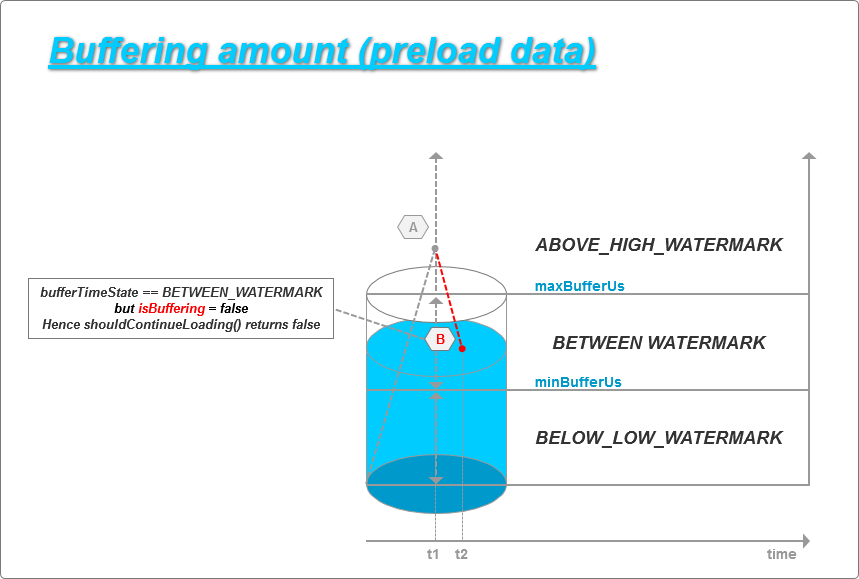
三个级别的水位与前面提到的四个常量的关系如图所示:

参考完整的 getBufferTimeState() 与 shouldContinueLoad() 函数,其中 getBufferTimeState() 根据当前的缓存AV数据的 duration time 来判断处于哪个水位。
private int getBufferTimeState(long bufferedDurationUs)

{

    return bufferedDurationUs > maxBufferUs ? ABOVE_HIGH_WATERMARK

        : (bufferedDurationUs < minBufferUs ? BELOW_LOW_WATERMARK : BETWEEN_WATERMARKS);

}
@Override

  public boolean shouldContinueLoading(long bufferedDurationUs)

  {

      int bufferTimeState = getBufferTimeState(bufferedDurationUs);

      boolean targetBufferSizeReached = allocator.getTotalBytesAllocated() >= targetBufferSize;

      boolean wasBuffering = isBuffering;

      isBuffering = bufferTimeState == BELOW_LOW_WATERMARK || (bufferTimeState == BETWEEN_WATERMARKS && isBuffering && !targetBufferSizeReached);

      if (priorityTaskManager != null && isBuffering != wasBuffering)

      {

          if (isBuffering)

          {

            priorityTaskManager.add(C.PRIORITY_PLAYBACK);

          }

          else

          {

            priorityTaskManager.remove(C.PRIORITY_PLAYBACK);

          }

      }

      return isBuffering;

  }
一个典型的加载行为经过 A、B、C 三个阶段:
Pass A
起始阶段,加载器开始连续的加载AV数据,一直达到或者超过 maxBufferUs 水位为止,需要注意的是这个时候时间线为停顿在 t1 ,如下图所示:

Pass B
t1 时间后,播放器消费缓冲区AV数据,但 isBuffering = false 并且 bufferTimeState == BETWEEN_WATERMARK,所以 shouldContinueLoading() 仍然返回 false,即不需要加载AV数据,时间线停顿在 t2 ,如下图所示:
Pass C
来到最后一个阶段,当播放器持续消费缓冲区AV数据,直到水位低于 minBufferUs ,即 bufferTimeState == BELOW_LOW_WATERMARK 时候,我们恢复加载程序,时间线停顿在 t3 ,如下图所示:
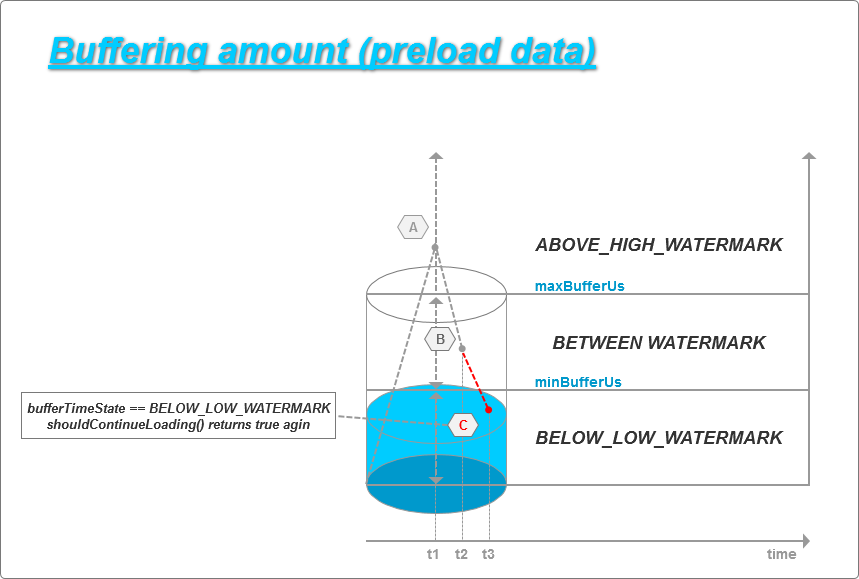
作为一个小节,通过三个阶段的图示我们了解到,从 t1 到 t3 之间区间内,加载器没有做任何加载操作。因此会遇到这种情景,某时刻缓冲区中只有仅仅15秒的缓冲数据。
除此之外,对于缓冲区大小也是有限制的,一般来说当网络状况良好时,一般都可以缓存 15 到 30 秒的AV数据,换句话说,有可能根据需求扩展缓冲区大小。
How to customize the buffer?
应用前面提到的 drip - feeding 滴灌方式,移除缓冲区的上线限制,代码如下:
isBuffering = bufferTimeState == BELOW_LOW_WATERMARK

                || (bufferTimeState == BETWEEN_WATERMARKS

            /*

             * commented below line to achieve drip-feeding method for better caching. once you are below maxBufferUs, do fetch immediately.

             */

            /* && isBuffering */

                && !targetBufferSizeReached);
同时扩大 maxBufferUs 和 minBufferUs 。
/**

 * To increase buffer time and size.

 */

public static int BUFFER_SCALE_UP_FACTOR = 4;

....

minBufferUs = BUFFER_SCALE_UP_FACTOR * minBufferMs * 1000L;

maxBufferUs = BUFFER_SCALE_UP_FACTOR * maxBufferMs * 1000L;

...
可以在 shouldContinueLoading() 函数下面添加日志,验证修改前后的不同表现。
Log.d(CustomLoadControl.class.getSimpleName(), "current buffer durationUs: " + bufferedDurationUs + ",max bufferUs: " + maxBufferUs + ", min bufferUs: " + minBufferUs + " shouldContinueLoading: " + isBuffering);
修改之前的LOG如下,可以观测到只有第一次水位达到 maxBufferUs ,之后的缓存策略一直维持在 minBufferUs :
D/DefaultLoadControl:    current    buffer    durationUs:    0,max    bufferUs:    30000000,    min    bufferUs:    15000000    shouldContinueLoading:    TRUE

D/DefaultLoadControl:    current    buffer    durationUs:    981333,max    bufferUs:    30000000,    min    bufferUs:    15000000    shouldContinueLoading:    TRUE

D/DefaultLoadControl:    current    buffer    durationUs:    2154666,max    bufferUs:    30000000,    min    bufferUs:    15000000    shouldContinueLoading:    TRUE

D/DefaultLoadControl:    current    buffer    durationUs:    3136000,max    bufferUs:    30000000,    min    bufferUs:    15000000    shouldContinueLoading:    TRUE

...

D/DefaultLoadControl:    current    buffer    durationUs:    15160125,max    bufferUs:    30000000,    min    bufferUs:    15000000    shouldContinueLoading:    TRUE

D/DefaultLoadControl:    current    buffer    durationUs:    15973479,max    bufferUs:    30000000,    min    bufferUs:    15000000    shouldContinueLoading:    FALSE

D/DefaultLoadControl:    current    buffer    durationUs:    15973479,max    bufferUs:    30000000,    min    bufferUs:    15000000    shouldContinueLoading:    FALSE

D/DefaultLoadControl:    current    buffer    durationUs:    15963667,max    bufferUs:    30000000,    min    bufferUs:    15000000    shouldContinueLoading:    FALSE

...

D/DefaultLoadControl:    current    buffer    durationUs:    15003688,max    bufferUs:    30000000,    min    bufferUs:    15000000    shouldContinueLoading:    FALSE

D/DefaultLoadControl:    current    buffer    durationUs:    14993604,max    bufferUs:    30000000,    min    bufferUs:    15000000    shouldContinueLoading:    TRUE

D/DefaultLoadControl:    current    buffer    durationUs:    15975896,max    bufferUs:    30000000,    min    bufferUs:    15000000    shouldContinueLoading:    FALSE

D/DefaultLoadControl:    current    buffer    durationUs:    15975896,max    bufferUs:    30000000,    min    bufferUs:    15000000    shouldContinueLoading:    FALSE

D/DefaultLoadControl:    current    buffer    durationUs:    15964834,max    bufferUs:    30000000,    min    bufferUs:    15000000    shouldContinueLoading:    FALSE

...

D/DefaultLoadControl:    current    buffer    durationUs:    15005417,max    bufferUs:    30000000,    min    bufferUs:    15000000    shouldContinueLoading:    FALSE

D/DefaultLoadControl:    current    buffer    durationUs:    14994542,max    bufferUs:    30000000,    min    bufferUs:    15000000    shouldContinueLoading:    TRUE

D/DefaultLoadControl:    current    buffer    durationUs:    15891750,max    bufferUs:    30000000,    min    bufferUs:    15000000    shouldContinueLoading:    FALSE

D/DefaultLoadControl:    current    buffer    durationUs:    15891750,max    bufferUs:    30000000,    min    bufferUs:    15000000    shouldContinueLoading:    FALSE

D/DefaultLoadControl:    current    buffer    durationUs:    15880042,max    bufferUs:    30000000,    min    bufferUs:    15000000    shouldContinueLoading:    FALSE

...

D/DefaultLoadControl:    current    buffer    durationUs:    15003708,max    bufferUs:    30000000,    min    bufferUs:    15000000    shouldContinueLoading:    FALSE

D/DefaultLoadControl:    current    buffer    durationUs:    14992667,max    bufferUs:    30000000,    min    bufferUs:    15000000    shouldContinueLoading:    TRUE

D/DefaultLoadControl:    current    buffer    durationUs:    15601000,max    bufferUs:    30000000,    min    bufferUs:    15000000    shouldContinueLoading:    FALSE

D/DefaultLoadControl:    current    buffer    durationUs:    15601000,max    bufferUs:    30000000,    min    bufferUs:    15000000    shouldContinueLoading:    FALSE

D/DefaultLoadControl:    current    buffer    durationUs:    15588708,max    bufferUs:    30000000,    min    bufferUs:    15000000    shouldContinueLoading:    FALSE

...

D/DefaultLoadControl:    current    buffer    durationUs:    15004458,max    bufferUs:    30000000,    min    bufferUs:    15000000    shouldContinueLoading:    FALSE

D/DefaultLoadControl:    current    buffer    durationUs:    14993416,max    bufferUs:    30000000,    min    bufferUs:    15000000    shouldContinueLoading:    TRUE

D/DefaultLoadControl:    current    buffer    durationUs:    16081313,max    bufferUs:    30000000,    min    bufferUs:    15000000    shouldContinueLoading:    FALSE
修改之后,缓冲区扩大,持续加载,维持在 maxBufferUs:
D/CustomControl:    current    buffer    durationUs:          0,max bufferUs:120000000,    min    bufferUs:60000000    shouldContinueLoading:    TRUE

D/CustomControl:    current    buffer    durationUs:     981333,max bufferUs:120000000,    min    bufferUs:60000000    shouldContinueLoading:    TRUE

D/CustomControl:    current    buffer    durationUs:    2154666,max bufferUs:120000000,    min    bufferUs:60000000    shouldContinueLoading:    TRUE

...

D/CustomControl:    current    buffer    durationUs:    53194146,max bufferUs:120000000,    min    bufferUs:60000000    shouldContinueLoading:    TRUE

D/CustomControl:    current    buffer    durationUs:    54319750,max bufferUs:120000000,    min    bufferUs:60000000    shouldContinueLoading:    TRUE

D/CustomControl:    current    buffer    durationUs:    55313834,max bufferUs:120000000,    min    bufferUs:60000000    shouldContinueLoading:    TRUE
Ok,本次分享的内容就到这里了,以上内容如有不对之处,请多多指正。
ExoPlayer Talk 01 缓存策略分析与优化的更多相关文章
- iOS网络加载图片缓存策略之ASIDownloadCache缓存优化
iOS网络加载图片缓存策略之ASIDownloadCache缓存优化 在我们实际工程中,很多情况需要从网络上加载图片,然后将图片在imageview中显示出来,但每次都要从网络上请求,会严重影响用 ...
- 详解服务器性能测试的全生命周期?——从测试、结果分析到优化策略(转载)
服务器性能测试是一项非常重要而且必要的工作,本文是作者Micheal在对服务器进行性能测试的过程中不断摸索出来的一些实用策略,通过定位问题,分析原因以及解决问题,实现对服务器进行更有针对性的优化,提升 ...
- tomcat压缩优化和缓存策略
tomcat压缩内容 tomcat的压缩优化就是将返回的html页面等内容经过压缩,压缩成gzip格式之后.发送给浏览器,浏览器在本地解压缩的过程. 对于页面量信息大或者带宽小的情况下用压缩方式还是蛮 ...
- Universal-Image-Loader源码分析,及常用的缓存策略
讲到图片请求,主要涉及到网络请求,内存缓存,硬盘缓存等原理和4大引用的问题,概括起来主要有以下几个内容: 原理示意图 主体有三个,分别是UI,缓存模块和数据源(网络).它们之间的关系如下: ① UI: ...
- okhttp缓存策略源码分析:put&get方法
对于OkHttp的缓存策略其实就是在下一次请求的时候能节省更加的时间,从而可以更快的展示出数据,那在Okhttp如何使用缓存呢?其实很简单,如下: 配置一个Cache既可,其中接收两个参数:一个是缓存 ...
- 【腾讯Bugly干货分享】彻底弄懂 Http 缓存机制 - 基于缓存策略三要素分解法
本文来自于腾讯Bugly公众号(weixinBugly),未经作者同意,请勿转载,原文地址:https://mp.weixin.qq.com/s/qOMO0LIdA47j3RjhbCWUEQ 作者:李 ...
- Http协议:彻底弄懂 Http 缓存机制 - 基于缓存策略三要素分解法
转载:http://mp.weixin.qq.com/s/uWPls0qrqJKHkHfNLmaenQ 导语 Http 缓存机制作为 web 性能优化的重要手段,对从事 Web 开发的小伙伴们来说是必 ...
- 高性能Linux服务器 第10章 基于Linux服务器的性能分析与优化
高性能Linux服务器 第10章 基于Linux服务器的性能分析与优化 作为一名Linux系统管理员,最主要的工作是优化系统配置,使应用在系统上以最优的状态运行.但硬件问题.软件问题.网络环境等 ...
- 【转载】HTTP 缓存的四种风味与缓存策略
原文地址:https://segmentfault.com/a/1190000006689795 HTTP Cache 通过网络获取内容既缓慢,成本又高:大的响应需要在客户端和服务器之间进行多次往返通 ...
随机推荐
- 基于Json序列化和反序列化通用的封装
1. 最近项目已经上线了 ,闲暇了几天 想将JSON的序列化以及反序列化进行重新的封装一下本人定义为JSONHelp,虽然Microsoft 已经做的很好了.但是我想封装一套为自己开发的项目使用.方便 ...
- java 数据库编程 学习笔记 不断更新
最近开始学习java,感觉java的数据库编程需要发个随笔记录一下,话不多说 切入正题. 一.数据库访问技术的简介 应用程序 → 执行SQL语句 →数据库 → 检索数据结果 → 应用程序 ( ...
- for(int a:i)在java 编程中的使用
这种有冒号的for循环叫做foreach循环,foreach语句是java5的新特征之一,在遍历数组.集合方面,foreach为开发人员提供了极大的方便. foreach语句是for语句的特殊简化版本 ...
- fedora下一些问题的解决方案汇总
解决fedora下一些使用问题 一 解决fedora下无法使用Fn+功能键来调整亮度的问题 在fedora下,背光的配置参数在/sys/class/backlight文件夹下,根据不同的显卡,有不同的 ...
- wampserver2.5局域网IP访问配置
wampserver2.5集成环境的安装和使用就不多说了,网上有很多教材.安装好后找到apache的配置文件httpd.conf.默认位置是: swap安装目录\wamp\bin\apache\apa ...
- python机器学习模块安装
环境:RHEL6.5 离线安装 ############################################################################ 一,本地yum ...
- Ubuntu安装桌面环境
1.安装Ubuntu默认的Gnome桌面: sudo apt-get install ubuntu-desktop 2.不安装默认组件,例如Evolution和OpenOffice: sudo apt ...
- (转)盒子概念和DiV布局
CSS盒子和DIV布局 (2013-11-24 16:17:29) 转载▼ 一.认识div层 1.<DIV>标记是一个区块容器标记,在标记之间可以放置其他一些HTML元素,例如p,h1,t ...
- 使用Fiddler调试手机端页面请求/抓包
简介 Fiddler作为一个强大的抓包工具,也是非常强大的http(s)协议分析工具,我们通常用它跟踪请求,PC端使用这里暂不做介绍(这里前提是熟悉PC端的使用),使用很简单. 那么我们如何来用它来跟 ...
- JavaBean+servlet+jsp——>对数据进行增删改查
1.开始页面(查询数据) <%@page import="com.zdsofe.work.Student"%> <%@page import="java ...