
ls /proc/$$,self/fd/3,255 引发的一些琐事
我在使用bash的时候通常会利用它的自动补全功能来看看文件夹下的内容(连按两下`Tab`键),例如:
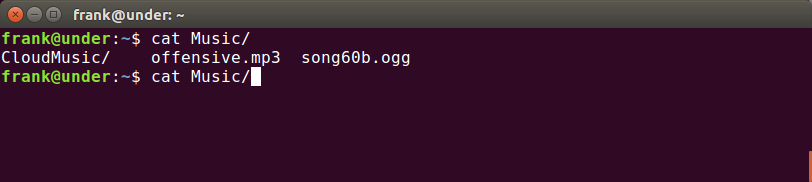
说明Music文件夹下有这三个文件,我也就不需要提前用ls命令来确定了。
但是最近我在查看当前shell(bash)的文件描述符时时却碰见一个“怪事”,当我用bash的自动补全功能查看时,显示为有0, 1, 2, 255, 3这五个文件:
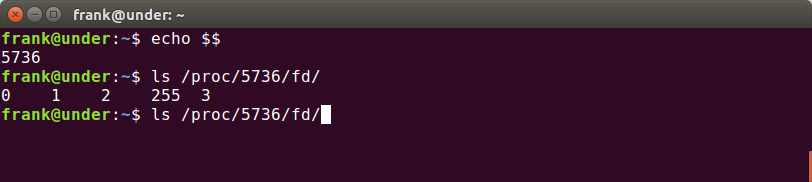
但是当我用ls命令来显示fd文件夹的时候,却只显示有0, 1, 2, 255这4个文件,3这个文件不存在:

这是为什么呢?
其实原因很简单,自动补全功能是bash内置的一个功能,而ls是系统上的一个程序,以子进程的形式独立于bash运行。所以如果bash这个自动补全功能打开了我们要补全的路径(文件夹也是文件),那么应该会获得文件描述符3,ls也是一样。但是5736这个PID是bash的,所以我们用ls的时候看不到3而用bash的自动补全功能看得到。
为了证实一下这个的想法,上网查了一下相关资料,了解到bash自动补全功能本身就是一个用shell语言写的脚本,其配置在/etc/bash_completion这个文件中,其中常用的内置命令是complete ,用法为complete -F _known_hosts xvncviewer ,即当开头的命令./程序是xvncviewer 的时候,如果用户在参数上连按Tab键就会调用_known_hosts这个shell内置函数 ,例如:
skx@lappy:~$ xvncviewer s[TAB]

savannah.gnu.org            ssh.tardis.ed.ac.uk

scratchy                    steve.org.uk

security.debian.org         security-master.debian.org

sun

skx@lappy:~$ xvncviewer sc[TAB]
我们进入/etc/bash_completion文件,查找刚刚使用的ls命令,看看它的自动补全是什么配置的:
complete -F _longopt a2ps awk base64 bash bc bison cat colordiff cp csplit \

    cut date df diff dir du enscript env expand fmt fold gperf \

    grep grub head indent irb ld ldd less ln ls m4 md5sum mkdir mkfifo mknod \

    mv netstat nl nm objcopy objdump od paste pr ptx readelf rm rmdir \

    sed seq sha{,1,224,256,384,512}sum shar sort split strip sum tac tail tee \

    texindex touch tr uname unexpand uniq units vdir wc who
可以看到,其调用的是_longopt这个内置函数,继续定位:
_longopt()

{

    local cur prev words cword split

    _init_completion -s || return

    case "${prev,,}" in

        --help|--usage|--version)

            return 0

            ;;

        --*dir*)

            _filedir -d

            return 0

            ;;

        --*file*|--*path*)

            _filedir

            return 0

            ;;

        --+([-a-z0-9_]))

            local argtype=$( $1 --help 2>&1 | sed -ne \

                "s|.*$prev\[\{0,1\}=[<[]\{0,1\}\([-A-Za-z0-9_]\{1,\}\).*|\1|p" )

            case ${argtype,,} in

                *dir*)

                    _filedir -d

                    return 0

                    ;;

#......省略
可以看到_longopt会调用_filedir这个函数:
_filedir()

{

    local i IFS=$'\n' xspec

    _tilde "$cur" || return 0

    local -a toks

    local quoted x tmp

    _quote_readline_by_ref "$cur" quoted

    x=$( compgen -d -- "$quoted" ) &&

    while read -r tmp; do

        toks+=( "$tmp" )

    done <<< "$x"

    if [[ "$1" != -d ]]; then

        # Munge xspec to contain uppercase version too

        # http://thread.gmane.org/gmane.comp.shells.bash.bugs/15294/focus=15306

        xspec=${1:+"!*.@($1|${1^^})"}

        x=$( compgen -f -X "$xspec" -- $quoted ) &&

        while read -r tmp; do

            toks+=( "$tmp" )

        done <<< "$x"

    fi

    # If the filter failed to produce anything, try without it if configured to

    [[ -n ${COMP_FILEDIR_FALLBACK:-} && \

        -n "$1" && "$1" != -d && ${#toks[@]} -lt 1 ]] && \

        x=$( compgen -f -- $quoted ) &&

#......省略
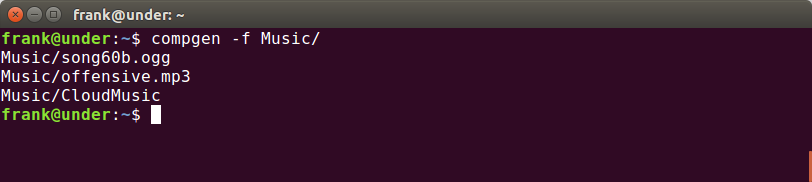
可以看到该函数使用了compgen这个内置命令来获取文件夹下的文件名(-f = "filename"),例如:
我们使用strace来追踪这个内置命令的系统调用,特别是返回文件描述符的系统调用open:
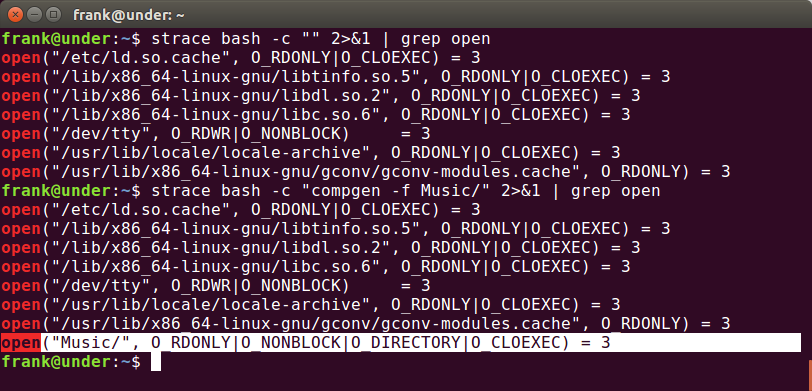
通过对比可以看到compgen调用open打开了这个文件夹,而且得到了文件描述符3(前面的open都调用了close删除了它们得到的文件描述符3)。
如果将compgen换成ls :
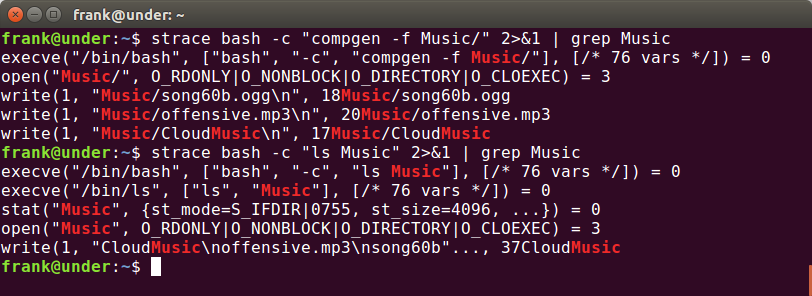
对比可以看出,compgen只有一个execve ,即compgen是在bash进程中执行的,但ls有两个,第二个说明了它是作为bash的子进程运行的, 证实了我们之前的想法。
如果感兴趣的话可以看看ls的源码,其中使用到了readdir opendir这两个库函数(GNU coreutils-8.29)
综上,我们可以用两个图来总结。
自动补全:
         Process: Bash

+-----------------------------+

|                             |

|  0,1,2,255       0,1,2,3,255|

|    Tab->compgen->open       |

|                             |

+-----------------------------+
ls 命令:
         Process: Bash

+-----------------------------+

|                             |

|  0,1,2,255                  |

|     ls                      |

|      +                      |

+-----------------------------+

       |

       |

       | Child Process: ls

+------+----------------------+

|                             |

|0,1,2         0,1,2,3        |

|  opendir->open              |

+-----------------------------+
另外,如果我们将操作应用于 /proc/self/文件夹也会得到一些有意思的结果:
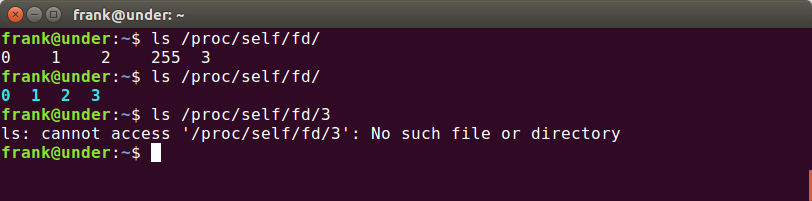
第一行我们已经讲明白了,但是第二行和第三行怎么解释呢?
在man 5 proc下对这个文件夹的解释是这样的:
/proc/self

              This  directory  refers  to  the  process  accessing  the  /proc

              filesystem, and is identical to the /proc directory named by the

              process ID of the same process.
也就是说, /proc/self/反应的是当前访问文件的进程的状态数据 ,所以我们用ls /proc/self/fd/实际上是ls /proc/${PID of ls}/fd/ ,而ls会打开这个文件夹(同时获得3这个文件描述符),所以就会看到0,1,2,3这个四个文件了。但如果我们直接ls /proc/self/fd/3 ,这个时候ls的进程还没有获得3这个描述符,就尝试去打开3这个不存在的文件,所以就报错了。在CentOS的文档中提到了这个文件夹的作用:
The /proc/self/ directory is a link to the currently running process. This allows a process to look at itself without having to know its process ID.
另外提一下bash进程中的255文件描述符,这个是bash独有的一个小“trick”,其对应的文件是一个终端设备:
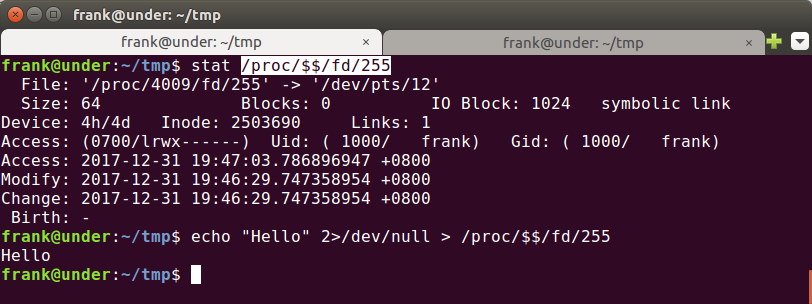
这次碰到的问题抽象点说就是获取信息的手段本身会影响信息,这样的问题在很多地方都有体现,简单的例如用ps aux | wc通过行数来获取进程数,但ps aux本身在运行的时候就会形成一个进程,以后需要注意;)
参考:
- An introduction to bash completion
- What is the use of file descriptor 255 in bash process
- Coreutils - GNU core utilities
随机推荐
- 【Java疑难杂症】有return的情况下try catch finally的执行顺序
有这样一个问题,异常处理大家应该都不陌生,类似如下代码: public class Test { public static void main(String[] args) { int d1 = 0 ...
- 安卓自定义控件(五)触控基础MotionEvent
之前去面试,人家说,我这个事件拦截机制写得太少了,还有一个MotionEvent没写,这个确实也很重要,后来我考虑了一下,决定将这篇文章放到自己定义控件里. 先简单再提一下事件分发,事件分发和拦截主要 ...
- C++ sqlite3解决中文排序问题
导言:sqlite3默认的编码方式为UTF8编码,而在UTF8编码下,中文不是按照拼音顺序编码的,所以想解决中文排序问题,必须自定义排序规则,将UTF8编码转换成GB2312编码(GB2312编码中文 ...
- C语言之循环计数
#include<stdio.h>int main(){int num,count=0,i=0;scanf("%d",&num);num/=10;count++ ...
- python并发编程之多线程二
一,开启线程的两种方式 方法一: from threading import Thread import random,time def eat(name): print('%s is eating. ...
- VS2015远程调试
原文链接 VS2015远程调试 在PayPal支付时,PayPal回调函数一直报错,本地没有外网IP,没有办法在本地调试,需要远程调试: 1.找到远程调试的文件夹: 找到对应的服务器的型号:64位 ...
- 项目实战8—tomcat企业级Web应用服务器配置与会话保持
tomcat企业级Web应用服务器配置与实战 环境背景:公司业务经过长期发展,有了很大突破,已经实现盈利,现公司要求加强技术架构应用功能和安全性以及开始向企业应用.移动APP等领域延伸,此时原来开发w ...
- docker、oci、runc以及kubernetes梳理
容器无疑是近年来云计算中最火热的关键词.随着docker的大热,docker.oci.runc.containerd等等名词也逐渐传播开来.这么多的名词,也容易让人混淆.本文对相关名词和其之间的联系进 ...
- constructor.prototype
一个很好玩的小问题考大家对js的理解function alert (){}; ________________ // 填空 alert(1); 使1弹出 http://perfectionkills ...
- linux 安装tensorflow(gpu版本)
一.安装cuda 具体安装过程见我的另一篇博客,ubuntu16.04下安装配置深度学习环境 二.安装tensorflow 1.具体安装过程官网其实写的比较详细,总结一下的话可以分为两种:安装rele ...