
ElasticSearch5在Ubuntu系统下的安装和Java调用
ElasticSearch是开源搜索平台的新成员,实时数据分析的神器。可以理解为作为搜索的数据库,可以提供搜索功能。对比关系型数据库,具有以下的相似关系:
| 关系型数据库 | 数据库 | 表 | 行 | 列 |
| ElasticSearch | 索引 | 类型 | 文档 | 字段 |
一个ES集群可以包含多个索引(数据库),每个索引又包含了很多类型(表),类型中包含了很多文档(行),每个文档又包含了很多字段(列)。
如果要实现对关系型数据库数据的搜索功能,需要将关系型数据库中的数据导入到ElasticSearch中,网上有解决方案。但是好像不支持最新的ElasticSearch5,可以使用我下面的Java代码实现数据的导入。
Ubuntu系统安装 Elasticsearch5
升级系统后安装 Oracle Java 7,既然 Elasticsearch 官方推荐使用 Oracle JDK 7 就不要尝试 JDK 8 和 OpenJDK 了:
1 $ sudo apt-get update
2 $ sudo apt-get upgrade
3
4 $ sudo apt-get install software-properties-common
5 $ sudo add-apt-repository ppa:webupd8team/java
6 $ sudo apt-get update
7
8 $ sudo apt-get install oracle-java7-installer
加入 Elasticsearch 官方源后安装 elasticsearch:
1 $ wget -O - http://packages.elasticsearch.org/GPG-KEY-elasticsearch | apt-key add -
2 $ sudo echo "deb http://packages.elasticsearch.org/elasticsearch/1.1/debian stable main" >> /etc/apt/sources.list
3
4 $ sudo apt-get update
5 $ sudo apt-get install elasticsearch
加入到系统启动文件并启动 elasticsearch 服务,用 curl 测试一下安装是否成功:
 1 $ sudo update-rc.d elasticsearch defaults 95 1
 2
 3 $ sudo /etc/init.d/elasticsearch start
 4
 5 $ curl -X GET 'http://localhost:9200'
 6 {
 7   "status" : 200,
 8   "name" : "Fer-de-Lance",
 9   "version" : {
10     "number" : "1.1.1",
11     "build_hash" : "f1585f096d3f3985e73456debdc1a0745f512bbc",
12     "build_timestamp" : "2014-04-16T14:27:12Z",
13     "build_snapshot" : false,
14     "lucene_version" : "4.7"
15   },
16   "tagline" : "You Know, for Search"
17 }
Elasticsearch 的集群和数据管理界面 Marvel 非常赞,可惜只对开发环境免费,安装很简单,完成后重启服务访问 http://192.168.2.172:9200/_plugin/marvel/ 就可以看到界面:
1 $ sudo /usr/share/elasticsearch/bin/plugin -i elasticsearch/marvel/latest
2
3 $ sudo /etc/init.d/elasticsearch restart
4  * Stopping Elasticsearch Server                                           [ OK ]
5  * Starting Elasticsearch Server                                           [ OK ]
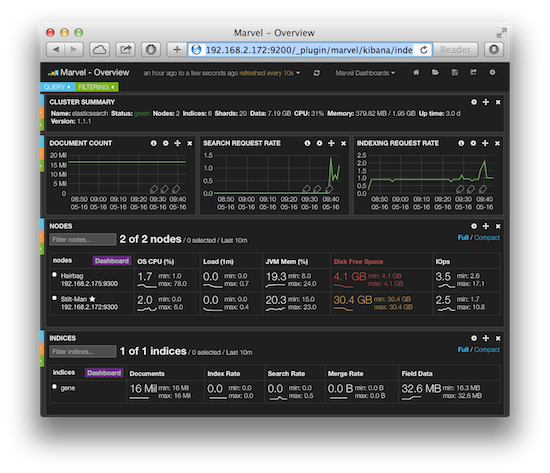
另外可以安装elasticsearch-head作为管理Elasticsearch的web前端插件。
安装教程:Elasticsearch5中安装Elasticsearch-head插件
ElasticSearch Java调用
命令调用的方式不再讲述了,网上很多。ElasticSearch最终是要在项目中使用的。官方的API文档:https://www.elastic.co/guide/en/elasticsearch/reference/current/index.html
自己写了助手类,方便大家调用。可以实现索引的增删改查,查询提供多种方法,包括or、and查询,多个关键词查询,关键词高亮等,适用于不同场合。
首先是引用需要的jar包。使用maven管理jar包,需要的jar包有:
 1         <dependency>
 2             <groupId>org.elasticsearch</groupId>
 3             <artifactId>elasticsearch</artifactId>
 4             <version>5.3.1</version>
 5         </dependency>
 6         <dependency>
 7             <groupId>org.elasticsearch.client</groupId>
 8             <artifactId>transport</artifactId>
 9             <version>5.3.1</version>
10         </dependency>
11         <dependency>
12             <groupId>org.apache.logging.log4j</groupId>
13             <artifactId>log4j-api</artifactId>
14             <version>2.7</version>
15         </dependency>
16         <dependency>
17             <groupId>org.apache.logging.log4j</groupId>
18             <artifactId>log4j-core</artifactId>
19             <version>2.7</version>
20         </dependency>
然后是ElasticSearch配置文件,存储集群名称、集群IP、索引名称。配置文件命名为:elasticsearch.properties
cluster_name=elasticsearch
cluster_serverip=127.0.0.1
indexname=blogsystem
还需要配置日志配置文件,命名为:log4j2.properties
appender.console.type = Console
appender.console.name = console
appender.console.layout.type = PatternLayout

rootLogger.level = info
rootLogger.appenderRef.console.ref = console
最后是java的实现ElasticSearch助手类。为了方便使用,助手类分为具体实现和调用两个类。
ElasticSearch具体实现类:ElasticSearchUtilsImp.java
 package com.blog.utils;

 import java.io.IOException;
 import java.io.InputStream;
 import java.lang.reflect.Method;
 import java.net.InetAddress;
 import java.net.UnknownHostException;
 import java.util.ArrayList;
 import java.util.HashMap;
 import java.util.List;
 import java.util.Map;
 import java.util.Properties;
 import java.util.concurrent.ExecutionException;

 import org.elasticsearch.action.delete.DeleteResponse;
 import org.elasticsearch.action.index.IndexResponse;
 import org.elasticsearch.action.search.SearchRequestBuilder;
 import org.elasticsearch.action.search.SearchResponse;
 import org.elasticsearch.action.update.UpdateRequest;
 import org.elasticsearch.client.transport.TransportClient;
 import org.elasticsearch.common.settings.Settings;
 import org.elasticsearch.common.text.Text;
 import org.elasticsearch.common.transport.InetSocketTransportAddress;
 import org.elasticsearch.common.xcontent.XContentBuilder;
 import org.elasticsearch.common.xcontent.XContentFactory;
 import org.elasticsearch.index.query.BoolQueryBuilder;
 import org.elasticsearch.index.query.QueryBuilder;
 import org.elasticsearch.index.query.QueryBuilders;
 import org.elasticsearch.rest.RestStatus;
 import org.elasticsearch.search.SearchHits;
 import org.elasticsearch.search.aggregations.AggregationBuilders;
 import org.elasticsearch.search.fetch.subphase.highlight.HighlightBuilder;
 import org.elasticsearch.search.fetch.subphase.highlight.HighlightField;
 import org.elasticsearch.transport.client.PreBuiltTransportClient;

 /**
  * @author:Tim
  * @date:2017年5月3日 下午8:24:22
  * @description:ElasticSearch助手类具体实现
  */
 public class ElasticSearchUtilsImp {

     private static String cluster_name = null;// 实例名称
     private static String cluster_serverip = null;// elasticSearch服务器ip
     private static String indexname = null;// 索引名称

     static {
         try {
             // 读取db.properties文件
             Properties props = new Properties();
             InputStream in = ElasticSearchUtilsImp.class.getResourceAsStream("/elasticsearch.properties");
             props.load(in);// 加载文件

             // 读取信息
             cluster_name = props.getProperty("cluster_name");
             cluster_serverip = props.getProperty("cluster_serverip");
             indexname = props.getProperty("indexname");
         } catch (IOException e) {
             e.printStackTrace();
             System.out.println("加载数据库配置文件出错!");
         }
     }

     /**
      * 返回一个到ElasticSearch的连接客户端
      *
      * @return
      */
     private static TransportClient getClient() {
         Settings settings = Settings.builder().put("cluster.name", cluster_name).build();// 设置集群名称
         @SuppressWarnings("unchecked")
         TransportClient client = new PreBuiltTransportClient(settings);// 创建client
         try {
             client.addTransportAddress(new InetSocketTransportAddress(InetAddress.getByName(cluster_serverip), 9300));// 增加地址和端口
         } catch (UnknownHostException e) {
             e.printStackTrace();
             System.out.println("ElasticSearch连接失败!");
         }

         return client;
     }

     /**
      * 将Map转换成builder
      *
      * @param mapParam
      * @return
      * @throws Exception
      */
     private static XContentBuilder createMapJson(Map<String, String> mapParam) throws Exception {
         XContentBuilder source = XContentFactory.jsonBuilder().startObject();

         for (Map.Entry<String, String> entry : mapParam.entrySet()) {
             source.field(entry.getKey(), entry.getValue());
         }

         source.endObject();

         return source;
     }

     /**
      * 将实体转换成json
      *
      * @param entity 实体
      * @param fieldNameParm 实体中待转换成json的字段
      * @return 返回json
      * @throws Exception
      */
     private static XContentBuilder createEntityJson(Object entity, String... methodNameParm) throws Exception {
         // 创建json对象, 其中一个创建json的方式
         XContentBuilder source = XContentFactory.jsonBuilder().startObject();

         try {
             for (String methodName : methodNameParm) {

                 if (!methodName.startsWith("get")) {
                     throw new Exception("不是有效的属性!");
                 }

                 Method method = entity.getClass().getMethod(methodName, null);
                 String fieldValue = (String) method.invoke(entity, null);
                 String fieldName = StringUtils.toLowerCaseFirstOne(methodName.replace("get", ""));// 去掉“get”,并将首字母小写

                 // 避免和elasticSearch中id字段重复
                 if (fieldName == "_id") {
                     fieldName = "id";
                 }

                 source.field(fieldName, fieldValue);
             }
         } catch (NoSuchMethodException e) {
             e.printStackTrace();
             System.out.println("未找到方法!");
         }

         source.endObject();

         return source;
     }

     /**
      * 将一个Map格式的数据(key,value)插入索引 (私有方法)
      *
      * @param type 类型(对应数据库表)
      * @param docId id,对应elasticSearch中的_id字段
      * @param mapParam Map格式的数据
      * @return
      */
     public static boolean addMapDocToIndex(String type, String docId, Map<String, String> mapParam) {
         boolean result = false;

         TransportClient client = getClient();
         XContentBuilder source = null;
         try {
             source = createMapJson(mapParam);
         } catch (Exception e) {
             e.printStackTrace();
         }

         // 存json入索引中
         IndexResponse response = null;
         if (docId == null) {
             // 使用默认的id
             response = client.prepareIndex(indexname, type).setSource(source).get();
         } else {
             response = client.prepareIndex(indexname, type, docId).setSource(source).get();
         }

         // 插入结果获取
         String index = response.getIndex();
         String gettype = response.getType();
         String id = response.getId();
         long version = response.getVersion();
         RestStatus status = response.status();

         String strResult = "新增文档成功:" + index + " : " + gettype + ": " + id + ": " + version + ": " + status.getStatus();
         System.out.println(strResult);

         if (status.getStatus() == 201) {
             result = true;
         }

         // 关闭client
         client.close();

         return result;
     }

     /**
      * 将一个实体存入到默认索引的类型中(指定_id,一般是业务数据的id,及elasticSearch和关系型数据使用同一个id,方便同关系型数据库互动)
      * (私有方法)
      *
      * @param type 类型(对应数据库表)
      * @param docId id,对应elasticSearch中的_id字段
      * @param entity 要插入的实体
      * @param methodNameParm 需要将实体中哪些属性作为字段
      * @return
      */
     public static boolean addEntityDoc(String type, String docId, Object entity, String... methodNameParm) {
         boolean result = false;

         TransportClient client = getClient();
         XContentBuilder source = null;
         try {
             source = createEntityJson(entity, methodNameParm);
         } catch (Exception e) {
             e.printStackTrace();
         }

         // 存json入索引中
         IndexResponse response = null;
         if (docId == null) {
             // 使用默认的id
             response = client.prepareIndex(indexname, type).setSource(source).get();
         } else {
             response = client.prepareIndex(indexname, type, docId).setSource(source).get();
         }

         // 插入结果获取
         String index = response.getIndex();
         String gettype = response.getType();
         String id = response.getId();
         long version = response.getVersion();
         RestStatus status = response.status();

         String strResult = "新增文档成功:" + index + " : " + gettype + ": " + id + ": " + version + ": " + status.getStatus();
         System.out.println(strResult);

         if (status.getStatus() == 201) {
             result = true;
         }

         // 关闭client
         client.close();

         return result;
     }

     /**
      * 删除文档
      *
      * @param type 类型(对应数据库表)
      * @param docId 类型中id
      * @return
      */
     public static boolean deleteDoc(String type, String docId) {
         boolean result = false;

         TransportClient client = getClient();
         DeleteResponse deleteresponse = client.prepareDelete(indexname, type, docId).get();

         System.out.println("删除结果:" + deleteresponse.getResult().toString());
         if (deleteresponse.getResult().toString() == "DELETED") {
             result = true;
         }

         // 关闭client
         client.close();

         return result;
     }

     /**
      * 修改文档
      *
      * @param type 类型
      * @param docId 文档id
      * @param updateParam 需要修改的字段和值
      * @return
      */
     public static boolean updateDoc(String type, String docId, Map<String, String> updateParam) {
         String strResult = "";
         boolean result = false;

         TransportClient client = getClient();

         UpdateRequest updateRequest = new UpdateRequest();
         updateRequest.index(indexname);
         updateRequest.type(type);
         updateRequest.id(docId);
         try {
             updateRequest.doc(createMapJson(updateParam));
         } catch (Exception e) {
             e.printStackTrace();
         }
         try {
             strResult = client.update(updateRequest).get().getResult().toString();
         } catch (InterruptedException e) {
             e.printStackTrace();
         } catch (ExecutionException e) {
             e.printStackTrace();
         }
         System.out.println(strResult);

         if (strResult == "UPDATED") {
             result = true;
         }

         return result;
     }

     /**
      * TODO or查询命中条数
      * @param type 类型
      * @param shouldMap 查询条件
      * @return
      */
     public static int multiOrSearchDocCount(String type, Map<String, String> shouldMap) {
         TransportClient client = getClient();

         return 0;
     }

     /**
      * 高亮搜索
      *
      * @param type 类型
      * @param fieldName 段
      * @param keyword 关键词
      * @param from 开始行数
      * @param size 每页大小
      * @return
      */
     public static Map<String, Object> searchDocHighlight(String type, String fieldName, String keyword, int from,
             int size) {
         TransportClient client = getClient();

         // 高亮
         HighlightBuilder hiBuilder = new HighlightBuilder();
         hiBuilder.preTags("<span style=\"color:red\">");
         hiBuilder.postTags("</span>");
         hiBuilder.field(fieldName);

         QueryBuilder queryBuilder = QueryBuilders.matchPhraseQuery(fieldName, keyword);

         SearchRequestBuilder responsebuilder = client.prepareSearch(indexname).setTypes(type);
         responsebuilder.setQuery(queryBuilder);
         responsebuilder.highlighter(hiBuilder);
         responsebuilder.setFrom(from);
         responsebuilder.setSize(size);
         responsebuilder.setExplain(true);

         SearchResponse myresponse = responsebuilder.execute().actionGet();
         SearchHits searchHits = myresponse.getHits();

         // 总命中数
         long total = searchHits.getTotalHits();
         Map<String, Object> map = new HashMap<String, Object>();
         map.put("total", total);
         List<Map<String, Object>> list = new ArrayList<Map<String, Object>>();
         for (int i = 0; i < searchHits.getHits().length; i++) {
             Map<String, HighlightField> highlightFields = searchHits.getHits()[i].getHighlightFields();

             // 段高亮
             HighlightField titleField = highlightFields.get(fieldName);
             Map<String, Object> source = searchHits.getHits()[i].getSource();
             if (titleField != null) {
                 Text[] fragments = titleField.fragments();
                 String name = "";
                 for (Text text : fragments) {
                     name += text;
                 }
                 source.put(fieldName, name);
             }

             list.add(source);
         }
         map.put("rows", list);

         return map;
     }

     /**
      * or条件查询高亮
      *
      * @param type 类型
      * @param shouldMap or条件和值
      * @param from 开始行数
      * @param size 每页大小
      * @return
      */
     public static Map<String, Object> multiOrSearchDocHigh(String type, Map<String, String> shouldMap, int from,
             int size) {
         TransportClient client = getClient();

         SearchRequestBuilder responsebuilder = client.prepareSearch(indexname).setTypes(type);
         responsebuilder.setFrom(from);
         responsebuilder.setSize(size);
         responsebuilder.setExplain(true);

         // 高亮
         HighlightBuilder hiBuilder = new HighlightBuilder();
         hiBuilder.preTags("<span style=\"color:red\">");
         hiBuilder.postTags("</span>");

         // 高亮每个字段
         for (String key : shouldMap.keySet()) {
             hiBuilder.field(key);
         }

         responsebuilder.highlighter(hiBuilder);

         if (null != shouldMap && shouldMap.size() > 0) {
             // 创建一个查询
             BoolQueryBuilder queryBuilder = QueryBuilders.boolQuery();

             // 这里查询的条件用map传递
             for (String key : shouldMap.keySet()) {
                 queryBuilder.should(QueryBuilders.matchPhraseQuery(key, shouldMap.get(key)));// or连接条件
             }
             // 查询
             responsebuilder.setQuery(queryBuilder);
         }

         SearchResponse myresponse = responsebuilder.execute().actionGet();
         SearchHits searchHits = myresponse.getHits();

         // 总命中数
         long total = searchHits.getTotalHits();
         Map<String, Object> map = new HashMap<String, Object>();
         map.put("total", total);
         List<Map<String, Object>> list = new ArrayList<Map<String, Object>>();
         for (int i = 0; i < searchHits.getHits().length; i++) {
             Map<String, HighlightField> highlightFields = searchHits.getHits()[i].getHighlightFields();
             Map<String, Object> source = searchHits.getHits()[i].getSource();

             for (String key : shouldMap.keySet()) {
                 // 各个段进行高亮
                 HighlightField titleField = highlightFields.get(key);
                 if (titleField != null) {
                     Text[] fragments = titleField.fragments();
                     String name = "";
                     for (Text text : fragments) {
                         name += text;
                     }
                     source.put(key, name);
                 }
             }

             list.add(source);
         }
         map.put("rows", list);

         return map;
     }

     /**
      * 搜索
      *
      * @param type 类型
      * @param fieldName 待搜索的字段
      * @param keyword 待搜索的关键词
      * @param from 开始行数
      * @param size 每页大小
      * @return
      */
     public static Map<String, Object> searchDoc(String type, String fieldName, String keyword, int from, int size) {
         List<String> hitResult = new ArrayList<String>();

         TransportClient client = getClient();

         QueryBuilder queryBuilder = QueryBuilders.matchPhraseQuery(fieldName, keyword);

         SearchRequestBuilder responsebuilder = client.prepareSearch(indexname).setTypes(type);
         responsebuilder.setQuery(queryBuilder);
         responsebuilder.setFrom(from);
         responsebuilder.setSize(size);
         responsebuilder.setExplain(true);

         SearchResponse myresponse = responsebuilder.execute().actionGet();
         SearchHits hits = myresponse.getHits();
         for (int i = 0; i < hits.getHits().length; i++) {
             hitResult.add(hits.getHits()[i].getSourceAsString());
         }

         // 将命中结果转换成Map输出
         Map<String, Object> modelMap = new HashMap<String, Object>(2);
         modelMap.put("total", hitResult.size());
         modelMap.put("rows", hitResult);

         return modelMap;
     }

     /**
      * 多个条件进行or查询
      *
      * @param type 类型
      * @param shouldMap 进行or查询的段和值
      * @param from 开始行数
      * @param size 每页大小
      * @return
      */
     public static Map<String, Object> multiOrSearchDoc(String type, Map<String, String> shouldMap, int from, int size) {
         List<String> hitResult = new ArrayList<String>();

         TransportClient client = getClient();

         SearchRequestBuilder responsebuilder = client.prepareSearch(indexname).setTypes(type);
         responsebuilder.setFrom(from);
         responsebuilder.setSize(size);
         responsebuilder.setExplain(true);

         if (null != shouldMap && shouldMap.size() > 0) {
             // 创建一个查询
             BoolQueryBuilder queryBuilder = QueryBuilders.boolQuery();

             // 这里查询的条件用map传递
             for (String key : shouldMap.keySet()) {
                 queryBuilder.should(QueryBuilders.matchPhraseQuery(key, shouldMap.get(key)));// or连接条件
             }
             // 查询
             responsebuilder.setQuery(queryBuilder);
         }

         SearchResponse myresponse = responsebuilder.execute().actionGet();
         SearchHits hits = myresponse.getHits();
         for (int i = 0; i < hits.getHits().length; i++) {
             hitResult.add(hits.getHits()[i].getSourceAsString());
         }

         // 将命中结果转换成Map输出
         Map<String, Object> modelMap = new HashMap<String, Object>(2);
         modelMap.put("total", hitResult.size());
         modelMap.put("rows", hitResult);

         return modelMap;
     }

     /**
      * 多个条件进行and查询
      *
      * @param type 类型
      * @param mustMap 进行and查询的段和值
      * @param from 开始行数
      * @param size 每页大小
      * @return
      */
     public static Map<String, Object> multiAndSearchDoc(String type, Map<String, String> mustMap, int from, int size) {
         List<String> hitResult = new ArrayList<String>();

         TransportClient client = getClient();

         SearchRequestBuilder responsebuilder = client.prepareSearch(indexname).setTypes(type);
         responsebuilder.setFrom(from);
         responsebuilder.setSize(size);
         responsebuilder.setExplain(true);

         if (null != mustMap && mustMap.size() > 0) {
             // 创建一个查询
             BoolQueryBuilder queryBuilder = QueryBuilders.boolQuery();

             // 这里查询的条件用map传递
             for (String key : mustMap.keySet()) {
                 queryBuilder.must(QueryBuilders.matchPhraseQuery(key, mustMap.get(key)));// and查询
             }
             // 查询
             responsebuilder.setQuery(queryBuilder);
         }

         SearchResponse myresponse = responsebuilder.execute().actionGet();
         SearchHits hits = myresponse.getHits();
         for (int i = 0; i < hits.getHits().length; i++) {
             hitResult.add(hits.getHits()[i].getSourceAsString());
         }

         // 将命中结果转换成Map输出
         Map<String, Object> modelMap = new HashMap<String, Object>(2);
         modelMap.put("total", hitResult.size());
         modelMap.put("rows", hitResult);

         return modelMap;
     }
 }
ElasticSearchUtilsImp.java
ElasticSearch调用类,是对实现类的各种组合,供外部调用。调用类名称:ElasticSearchUtils.java
  1 package com.blog.utils;
  2
  3 import java.util.Map;
  4
  5 /**
  6  * @author:Tim
  7  * @date:2017年5月3日 下午8:24:22
  8  * @description:ElasticSearch助手类
  9  */
 10 public class ElasticSearchUtils {
 11
 12     /**
 13      * 将一个Map格式的数据(key,value)插入索引(指定_id,一般是业务数据的id,及elasticSearch和关系型数据使用同一个id,方便同关系型数据库互动)
 14      *
 15      * @param type 类型(对应数据库表)
 16      * @param docId id,对应elasticSearch中的_id字段
 17      * @param mapParam Map格式的数据
 18      * @return
 19      */
 20     public static boolean addDoc(String type, String docId, Map<String, String> mapParam) {
 21         return ElasticSearchUtilsImp.addMapDocToIndex(type, docId, mapParam);
 22     }
 23
 24     /**
 25      * 将一个Map格式的数据(key,value)插入索引 (使用默认_id)
 26      *
 27      * @param type 类型(对应数据库表)
 28      * @param mapParam Map格式的数据
 29      * @return
 30      */
 31     public static boolean addDoc(String type, Map<String, String> mapParam) {
 32         return ElasticSearchUtilsImp.addMapDocToIndex(type, null, mapParam);
 33     }
 34
 35     /**
 36      * 将一个实体存入到默认索引的类型中(默认_id)
 37      *
 38      * @param type 类型(对应数据库表)
 39      * @param entity 要插入的实体
 40      * @param methodNameParm 需要将实体中哪些属性作为字段
 41      * @return
 42      */
 43     public static boolean addDoc(String type, Object entity, String... methodNameParm) {
 44         return ElasticSearchUtilsImp.addEntityDoc(type, null, entity, methodNameParm);
 45     }
 46
 47     /**
 48      * 将一个实体存入到默认索引的类型中(指定_id,一般是业务数据的id,及elasticSearch和关系型数据使用同一个id,方便同关系型数据库互动)
 49      *
 50      * @param type 类型(对应数据库表)
 51      * @param docId id,对应elasticSearch中的_id字段
 52      * @param entity 要插入的实体
 53      * @param methodNameParm 需要将实体中哪些属性作为字段
 54      * @return
 55      */
 56     public static boolean addDoc(String type, String docId, Object entity, String... methodNameParm) {
 57         return ElasticSearchUtilsImp.addEntityDoc(type, docId, entity, methodNameParm);
 58     }
 59
 60     /**
 61      * 删除文档
 62      *
 63      * @param type 类型(对应数据库表)
 64      * @param docId 类型中id
 65      * @return
 66      */
 67     public static boolean deleteDoc(String type, String docId) {
 68         return ElasticSearchUtilsImp.deleteDoc(type, docId);
 69     }
 70
 71     /**
 72      * 修改文档
 73      *
 74      * @param type 类型
 75      * @param docId 文档id
 76      * @param updateParam 需要修改的字段和值
 77      * @return
 78      */
 79     public static boolean updateDoc(String type, String docId, Map<String, String> updateParam) {
 80         return ElasticSearchUtilsImp.updateDoc(type, docId, updateParam);
 81     }
 82
 83     // --------------------以下是各种搜索方法--------------------------
 84
 85     /**
 86      * 高亮搜索
 87      *
 88      * @param type 类型
 89      * @param fieldName 段
 90      * @param keyword 段值
 91      * @return
 92      */
 93     public static Map<String, Object> searchDocHighlight(String type, String fieldName, String keyword) {
 94         return ElasticSearchUtilsImp.searchDocHighlight(type, fieldName, keyword, 0, 10);
 95     }
 96
 97     /**
 98      * 高亮搜索
 99      *
100      * @param type 类型
101      * @param fieldName 段
102      * @param keyword 关键词
103      * @param from 开始行数
104      * @param size 每页大小
105      * @return
106      */
107     public static Map<String, Object> searchDocHighlight(String type, String fieldName, String keyword, int from,
108             int size) {
109         return ElasticSearchUtilsImp.searchDocHighlight(type, fieldName, keyword, from, size);
110     }
111
112     /**
113      * or条件查询高亮
114      *
115      * @param type 类型
116      * @param shouldMap or条件和值
117      * @return
118      */
119     public static Map<String, Object> multiOrSearchDocHigh(String type, Map<String, String> shouldMap, int from,
120             int size) {
121         return ElasticSearchUtilsImp.multiOrSearchDocHigh(type, shouldMap, from, size);
122     }
123
124     /**
125      * 搜索
126      *
127      * @param type 类型
128      * @param fieldName 待搜索的字段
129      * @param keyword 待搜索的关键词
130      */
131     public static Map<String, Object> searchDoc(String type, String fieldName, String keyword) {
132         return ElasticSearchUtilsImp.searchDoc(type, fieldName, keyword, 0, 10);
133     }
134
135     /**
136      * 多个条件进行or查询
137      *
138      * @param type 类型
139      * @param shouldMap 进行or查询的段和值
140      * @return
141      */
142     public static Map<String, Object> multiOrSearchDoc(String type, Map<String, String> shouldMap) {
143         return ElasticSearchUtilsImp.multiOrSearchDoc(type, shouldMap, 0, 10);
144     }
145
146     /**
147      * 多个条件进行and查询
148      *
149      * @param type 类型
150      * @param mustMap 进行and查询的段和值
151      * @return
152      */
153     public static Map<String, Object> multiAndSearchDoc(String type, Map<String, String> mustMap) {
154         return ElasticSearchUtilsImp.multiAndSearchDoc(type, mustMap, 0, 10);
155     }
156 }
会使用到的其他助手类:StringUtils.java
具体的使用在我的另一个项目中有使用实例,该项目使用这个助手类实现了索引的各种操作,以及搜索展现功能。项目位置:https://github.com/yangtzeyufei/EasyBlog
ElasticSearch5在Ubuntu系统下的安装和Java调用的更多相关文章
- Ubuntu系统下环境安装遇到依赖冲突问题
问题场景:在ubuntu系统下使用docker拉了一个python3.6的镜像,要在该容器中安装vim结果总是报已安装某些依赖的版本不满足要求 解决方法: 1.安装aptitude apt-get i ...
- 虚拟机Ubuntu系统下kaldi安装与编译简介
kaldi官网:http://www.kaldi-asr.org/doc/index.html 在http://github.com/kaldi-asr/kaldi中直接下载kaldi的zip包,没有 ...
- Ubuntu 系统下如何安装pip3工具
一.[导读]Ubuntu 系统内置了 Python2 和 Python3 两个版本的开发环境,却没有内置相应的 pip3 管理工具,本文将介绍如何在Ubuntu下如何快速安装 pip3 工具,并升级到 ...
- ubuntu系统下手动安装autoconf安装包
首先简单介绍一下autoconf.Autoconf是一个可以适应多种unix类系统的shell脚本的工具. 我在往虚拟机中安装应用时,需要用到该工具,于是想下载一个.但是由于系统内核版本低,已不能用a ...
- Ubuntu 系统下 mongodb 安装和配置
安装 MongoDB sudo apt-get install mongodb sudo apt-get install mongodb 关闭/启动 sudo service mongodb stop ...
- ubuntu系统下怎么安装gcc编译器
你安装一个名字叫做build-essential的软件包,就可以一次将编译器.make工具.所有的编程头文件.函数库等东东全部安装上,其中也包括gcc编译器,这是非常稳妥的安装方式,安装命令是用roo ...
- Ubuntu系统下,pip3安装python3的pymysql包 报错的问题
sudo pip3 --version 查看pip3的版本 sudo pip3 install --upgrade pip 更新pip3 sudo pip3 list 查看安装的包列表 如上图, p ...
- Python 基础之在ubuntu系统下安装双版本python
前言:随着python升级更新,新版本较于老版本功能点也有不同地方,作为一个初学者应该了解旧版本的规则,也要继续学习新版本的知识.为了能更好去学习python,我在ubuntu安装python2和py ...
- Tex_安装_在Ubuntu系统下
$\LaTeX$是一个强大的排版软件,在数学公式.表格.甚至是科学绘图方面有着独特优势.本文在Ubuntu系统下,整理Tex安装相关的操作,以为备忘.所引链接都未同作者商量,如有不妥望及时告知. 命令 ...
随机推荐
- 分享几个不错的Android开源音视频播放器
整理了一下Github上几个开源的音视频播放器项目,有兴趣的同学可以clone代码去研究学习. UniversalMusicPlayer https://github.com/googlesamp ...
- Windows 10 IoT Serials 7 – 如何用树莓派制作家庭流媒体播放器
Windows 10平台引入了AllJoyn开源软件框架,它提供了一组服务可以创建动态近端网络,让设备可以相互连接实现功能交互.目前,AllJoyn开源软件框架由AllSeen联盟负责管理.AllSe ...
- MySql Table错误:is marked as crashed and last (automatic?) 和 Error: Table "mysql"."innodb_table_stats" not found
一.mysql 执行select 的时候报Table错误:is marked as crashed and last (automatic?) 解决方法如下: 找到mysql的安装目录的bin/myi ...
- Oracle子查询中any、some、all之间的区别
用some,any和all对子查询中返回的多行结果进行处理. 下面我们来简单介一下这几个关键词的含义. * Some在此表示满足其中一个的意义,是用or串起来的比较从句. * Any也表示满足其中一个 ...
- C++ 网络爬虫实现
最近有个概念吵得很火,网络爬虫,但是基本都是用什么python或者JAVA写,貌似很少看到用c++写的,我在网上找了一个,看到其实还是很简单的算法 算法讲解:1.遍历资源网站 2.获取html信息 ...
- iOS 开发遇到 调不起相机问题
在iOS 开发中 使用html 中的input 标签调起工程里面的相机,手机无反应 1.先看看info.plist 加没加相机的权限,添加Privacy - Camera Usage Descript ...
- codeforces 372E. Drawing Circles is Fun
tags:[圆の反演][乘法原理][尺取法]题解:圆の反演:将过O点的圆,映射成不过O的直线,相切的圆反演出来的直线平行.我们将集合S中的点做反演变换:(x,y)->(x/(x^2+y^2), ...
- 判断是否是IE(包含IE11)
判断是否是IE(包含IE11) if(!!window["ActiveXObject"] || "ActiveXObject" in window) { ale ...
- js在(FF)中长字段溢出(自动换行)
function toBreakWord(el,intLen){ var obj=document.getElementByIdx_x(el); var strContent=obj.i ...
- 原型prototype、原型链__proto__、构造器constructor
创建函数时,会有原型prototype,有原型链__proto__,有constructor.(构造函数除外,没有原型) . prototype原型:是对象的一个属性(也是对象),使你有能力向对象添加 ...