
ES6-10笔记(二)
class类
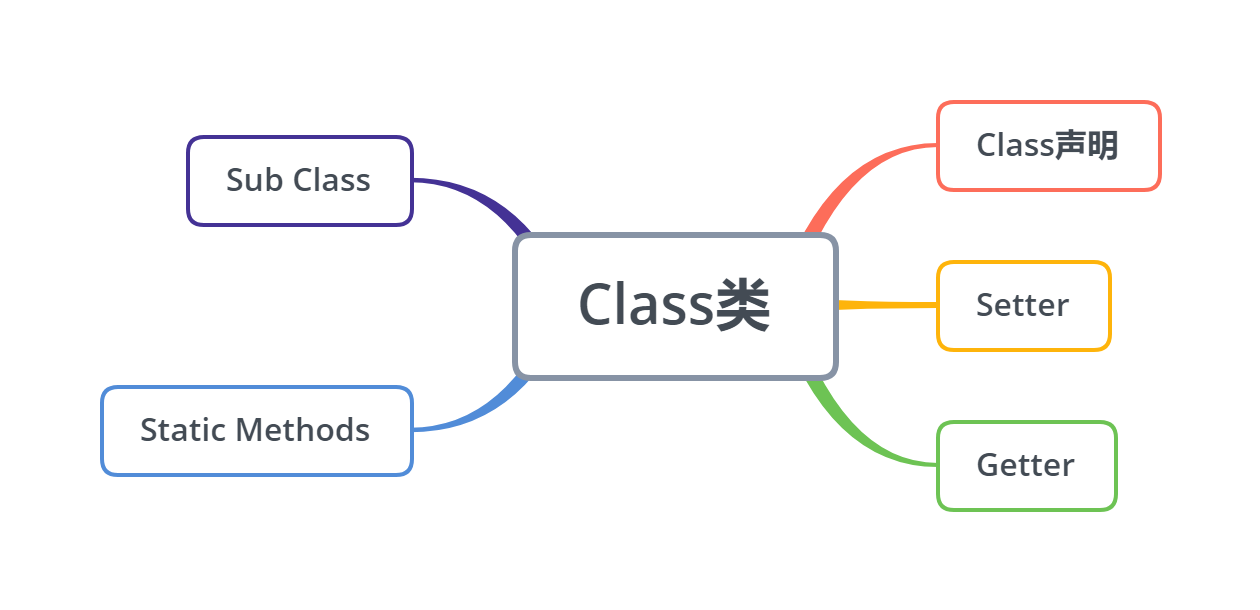
Javascript是一种基于对象(object-based)的语言,你遇到的所有东西几乎都是对象。但是,它又不是一种真正的面向对象编程(OOP)语言,因为它的语法中没有class(类)。摘自阮一峰老师语录
class声明
ES5的JavaScript中只有对象,想要模拟类去生成一个对象实例,只能通过定义一个构造函数,然后通过new操作符来完成。
let Animal = function (type) {

  this.type = type

}

Animal.prototype.walk = function () {

  console.log(`I am walking`)

}

let dog = new Animal('dog')

let monkey = new Animal('monkey')

//构造函数生成实例的执行过程

1.当使用了构造函数,并且new 构造函数(),后台会隐式执行new Object()创建对象;

2.将构造函数的作用域给新对象,(即new Object()创建出的对象),而函数体内的this就代表new Object()出来的对象。

3.执行构造函数的代码。

4.返回新对象(后台直接返回);
ES6引入了Class(类)这个概念,通过class关键字可以定义一个类
class Animal {

  constructor (type) {

    this.type = type

  }

  walk () {

    console.log(`I am walking`)

  }

}

let dog = new Animal('dog')

let monkey = new Animal('monkey')
但是Class的类型还是function,并且console.log(Animal.prototype);结果几乎是一样的,所以可以认为class声明类的方式是function声明类方式的语法糖。甚至在class声明类后仍可使用ES5的方式来为这个类添加,覆盖方法。
console.log(typeof Animal); //function

ES5中打印的console.log(Animal.prototype)

//{eat: ƒ, constructor: ƒ}

//eat: ƒ ()

//constructor: ƒ (type)

//__proto__: Object

ES6中打印的console.log(Animal.prototype)

//{constructor: ƒ, eat: ƒ}

//constructor: class Animal

//eat: ƒ eat()

//__proto__: Object

除了constructor后边分别是f(type)和class Animal
class不存在变量提升,所以需要先定义再使用。因为ES6不会把类的声明提升到代码头部,但是ES5就不一样,ES5存在变量提升,可以先使用,然后再定义。
//ES5可以先使用再定义,存在变量提升

new A();

function A(){

}

//ES6不能先使用再定义,不存在变量提升 会报错

new B();//B is not defined

class B{

}
Setters&Getters
类中的属性,可以直接在constructor中通过this直接定义,还可以通过get/set直接在类的顶层定义
class Animal {

  constructor (type, age) {

    this.type = type

    this._age = age

  }

  get age () {

    return this._age

  }

  set age (val) {

    this._age = val

  }

}
get可以定义一个只读属性
class Animal {

  constructor (type) {

    this.type = type

  }

  get addr () {

    return '北京动物园'

  }

}
get/set可以进行一些简单封装,如下
class CustomHTMLElement {

  constructor (element) {

    this.element = element

  }

  get html () {

    return this.element.innerHTML

  }

  set html (value) {

    this.element.innerHTML = value

  }

}
get/set还可以模拟设置私有属性,并可以通过get和set对获取属性和读取属性进行一些逻辑判断
let _age = 4

class Animal{

	constructor(type) {

	    this.type = type

	}

	get age() {

		if(this.type == 'dog'){

				return _age

		}else{

			return "I don't know"

		}

	}

	set age(val){

		if(val<7&&val>4){

			_age = val

		}

	}

	eat () {

		console.log('i am eat food')

	}

}

let dog = new Animal('dog')

let cat = new Animal('cat')

console.log(dog.age)//4

console.log(cat.age)//I don't know  在get age中只有dog能拿到_age

dog.age = 6

console.log(dog.age)//6

dog.age = 8

console.log(dog.age)//6  在set age中传入参数必须小于7大于4才能生效
继承
ES5中继承的实现
// 定义父类

let Animal = function (type) {

  this.type = type

}

// 定义方法

Animal.prototype.walk = function () {

  console.log(`I am walking`)

}

// 定义静态方法

Animal.eat = function (food) {

  console.log(`I am eating`)

}

// 定义子类

let Dog = function () {

  // 初始化父类

  Animal.call(this, 'dog')

  this.run = function () {

    console.log('I can run')

  }

}

// 继承

Dog.prototype = Animal.prototype
ES6中通过extends关键字实现继承。
子类必须在constructor方法中调用super方法,之后才能使用this关键字,否则新建实例时会报错。这是因为子类没有自己的this对象,而是继承父类的this对象。如果不调用super方法,子类就得不到this对象。在这一点上ES5的继承与ES6正好相反,ES5先创建自己的this对象然后再将父类的属性方法添加到自己的this当中。
如果子类没有显式的定义constructor,那么下面的代码将被默认添加(不信可以尝试下,哈)。换言之,如果constructor函数中只有super的话,该constructor函数可以省略。
class Animal {

  constructor (type) {

    this.type = type

  }

  walk () {

    console.log(`I am walking`)

  }

  static eat () {

    console.log(`I am eating`)

  }

}

class Dog extends Animal {

  constructor () {

    super('dog')

  }

  run () {

    console.log('I can run')

  }

}
静态方法 static Methods&静态属性
静态方法是面向对象最常用的功能,在ES5中利用function实现的类是这样实现一个静态方法的
let Animal = function (type) {

  this.type = type

  this.walk = function () {

    console.log(`I am walking`)

  }

}

Animal.eat = function (food) {

  console.log(`I am eating`);

}
在ES6中使用static的比纳基是不是静态方法
class Animal {

  constructor (type) {

    this.type = type

  }

  walk () {

    console.log(`I am walking`)

  }

  static eat () {

    console.log(`I am eating`)

  }

}
静态方法不需要实例化可以直接通过类调用
class Animal{

    static a(){

        return "我是Animal类中的,实例方法,无须实例化,可以直接调用"

    }

}

//通过类名直接调用

console.log(Animal.a());//我是Animal类中的,实例方法,无须实例化,可直接调用!
静态方法只能在静态方法中调用,不能在实例方法中调用
class Animal{

    static a(){

        return "我只允许被静态方法调用哦!"

    }

    static b(){

        //通过静态方法b来调用静态方法a

        console.log(this.a());

    }

}

Animal.b();//输出:我只允许被静态方法调用
通过实例方法来调用静态方法会报错
class Animal{

    static a(){

        return "我只允许被静态方法调用哦!"

    }

    b(){

        console.log(this.a());//TypeError: this.a is not a function

    }

}

var obj=new Animal();

obj.b();

//其他地方想要调用静态方法可借助类来调用,如使用Animal.b()

class Animal{

    static a(){

        return "我只允许被静态方法调用哦!"

    }

    static b(){

        //通过静态方法b来调用静态方法a

        console.log(this.a());

    }

    c(){

    	console.log(Animal.b())

    }

}

Animal.b();//输出:我只允许被静态方法调用

let dog = new Animal()

Animal.c()////输出:我只允许被静态方法调用
父类的静态方法,可以被子类继承
class Animal {

    static a() {//父类Animal的静态方法

        return '我是父类的静态方法a';

    }

}

class Dog extends Animal {}

//子类Dog可以直接调用父类的静态方法a

console.log(Dog.a());
想通过子类的静态方法调用父类的静态方法,需要从super对象上调用
class Animal {

    static a() {

        return '我是通过super来调取出来的';

    }

}

class Dog extends Animal {

    static a(){

        return super.a();

    }

}

console.log(Dog.a()); //我是通过super来调取出来的
静态属性指的是 Class 本身的属性, 即Class.propname, 而不是定义在实例对象( this) 上的属性。
class Animal{

   constructor(){

       this.name="实例属性"

   }

}

Animal.prop1="静态属性1";

Animal.prop2="静态属性2";

console.log(Animal.prop1,Animal.prop2);//静态属性1  静态属性2
类的应用场景
前端各种框架起飞,基本不需要去使用类来实现或者完善前端页面功能,在服务端写node.js的话可能会经常使用类语法。
下方代码是用类实现在同一个页面设置多个分页列表。(这个功能多数UI框架也解决了。。。)
class PageUtil{

	constructor(pageNo,pageSize,total){    //构造初始变量

		this.pageNo = pageNo;     //起始页面

		this.pageSize = pageSize  //一页数据条数

		this.total = total        //数据总数

		this.currentPage = 0      //当前选中页数

		this.pageTotal = Math.ceil(this.total/this.pageSize)   //总页数

	}

	nextPage(){     //下一页

		if(this.currentPage < this.pageTotal){

			this.currentPage++

		}

	}

	beforePage(){    //上一页

		if(this.currentPage > 1){

			this.currentPage--

		}

	}

	jumpPage(page){     //跳页

		this.currentPage = page

	}

	changePageSize(pageSize){    //改变页大小

		this.pageSize = pageSize

		this.pageTotal = Math.ceil(this.total/this.pageSize)   //总页数

	}

	getTotalPage(){    //获取总页数

		return Math.ceil(this.total/this.pageSize)

	}

}

class DialogPage extends PageUtil{    //继承PageUtil类

	constructor(pageNo,pageSize,total,pageTotal){

		super(pageNo,pageSize,total)

		this.pageTotal = pageTotal

	}

	getTotalPage(){

		return this.pageTotal || super.getTotalPage()   //重写getTotalPage方法

	}

}

const contentPage = new PageUtil(1,10,100)   //实例化2个pageUtil对象

contentPage.getTotalPage()

console.log(contentPage.currentPage)

contentPage.nextPage()

console.log(contentPage.currentPage)

const dialogPage = new DialogPage(1,10,100,10)

console.log(dialogPage.currentPage)

dialogPage.getTotalPage()
实现一个类具有Push,PoP功能
class Myarray {

       constructor(arr) {

       this.arr = arr;

   }

   myPop() {

       if (this.arr.length === 0) return undefined;

       return Number(this.arr.splice(this.arr.length - 1, 1))

   }

   myPush() {

       let _this = this;

       Array.from(arguments, el => _this.arr.splice(_this.arr.length, 0, el))

       return this.arr.length;

   }

}

let arr = Array.of(1, 5, 6, 7, 8)

let myArray = new Myarray(arr);

console.log(myArray.myPop(), arr)

console.log(myArray.myPush(null), arr)
ES6-10笔记(二)的更多相关文章
- ES6学习笔记<二>arrow functions 箭头函数、template string、destructuring
接着上一篇的说. arrow functions 箭头函数 => 更便捷的函数声明 document.getElementById("click_1").onclick = ...
- ES6读书笔记(二)
前言 前段时间整理了ES6的读书笔记:<ES6读书笔记(一)>,现在为第二篇,本篇内容包括: 一.数组扩展 二.对象扩展 三.函数扩展 四.Set和Map数据结构 五.Reflect 本文 ...
- ES6学习笔记二
字符串遍历 var str = 'hello'; for(let s of str){console.log(s += ' ')} //h e l l o 字符串查找:添加了include(str,i ...
- ES6学习笔记二:各种扩展
转载请注明原文地址:http://www.cnblogs.com/ygj0930/p/7242967.html 一:字符串扩展 1:字符串遍历器 for (let char of str) { // ...
- ES6学习笔记(二)——字符串扩展
相信很多人也和我一样,不喜欢这样循规蹈矩的逐条去学习语法,很枯燥乏味.主要是这样学完一遍之后,没过一段时间就忘到九霄云外了.不如实际用到的时候研究它记得牢靠,所以我就整理成笔记,加深记忆的同时便于复习 ...
- ES6学习笔记(二)
Set 和 Map 数据结构 1.set 基本用法 ES6提供了新的数据结构Set,它类似于数组,但是成员的值都是唯一的,没有重复的值 Set本身是一个构造函数,用来生成Set数据结构 const s ...
- es6学习笔记二:生成器 Generators
今天这篇文章让我感到非常的兴奋,接下来我们将一起领略ES6中最具魔力的特性. 为什么说是“最具魔力的”?对于初学者来说,此特性与JS之前已有的特性截然不同,可能会觉得有点晦涩难懂.但是,从某种意义上来 ...
- ES6学习笔记<四> default、rest、Multi-line Strings
default 参数默认值 在实际开发 有时需要给一些参数默认值. 在ES6之前一般都这么处理参数默认值 function add(val_1,val_2){ val_1 = val_1 || 10; ...
- ES6学习笔记<三> 生成器函数与yield
为什么要把这个内容拿出来单独做一篇学习笔记? 生成器函数比较重要,相对不是很容易理解,单独做一篇笔记详细聊一聊生成器函数. 标题为什么是生成器函数与yield? 生成器函数类似其他服务器端语音中的接口 ...
- ES6读书笔记(三)
前言 前段时间整理了ES6的读书笔记:<ES6读书笔记(一)>,<ES6读书笔记(二)>,现在为第三篇,本篇内容包括: 一.Promise 二.Iterator和for of循 ...
随机推荐
- Python基础之语言简介
python是什么 Python 是一个高层次的结合了解释性.编译性.互动性和面向对象的脚本语言,其设计具有很强的可读性,相比其他语言经常使用英文关键字,其他语言的一些标点符号,它具有比其他语言更有特 ...
- 关于赋值的Java面试题
面试题:(1) short s = 1:s = s + 1;(2) short s = 1;s += 1;问:上面两个代码有没有问题,如果有,哪里有问题? 答:(1) 第一个是错的,会报错损失精度,因 ...
- Java 解析 xml 常见的4中方式:DOM SAX JDOM DOM4J
Java 四种解析 XML 的特点 1.DOM 解析: 形成了树结构,有助于更好的理解.掌握,且代码容易编写. 解析过程中,树结构保存在内存中,方便修改. 2.SAX 解析: 采用事件驱动模式,对内存 ...
- sqlilab less15-17
less15 试了很多符号,页面根本不显示别的信息,猜测为盲注 可是怎么检测闭合? 万能密码登录 最终试出来'闭合 uname=1' or 1=1 # 接下来就要工具跑 less16 同上用万能密码试 ...
- vs code 打开文件时,取消文件目录的自动定位跟踪
文件-->首选项-->设置-->在搜索栏中搜索:explorer.autoReveal; 去掉勾选即可.
- (转)对 Linux 新手非常有用的 20 个命令
你打算从Windows换到Linux上来,还是你刚好换到Linux上来?哎哟!!!我说什么呢,是什么原因你就出现在我的世界里了.从我以往的经验来说,当我刚使用Linux,命令,终端啊什么的,吓了我一跳 ...
- 基于jenkins自动打包并部署Tomcat环境
传统网站部署的流程 在运维过程中,网站部署是运维的工作之一.传统的网站部署的流程大致分为:需求分析->原型设计->开发代码->提交代码->内网部署->内网测试->确 ...
- Tomcat实现Session复制
Tomcat实现Session复制 需要三台虚拟机一台Nginx两台Tomcat 关闭相关的安全机制 systemctl stop firewalldiptables -Fsetenforce 0 首 ...
- Linux系统管理第五次作业 LVM逻辑卷 磁盘配额
1.为主机增加80G SCSI 接口硬盘 2.划分三个各20G的主分区 [root@localhost ~]# fdisk /dev/sdf 欢迎使用 fdisk (util-linux 2.23.2 ...
- 定了,这个vue.js开源项目,面试时,一定会考问
因为现在的网店,都是用的商城系统, 而实体店都是入座后,扫码打开网上商城进行选购(餐饮,超市等),所以,vue.js迅速开发网上购物商城系统成为了香饽饽, 本人开源2020年4月开发的购物商城系统, ...