
angular2 + bootstrap +jquery 实例
一、Create a project process:
1.use Angular CLI to create an Angular Project "demo":
need the commmand of "ng new demo" to produce demo project.
2.load the project to VSCode
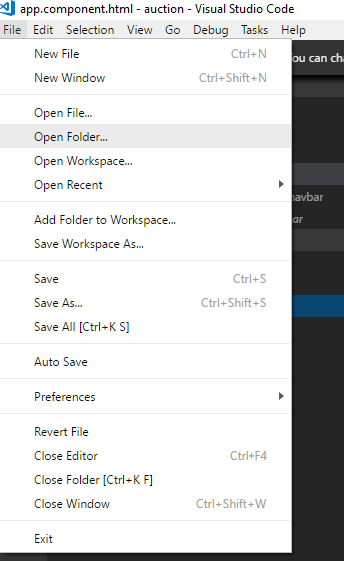
click the File,select "Open Folder"
select import project "demo"
3.Configuration and install plugins in “demo” project
Use “npm install bootstrap@3” command to produce bootstrap@3.3.7(node_modules)
Use “npm install jquery” command to produce jquery(node_modules)
Use “npm install angular-in-memory-web-api” command to intall angular-in-memory-web-api
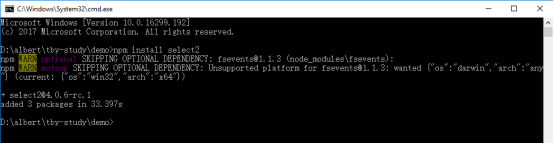
Use “npm install select2” command to install “select2”(node_modules)
E.g: install select2:
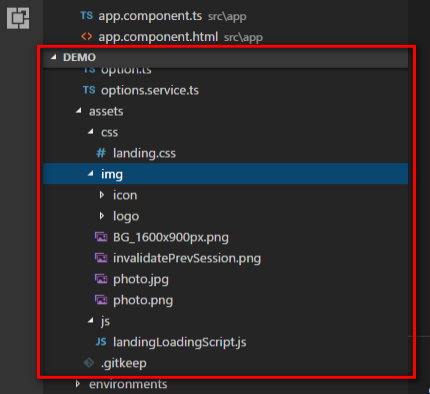
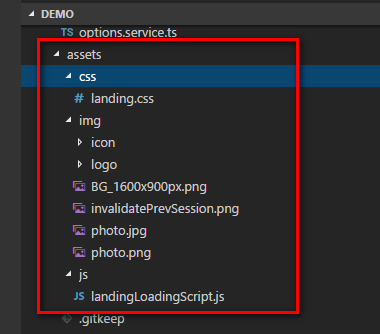
4. In the assets directory,add css, img, js three documents, the contents of the three documents are as follows:
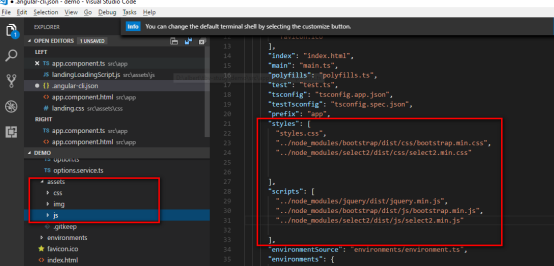
5.Configuration angular-cli.json
Import:
1. "styles": [
"../node_modules/bootstrap/dist/css/bootstrap.min.css",
"../node_modules/select2/dist/css/select2.min.css",
]
2. "scripts": [
"../node_modules/jquery/dist/jquery.min.js",
"../node_modules/bootstrap/dist/js/bootstrap.min.js",
"../node_modules/select2/dist/js/select2.min.js",
]
6.Startup project
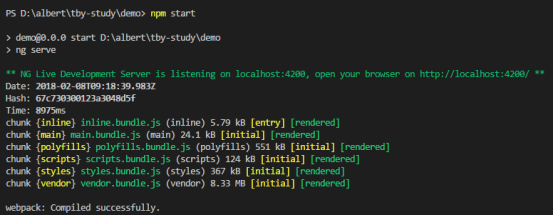
input the command "npm start" to startup project.
二、Define UI Interface and decorate UI Interface
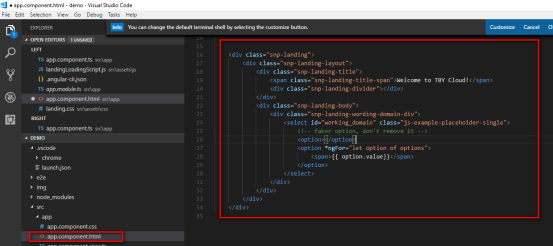
1.Define UI interface in app.component.html:
2.In assets directory, css file into a “landing.css style”, img file into the relevant pictures, js file into a “landingLoadingScript.js” script. These things are used to decorate UI inferface.
3.Configuration angular-cli.json:
Import:
"styles": [
"assets/css/landing.css" ]
"scripts": [
"assets/js/landingLoadingScript.js" ]

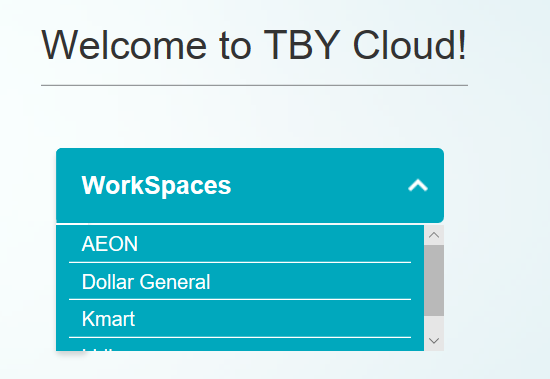
4.Show UI inferface:
三、Get data from a mock server, the in-memory web API.
1. Define a class
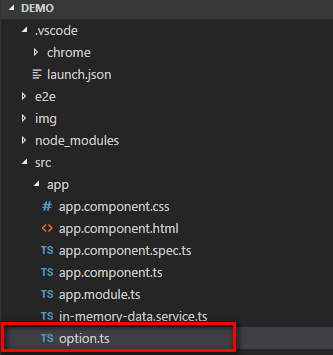
1.new a file that name is “option.ts”.
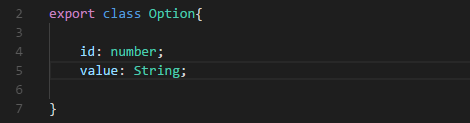
2.In “options.ts”, define a class “Option”
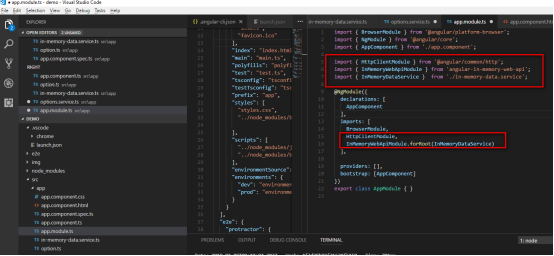
3.Import InMemoryWebApiModule and add it to the module's imports array and Import HttpClientModule and add it to the module's imports array.
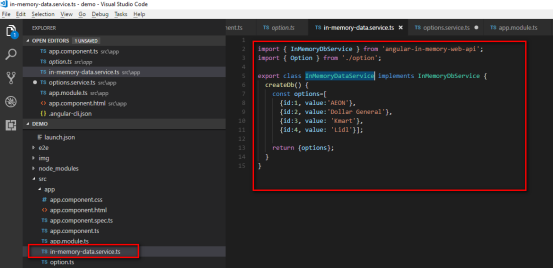
4.The forRoot () configuration method requires an instance of the InMemoryDataService class to populate the in-memory database with data.so,we need to define a InMemoryDataService class to initialize the data.
5.Get data from web api in app.component.ts:
(1) Import { Option } from ‘./option’ and import { HttpClient } from ‘@angular/common/http’ and import { OnInit } from ‘@angular/core’.
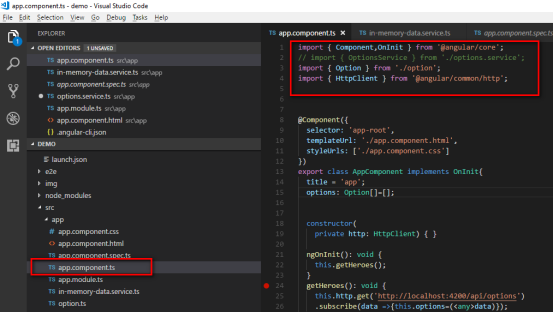
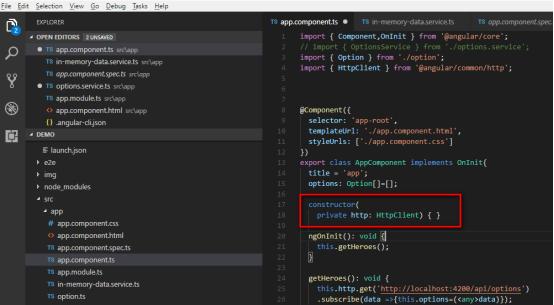
(2) Constructs an httpClient object:
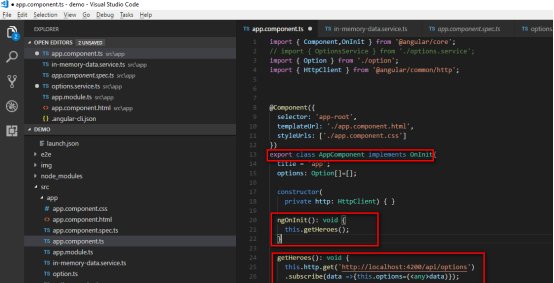
(3) AppComponent need to implement the angular ngOnInit lifecycle hook and implement “ngOnInit()” method. We've written a logical “ngOnInit” method with fetch data. Angular will call it at the right time. We get the data from the emulation server by calling getHeroes (),and through the get () method to send the request and through subscribe() method to get the data to the parameters “options”.
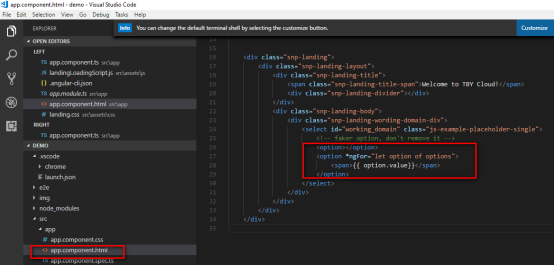
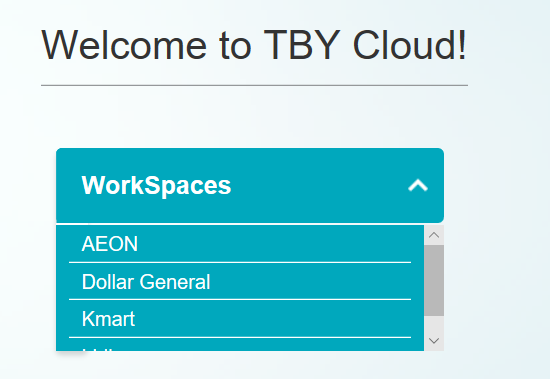
(4) Bind data to app.component.html with the options data in app.component.ts:use * ngFor to loop through the data in options:
(4) Save, the browser will automatically refresh (provided you have executed the npm start command),The results shown:
angular2 + bootstrap +jquery 实例的更多相关文章
- Bootstrap历练实例:轮播(carousel)
<!DOCTYPE html><html><head><meta http-equiv="Content-Type" content=&q ...
- Bootstrap历练实例:响应式导航(带有表单)
<!DOCTYPE html><html><head><meta http-equiv="Content-Type" content=&q ...
- Bootstrap历练实例:响应式导航
<!DOCTYPE html><html lang="zh-cn"><head><meta http-equiv="Conten ...
- Bootstrap 历练实例-轮播(carousel)插件的事件
事件 下表列出了轮播(Carousel)插件中要用到的事件.这些事件可在函数中当钩子使用. 事件 描述 实例 slide.bs.carousel 当调用 slide 实例方法时立即触发该事件. $(' ...
- Bootstrap 历练实例-轮播(carousel)插件方法
方法 下面是一些轮播(Carousel)插件中有用的方法: 方法 描述 实例 .carousel(options) 初始化轮播为可选的 options 对象,并开始循环项目. $('#identifi ...
- Bootstrap 历练实例 - 折叠(Collapse)插件事件
事件 下表列出了折叠(Collapse)插件中要用到的事件.这些事件可在函数中当钩子使用. 事件 描述 实例 show.bs.collapse 在调用 show 方法后触发该事件. $('#ident ...
- Bootstrap 历练实例 - 折叠(Collapse)插件方法
方法 下面是一些折叠(Collapse)插件中有用的方法: 方法 描述 实例 Options:.collapse(options) 激活内容为可折叠元素.接受一个可选的 options 对象. $(' ...
- Bootstrap历练实例:简单的可折叠
<!DOCTYPE html><html><head><meta http-equiv="Content-Type" content=&q ...
- Bootstrap 历练实例 - 按钮(Button)插件复选框
复选框(Checkbox) 您可以创建复选框按钮 组,并通过向 btn-group 添加 data 属性 data-toggle="buttons" 来添加复选框按钮组的切换. & ...
随机推荐
- 2019-2020-1 20199310《Linux内核原理与分析》第七周作业
1.问题描述 在前面的文章中,学习了系统调用system_call的处理过程,在MenuOS中运行getpid命令,通过gdb跟踪调用time函数的过程,并分析system_call代码对应的工作过程 ...
- 2019-2020-1 20199328《Linux内核原理与分析》第十一周作业
预备实验部分 2019/11/27 10:17:34 下载安装后的界面,如图1 出现vulnerable字样,发现了shellshock漏洞,如图2 实验部分 2019/11/27 10:26:48 ...
- vue2.x学习笔记(二十七)
接着前面的内容:https://www.cnblogs.com/yanggb/p/12682364.html. 单元测试 vue cli拥有开箱即用的通过jest或mocha进行单元测试的内置选项.官 ...
- 腾讯视频怎么转成mp4模式 软件 工具 方法 最新【已解决】
1.搜索: 小白兔视频格式在线转换 2.转换好后视频已经是MP4格式了. 转载于:https://blog.51cto.com/14204019/2396896
- openlayers3中Overlay用法
Overlay 从名字看,是覆盖图.覆盖物的意思,主要的用途就是在地图之上再覆盖一层,用以显示额外的可见元素,可见元素一般是 HTML 元素,利用 overlay,可以将可见元素放置到地图的任意位置, ...
- Redis(一):数据结构与对象
前言 本书是Redis设计与实现的读书笔记,旨在对Redis底层的数据结构及实现有一定了解.本书所有的代码基于Redis 3.0. 简单动态字符串 SDS Redis没有直接使用C语言中的字符串,而是 ...
- java中文乱码解决之道(七)—–JSP页面编码过程
我们知道JSP页面是需要转换为servlet的,在转换过程中肯定是要进行编码的.在JSP转换为servlet过程中下面一段代码起到至关重要的作用. <%@ page language=" ...
- Linux 开发之线程条件锁那些事
2019独角兽企业重金招聘Python工程师标准>>> 条件锁即在一定条件下触发,那什么时候适合用条件锁呢,那当然是你在等待一个符合的条件下触发.一个常用的例子就是在线程中无限循环执 ...
- EntityFramework 迁移遇到的问题
2019独角兽企业重金招聘Python工程师标准>>> 添加迁移add-migration migrationname 更新数据Update-Database EntityFrame ...
- document.documentElement.scrollTop指定位置失效解决办法
近期在vue的H5项目中,做指定位置定位的时候发现使用document.documentElement.scrollTop一直不生效. 解决办法是document.documentElement.sc ...