
自定义 ---UICollectionViewLayout-正N变形居中布局
1. 自定义UICollectionLayout ---- 正三角形居中布局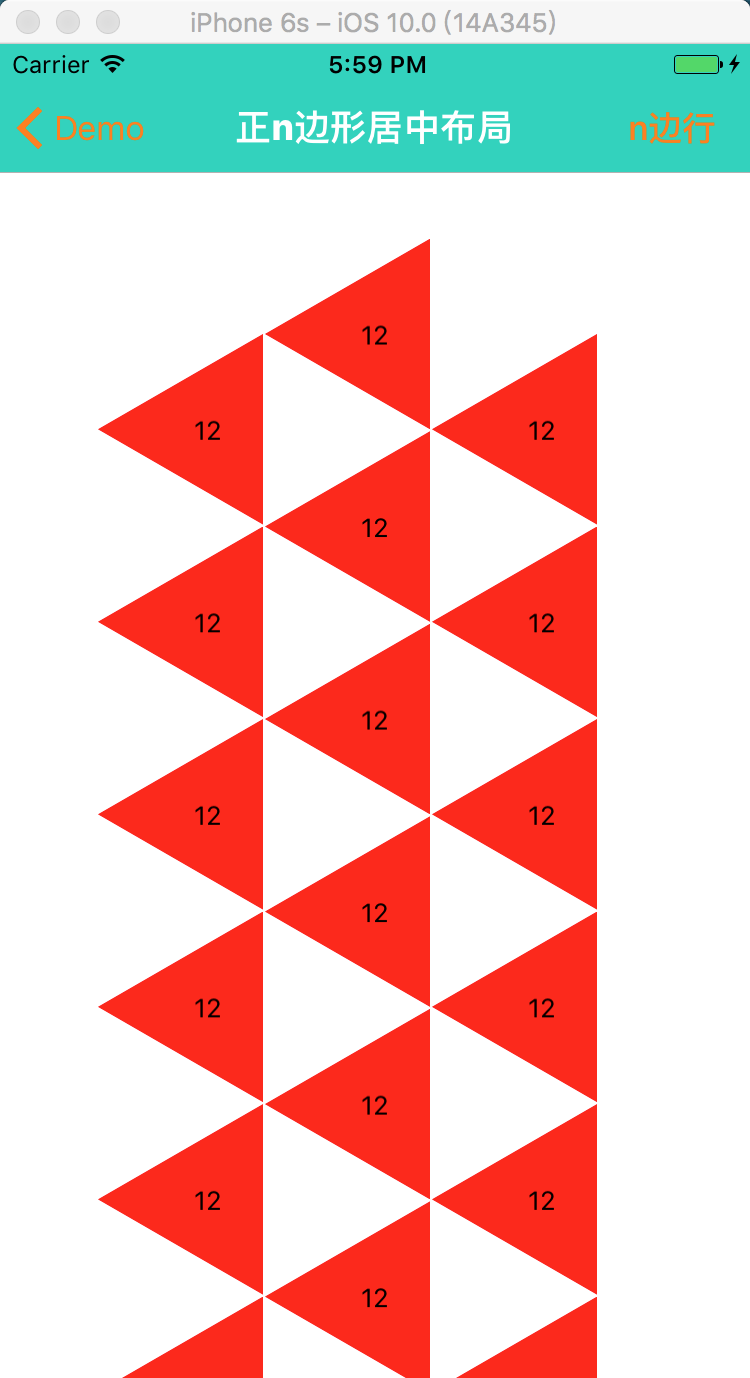
支持多个图形的自动布局

2. 自定义UICollectionLayout ---- 正方形居中布局
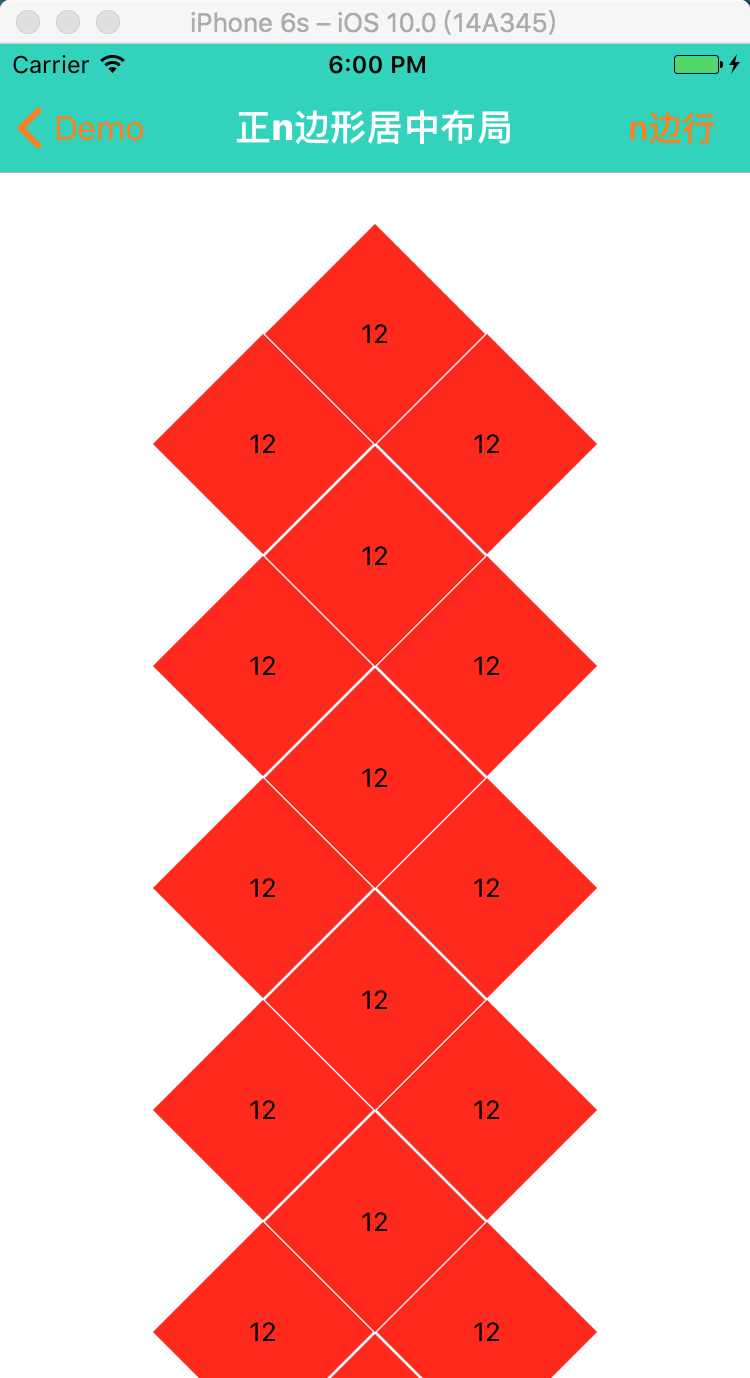
滚动展示的区域

3. 自定义UICollectionLayout ---- 正六边形居中布局(蜂窝布局)

等等正n变形布局,其中 正六边形支持 间距大小的改变,图形的旋转。

旋转 --

间距

4. 核心代码 ---- 绘制正n边形 (贝塞尔曲线)
- (void)layoutSubviews
{
    [super layoutSubviews];
    // step 1: 绘制正n变形
    CGFloat X = self.contentView.frame.size.width  * 0.5;
    CGFloat Y = self.contentView.frame.size.height * 0.5;
    UIBezierPath* bezierPath = [UIBezierPath bezierPath];
    bezierPath.lineCapStyle = kCGLineCapRound;
    bezierPath.lineJoinStyle = kCGLineCapRound;
    CGFloat angle = labs(360/self.number);
    [bezierPath moveToPoint: CGPointMake(X - mm , Y)];
    for (int i = 0; i < self.number - 1; i ++) {
        CGFloat angle1 = angle *(i + 1);
        CGFloat XX = X + (mm * (COS(angle1)))*(-1);
        CGFloat YY = Y + mm * (SIN(angle1));
        [bezierPath addLineToPoint: CGPointMake(XX, YY)];
    }
    [bezierPath addLineToPoint: CGPointMake(X - mm , Y)];
    // step 2: 根据路径生成蒙板
    CAShapeLayer *maskLayer = [CAShapeLayer layer];
    maskLayer.path = [bezierPath CGPath];

    self.backgroundColor = [UIColor redColor];
    // step 3: 给cell添加模版
    self.layer.mask = maskLayer;
    self.titleLabel.frame = self.bounds;
}
5. 核心代码 --- 自定义Layout布局
- (void)prepareLayout
{
    [super prepareLayout];
    _itemCount = [self.collectionView numberOfItemsInSection:];
    _attributeAttay = [[NSMutableArray alloc]init];
     ; i < _itemCount; i ++) {
        //设置第一个正六边形的中心位置
        CGFloat X = self.collectionView.frame.size.width*0.5;
        CGFloat Y = self.TopMargin;
         == ? -:i%;
         == ? :i%;
        X += CST(-num)*([self judgeXWithNumber:self.number]);
        Y += ([self judgeSizeWithNumber:self.number].height + self.margin)*(i/) + CST(num2)*([self judgeSizeWithNumber:self.number].height/)+self.margin;
        UICollectionViewLayoutAttributes *attribute = [UICollectionViewLayoutAttributes layoutAttributesForCellWithIndexPath:[NSIndexPath indexPathForRow:i inSection:]];
        // 设置每隔item的大小
        attribute.size = [self judgeSizeWithNumber:self.number];
        // 设置每隔item的圆心
        // 计算每个item的中心坐标
        attribute.center = CGPointMake(X, Y);
        [_attributeAttay addObject:attribute];
    }
}

// X轴方向的间隔
- (CGFloat)judgeXWithNumber:(NSInteger)xNumber
{
     ) {
        /xNumber)*mm;
    }
    )
    {
        /xNumber)*mm;
    }
    )
    {
        /xNumber)*mm - ;
    }
    )
    {
        /xNumber)*mm;
    }
    )
    {
        /xNumber)*mm;
    }
    else
    {
        *mm + self.margin ;
    }
}

// 就算正n变形的大小
- (CGSize)judgeSizeWithNumber:(NSInteger)sNumber
{
     || sNumber ==  ) {
        *mm,*SIN(/sNumber)*mm);
    }
    else
    {
        *(mm),*mm);
    }
}

//设置内容区域的大小
-(CGSize)collectionViewContentSize
{
    CGFloat hh = [self judgeSizeWithNumber:self.number].height;
    CGFloat height = (hh+self.margin)*(self.itemCount/ + ) + self.TopMargin + ;
    if (height > Device_height) {
        height = height;
    }
    else
    {
        height = Device_height;
    }

    return CGSizeMake(Device_width, height);
}

//返回设置数组
-(NSArray<UICollectionViewLayoutAttributes *> *)layoutAttributesForElementsInRect:(CGRect)rect{
    return _attributeAttay;
}
View Layout
自定义 ---UICollectionViewLayout-正N变形居中布局的更多相关文章
- 自定义UICollectionViewLayout 布局实现瀑布流
自定义 UICollectionViewLayout 布局,实现瀑布流:UICollectionView和UICollectionViewCell 另行创建,这只是布局文件, 外界控制器只要遵守协议并 ...
- iOS 关于自定义UICollectionViewLayout实现复杂布局
UICollectionView的简单介绍 UICollectionView的结构 Cells Supplementary Views 追加视图 (类似Header或者Footer) Decorati ...
- 自定义UICollectionViewLayout并添加UIDynamic - scorpiozj(转)
转载自:http://www.tuicool.com/articles/jM77Vf 自定义UICollectionViewLayout并添加UIDynamic UICollectionVie ...
- 自定义UICollectionViewLayout并添加UIDynamic
大家也可以到这里查看. UICollectionView是iOS6引入的控件,而UIDynamicAnimator是iOS7上新添加的框架.本文主要涵盖3部分: 一是简单概括UICollectionV ...
- 自定义UICollectionViewLayout 实现瀑布流
今天研究了一下自定义UICollectionViewLayout. 看了看官方文档,要自定义UICollectionViewLayout,需要创建一个UICollectionViewLayout的子类 ...
- 自定义UICollectionViewLayout之CATransform3D
1.自定义UICollectionViewLayout旋转效果 之前有自定义UICollectionViewLayout(适用于多个section),本文是一个对cell进行CATransform3D ...
- CSS居中布局总结【转】
居中布局 <div class="parent"> <div class="child">demo</div> </d ...
- CSS居中布局总结
居中布局 <div class="parent"> <div class="child">demo</div> </d ...
- sass—使用自定义function和@each实现栅格布局
/*使用自定义function和@each实现栅格布局*/ @function buildLayout($num: 5){ $map: (defaultValue: 0); //不能直接生成col,需 ...
随机推荐
- 混合欧拉回路poj 1637 Sightseeing tour
把该图的无向边随便定向,计算每个点的入度和出度.如果有某个点出入度之差为奇数,那么肯定不存在欧拉回路.因为欧拉回路要求每点入度 = 出度,也就是总度数为偶数,存在奇数度点必不能有欧拉回路: 好了,现在 ...
- day13-面向对象
#解决同一类问题,使用面向对象的思想.类是制造对象的模具,类是抽象的,我们能知道它有哪些属性(name,age,saraly),但不知道具体的属性值. #看下面代码:类Penson制造了实例化对象re ...
- linux通过grep根据关键字查找日志文件上下文
linux通过grep根据关键字查找日志文件上下文 1.在标准unix/linux下的grep命令中,通过以下参数控制上下文的显示: grep -C 10 keyword catalina.out 显 ...
- mysql之存储过程(一)
今天开发一个需求,需要在一个旧表中增加一列并且对已经的表中记录初始化新列的值, 由于是一次性的工作,故写了个存储过程来代替代码程序初始化 创建及执行过程记录如下: MySQL [XXX_YYY]> ...
- jQuery性能优化与技巧
1.使用最新版本的jQuery类库 jQuery的每一个新的版本都会较上一版进行Bug修复和一些优化,同时也会包含一些创新,所以建议使用最新版本的jQuery来提高性能,需要注意的是在更换版本之后,要 ...
- VBA/VB6/VBS/VB.NET/C#/Python/PowerShell都能调用的API封装库
API函数很强大,但是声明的时候比较繁琐. 我开发的封装库,包括窗口.键盘.鼠标.消息等常用功能.用户不需要添加API函数的声明,就可以用到API的功能. 在VBA.VB6的引用对话框中引用API.t ...
- WebService客户端生成方法
1.使用JDK的wsimport.exe产生客户端代码 打开cmd命令框,输入如下格式命令: 格式:wsimport -s "src目录" -p "生成类所在包名&quo ...
- Jenkins+maven+jmeter+eclipse搭建自动化测试平台
一.准备工作 1.jmeter准备测试脚本 2.maven环境配置 3.eclipse创建maven项目 4.Jenkins集成项目 二.jmeter准备测试脚本 使用jmeter准备测试脚本(不管录 ...
- markdown常见用法
命令 生成目录 [TOC] 插入标题 # 一级标题## 二级标题### 三级标题#### 四级标题##### 五级标题###### 六季标题 插入shell 开头:```shell 结尾 ...
- mapreduce.shuffle set in yarn.nodemanager.aux-services is invalid
15/07/01 20:14:41 FATAL containermanager.AuxServices: Failed to initialize mapreduce.shuffle java.la ...