
Data Flow Diagram with Examples - Customer Service System
Data Flow Diagram (DFD) provides a visual representation of the flow of information (i.e. data) within a system. By creating a Data Flow Diagram, you can tell the information provided by and delivered to someone who takes part in system processes, the information needed in order to complete the processes and the information needed to be stored and accessed. Data Flow Diagram is widely-used in software engineering. You can use DFD in modeling information systems. This article describes and explain Data Flow Diagram (DFD) by using a customer service system as an example.
The CS System Example
The data flow diagram is a hierarchy of diagram consist of:
- Context Diagram (conceptually level zero)
- The Level-1 DFD
- And possible Level-2 DFD and further levels of functional decomposition depending on the complexity of your system
Context DFD
The figure below shows a context Data Flow Diagram that is drawn for a railway company's Customer Service System. It contains a process (shape) that represents the system to model, in this case, the "CS System". It also shows the participants who will interact with the system, called the external entities. In this example, CS Assistant and Passenger are the two entities who will interact with the system. In between the process and the external entities, there are data flow (connectors) that indicate the existence of information exchange between the entities and the system.

Context DFD is the entrance of a data flow model. It contains one and only one process and does not show any data store.
Level 1 DFD
The figure below shows the level 1 DFD, which is the decomposition (i.e. break down) of the CS System process shown in the context DFD. Read through the diagram and then we will introduce some of the key concepts based
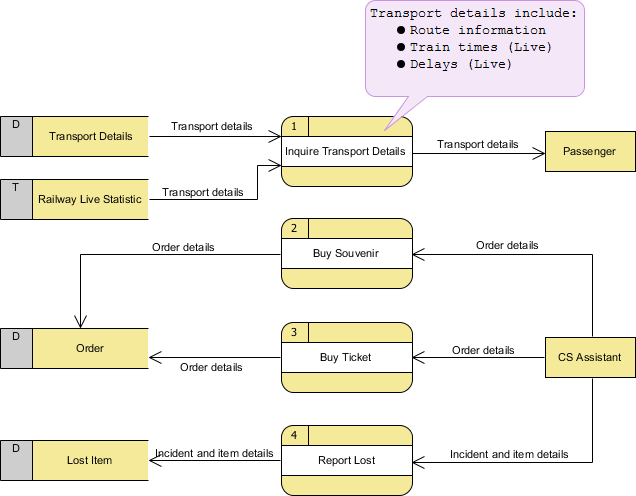
The CS System Data Flow Diagram example contains four processes, two external entities and four data stores. Although there is no design guidelines that governs the positioning of shapes in a Data Flow Diagram, we tend to put the processes in the middle and data stores and external entities on the sides to make it easier to comprehend.
Based on the diagram, we know that a Passenger can receive Transport details from the Inquiry Transport Details process, and the details are provided by the data stores Transport Details and Railway Live Statistic. While data stored in Transport Details are persistent data (indicated by the label "D"), data stored in Railway Live Statistic are transient data that are held for a short time (indicated by the label "T"). A callout shape is used to list out the kind of details that can be inquired by passenger.
CS Assistant can initiate the Buy Souvenir process, which will result in having the Order details stored in the Order data store. Although customer is the real person who buy souvenir, it is the CS Assistant who accesses the system for storing the order details. Therefore, we make the data flow from CS Assistant to the Buy Souvenir process.
CS Assistant can also initiate the Buy Ticket process by providing Order details and the details will be stored again in the Order data store. Data Flow Diagram is a high level diagram that is drawn with a high degree of abstraction. The data store Order which is drawn here does not necessarily imply a real order database or order table in a database. The way how order details are stored physically is to be decided later on when implementing the system.
Finally, CS Assistant can initiate the Report Lost process by providing the Incident and item details and the information will be stored in the Lost Item database.
Data Flow Diagram Tips and Cautions
Stating the type of data with D, M and T
Each data store which is drawn in a Data Flow Diagram are prefixed by a letter, which is 'D' by default. The letter indicates the kind of data the data store holds. The letter 'D' is used to represent a persistent computerized data, which is probably the most common kind of data type in a typical information system. Besides computerized data, data can also be held for a short time in temporary. We call this kind of data transient data and is represented by letter 'T'. Sometimes, data is stored without the use of a computer. We call this kind of data manual data and is represented by letter 'M'. Finally, if the data is stored without using computer and also is held for a short time, this is known as manual transient data and is represented by T(M).
Be aware of the level of details
In this Data Flow Diagram example, the word "details" is used many times when labeling data. We have "transport details" and "order details". What if we write them explicitly as "route information, train times and delays", "souvenir name, quantity and amount" and "ticket type and amount"? Is this correct? Well, there is no definite answer to this question but try to ask yourself a question when making a decision. Why are you drawing a DFD?
In most cases, Data Flow Diagram is drawn in the early phase of system development, where many details are yet to be confirmed. The use of general terminologies like "details", "information", "credential" certainly leave room for discussion. However, using general terms can be kind of lacking details and make the design lost its usefulness. So it really depends on the purpose of your design.
Don't overdrawn
In a Data Flow Diagram, we focus on the interactions between the system and external parties, rather than the internal communications among interfaces. Therefore, data flows between interfaces and the data stores used are considered to be out of scope and should not be shown in the diagram.
Don't mix up data flow and process flow
Some designers may feel uncomfortable when coming across a connector connecting from a data store to a process, without showing the step of data request being specified on the diagram. Some designers will attempt to put a request attached to the connector between a process and a data store, labeling it "a request" or "request for something", which is surely unnecessary.
Keep in mind that Data Flow Diagram was designed for representing the exchange of information. Connectors in a Data Flow Diagram are for representing data, not for representing process flow, step or anything else. When we label a data flow that ends at a data store "a request", this literally means we are passing a request as data into a data store. Although this may be the case in implementation level as some of the DBMS do support the use of functions, which intake some values as parameters and return a result, however, in data flow diagram, we tend to treat data store as a sole data holder that does not possess any processing capability. If you want to model the system flow or process flow, you could use either Activity Diagram or BPMN Business Process Diagram instead. If you want to model the internal structure of data store, you may use Entity Relationship Diagram.
Data Flow Diagram with Examples - Customer Service System的更多相关文章
- 数据可视化 —— 数据流图(Data Flow Diagram)
数据流图(Data Flow Diagram):简称 DFD,它从数据传递和加工角度,以图形方式来表达系统的逻辑功能.数据在系统内部的逻辑流向和逻辑变换过程,是结构化系统分析方法的主要表达工具及用于表 ...
- react & redux data flow diagram
react & redux data flow diagram Redux 数据流程图
- SSIS Data Flow 的 Execution Tree 和 Data Pipeline
一,Execution Tree 执行树是数据流组件(转换和适配器)基于同步关系所建立的逻辑分组,每一个分组都是一个执行树的开始和结束,也可以将执行树理解为一个缓冲区的开始和结束,即缓冲区的整个生命周 ...
- Intel® Threading Building Blocks (Intel® TBB) Developer Guide 中文 Parallelizing Data Flow and Dependence Graphs并行化data flow和依赖图
https://www.threadingbuildingblocks.org/docs/help/index.htm Parallelizing Data Flow and Dependency G ...
- Data Flow ->> Script Component
和Control Flow中的Script Task非常类似,不同的是Script Component是Per-Row的执行类型.打个比方,在Script Component中加入两个Output的字 ...
- Spring Cloud Data Flow 中的 ETL
Spring Cloud Data Flow 中的 ETL 影宸风洛 程序猿DD 今天 来源:SpringForAll社区 1 概述 Spring Cloud Data Flow是一个用于构建实时数据 ...
- 【SFA官方译文】:Spring Cloud Data Flow中的ETL
原创: 影宸风洛 SpringForAll社区 昨天 原文链接:https://www.baeldung.com/spring-cloud-data-flow-etl 作者:Norberto Ritz ...
- (转)CAS (4) —— CAS浏览器SSO访问顺序图详解(CAS Web Flow Diagram by Example)
CAS (4) —— CAS浏览器SSO访问顺序图详解(CAS Web Flow Diagram by Example) tomcat版本: tomcat-8.0.29 jdk版本: jdk1.8.0 ...
- SSIS ->> Data Flow Design And Tuning
Requirements: Source and destination system impact Processing time windows and performance Destinati ...
随机推荐
- Python Tkinter Grid布局管理器详解
Grid(网格)布局管理器会将控件放置到一个二维的表格里.主控件被分割成一系列的行和列,表格中的每个单元(cell)都可以放置一个控件. 注意:不要试图在一个主窗口中混合使用pack和grid (1) ...
- 并查集例题01. 种类并查集(poj1733)
题目: http://poj.org/problem?id=1733 题意: 输入n表示有一个长度为n的0,1字符串, m表示接下来有m行输入, 接下来的m行输入中x, y, even表示第x到第y个 ...
- 用全站 CDN 部署 Discourse 论坛
Discourse 介绍 Discourse 是一款由 Stack Overflow 的联合创始人--Jeff Atwood,基于 Ruby on Rails 开发的开源论坛.相较于传统论坛,Disc ...
- flume客户端模拟数据发送并记录在mysql数据库
这里只是做了简单的demo,并未深研 1.编写PolluteSink 1.1 maven创建项目(pom.xml) <dependencies> <dependency> &l ...
- Jenkins中管道案例脚本(生命式语法)
pipeline { agent any parameters { choice( choices: 'feature\nmaster\npercent10', description: '选择要发布 ...
- Jmeter 压力测试笔记(3)--脚本调试/签名/cookie/提升吞吐量/降低异常率/提升单机并发性能
import XXXsign.Openapi2sign;---导入jar包中的签名方法 String str1 = "12121"; ---需要被签名的字段:向开发了解需要哪些哪些 ...
- 如何将icon图标库引入自己的项目中
---恢复内容开始--- 今天是18年的国庆,趁着国庆的这股开心劲儿,开开心心的写点东西: 第一篇:关于如何将icon图标库引入自己的项目(此方法Taro,微信小程序,支付宝小程序等均适用,不会存在不 ...
- Docker的简介以及Dockerfile编写与使用
Docker的简介 Docker是在容器的基础上,进行了进一步的封装,极大的简化了容器的创建和维护.使得Docker技术比虚拟机技术更为轻便.快捷. 下面是两张对比图. 可以看到传统虚拟机技术是虚拟出 ...
- MTK Android 权限大全
Android权限大全 1.android.permission.WRITE_USER_DICTIONARY允许应用程序向用户词典中写入新词 2.android.permission.WRITE_SY ...
- 2015蓝桥杯五星填数(C++C组)
题目:五星填数 如[图1.png]的五星图案节点填上数字:1~12,除去7和11.要求每条直线上数字和相等.如图就是恰当的填法.请你利用计算机搜索所有可能的填法有多少种.注意:旋转或镜像后相同的算同一 ...