
ASP.NET MVC升级到ASP.NET Core MVC踩坑小结
写在前面
ASP.NET Core是微软新推出的支持跨平台、高性能、开源的开发框架,它的优势不必多说,因为已经说得太多了。当然,现在依然有着数量庞大的系统运行于.NET Framework上,由于有大量的Break Changes,很多项目项目团队也不敢贸然升级,其中的考量也不全部是技术原因,更多的可能还是业务推进因素。
小编自年前开始考虑升级一套电商系统,原先是基于.NET Framework 4.5的,打算直接升级到.NET Core 3.1,由于系统规模比较庞大,所以一旦开工就是一个漫长的工程,我的博客也在很长时间没有再更新,有点对不起读者了。
年前第一次重构时,由于低估这套系统的复杂性再加上有些冒进,步子迈得有点大,出现了很多问题,不得不重新开始。这一次重构先易后难,步步为营,难题统一在后面解决,到现在已经完成了全部工程的百分之八十,后面的也没有太困难了,所以特地抽出时间小结一下。
详细内容
类库部分
类库部分的迁移应该是最简单的了,我是创建了一个新的类库,然后把代码copy过去,很少有地方需要修改,当然了有一些引用的第三方类库需要特殊对待,如Automapper、Autofac、FluentValidation等,这些也很简单,看看文档就行。
.NET Framework中,会有一些常用的封装库,如Session、Cookie和HttpRuntime等,这些变化比较大,所以自己在Startup中启用。
- Session:
- Startup.Configure:
1: app.UseSession(new SessionOptions
2: {3: Cookie = new CookieBuilder
4: {5:
6: },
7: IdleTimeout = TimeSpan.FromSeconds(1),
8: IOTimeout = Timeout.InfiniteTimeSpan
9: });
- Startup.ConfigureServices:
1: services.AddSession();
- Startup.ConfigureServices:
- 使用Session,可以通过HttpContext调用:
1: HttpContext.Session.SetString("sessionId", sessionValue);2: HttpContext.Session.GetString("sessionId");3: context.Session.Remove("sessionId"); - Cookie:
1: Response.Cookies.Append("User", "1", new CookieOptions()2: {3: Expires = DateTime.Now.AddMinutes(10)
4: });
5: Response.Cookies.Delete("User");
.csharpcode, .csharpcode pre
{
font-size: small;
color: black;
font-family: consolas, "Courier New", courier, monospace;
background-color: #ffffff;
/*white-space: pre;*/
}
.csharpcode pre { margin: 0em; }
.csharpcode .rem { color: #008000; }
.csharpcode .kwrd { color: #0000ff; }
.csharpcode .str { color: #006080; }
.csharpcode .op { color: #0000c0; }
.csharpcode .preproc { color: #cc6633; }
.csharpcode .asp { background-color: #ffff00; }
.csharpcode .html { color: #800000; }
.csharpcode .attr { color: #ff0000; }
.csharpcode .alt
{
background-color: #f4f4f4;
width: 100%;
margin: 0em;
}
.csharpcode .lnum { color: #606060; }
-->
HttpRuntime的使用,可以通过IMemoryCache替换,具体的使用方法可参考MSDN
- System.Drawing已经不存在了,我使用的是ZKWeb.System.Drawing,基本上类名、枚举名没变化,只是命名空间Drawing变成了DrawingCore
- 依赖注入部分全部迁移到Startup.ConfigureServices
Controller部分
顺便说一下,静态资源部分,如JS、CSS、Image、Font这些复制到wwwroot目录上,另外app.UseStaticFiles();会在模板中出现。
1、获取Controller及Action信息,可以通过RouteData.Values["controller"].ToString(),RouteData.Values["action"].ToString()
2、很多的信息都放到了Request.Header[“”]中,如果之前可以用过Request直接点出来的,但是现在点不出来了,可以尝试使用这种方式,说不准会有意外惊喜。另外有一个相关的常量在这里出示一下,使用方式即Request.Header[HeaderNames.Authority],当然Request.HttpMethod 改为了 Request.Method。
1: public static class HeaderNames
2: {
3: public static readonly string Accept;
4: public static readonly string AcceptCharset;
5: public static readonly string AcceptEncoding;
6: public static readonly string AcceptLanguage;
7: public static readonly string AcceptRanges;
8: public static readonly string AccessControlAllowCredentials;
9: public static readonly string AccessControlAllowHeaders;
10: public static readonly string AccessControlAllowMethods;
11: public static readonly string AccessControlAllowOrigin;
12: public static readonly string AccessControlExposeHeaders;
13: public static readonly string AccessControlMaxAge;
14: public static readonly string AccessControlRequestHeaders;
15: public static readonly string AccessControlRequestMethod;
16: public static readonly string Age;
17: public static readonly string Allow;
18: public static readonly string Authority;
19: public static readonly string Authorization;
20: public static readonly string CacheControl;
21: public static readonly string Connection;
22: public static readonly string ContentDisposition;
23: public static readonly string ContentEncoding;
24: public static readonly string ContentLanguage;
25: public static readonly string ContentLength;
26: public static readonly string ContentLocation;
27: public static readonly string ContentMD5;
28: public static readonly string ContentRange;
29: public static readonly string ContentSecurityPolicy;
30: public static readonly string ContentSecurityPolicyReportOnly;
31: public static readonly string ContentType;
32: public static readonly string Cookie;
33: public static readonly string CorrelationContext;
34: public static readonly string Date;
35: public static readonly string DNT;
36: public static readonly string ETag;
37: public static readonly string Expect;
38: public static readonly string Expires;
39: public static readonly string From;
40: public static readonly string Host;
41: public static readonly string IfMatch;
42: public static readonly string IfModifiedSince;
43: public static readonly string IfNoneMatch;
44: public static readonly string IfRange;
45: public static readonly string IfUnmodifiedSince;
46: public static readonly string KeepAlive;
47: public static readonly string LastModified;
48: public static readonly string Location;
49: public static readonly string MaxForwards;
50: public static readonly string Method;
51: public static readonly string Origin;
52: public static readonly string Path;
53: public static readonly string Pragma;
54: public static readonly string ProxyAuthenticate;
55: public static readonly string ProxyAuthorization;
56: public static readonly string Range;
57: public static readonly string Referer;
58: public static readonly string RequestId;
59: public static readonly string RetryAfter;
60: public static readonly string Scheme;
61: public static readonly string SecWebSocketAccept;
62: public static readonly string SecWebSocketKey;
63: public static readonly string SecWebSocketProtocol;
64: public static readonly string SecWebSocketVersion;
65: public static readonly string Server;
66: public static readonly string SetCookie;
67: public static readonly string Status;
68: public static readonly string StrictTransportSecurity;
69: public static readonly string TE;
70: public static readonly string TraceParent;
71: public static readonly string TraceState;
72: public static readonly string Trailer;
73: public static readonly string TransferEncoding;
74: public static readonly string Translate;
75: public static readonly string Upgrade;
76: public static readonly string UpgradeInsecureRequests;
77: public static readonly string UserAgent;
78: public static readonly string Vary;
79: public static readonly string Via;
80: public static readonly string Warning;
81: public static readonly string WebSocketSubProtocols;
82: public static readonly string WWWAuthenticate;
83: public static readonly string XFrameOptions;
84: }
.csharpcode, .csharpcode pre
{
font-size: small;
color: black;
font-family: consolas, "Courier New", courier, monospace;
background-color: #ffffff;
/*white-space: pre;*/
}
.csharpcode pre { margin: 0em; }
.csharpcode .rem { color: #008000; }
.csharpcode .kwrd { color: #0000ff; }
.csharpcode .str { color: #006080; }
.csharpcode .op { color: #0000c0; }
.csharpcode .preproc { color: #cc6633; }
.csharpcode .asp { background-color: #ffff00; }
.csharpcode .html { color: #800000; }
.csharpcode .attr { color: #ff0000; }
.csharpcode .alt
{
background-color: #f4f4f4;
width: 100%;
margin: 0em;
}
.csharpcode .lnum { color: #606060; }
-->
3、Request.IsAjaxRequest
这个已经不存在了,可以自行实现。
1: public static bool IsAjaxRequest(this HttpRequest request)
2: {
3: if (request == null)
4: throw new ArgumentNullException("request");
5:
6: if (request.Headers != null)
7: return request.Headers["X-Requested-With"] == "XMLHttpRequest";
8: return false;
9: }
4、Area注册
之前的AreaRegistration已经不存在,如果需要设置Area,可以在每个Controller上设置[Area(“Admin”)],路由处的注册可以考虑如下方式
1: app.UseEndpoints(endpoints =>
2: {
3: endpoints.MapControllerRoute(
4: name: "default",
5: pattern: "{controller=Home}/{action=Index}/{id?}");
6:
7: endpoints.MapControllerRoute(
8: name: "areas",
9: pattern: "{area:exists}/{controller=Home}/{action=Index}/{id?}"
10: );
11: });
.csharpcode, .csharpcode pre
{
font-size: small;
color: black;
font-family: consolas, "Courier New", courier, monospace;
background-color: #ffffff;
/*white-space: pre;*/
}
.csharpcode pre { margin: 0em; }
.csharpcode .rem { color: #008000; }
.csharpcode .kwrd { color: #0000ff; }
.csharpcode .str { color: #006080; }
.csharpcode .op { color: #0000c0; }
.csharpcode .preproc { color: #cc6633; }
.csharpcode .asp { background-color: #ffff00; }
.csharpcode .html { color: #800000; }
.csharpcode .attr { color: #ff0000; }
.csharpcode .alt
{
background-color: #f4f4f4;
width: 100%;
margin: 0em;
}
.csharpcode .lnum { color: #606060; }
-->
5、AbsoluteUri也已经不存在了,但是可以通过如下方式取代:
1: /// <summary>
2: /// Returns the combined components of the request URL in a fully un-escaped form (except for the QueryString)
3: /// suitable only for display. This format should not be used in HTTP headers or other HTTP operations.
4: /// </summary>
5: /// <param name="request">The request to assemble the uri pieces from.</param>
6: /// <returns>The combined components of the request URL in a fully un-escaped form (except for the QueryString)
7: /// suitable only for display.</returns>
8: public static string GetDisplayUrl(this HttpRequest request);
9:
10: /// <summary>Returns the relative URI.</summary>
11: /// <param name="request">The request to assemble the uri pieces from.</param>
12: /// <returns>The path and query off of <paramref name="request" />.</returns>
13: public static string GetEncodedPathAndQuery(this HttpRequest request);
14:
15: /// <summary>
16: /// Returns the combined components of the request URL in a fully escaped form suitable for use in HTTP headers
17: /// and other HTTP operations.
18: /// </summary>
19: /// <param name="request">The request to assemble the uri pieces from.</param>
20: /// <returns>The encoded string version of the URL from <paramref name="request" />.</returns>
21: public static string GetEncodedUrl(this HttpRequest request);
6、过滤器
之前继承ActionFilterAttribute,现在实现IActionFilter,注册方式为services.AddMvc(o=>o.Filters.Add(new XX())),当然之前的很多过滤器或者Controller基类方法已经不存在了,如Controller OnAuthentication。
IResultFilter中的OnResultExecuting(ResultExecutingContext filterContext)需要通过filterContext.Controller as Controller来获取默认的Controller。
最后有一个比较重要的类ActionDescriptor,ControllerDescriptor继承自ActionDescriptor,这里可以通过类型转换获取相关信息。
之前有很多的FilterAttribute也可以通过中间件来取代。
7、Action上被去掉的Attribute,如[ValidateInput(false)],[ChildActionOnly]
View部分
1、页面基类型及扩展
之前我们创建页面基类型,是通过继承System.Web.Mvc.WebViewPage<TModel>来实现,现在我们可以通过RazorPage<TModel>来取代。
扩展HtmlHelper也换成了IHtmlHelper接口。HtmlString也替换了MvcHtmlString,更上层也以接口方式来取代IHtmlContent。
1: public static IHtmlContent XXX(this IHtmlHelper _html, string xxxxx)
2: {
3: //your code
4: return new HtmlString(html.ToString());
5: }
2、Ajax.BeginForm换成了<form asp-controller="DistributorGrade" asp-action="Save" id="addform" data-ajax="true" data-ajax-method="post" data-ajax-begin="begin" data-ajax-success="success">。当前.NET Core 依然支持Html.BeginForm,不过我建议大家有时间的时候都替换一下,具体请参考下一条。
3、第2条出现的asp-action等是通过Razor Tag Helpers来实现的,很多的自定义需要加入到_ViewImports.cshtml,当然一些引用也可以统一放到这里,如@using Microsoft.AspNetCore.Routing,这样就可以在当前的Area中作为全局引用了。
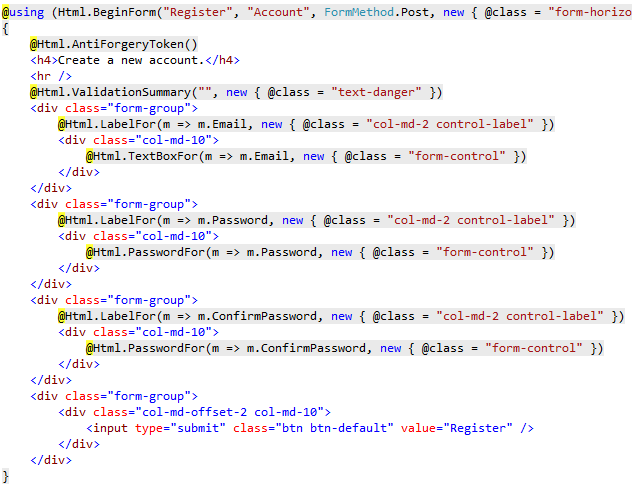
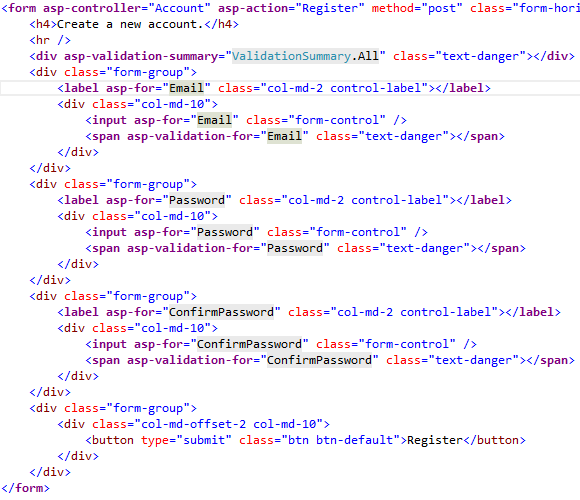
Razor Tag Help是一个十分重要的功能,它使得.NET Core MVC的开发更像是在写Html语言,更加的清晰,更加具有生产力。
如@Html.TextBoxFor()可以用通过<input asp-for=””/>替换,以下图片摘自MSDN:
Framework MVC的写法
Core MVC的写法
一些Tag Help集锦:
Built-in ASP.NET Core Tag Helpers
4、@Html.Action和@Html.RenderAction可以通过ViewComponents来取代
1: public class XXXXViewComponent : ViewComponent
2: {
3: public IViewComponentResult Invoke()
4: {
5: return this.View("");
6: }
7: }
调用方式是await Component.InvokeAsync(“XXXXViewComponent“),详情请点击链接
5、@MvcHtmlString.Create()可以使用new Microsoft.AspNetCore.Html.HtmlString()取代
6、IP地址可以通过HttpRequest.HttpContext.Connection.RemoteIpAddress获取
7、之前通过@helper 定义页面的函数,这个已经被去掉了,现在可以通过@functions来取代
小结
限于篇幅,先总结这么多,系统尚未完全结束,不过升级到.NET Core是一个非常棒的过程,可以更好地体验.NET Core的强大。如果小伙伴在升级过程中也遇到了很多问题,希望这篇文章可以给大家一些帮助,另外我没有写到的,大家可以留个言,我统一收集一下。
ASP.NET MVC升级到ASP.NET Core MVC踩坑小结的更多相关文章
- C# -- HttpWebRequest 和 HttpWebResponse 的使用 C#编写扫雷游戏 使用IIS调试ASP.NET网站程序 WCF入门教程 ASP.Net Core开发(踩坑)指南 ASP.Net Core Razor+AdminLTE 小试牛刀 webservice创建、部署和调用 .net接收post请求并把数据转为字典格式
C# -- HttpWebRequest 和 HttpWebResponse 的使用 C# -- HttpWebRequest 和 HttpWebResponse 的使用 结合使用HttpWebReq ...
- ASP.NET MVC3升级到ASP.NET MVC4 的方法
ASP.NET MVC3升级 ASP.NET MVC4 的方法: 1.先去掉引用的System.Web.Mvc.dll(MVC3版本),重新引入System.Web.Mvc.dll(MVC4版本) 2 ...
- ASP.Net Core开发(踩坑)指南
ASP.NET与ASP.NET Core很类似,但它们之间存在一些细微区别以及ASP.NET Core中新增特性的使用方法,在此之前也写过一篇简单的对比文章ASP.NET MVC应用迁移到ASP.NE ...
- asp.net asp.net application 升级到 asp.net web 解决找不到控件 批量生成.designer文件
颇费周折后,其实很简单,只需要生成designer文件后,重新保存所有页面即可.就是懒得写.懒真的是一种病,手上不能懒,脑子里更不能懒,否则就是给自己挖坑,仔细认真,注意细节!!!! PS:注意修改p ...
- .NET Core + Abp踩坑和填坑记录(1)
1. Net Core 的DI和Abp的DI并存 Startup中 ConfigureServices返回值改为IServiceProvider 在ConfigureServices最后调用retur ...
- .NET CORE迁移踩坑
https://www.cnblogs.com/leolaw/p/10740678.html
- C# .net 提升 asp.net mvc, asp.net core mvc 并发量
1.提升System.Net.ServicePointManager.DefaultConnectionLimit 2.提升最小工作线程数 ------ DefaultConnectionLimit在 ...
- 从零开始实现ASP.NET Core MVC的插件式开发(五) - 插件的删除和升级
标题:从零开始实现ASP.NET Core MVC的插件式开发(五) - 使用AssemblyLoadContext实现插件的升级和删除 作者:Lamond Lu 地址:https://www.cnb ...
- 从零开始实现ASP.NET Core MVC的插件式开发(九) - 升级.NET 5及启用预编译视图
标题:从零开始实现ASP.NET Core MVC的插件式开发(九) - 如何启用预编译视图 作者:Lamond Lu 地址:https://www.cnblogs.com/lwqlun/p/1399 ...
随机推荐
- PM2.5如何引发心脏病的?
过去的几十年里,科学家们一点一滴地积累起关于空气污染如何威胁人类健康的新认识.他们的注意力大多集中在肺部疾病,包括癌症上面.对空气污染具体危害的认识越来越多,但是对污染的控制和治理却显得举步维艰.面对 ...
- 设计模式详解及PHP实现:代理模式
[目录] 代理模式(Proxy pattern) 代理模式是一种结构型模式,它可以为其他对象提供一种代理以控制对这个对象的访问. 主要角色 抽象主题角色(Subject):它的作用是统一接口.此角色定 ...
- Logstash实践
转载请注明出处:https://www.cnblogs.com/shining5/p/9542710.html Logstash简介 一个开源的数据收集引擎,具有实时数据传输能力,可以统一过滤来自不同 ...
- 学了C++不知道怎么搞后台开发?先看看这份学习路线吧!
作者:AJ 在去年结束的秋季招聘中,后台开发或服务器开发的岗位需求一度火热,甚至超过了算法岗.不少同学从诸神黄昏的算法岗战场上退下,转向更偏向工程能力的后台开发岗,从而造成后台开发岗位竞争的大爆发. ...
- python爬虫之浅析验证码
一.什么是验证码? 验证码(CAPTCHA)是“Completely Automated Public Turing test to tell Computers and Humans Apart”( ...
- Elasticsearch系列---深入全文搜索
概要 本篇介绍怎样在全文字段中搜索到最相关的文档,包含手动控制搜索的精准度,搜索条件权重控制. 手动控制搜索的精准度 搜索的两个重要维度:相关性(Relevance)和分析(Analysis). 相关 ...
- javascript设计模式--策略模式
javascript策略模式总结 1.什么是策略模式? 策略模式的定义是:定义一系列的算法,把他们独立封装起来,并且可以相互替换. 例如我们需要写一段代码来计算员工的奖金.当绩效为a时,奖金为工资的5 ...
- css实现边框动画效果
最近写了几个页面都用到css动画,以及很多before,after伪类.在此记录一下成果.css边框循环动画,页面效果如下: 1.沿着边框动画的图形使用before,after伪类写的.当时想用切图来 ...
- 前端每日实战:85# 视频演示如何用纯 CSS 创作一个小球反弹的动画
效果预览 按下右侧的"点击预览"按钮可以在当前页面预览,点击链接可以全屏预览. https://codepen.io/comehope/pen/OwWROO 可交互视频 此视频是可 ...
- Mac笔记本使用小道解答集
如何设置Mac默认应用程序 https://www.jianshu.com/p/0f912e6c846c 苹果本安装微软雅黑 下载微软雅黑字体Mac版 解压.ttf 拖拽放入 我的电脑/资源库/fon ...