
linux centos7 和 windows下 部署 .net core 2.0 web应用
centos7 下部署asp.net core 2.0应用
- 安装CentOS7
- 配置网络【可选】
- 安装.Net core2.0
- 创建测试Asp.net Core应用程序
- 正式部署项目
安装VMware->新建虚拟机->找到系统镜像->一步一步往下装,不多说了。。
如果ping baidu.com ping不通, 系统版本可能没有配置网络:
博客园有很多CentOs配置网络的文章自己去搜索一下。。
安装.Net core2.0,创建测试Asp.net Core应用程序:
按照官网来就行,不再赘述:
https://www.microsoft.com/net/learn/get-started/linux/rhel#install
正式部署项目:
查看主机IP
使用FTP上传程序包到Linux
打开终端->找到项目根目录->执行 dotnet xxx.web.dll ,这个xxx.web.dll是指你的web应用程序集。
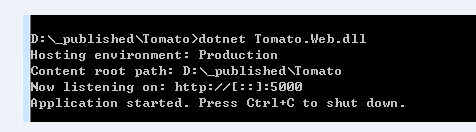
搞定!
使用:IP+端口访问去吧。
部署之Docker
待续....
Windows下部署asp.net core 2.0 之 Kestrel
如果没有运行环境,请去下载: https://www.microsoft.com/net/learn/get-started/windows
打开cmd,使用cd /d c:\xxxpatn 命令 找到发布的项目根目录;运行dotnet xxx.web.dll,这个xxx.web.dll是指你的web应用程序集。
没有问题的话看下面
本地访问:http://localhost:5000
使用Nginx反向代理服务器映射端口到80:
下载:http://nginx.org/en/download.html 安装
配置 \conf\nginx.conf 文件
 #user  nobody;

 worker_processes  1;

 #error_log  logs/error.log;

 #error_log  logs/error.log  notice;

 #error_log  logs/error.log  info;

 #pid        logs/nginx.pid;

 events {

     worker_connections  1024;

 }

 http {

     include       mime.types;

     default_type  application/octet-stream;

     #log_format  main  '$remote_addr - $remote_user [$time_local] "$request" '

     #                  '$status $body_bytes_sent "$http_referer" '

     #                  '"$http_user_agent" "$http_x_forwarded_for"';

     #access_log  logs/access.log  main;

     sendfile        on;

     #tcp_nopush     on;

     #keepalive_timeout  0;

     keepalive_timeout  65;

     #gzip  on;

     #配置服务器地址,可以有多台,localhost 为 服务名

     upstream localhost {

      server 127.0.0.1:5000 weight=1;

     }

     server {
       #侦听80端口

         listen       80;
        #服务名称必须和upstream后面的名称一致

         server_name  localhost;

         #charset koi8-r;

         #access_log  logs/host.access.log  main;

         #location / {

         #    root   html;

         #    index  index.html index.htm;

         #}

         #指定访问时转发到哪里,localhost为服务名

         location / {

             proxy_pass         http://localhost;

         }

         #error_page  404              /404.html;

         # redirect server error pages to the static page /50x.html

         #

         error_page   500 502 503 504  /50x.html;

         location = /50x.html {

             root   html;

         }

         # proxy the PHP scripts to Apache listening on 127.0.0.1:80

         #

         #location ~ \.php$ {

         #    proxy_pass   http://127.0.0.1;

         #}

         # pass the PHP scripts to FastCGI server listening on 127.0.0.1:9000

         #

         #location ~ \.php$ {

         #    root           html;

         #    fastcgi_pass   127.0.0.1:9000;

         #    fastcgi_index  index.php;

         #    fastcgi_param  SCRIPT_FILENAME  /scripts$fastcgi_script_name;

         #    include        fastcgi_params;

         #}

         # deny access to .htaccess files, if Apache's document root

         # concurs with nginx's one

         #

         #location ~ /\.ht {

         #    deny  all;

         #}

     }

     # another virtual host using mix of IP-, name-, and port-based configuration

     #

     #server {

     #    listen       8000;

     #    listen       somename:8080;

     #    server_name  somename  alias  another.alias;

     #    location / {

     #        root   html;

     #        index  index.html index.htm;

     #    }

     #}

     # HTTPS server

     #

     #server {

     #    listen       443 ssl;

     #    server_name  localhost;

     #    ssl_certificate      cert.pem;

     #    ssl_certificate_key  cert.key;

     #    ssl_session_cache    shared:SSL:1m;

     #    ssl_session_timeout  5m;

     #    ssl_ciphers  HIGH:!aNULL:!MD5;

     #    ssl_prefer_server_ciphers  on;

     #    location / {

     #        root   html;

     #        index  index.html index.htm;

     #    }

     #}

 }
配置好之后:我们cmd->cd /d Nginx目录->start nginx
访问 http://localhost 搞定!
Nginx其他命令:nginx -s stop 停止
Windows下部署asp.net core 2.0 之 IIS
待续....
Nginx 请求分发
待续....
linux centos7 和 windows下 部署 .net core 2.0 web应用的更多相关文章
- Ubuntu 下使用 Nginx 部署 .NET Core 2.0 网站
前言 本文介绍如何在 Ubuntu 16.04 服务器上安装 .NET Core 2.0 SDK.创建项目与发布,并使用 Nginx 部署 .NET Core 2.0 Web 项目. 安装 .NET ...
- Windows下部署ElasticSearch5.0以下版本
Windows下部署ElasticSearch分ElasticSearch5.0以上版本(包括5.0)和ElasticSearch5.0以下版本两种情况,这两种安装方式有很大不同.今天首先说Elast ...
- win10下ASP.NET Core 2.0部署环境搭建(转)
此文用于记录在win10环境下,新建的Asp.net Core 2.0 Web应用项目如何运行在IIS上 一.运行环境 操作系统: Window10 家庭中文版 版本 10.0.15063 版本 15 ...
- windows 下部署 .netcore 到 docker
前面我们演示了如何将 Asp.Net Core 程序部署到 iis 和 部署到 windows 服务.其实前面的都是铺垫,如何将 Asp.Net Core 站点部署到 docker 才是这个系列文章的 ...
- windows 下部署kafka 日记 转
windows 下部署kafka 日记 转一.下载去apache 的官网(http://kafka.apache.org/downloads.html)下载最新的二进制版的压缩包.目前的最新版本是ka ...
- .net core 2.2 部署CentOS7(5)部署.net core mvc
目录: .net core 2.2 部署CentOS7(1)安装虚拟机 .net core 2.2 部署CentOS7(2)给虚拟机安装CentOS7 .net core 2.2 部署CentOS7( ...
- windows 下部署 .netcore 到 windows service
接上一篇 <windows 下部署 .netcore 到 iis>,这一篇记录一下怎么将 Asp.Net Core 以 windows 服务的方式部署. 一.修改代码 其实也很简单,只要调 ...
- QT程序在windows下部署发布
转载:http://www.cnblogs.com/Fan_Fan/archive/2010/05/29/1746860.html QT程序在windows下部署发布 以下包括了部分网上收集的,以及q ...
- 关于在windows下部署发布QT程序的总结
原文请看:http://www.cnblogs.com/javaexam2/archive/2011/05/18/2632916.html 关于在windows下部署发布QT程序的总结 2008-06 ...
随机推荐
- centos下python多版本管理(pyenv+python+virtualenv+ipython)
pyenv是个多版本python管理器,可以同时管理多个python版本共存,如pypy,miniconde等等 1 环境准备 安装相关软件和pyenv1.1 安装相关软件yum install -y ...
- 头文件<cmath>中常用函数
<cmath>里面有很多数学函数,下面说一下常用的一些函数吧:直接把函数原型给了出来,用的时候注意参数 先说一下,c++自身是没有四舍五入函数round()的,若果你要用到的话,可以自己写 ...
- Oracle 11g 精简客户端
通常开发人员会装上一个 oracle客户端,但一般不会在自己的机器上安装Oracle database Oracle 客户端安装体积很大,但是装上去了基本上就用2个功能:TNS配置服务名和sqlplu ...
- 47000名开发者每月产生30000个漏洞 微软是如何用AI排查的
目前微软共有 47000 多名开发人员,每月会产生将近 30000 个漏洞,而这些漏洞会存储在 100 多个 AzureDevOps 和 GitHub 仓库中,以便于在被黑客利用之前快速发现关键的漏洞 ...
- 安装并使用pyecharts库
在cmd命令行中输入安装命令, pyecharts库的安装命令如下: pip install -i https://pypi.tuna.tsinghua.edu.cn/simple pyecharts ...
- oracle查询当前系统时间前10天的数据
select * from eo_c_order t where t.create_time>systimestamp-interval'1'day; 转载于:https://www.cnblo ...
- mac OS 安装 Eclipse
安装Eclipse前先确认你的Mac上是否已安装Java运行环境.进入终端,输入"java -version",如果返回了java版本号则说明已安装 访问Eclipse官方首页ht ...
- Hawkeye部署Github监控系统
2019独角兽企业重金招聘Python工程师标准>>> step1:python环境安装 #pwd /usr/local/soft #wget https://www.python. ...
- 一个页面从输入url到页面加载完成究竟经历了些什么
本人经参考谢希仁著<计算机网络(第 5版)>.<HTTP权威指南>和网络上关于浏览器渲染原理的介绍,结合自己理解,整理出以下结论,如有不正确或者不完善之处欢迎指正: 当用户在浏 ...
- Code force-CodeCraft-20 (Div. 2) D. Nash Matrix 详解(DFS构造)
D. Nash Matrix time limit per test2 seconds memory limit per test256 megabytes inputstandard input o ...