
第04项目:淘淘商城(SpringMVC+Spring+Mybatis) 的学习实践总结【第五天】
https://pan.baidu.com/s/1bptYGAb#list/path=%2F&parentPath=%2Fsharelink389619878-229862621083040
第04项目:淘淘商城(SpringMVC+Spring+Mybatis) 的学习实践总结【第四天】
第04项目:淘淘商城(SpringMVC+Spring+Mybatis) 的学习实践总结【第五天】
开发环境:
Eclipse IDE for Enterprise Java Developers
OS: Windows 10, v.10.0, x86_64 / win32
Java version: 1.8.0_221
05.第五天(前台工程搭建、首页商品类目显示)
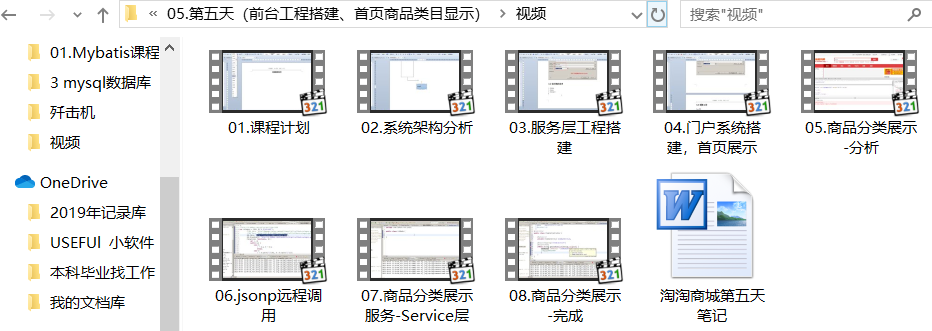
taotao-rest项目
web.xml
    <!-- springmvc的前端控制器 -->

    <servlet>

        <servlet-name>taotao-rest</servlet-name>

        <servlet-class>org.springframework.web.servlet.DispatcherServlet</servlet-class>

        <!-- contextConfigLocation不是必须的, 如果不配置contextConfigLocation,

        springmvc的配置文件默认在:WEB-INF/servlet的name+"-servlet.xml" -->

        <init-param>

            <param-name>contextConfigLocation</param-name>

            <param-value>classpath:spring/springmvc.xml</param-value>

        </init-param>

        <load-on-startup>1</load-on-startup>

    </servlet>

    <servlet-mapping>

        <servlet-name>taotao-rest</servlet-name>

        <url-pattern>/rest/*</url-pattern>

    </servlet-mapping>
因为springMVC在web.xml里配置的前端控制器的url-pattern拦截的不是:/
所以在开发时resources目录下的springmvc.xml里就不需要配置静态资源的映射,因为这些静态资源在浏览器发送请求时没有被拦截。
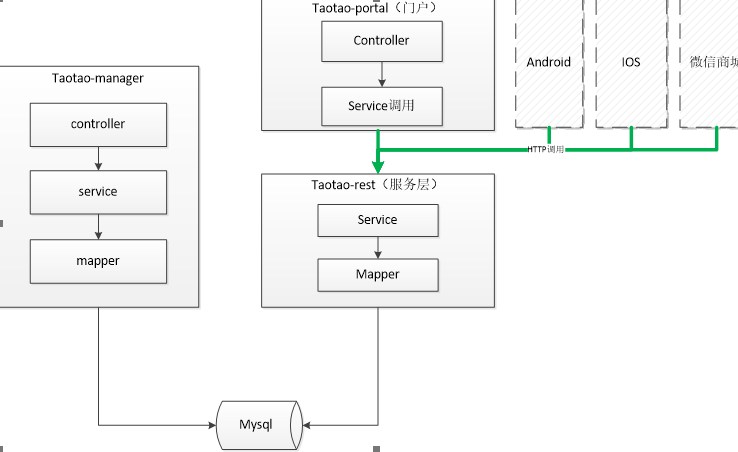
03.服务层工程搭建
一、跳过测试的Maven命令:install -DskipTests

install -DskipTests
二、 放置静态资源的目录是 webapp目录

taotao-portal项目模块
web.xml
<?xml version="1.0" encoding="UTF-8"?>

<web-app xmlns:xsi="http://www.w3.org/2001/XMLSchema-instance"

    xmlns="http://java.sun.com/xml/ns/javaee" xmlns:web="http://java.sun.com/xml/ns/javaee/web-app_2_5.xsd"

    xsi:schemaLocation="http://java.sun.com/xml/ns/javaee http://java.sun.com/xml/ns/javaee/web-app_2_5.xsd"

    id="WebApp_ID" version="2.5">

    <display-name>taotao-portal-web</display-name>

    <welcome-file-list>

        <welcome-file>index.html</welcome-file>

        <welcome-file>index.htm</welcome-file>

        <welcome-file>index.jsp</welcome-file>

        <welcome-file>default.html</welcome-file>

        <welcome-file>default.htm</welcome-file>

        <welcome-file>default.jsp</welcome-file>

    </welcome-file-list>

    <!-- 加载spring容器,注意修改通配符 -->

    <context-param>

        <param-name>contextConfigLocation</param-name>

        <param-value>classpath:spring/applicationContext-*.xml</param-value>

    </context-param>

    <listener>

        <listener-class>org.springframework.web.context.ContextLoaderListener</listener-class>

    </listener>

    <!-- 解决post乱码 -->

    <filter>

        <filter-name>CharacterEncodingFilter</filter-name>

        <filter-class>org.springframework.web.filter.CharacterEncodingFilter</filter-class>

        <init-param>

            <param-name>encoding</param-name>

            <param-value>utf-8</param-value>

        </init-param>

        <!-- <init-param>

            <param-name>forceEncoding</param-name>

            <param-value>true</param-value>

        </init-param> -->

    </filter>

    <filter-mapping>

        <filter-name>CharacterEncodingFilter</filter-name>

        <url-pattern>/*</url-pattern>

    </filter-mapping>

    <!-- springmvc的前端控制器 -->

    <servlet>

        <servlet-name>taotao-portal</servlet-name>

        <servlet-class>org.springframework.web.servlet.DispatcherServlet</servlet-class>

        <!-- contextConfigLocation不是必须的, 如果不配置contextConfigLocation,

        springmvc的配置文件默认在:WEB-INF/servlet的name+"-servlet.xml" -->

        <init-param>

            <param-name>contextConfigLocation</param-name>

            <param-value>classpath:spring/springmvc.xml</param-value>

        </init-param>

        <load-on-startup>1</load-on-startup>

    </servlet>

    <servlet-mapping>

        <servlet-name>taotao-portal</servlet-name>

        <!-- 伪静态化给搜索引擎看的 -->

        <url-pattern>*.html</url-pattern>

    </servlet-mapping>

</web-app>
5 商品分类展示
首页左侧有一个商品分类。当鼠标分类上,需要展示出此分类下的子分类。
当鼠标滑动到连接上触发mousemove事件。页面做一个ajax请求,请求json数据包含分类信息,得到json数据后初始化分类菜单,展示。
Eclipse快捷键:Ctrl+L,这样直接弹出Go to line对话框,在里面输入要跳转到的行号,按回车或者单击‘确定’。
或者找到Eclipse界面下的状态栏,找到行号列,双击它,也会弹出Go to line对话框,也是输入行号,然后按回车键。
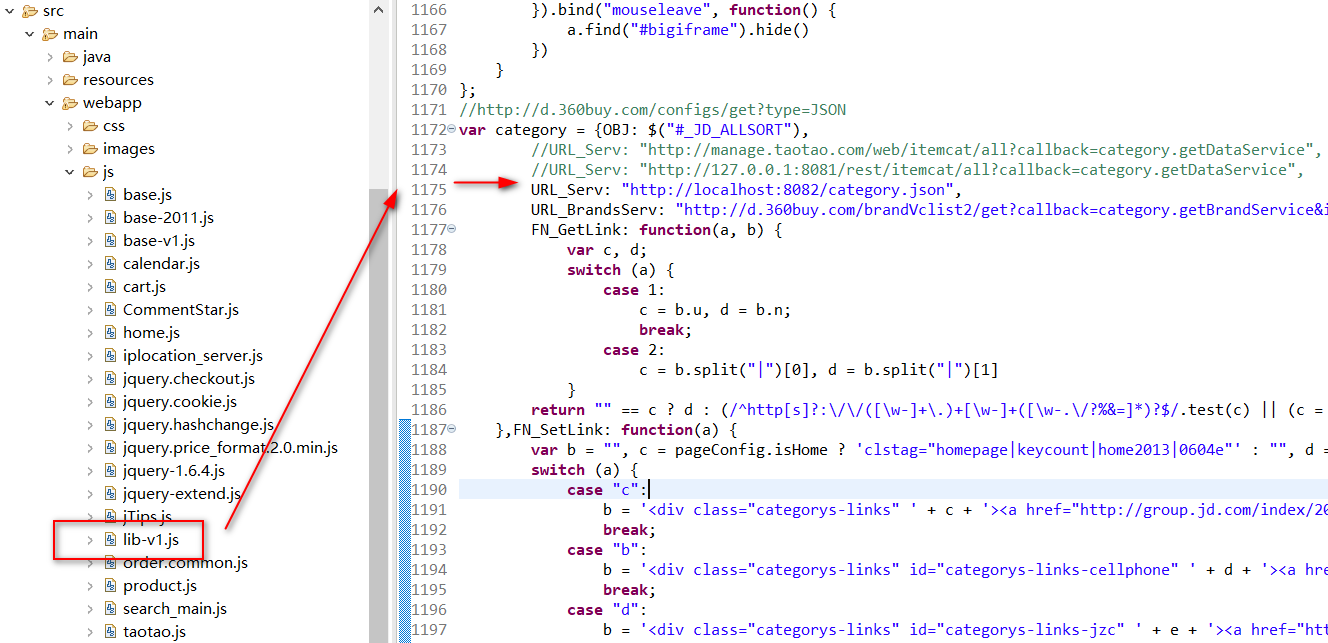
然后在webapp目录下copy一个category.json

使用JSON Viewer可以Format这个json然后方便查看分析其结构组成。
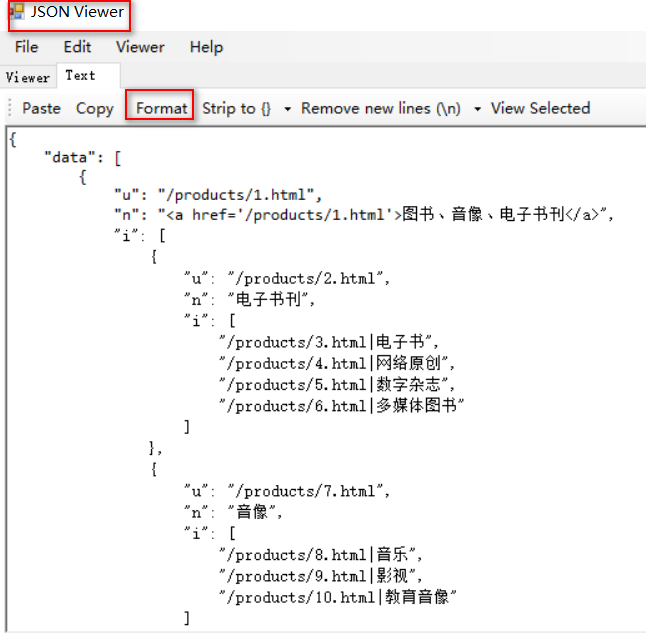
第一层:u、n(包含a标签)、i
第二层:u、n、i
第三层:字符串
使用ajax访问本工程的json数据(jQuery的方式)

本项目调试前端页面用FireFox火狐浏览器正常显示,但使用搜狗浏览器访问不显示左侧的商品分类。
数据需要从taotao-rest中调用服务获得。

将category.json移动到taotao-rest模块下的webapp目录下,浏览器访问可以请求到该json文件。
5.3 Ajax跨域请求
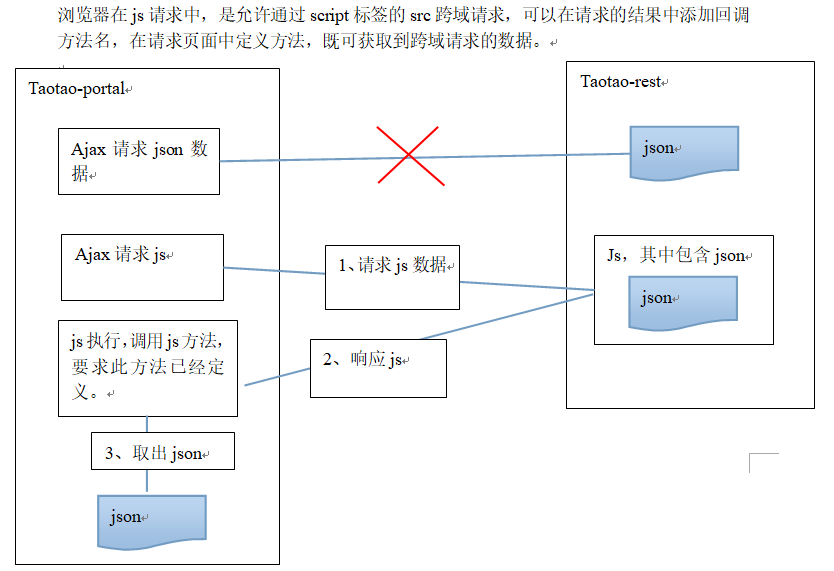
ajax是不能跨域请求。出于安全考虑,js设计时不可以跨域。
什么是跨域:
1、域名不同时。
2、域名相同,端口不同。
只有域名相同、端口相同时,才可以访问。
可以使用jsonp解决跨域问题。
Jsonp其实就是一个跨域解决方案。js跨域请求数据是不可以的,但是js跨域请求js脚本是可以的。可以把数据封装成一个js语句,做一个方法的调用。跨域请求js脚本可以得到此脚本。
得到js脚本之后会立即执行。
可以把数据做为参数传递到方法中。就可以获得数据。从而解决跨域问题。



5.4 从数据库中取商品分类列表
5.4.1 Dao层
可以使用逆向工程生成的代码。
5.4.2 Service层
查询所有商品分类生成前台页面要求的json数据格式。返回一个pojo。
需要创建两个pojo
1、分类列表的节点。包含u、n、i属性。
package com.taotao.rest.pojo;

import java.util.List;

import com.fasterxml.jackson.annotation.JsonProperty;

public class CatNode {

    // @JsonProperty此注解用于pojo成员属性上,作用是把该属性的名称序列化为另外一个名称

    @JsonProperty("n")

    private String name;

    @JsonProperty("u")

    private String url;

    @JsonProperty("i")

    private List<?> item;

    //Shift+Alt+S 快捷键

    public String getName() {

        return name;

    }

    public void setName(String name) {

        this.name = name;

    }

    public String getUrl() {

        return url;

    }

    public void setUrl(String url) {

        this.url = url;

    }

    public List<?> getItem() {

        return item;

    }

    public void setItem(List<?> item) {

        this.item = item;

    }

}
//@JsonProperty此注解用于pojo成员属性上
2、返回值pojo。包含data属性是一个list类型。
放到taotao-rest工程中。其他的项目不用到。
package com.taotao.rest.pojo;

import java.util.List;

public class CatResult {

    private List<?> data;

    public List<?> getData() {

        return data;

    }

    public void setData(List<?> data) {

        this.data = data;

    }

}
Service层
//门户左侧商品分类服务

@Service

public class ItemCatServiceImpl implements ItemCatService {

    @Autowired

    private TbItemCatMapper ibItemCatMapper;

    @Override

    public CatResult getItemCatList() {

        CatResult catResult = new CatResult();

        // 查询商品分类列表

        // 调用类中私有方法

        catResult.setData(getCatList(0));

        return catResult;

    }

    // 查询商品分类列表的私有方法

    private List<?> getCatList(long parentId) {

        // 创建查询条件

        TbItemCatExample example = new TbItemCatExample();

        Criteria criteria = example.createCriteria();

        criteria.andParentIdEqualTo(parentId);

        // 执行Example查询

        List<TbItemCat> list = ibItemCatMapper.selectByExample(example);

        // 返回值list

        List resultList = new ArrayList<>();

        // 向list中添加节点

        // 递归

        for (TbItemCat tbItemCat : list) {

            // 判断是否为父节点

            if (tbItemCat.getIsParent()) {

                CatNode catNode = new CatNode();

                if (parentId == 0) {

                    catNode.setName(

                            "<a href='/products/" + tbItemCat.getId() + ".html'>" + tbItemCat.getName() + "</a>");

                } else {

                    catNode.setName(tbItemCat.getName());

                }

                catNode.setUrl("/products/" + tbItemCat.getId() + ".html");

                catNode.setItem(getCatList(tbItemCat.getId()));

                resultList.add(catNode);

                // 如果是叶子节点

            } else {

                resultList.add("/products/" + tbItemCat.getId() + ".html|" + tbItemCat.getName());

            }

        }

        return resultList;

    }

}
Controller层
接收页面传递过来的参数。参数就是方法的名称。返回一个json数据,需要把json数据包装成一句js代码。返回一个字符串。
参数:回调方法名称
返回值:字符串
为了防止页面请求到的JSON中文乱码,需要添加,produces="MediaType.APPLICATION_JSON_VALUE"+";charset=utf-8"
//商品分类列表

@Controller

public class ItemCatController {

    @Autowired

    private ItemCatService itemCatService;

    @RequestMapping(value="/itemcat/list", produces="MediaType.APPLICATION_JSON_VALUE"+";charset=utf-8")

    @ResponseBody

    public String getItemCatList(String callback) {

        CatResult catResult = itemCatService.getItemCatList();

        //把pojo转换成字符串

        String json = JsonUtils.objectToJson(catResult);

        //拼装返回值

        String result = callback + "(" + json + ");";

        return result;

    }

}
taotao-rest的查询商品分类列表Controller
//商品分类列表

@Controller

public class ItemCatController {

    @Autowired

    private ItemCatService itemCatService;

    @RequestMapping("/itemcat/list")

    @ResponseBody

    public Object getItemCatList(String callback) {

        CatResult catResult = itemCatService.getItemCatList();

        MappingJacksonValue mappingJacksonValue = new MappingJacksonValue(catResult);

        mappingJacksonValue.setJsonpFunction(callback);

        return mappingJacksonValue;

    }

}
http://localhost:8081/rest/itemcat/list?callback=myfunction
修改lib-v1.js

============================================
参考资料:
Java:关于List类中的add、addAll和set方法
produces在@requestMapping中的使用方式
end
第04项目:淘淘商城(SpringMVC+Spring+Mybatis) 的学习实践总结【第五天】的更多相关文章
- 第04项目:淘淘商城(SpringMVC+Spring+Mybatis) 的学习实践总结【第二天】
淘淘商城(SpringMVC+Spring+Mybatis) 是传智播客在2015年9月份录制的,几年过去了.由于视频里课上老师敲的代码和项目笔记有些细节上存在出入,只有根据日志报错信息作出适当的调 ...
- 第04项目:淘淘商城(SpringMVC+Spring+Mybatis) 的学习实践总结【第一天】
本人做过一年的MATLAB编程和简单维护过VB和C++的项目.是跟着网上获得的黑马的Java双元视频课来自学入门Java知识和常用框架的使用. 淘淘商城(SpringMVC+Spring+Mybati ...
- 第04项目:淘淘商城(SpringMVC+Spring+Mybatis) 的学习实践总结【第六天】
https://pan.baidu.com/s/1bptYGAb#list/path=%2F&parentPath=%2Fsharelink389619878-229862621083040 ...
- 第04项目:淘淘商城(SpringMVC+Spring+Mybatis) 的学习实践总结【第四天】
https://pan.baidu.com/s/1bptYGAb#list/path=%2F&parentPath=%2Fsharelink389619878-229862621083040 ...
- 第04项目:淘淘商城(SpringMvc+Spring+Mybatis) 的学习实践总结【第三天】
淘淘商城(SpringMVC+Spring+Mybatis) 是传智播客在2015年9月份录制的,几年过去了.由于视频里课上老师敲的代码和项目笔记有些细节上存在出入,只有根据日志报错信息作出适当的调 ...
- 第04项目:淘淘商城(SpringMVC+Spring+Mybatis)【第十天】(单点登录系统实现)
https://pan.baidu.com/s/1bptYGAb#list/path=%2F&parentPath=%2Fsharelink389619878-229862621083040 ...
- 第04项目:淘淘商城(SpringMVC+Spring+Mybatis)【第九天】(商品详情页面实现)
https://pan.baidu.com/s/1bptYGAb#list/path=%2F&parentPath=%2Fsharelink389619878-229862621083040 ...
- 第04项目:淘淘商城(SpringMVC+Spring+Mybatis)【第八天】(solr服务器搭建、搜索功能实现)
https://pan.baidu.com/s/1bptYGAb#list/path=%2F&parentPath=%2Fsharelink389619878-229862621083040 ...
- 第04项目:淘淘商城(SpringMVC+Spring+Mybatis)【第七天】(redis缓存)
https://pan.baidu.com/s/1bptYGAb#list/path=%2F&parentPath=%2Fsharelink389619878-229862621083040 ...
随机推荐
- C# web.config常用配置说明(文件上传大小、调试、session)
直接贴代码可好(后续用到的在更新) 黄色字体的为说明 <?xml version="1.0" encoding="utf-8"?><!-- 有 ...
- python实现微信发送服务器监控报警消息代码实现
这篇文章主要介绍了python3.8 微信发送服务器监控报警消息代码实现,文中通过示例代码介绍的非常详细,对大家的学习或者工作具有一定的参考学习价值,需要的朋友可以参考下 ! python版本 > ...
- 吴裕雄--天生自然 JAVASCRIPT开发学习:作用域
<!DOCTYPE html> <html> <head> <meta charset="utf-8"> <title> ...
- java后台读取excel模板数据
/** * 读取EXCEL模板数据 * * @param excelFilePath excel文件路径 * @param dataRowNum 开始读取数据的行数 * @param keyRowNu ...
- 配置自己的sublime
我配置的sublime的是这样的,就是在input里输入数据,然后在output里可以得到数据,这样比较方便,看到有的大神还配置背景和其他的,有时间搞一下: 首先把编译器g++配置到环境变量,可以从d ...
- Kettle无法下载以及点击无反应的问题
最开始用于解决MySQL转移数据到ORACLE的问题,尝试了几种方法. 1.直接从Mysql导出csv文件.这种方式最直接简单,但是问题是数据大的话,容易出现数据对不齐的情况,导入这个时候就会出现错误 ...
- The full stack trace of the root cause is available in the Apache Tomcat/8.0.8 logs.
这个问题是版本冲突的问题 1.调低jdk 版本,不能让jdk版本太高,至少不能比tomcat高,要不然就会有这个错误. 2.如果看过我这篇博客的人(https://www.cnblogs.com/CH ...
- JKS not Found
近期使用Spring Boot开发微信验证的时候, 在获取token时,Idea老是提示Jks not found,网上找资料,都说是SSL的问题 实际解决方法: 重装JDK,将JDK重装之后,运行正 ...
- centos系统将shell脚本改成systemctl启动的形式
说明: CentOS 7的服务systemctl脚本存放在:/usr/lib/systemd/,有系统(system)和用户(user)之分,像需要开机不登陆就能运行的程序,就将程序存在系统服务里,即 ...
- Django2.0——请求与响应(上)
客户端与服务段通过http协议进行数据的传输,而http协议是一种双向单工的,且主动发起连接的只有客户端.故数据的传送就离不开请求和响应,客户端每发起一个请求,服务端就是返回一个响应.在django的 ...