
学习Redis你必须了解的数据结构——HashMap实现
本文版权归博客园和作者吴双本人共同所有,转载和爬虫请注明原文链接博客园蜗牛 cnblogs.com\tdws .
首先提供一种获取hashCode的方法,是一种比较受欢迎的方式,该方法参照了一位园友的文章,链接在尾部给出:
 var djb2Code = function (str) {

        var hash = 5381;

        for (i = 0; i < str.length; i++) {

            char = str.charCodeAt(i);

            hash = ((hash << 5) + hash) + char; /* hash * 33 + c */

        }

        return hash;

   }
接下来我们用js实现hashmap, hashmap是一种键值对的数据结构。意味着你可以通过key快速找到你所需要查找的值。我使用数组加上LinkedList来实现hashmap,这种方式也被称为解决hashcode冲突的分离链接法。hashmap通常具备以下几种方法:put,get,remove。put是写入和修改数据,在put数据时,首先获取key的hashcode,作为数组的索引。而数组索引对应的值则是一个linkedlist,并且linkedlist所存储的节点值,同时包含着所需存储的key和value。这样以便解决当hashcode重复冲突时,在链表中根据key名称来get查找值。 关于hashmap更多的原理,我推荐这篇文章 http://www.admin10000.com/document/3322.html
下面直接给出实现,其中使用到LinkedList数据结构的源码,在我的这篇分享当中:http://www.cnblogs.com/tdws/p/6033209.html
   var djb2Code = function (str) {

         var hash = 5381;

         for (i = 0; i < str.length; i++) {

             char = str.charCodeAt(i);

             hash = ((hash << 5) + hash) + char; /* hash * 33 + c */

         }

         return hash;

     }

     function HashMap() {

         var map = [];

         var keyValPair = function (key, value) {

             this.key = key;

             this.value = value;

         }

         this.put = function (key, value) {

             var position = djb2Code(key);

             if (map[position] == undefined) {

                 map[position] = new LinkedList();

             }

             map[position].append(new keyValPair(key, value));

         },

         this.get = function (key) {

             var position = djb2Code(key);

             if (map[position] != undefined) {

                 var current = map[position].getHead();

                 while (current.next) {

                     if (current.element.key === key) {  //严格判断

                         return current.element.value;

                     }

                     current = current.next;

                 }

                 if (current.element.key === key) {//如果只有head节点,则不会进while.  还有尾节点,不会进while,这个判断必不可少

                     return current.element.value;

                 }

             }

             return undefined;

         },

         this.remove = function (key) {

             var position = djb2Code(key);

             if (map[position] != undefined) {

                 var current = map[position].getHead();

                 while (current.next) {

                     if (current.element.key === key) {

                         map[position].remove(current.element);

                         if (map[position].isEmpty()) {

                             map[position] == undefined;

                         }

                         return true;

                     }

                     current = current.next;

                 }

                 if (current.element.key === key) {

                     map[position].remove(current.element);

                     if (map[position].isEmpty()) {

                         map[position] == undefined;

                     }

                     return true;

                 }

             }

         }

     }

     //链表

     function LinkedList() {

         var Node = function (element) {        //新元素构造

             this.element = element;

             this.next = null;

         };

         var length = 0;

         var head = null;

         this.append = function (element) {

             var node = new Node(element);        //构造新的元素节点

             var current;

             if (head === null) {             //头节点为空时  当前结点作为头节点

                 head = node;

             } else {

                 current = head;

                 while (current.next) {          //遍历,直到节点的next为null时停止循环,当前节点为尾节点

                     current = current.next;

                 }

                 current.next = node;            //将尾节点指向新的元素,新元素作为尾节点

             }

             length++;                    //更新链表长度

         };

         this.removeAt = function (position) {

             if (position > -1 && position < length) {

                 var current = head;

                 var index = 0;

                 var previous;

                 if (position == 0) {

                     head = current.next;

                 } else {

                     while (index++ < position) {

                         previous = current;

                         current = current.next;

                     }

                     previous.next = current.next;

                 }

                 length--;

                 return current.element;

             } else {

                 return null;

             }

         };

         this.insert = function (position, element) {

             if (position > -1 && position <= length) {        //校验边界

                 var node = new Node(element);

                 current = head;

                 var index = 0;

                 var previous;

                 if (position == 0) {                    //作为头节点,将新节点的next指向原有的头节点。

                     node.next = current;

                     head = node;                        //新节点赋值给头节点

                 } else {

                     while (index++ < position) {

                         previous = current;

                         current = current.next;

                     }                                //遍历结束得到当前position所在的current节点,和上一个节点

                     previous.next = node;                    //上一个节点的next指向新节点  新节点指向当前结点,可以参照上图来看

                     node.next = current;

                 }

                 length++;

                 return true;

             } else {

                 return false;

             }

         };

         this.toString = function () {

             var current = head;

             var string = '';

             while (current) {

                 string += ',' + current.element;

                 current = current.next;

             }

             return string;

         };

         this.indexOf = function (element) {

             var current = head;

             var index = -1;

             while (current) {

                 if (element === current.element) {            //从头节点开始遍历

                     return index;

                 }

                 index++;

                 current = current.next;

             }

             return -1;

         };

         this.getLength = function () {

             return length;

         };

         this.getHead = function () {

             return head;

         };

         this.isEmpty = function () {

             return length == 0;

         }

     }
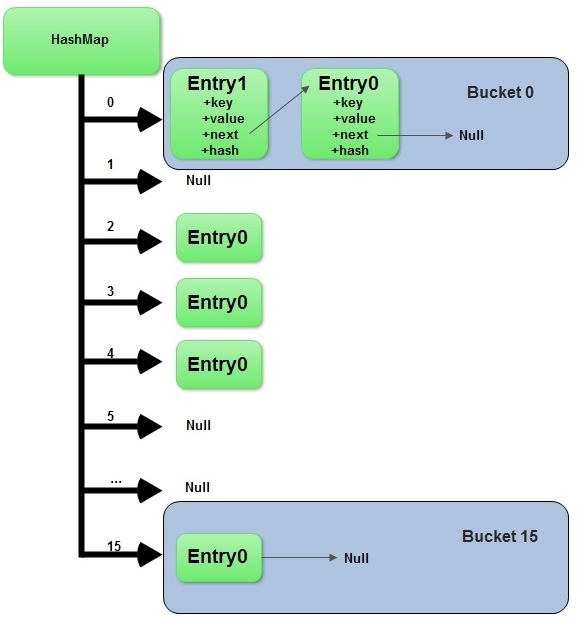
参考文章:js获取hashcode : http://www.cnblogs.com/pigtail/p/3342977.html
如果我的点滴分享对你有点滴帮助,欢迎点击下方红色按钮,我将长期输出分享。
学习Redis你必须了解的数据结构——HashMap实现的更多相关文章
- 学习Redis你必须了解的数据结构——JS实现集合和ECMA6集合
集合类似于数组,但是集合中的元素是唯一的,没有重复值的.就像你学高中数学的概念一样,集合还可以做很多比如,并集,交集,差集的计算.在ECMA6之前,JavaScript没有提供原生的Set类,所以只能 ...
- 学习Redis你必须了解的数据结构——双向链表(JavaScript实现)
本文版权归博客园和作者吴双本人共同所有,转载和爬虫请注明原文链接 http://www.cnblogs.com/tdws/ 下午分享了JavaScript实现单向链表,晚上就来补充下双向链表吧.对链表 ...
- 在微博微信场景下学习Redis数据结构
Redis安装 下载地址:http://redis.io/download 安装步骤: 1.yum install gcc 2.wget http://download.redis.io/releas ...
- Redis源码分析-底层数据结构盘点
前段时间翻看了Redis的源代码(C语言版本,Git地址:https://github.com/antirez/redis), 过了一遍Redis数据结构,包括SDS.ADList.dict.ints ...
- 聊聊Mysql索引和redis跳表 ---redis的有序集合zset数据结构底层采用了跳表原理 时间复杂度O(logn)(阿里)
redis使用跳表不用B+数的原因是:redis是内存数据库,而B+树纯粹是为了mysql这种IO数据库准备的.B+树的每个节点的数量都是一个mysql分区页的大小(阿里面试) 还有个几个姊妹篇:介绍 ...
- Redis(1)——5种基本数据结构
一.Redis 简介 "Redis is an open source (BSD licensed), in-memory data structure store, used as a d ...
- 学习Redis好一阵了,我对它有了一些新的看法
前言 本篇文章不是一篇具体的教程,我打算记录一下自己对Redis的一些思考.说来惭愧,我刚接触Redis的时候只是简单地使用了一下,背了一些面试题,就在简历上写下了Redis这个技能点. 我们能在网络 ...
- 你真的懂Redis的5种基本数据结构吗?
摘要: 你真的懂Redis的5种基本数据结构吗?这些知识点或许你还需要看看. 本文分享自华为云社区<你真的懂Redis的5种基本数据结构吗?这些知识点或许你还需要看看>,作者:李子捌. 一 ...
- 学习Redis从这里开始
本文主要内容 Redis与其他软件的相同之处和不同之处 Redis的用法 使用Python示例代码与Redis进行简单的互动 使用Redis解决实际问题 Redis是一个远程内存数据库,它不仅性能强劲 ...
随机推荐
- 缓存工厂之Redis缓存
这几天没有按照计划分享技术博文,主要是去医院了,这里一想到在医院经历的种种,我真的有话要说:医院里的医务人员曾经被吹捧为美丽+和蔼+可亲的天使,在经受5天左右相互接触后不得不让感慨:遇见的有些人员在挂 ...
- webapp应用--模拟电子书翻页效果
前言: 现在移动互联网发展火热,手机上网的用户越来越多,甚至大有超过pc访问的趋势.所以,用web程序做出仿原生效果的移动应用,也变得越来越流行了.这种程序也就是我们常说的单页应用程序,它也有一个英文 ...
- 简记用ArcGIS处理某项目需求中数据的步骤
文章版权由作者李晓晖和博客园共有,若转载请于明显处标明出处:http://www.cnblogs.com/naaoveGIS/ 1. 背景 项目需求涉及如下几个步骤: a.矢量化 b.获取范围内要素 ...
- Java compiler level does not match解决方法
从别的地方导入一个项目的时候,经常会遇到eclipse/Myeclipse报Description Resource Path Location Type Java compiler level d ...
- Linux命令
系统信息 arch 显示机器的处理器架构(1) uname -m 显示机器的处理器架构(2) uname -r 显示正在使用的内核版本 dmidecode -q 显示硬件系统部件 - (SMBIOS ...
- Linux C语言解析并显示.bmp格式图片
/************************* *bmp.h文件 *************************/ #ifndef __BMP_H__ #define __BMP_H__ # ...
- NYOJ 998
这道题是欧拉函数的使用,这里简要介绍下欧拉函数. 欧拉函数定义为:对于正整数n,欧拉函数是指不超过n且与n互质的正整数的个数. 欧拉函数的性质:1.设n = p1a1p2a2p3a3p4a4...pk ...
- javascript运动学教程
本文系笔者学习原生javascript动效的笔记.内容基于某非著名培训机构的视频教程.并重新做了归类整理.删除了一些过时的内容.并重做了GIF图,加上了自己的一些分析. 一. 运动学基础 引子:从左到 ...
- Mono 3.2.3 TCP吞吐性能测试报告
在前几天简单地测试了一下Mono 3.2.3 TCP处理的稳定性,有同学问Mono 3.2.3的TCP处理性有怎样,以下是针对Mono 3.2.3TCP在吞吐方面的性能测试.主要测试分两种场分别是连接 ...
- Hadoop4 利用VMware搭建自己的hadoop集群
前言: 前段时间自己学习如何部署伪分布式模式的hadoop环境,之前由于工作比较忙,学习的进度停滞了一段时间,所以今天抽出时间把最近学习的成果和大家分享一下. 本文要介绍的是如 ...