
VsSharp:一个VS扩展开发框架(上)
上篇:设计
一、引子
自2008年起开发SSMS插件SqlSharp(er)的过程中,有一天发现多数代码都大同小异,就像这样。
 Commands2 commands = (Commands2)_applicationObject.Commands;

                string toolsMenuName = "Tools";

                //Place the command on the tools menu.

                //Find the MenuBar command bar, which is the top-level command bar holding all the main menu items:

                Microsoft.VisualStudio.CommandBars.CommandBar menuBarCommandBar = ((Microsoft.VisualStudio.CommandBars.CommandBars)_applicationObject.CommandBars)["MenuBar"];

                //Find the Tools command bar on the MenuBar command bar:

                CommandBarControl toolsControl = menuBarCommandBar.Controls[toolsMenuName];

                CommandBarPopup toolsPopup = (CommandBarPopup)toolsControl;

                //This try/catch block can be duplicated if you wish to add multiple commands to be handled by your Add-in,

                //  just make sure you also update the QueryStatus/Exec method to include the new command names.

                try

                {

                    //Add a command to the Commands collection:

                    // add + (int)vsCommandStatus.vsCommandStatusEnabled if we want the default state to be enabled

                    Command command = commands.AddNamedCommand2(_addInInstance, "FormatSQL", "Format SQL", "Format SQL", true, , ref contextGUIDS, (int)vsCommandStatus.vsCommandStatusSupported + (int)vsCommandStatus.vsCommandStatusEnabled, (int)vsCommandStyle.vsCommandStylePictAndText, vsCommandControlType.vsCommandControlTypeButton);

                    //Add a control for the command to the tools menu:

                    if ((command != null) && (toolsPopup != null))

                    {

                        command.AddControl(toolsPopup.CommandBar, );

                    }

                }

                catch (System.ArgumentException)

                {

                    //If we are here, then the exception is probably because a command with that name

                    //  already exists. If so there is no need to recreate the command and we can

                    //  safely ignore the exception.

                }
于是萌生出开发一个框架的想法。
于是有了一个叫SsmsSharp的框架,后正式命名为SqlSharp发布到了CodePlex上。
与此同时,将操纵EnvDTE的代码与SSMS Objects的代码分离,操纵EnvDTE的代码就形成了本篇要说的VsSharp。
后来,当我正式使用VsSharp开发VS扩展时,又引出一些新问题如源代码签出、一个VS搭载多个扩展,解决这些问题后,VsSharp开始成熟起来。
二、设计思路
1、目标
应用Command模式,定义每个控件的行为。将一个个控件的属性与行为集合在一个配置文件中,在VS启动时自动加载控件,点击控件时通过反射触发相应的命令。
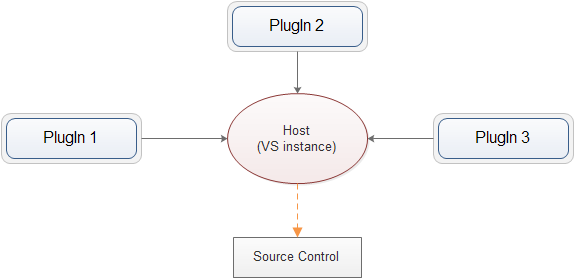
2、流程

User:终端用户(也就是各位码农)
Host:VS实例,提供全局的EnvDTE对象访问器,注册Plugin,响应IDE的各种事件(如文档打开关闭等)
Plugin:基于VsSharp开发的插件(此处为避免与EnvDTE.AddIn重名,命名为Plugin)
由此引出VsSharp的职责
- 负责配置的加载
- 向VS注册控件
- 响应用户的点击及其他事件
三、概要设计
1、对象设计
1.1 基于上述职责定义,抽象出如下对象:
- CommandConfig:负责命令与控件的配置描述
- CommandManager:负责配置的加载,和与VS的交互
- CommandBarAccessor:与VS直接交互的对象,实现ICommandBarAccessor接口,主要是为了隔离VS版本的差异
- Host:宿主,单例,表示当前操作的VS实例;CommandAccessor通过它与EnvDTE交互
- PlugIn:主要属性为CommandConfig和Connect入口的Assembly
CommandBarAccessor的行为:
 public interface ICommandBarAccessor

    {

        void AddControl(CommandControl control);

        void ResetControl(CommandControl control);

        void EnableControls(IEnumerable<string> ids ,bool enabled);

        void Delete();

    }
- AddContro:添加一个控件
- ResetControl:重置控件,比如某控件的子菜单可以依赖于特定的配置或数据源,当配置或数据源发生变化时,需要重新加载控件
- EnableControl:启用(禁用)控件,比如某些控件是用于操作文档的,当有文档打开时才启用
- Delete:删除控件,当VS退出时执行Disconnect方法时触发
1.2 命令接口
 public interface ICommand

    {

        void Execute(object arg = null);

    }
命令类型:
 public enum CommandActionType

    {

        Menu,

        Program,

        Window,

        Dialog

    }
- Menu:缺省类型,无任何行为
- Program:执行一段程序
- Window:打开一个窗体
- Dialog:打开一个模态窗体
1.3 命令控件描述
主要有两种控件类型:
- CommandMenu:包括主菜单栏的自定义菜单、上下文菜单,其下级可以有子菜单
- CommandButton:主要是插入ToolStrip的ToolStripButton,其下级也可以有子菜单
抽象类CommandControl:CommandMenu和CommandButton的父类,描述控件的ID、文本、图标、命令类型、位置、所属父控件等属性。
以下代码段为CommandControl的全部属性。
其中,
ClassName为供反射用的动作类型名称,当CommandActionType为Program时,要求该类型实现了ICommand接口。
public abstract class CommandControl

    {

        private Form _form;

        private int _position;

        private Image _image;

        private string _arg;

        private ICommand _command;

        /// <summary>

        /// Constructor

        /// </summary>

        protected CommandControl()

        {

            CommandActionType = CommandActionType.Menu;

            Position = ;

        }

        /// <summary>

        /// Id,as while as the command Name

        /// </summary>

        [XmlAttribute("id")]

        public string Id { get; set; }

        /// <summary>

        /// Text

        /// </summary>

        [XmlAttribute("text")]

        public string Text { get; set; }

        /// <summary>

        /// Tooltip text

        /// </summary>

        [XmlAttribute("tooltip")]

        public string Tooltip { get; set; }

        /// <summary>

        /// Office style icon face id

        /// </summary>

        [XmlAttribute("faceId")]

        public int FaceId { get; set; }

        /// <summary>

        ///   Relative position in the parent control,can be minus

        /// </summary>

        /// <remarks>

        /// 相对于父控件Child总数n而言,大于等于0则放在末尾n+1的位置,为负数则放在倒数第n-Position的位置

        /// </remarks>

        [XmlAttribute("position")]

        public int Position

        {

            get { return _position; }

            set

            {

                if (value >= )

                    value = ;

                _position = value;

            }

        }

        /// <summary>

        /// Picture id in ResourceManager

        /// </summary>

        [XmlAttribute("picture")]

        public string Picture { get; set; }

        [XmlIgnore]

        public StdPicture StdPicture

        {

            get

            {

                if (!String.IsNullOrEmpty(Picture) && Plugin != null && Plugin.ResourceManager != null)

                {

                    return Plugin.ResourceManager.LoadPicture(Picture);

                }

                return null;

            }

        }

        /// <summary>

        /// Image instance from ResourceManager

        /// </summary>

        [XmlIgnore]

        public Image Image

        {

            get

            {

                if (_image == null && !string.IsNullOrEmpty(Picture) && Picture.Trim().Length >  && Plugin != null && Plugin.ResourceManager != null)

                {

                    _image = Plugin.ResourceManager.LoadBitmap(Picture);

                }

                return _image;

            }

            set

            {

                _image = value;

            }

        }

        /// <summary>

        /// Action class type name

        /// </summary>

        [XmlAttribute("class")]

        public string ClassName { get; set; }

        /// <summary>

        /// Action type

        /// </summary>

        [XmlAttribute("type")]

        public CommandActionType CommandActionType { get; set; }

        /// <summary>

        /// Parent control name that the control attach to

        /// </summary>

        [XmlAttribute("attachTo")]

        public string AttachTo { get; set; }

        //[XmlAttribute("hotKey")]

        //public string HotKey { get; set; }

        /// <summary>

        /// begin group,insert a bar in context menu if set True

        /// </summary>

        [XmlAttribute("beginGroup")]

        public bool BeginGroup { get; set; }

        /// <summary>

        /// Command instance of <see cref="ClassName"/>

        /// </summary>

        [XmlIgnore]

        public ICommand Command

        {

            get { return _command ?? (_command = LoadInstance(ClassName) as ICommand); }

            set { _command = value; }

        }

        /// <summary>

        /// <see cref="Plugin"/> which the control attach to

        /// </summary>

        [XmlIgnore]

        public Plugin Plugin { get; set; }

        /// <summary>

        /// Argument for <see cref="ICommand"/> execution

        /// </summary>

        [XmlAttribute("arg")]

        public string Arg

        {

            get { return _arg; }

            set

            {

                _arg = value;

                Tag = _arg;

            }

        }

        /// <summary>

        /// <see cref="DependentItems"/> name for making the control  enabled or disabled

        /// </summary>

        [XmlAttribute("dependOn")]

        public string DependOn { get; set; }

          [XmlIgnore]

        public DependentItems DependentItems {

              get

              {

                  return string.IsNullOrEmpty(DependOn) || DependOn.Trim().Length ==

                      ? DependentItems.None

                      : (DependentItems)Enum.Parse(typeof(DependentItems), DependOn);

              } }

        /// <summary>

          /// Argument for <see cref="ICommand"/> execution,only be assgined by programming

        /// </summary>

        [XmlIgnore]

        public object Tag { get; set; }

        public override string ToString()

        {

            return Text;

        }

        /// <summary>

        /// execute action

        /// </summary>

        public virtual void Execute()

        {

            var arg = Arg ?? Tag;

            switch (CommandActionType)

            {

                case CommandActionType.Program:

                    if (Command != null)

                    {

                        Command.Execute(arg);

                    }

                    break;

                case CommandActionType.Window:

                    var window = GetForm();

                    window.Show();

                    break;

                case CommandActionType.Dialog:

                    var dialog = GetForm();

                    dialog.ShowDialog();

                    break;

            }

        }

        /// <summary>

        /// load an instance

        /// </summary>

        /// <param name="typeName"></param>

        /// <returns></returns>

        public object LoadInstance(string typeName)

        {

            if (typeName.Contains(","))

            {

                var arr = typeName.Split(',');

                if (arr.Length < )

                    return null;

                var assemblyName = arr[];

                try

                {

                    var assembly = Assembly.Load(assemblyName);

                    return assembly.CreateInstance(arr[]);

                }

                catch

                {

                    var file = Path.Combine(Plugin.Location, assemblyName + ".dll");

                    if (File.Exists(file))

                    {

                        var assembly = Assembly.LoadFile(file);

                        return assembly.CreateInstance(arr[]);

                    }

                }

            }

            return Plugin.Assembly.CreateInstance(typeName);

        }

        private Form GetForm()

        {

            if (_form != null && !_form.IsDisposed)

                return _form;

            _form = (Form)LoadInstance(ClassName);

            return _form;

        }

    }
CommandMenu继承CommandControl,特有子菜单相关属性。
其中SubMenus属性可在编程时操纵,SubGeneratorType为配置文件中定义的供反射用的子菜单生成器类型,用于启动时根据特定数据源自动生成。
 public class CommandMenu : CommandControl

    {

        private List<CommandMenu> _subMenus;

        public CommandMenu()

        {

            _subMenus = new List<CommandMenu>();

        }

        [XmlElement("menu")]

        public List<CommandMenu> SubMenus

        {

            get

            {

                if (_subMenus.Count ==  && !string.IsNullOrEmpty(SubGeneratorType))

                {

                    LoadSubMenus();

                }

                return _subMenus;

            }

            set { _subMenus = value; }

        }

        [XmlAttribute("sgt")]

        public string SubGeneratorType { get; set; }

        protected virtual IEnumerable<CommandMenu> GenerateSubMenus()

        {

            if (string.IsNullOrEmpty(SubGeneratorType) || SubGeneratorType.Trim().Length == )

                return null;

            var gen = LoadInstance(SubGeneratorType) as ICommandMenuGenerator;

            if (gen == null)

                return null;

            return gen.Generate();

        }

        public virtual void LoadSubMenus()

        {

            if (GenerateSubMenus() == null)

                return;

            _subMenus = GenerateSubMenus().ToList();

        }

    }
2、类图
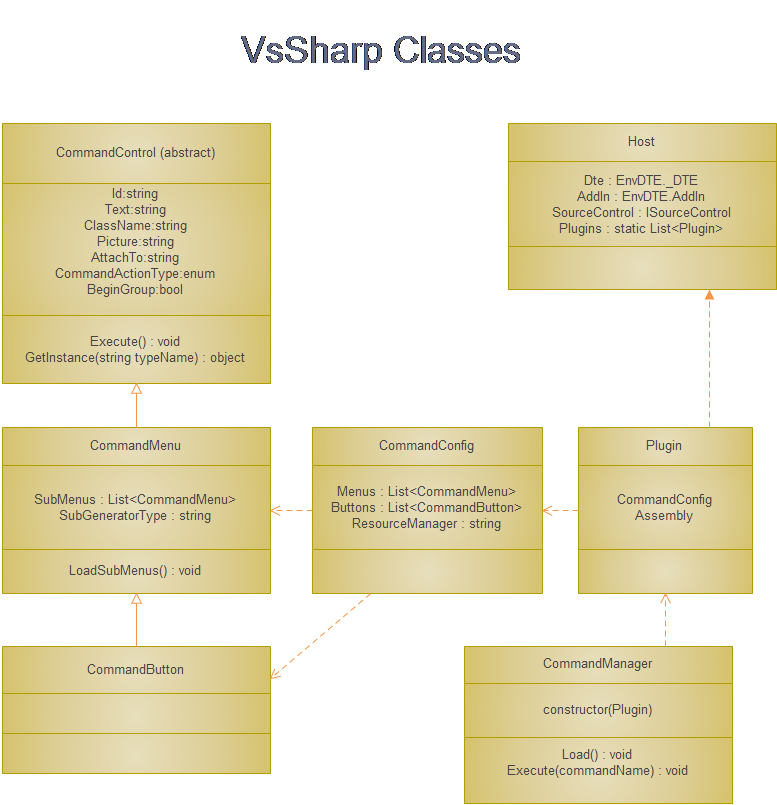
调用关系 :
- Connect对象启动时加载CommandConfig,生成一个Plugin对象传给CommandManager,并向Host.Instance注册;CommandManager加载CommandConfig描述的所有控件
- Connect.OnConnection方法调用CommandManager.Load方法
- Connect.Exec方法调用CommandManager.Execute方法
- Connect.OnDisconnection方法调用CommandManager.Disconnect方法
四、源代码
---------------------------------------------------
下篇将以一个实例来讲解框架的使用,敬请期待。
VsSharp:一个VS扩展开发框架(上)的更多相关文章
- VS扩展开发框架
VsSharp:一个VS扩展开发框架(上) 上篇:设计 一.引子 自2008年起开发SSMS插件SqlSharp(er)的过程中,有一天发现多数代码都大同小异,就像这样. Commands2 comm ...
- CSLA .NET是一个.NET软件开发框架
CSLA .NET是一个.NET软件开发框架,帮助开发者“为Windows.Web.面向服务和工作流等应用构建强大和可维护的业务逻辑层”. CSLA是Component-based, Scalable ...
- 我的第一个python web开发框架(41)——总结
我的第一个python web开发框架系列博文从17年6.7月份开始写(存了近十章稿留到9月份才开始发布),到今天结束,一年多时间,想想真不容易啊. 整个过程断断续续,中间有段时间由于工作繁忙停了好长 ...
- dropzonejs中文翻译手册 DropzoneJS是一个提供文件拖拽上传并且提供图片预览的开源类库.
http://wxb.github.io/dropzonejs.com.zh-CN/dropzonezh-CN/ 由于项目需要,完成一个web的图片拖拽上传,也就顺便学习和了解了一下前端的比较新的技术 ...
- 我的第一个chrome扩展(1)——读样例,实现时钟
学习chrome扩展开发: 与网页类似,需要的知识:html,javascript chrome扩展程序的构成: manifest.json:对扩展程序的整体描述文件 { "manifest ...
- 一个在 Java VM 上使用可观测的序列来组成异步的、基于事件的程序的库 RxJava,相当好
https://github.com/ReactiveX/RxJava https://github.com/ReactiveX/RxAndroid RX (Reactive Extensions,响 ...
- BuguMongo是一个MongoDB Java开发框架,集成了DAO、Query、Lucene、GridFS等功能
http://code.google.com/p/bugumongo/ 简介 BuguMongo是一个MongoDB Java开发框架,它的主要功能包括: 基于注解的对象-文档映射(Object-Do ...
- 我的第一个python web开发框架(14)——后台管理系统登录功能
接下来正式进入网站的功能开发.要完成后台管理系统登录功能,通过查看登录页面,我们可以了解到,我们需要编写验证码图片获取接口和登录处理接口,然后在登录页面的HTML上编写AJAX. 在进行接口开发之前, ...
- 一个可扩展的深度学习框架的Python实现(仿keras接口)
一个可扩展的深度学习框架的Python实现(仿keras接口) 动机 keras是一种非常优秀的深度学习框架,其具有较好的易用性,可扩展性.keras的接口设计非常优雅,使用起来非常方便.在这里,我将 ...
随机推荐
- Android 两个Activity进行数据传送 发送
Activity1:: Intent intent= new Intent(this, OtherActivity.class); String name = "heyiyong" ...
- ckeditor与ckfinder简单整合使用
Ckeditor与ckfinder简单整合使用 功能:主要用来发送图文的email,图片上传到本地服务器,但是email的图片地址要写上该服务器的远程地址(图片地址:例如:http://www.bai ...
- 第1章 开发环境安装和配置(二)安装JDK、SDK、NDK
原文 第1章 开发环境安装和配置(二)安装JDK.SDK.NDK 无论是用C#和VS2015开发Androd App还是用Java和Eclipse开发Androd App,都需要先安装JDK和Andr ...
- Camus导入中文乱码问题(源码修改、编译、部署、任务启动)
Camus使用过程中业务方反映从Kafka导入至HDFS中的数据有中文乱码问题,且业务方确认写入的数据编码为UTF-8,开始跟进. 问题重现: (1)编写代码将带有中文的字符串以编码UTF-8 ...
- Android手机应用程序开发环境配置(Eclipse+Java+ADT)
参考: Java手机游戏开发实例简明教程 http://dev.10086.cn/blog/?uid-82940-action-viewspace-itemid-1772 Eclipse下载: htt ...
- Linux学习笔记19——信号2
上一节中讲到了sigprocmask函数,它的作用是检查或修改它的进程信号掩码,这一节我们主要学习捕捉与忽略信号的函数sigaction和等待信号函数. 一 sigaction函数的作用 定义在接收 ...
- zendstudio xdebug 配置
1. 下载XDebug: http://www.xdebug.org/download.php 通过phpinfo()查看你的php版本,现在相对应的dll文件
- hdoj 1686 Oulipo【求一个字符串在另一个字符串中出现次数】
Oulipo Time Limit: 3000/1000 MS (Java/Others) Memory Limit: 32768/32768 K (Java/Others)Total Subm ...
- EXCEL VBA运行不显示系统提示
Sub XXX() Application.DisplayAlerts = False '代码段 Application.DisplayAlerts = True End Sub 以下是MICROSO ...
- iPhone之Quartz 2D系列--编程指南(1)概览
以下几遍关于Quartz 2D博文都是转载自:http://www.cocoachina.com/bbs/u.php?action=topic&uid=38018 iPhone之Quartz ...